

Share this tool:
 |
Description:
Respan AI is a developer-focused platform for teams building LLM apps and AI agents that need more visibility after launch. It is not a chatbot, content generator, or no-code automation tool. It is closer to an AI engineering control layer: trace what the agent did, evaluate output quality, monitor production behavior, manage prompts, and route model calls through a gateway when needed. Respan’s own docs describe it as a full-stack AI engineering platform for teams shipping LLM and agent products.
The simplest way to understand Respan is this: it helps engineering teams see what happens inside an AI system after a user sends a request. That matters because modern AI agents are not just one prompt and one answer. They may call tools, retrieve documents, branch across steps, retry failed actions, use different models, and produce outputs that need to be judged for quality.
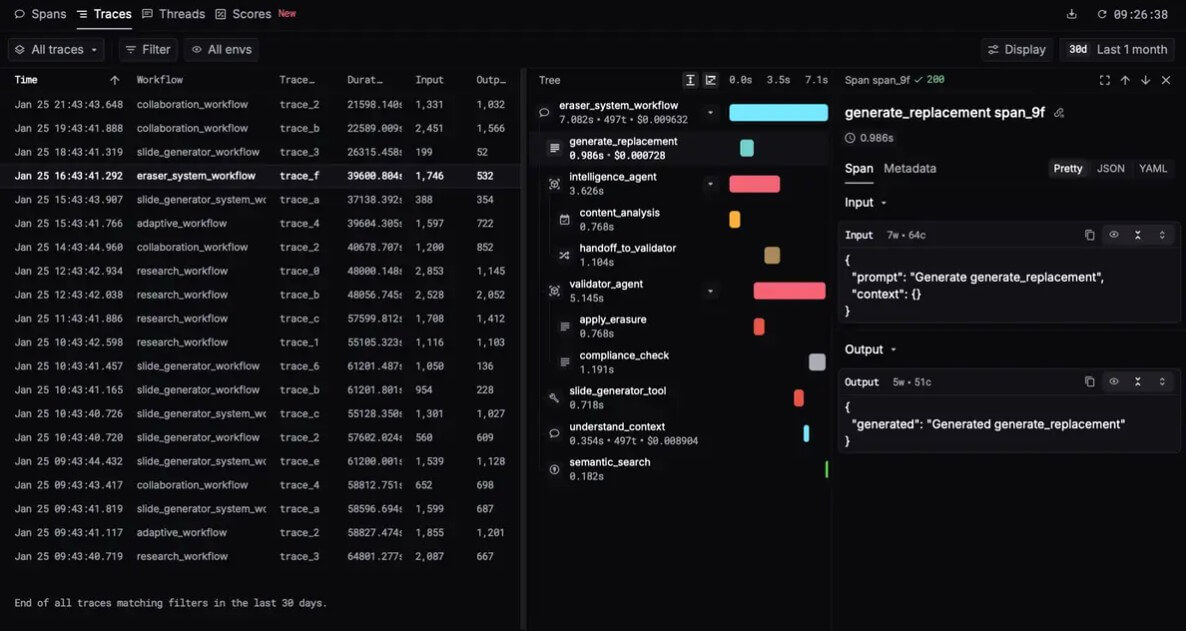
Respan organizes this activity around spans. Its docs say every LLM interaction, whether captured through the SDK, framework integration, AI gateway, or direct API call, is stored as a span with input, output, model, metrics, and metadata. Those spans form traces, threads, and evaluation scores, so debugging and improvement work from the same underlying data.
That structure is the product’s core value. Instead of treating logs, prompts, evals, and routing as separate systems, Respan tries to connect them into one loop: trace production behavior, evaluate quality, optimize prompts or models, deploy changes, then keep monitoring.
Respan is strongest for teams with AI already inside a product. If you are still experimenting with prompts in a notebook, it may feel heavier than you need. But once users depend on your AI feature, the hard questions change. Why did this agent fail? Which model caused the latency spike? Did the new prompt improve quality or just sound better in a demo? Which users are producing the most errors? Which tool call broke the workflow?
This is where Respan fits well. Its workflow captures production data, turns that data into evaluations, lets teams compare prompt versions and model configurations, then pushes improved configurations back into production through prompt management and the gateway.
| Feature | What it helps with |
|---|---|
| Tracing | Shows agent workflows as trace trees with inputs, outputs, latency, cost, and parent-child spans. |
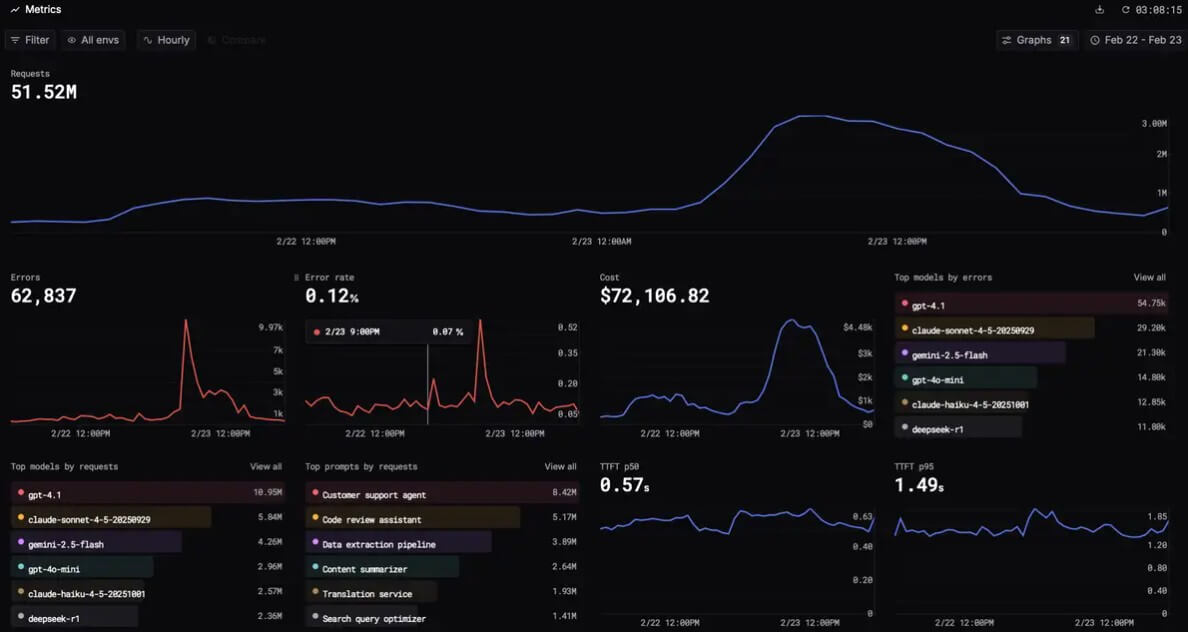
| Monitoring | Tracks production behavior such as requests, tokens, errors, latency, cost, model usage, and user-level slices. |
| Evaluations | Scores outputs using LLM judges, code checks, human review, online evals, and offline datasets. |
| Prompt management | Lets teams create, version, configure, test, and deploy prompt templates outside the codebase. |
| AI gateway | Routes LLM calls through a unified API with automatic tracing, fallbacks, caching, and access to hundreds of models. |
| Integrations | Supports common model providers and agent frameworks, including OpenAI, Anthropic, Azure OpenAI, Google Vertex AI, AWS Bedrock, Vercel AI, and OpenAI Agents SDK. |
The important point is that these are not isolated dashboard features. Respan becomes more useful when tracing, evals, prompt changes, and routing decisions all feed each other.
Tracing is the most practical starting point. Respan can show the execution tree of an AI workflow, including agent steps, tool calls, and model requests. Each span can include the input, output, latency, and cost, which gives teams a clearer view of what the system did before a bad response appeared.
The setup path is developer-friendly. The docs say teams can use the Respan CLI setup command, which detects the project language, installs the SDK, and instruments code with help from coding agents like Claude Code, Cursor, and Codex. Once instrumented, the app logs traces to Respan for every AI call.
This is useful because AI bugs often hide across multiple steps. A support agent may retrieve the wrong document, pass weak context to the model, call the wrong tool, then produce a confident answer. A normal application log might show only fragments. A trace view gives the team the full path.
Evals are the second major reason to use Respan. The platform supports both online evaluations on live traffic and offline evaluations on test datasets. Evaluator workflows can combine LLM graders, code graders, and human reviewers. For example, an LLM judge might score response quality first, then route low-scoring outputs to a human reviewer.
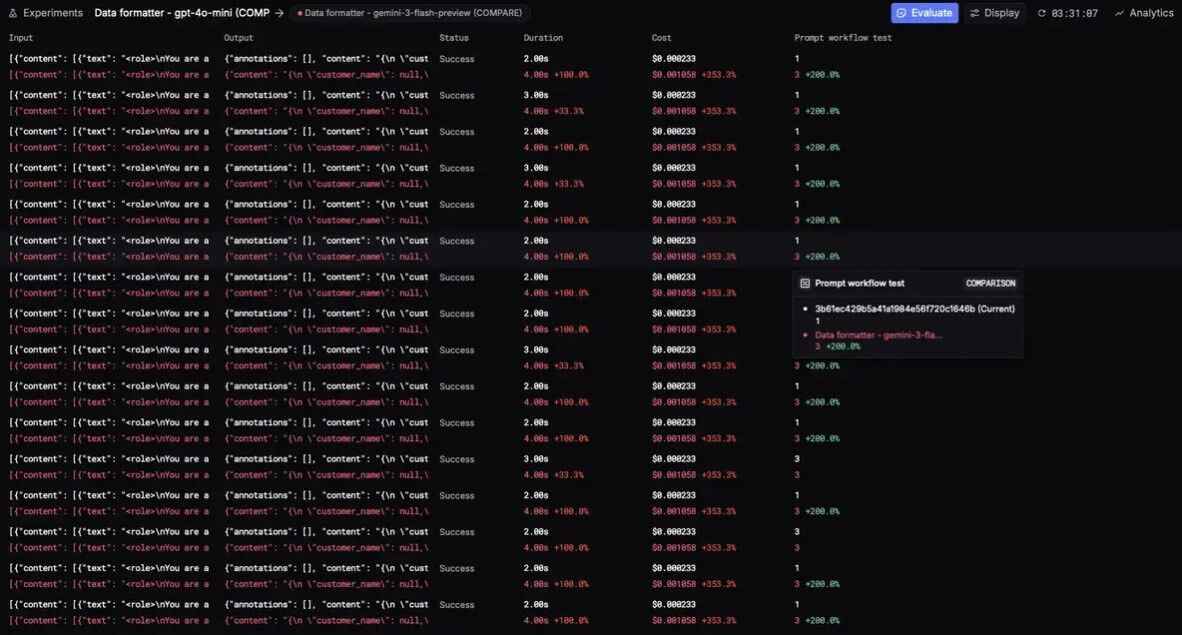
This matters because AI quality cannot be managed only by reading random outputs. Teams need repeatable tests. Respan’s eval workflow uses prompts or models, datasets, evaluators, and experiments. Teams can run the same dataset against different prompt versions or model choices, compare results, and deploy the version that performs better.
The stronger use case is not “grade every answer perfectly.” It is building a practical quality loop. Capture real failures, turn them into datasets, test fixes, compare results, then keep watching production traffic.
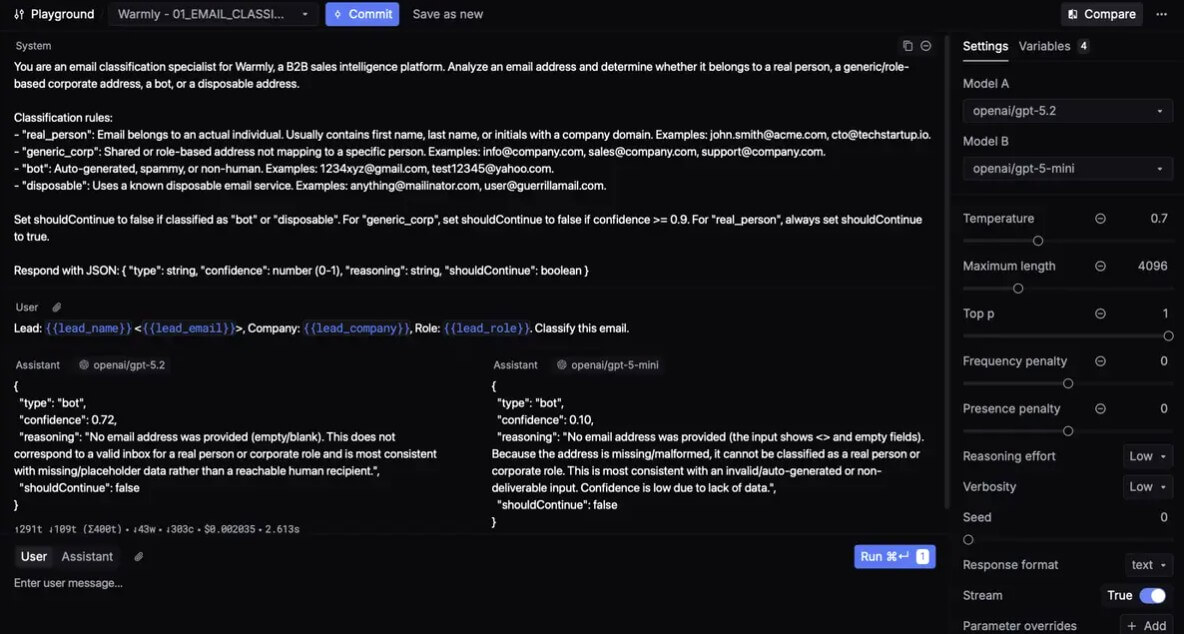
Respan’s prompt management system is useful for teams that do not want production prompts scattered through source code. The docs describe prompt management as a way to create, version, and deploy prompt templates centrally, then reference them by ID from the application. It also supports configuration options such as model, temperature, max tokens, and top P inside the editor.
The gateway adds another layer. It lets teams call many LLMs through one unified API, with automatic tracing, fallback models, retries, load balancing, and caching. Respan also supports provider credentials, so teams can connect their own model provider keys instead of treating Respan as the only model account layer.
The caveat is latency. Respan’s own gateway documentation says the gateway may add about 50 to 150 milliseconds and may not suit products with strict latency requirements. That is a fair trade-off for many backend workflows, but it matters for real-time voice agents, live chat, or any product where every delay is felt by the user.
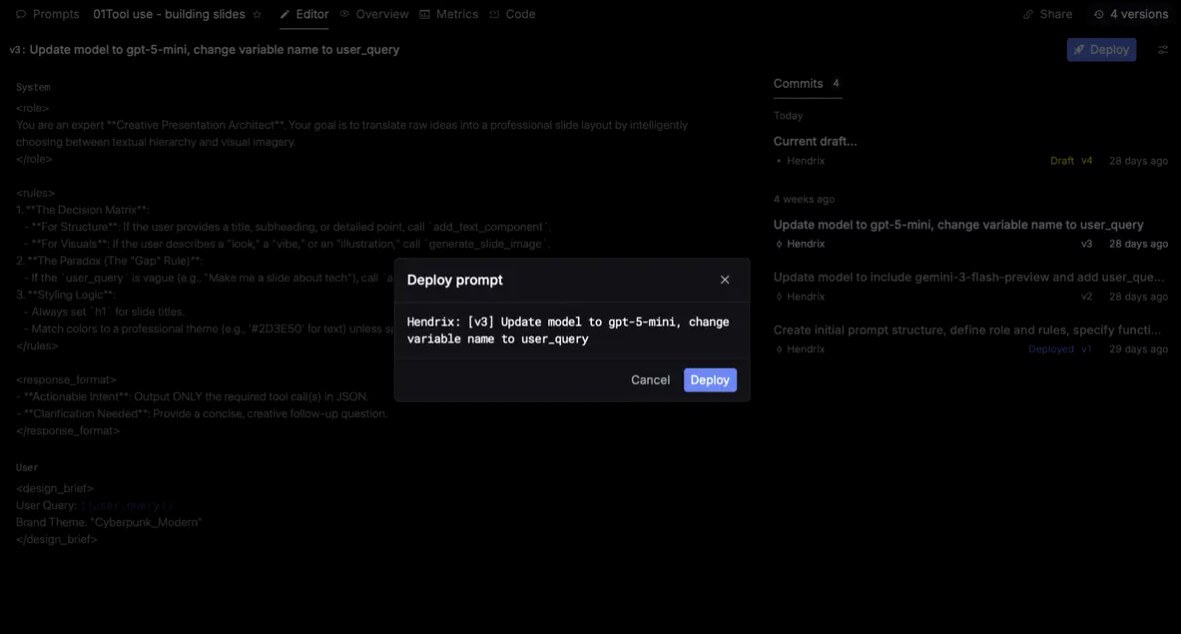
Respan is not a beginner AI tool. It is built for engineers, AI product teams, and technical operators. The interface may help make debugging easier, but the underlying work still involves SDKs, provider keys, API calls, prompt versions, datasets, evaluators, and production monitoring.
That said, the onboarding looks more practical than many developer tools. Respan supports auto-instrumented SDKs for several providers, explicit instrumentors for agent frameworks, manual ingestion through OTLP or JSON API, and a CLI wizard for setup.
The product is easiest to justify when several people need shared visibility: engineers debugging traces, product managers reviewing quality trends, prompt owners comparing versions, and support teams investigating user failures.
Respan competes in the same broad space as LangSmith, Langfuse, and Braintrust, but its positioning is slightly different. LangSmith is closely tied to the LangChain ecosystem while also describing itself as framework-agnostic for building, debugging, evaluating, and deploying agents and LLM apps.
Langfuse is a strong open-source option for teams that want tracing, prompt management, evals, experiments, and human annotation in one platform, with self-hosting as a key advantage.
Braintrust is especially known for AI evals, logging, prompt iteration, and quality workflows. Its public positioning emphasizes querying logs, running evals, and updating prompts from developer workflows.
Respan’s appeal is the combination of agent-first tracing, evals, prompt deployment, monitoring, and gateway routing in one operational loop. Choose it when your team wants a managed platform that connects debugging, quality measurement, and deployment decisions. Choose Langfuse when open source and self-hosting matter most. Choose LangSmith when your team is deep in LangChain. Choose Braintrust when evals and experimentation are the center of the workflow.
Respan is a strong fit for AI agent products, customer support agents, RAG systems, workflow automation tools, coding agents, voice-agent infrastructure, and any product where LLM behavior affects real users.
It is also useful for teams that frequently compare models, run prompt experiments, need fallback routing, or want to monitor production quality with both automated and human review. For regulated or enterprise environments, Respan’s homepage states commitments around ISO 27001, SOC 2, GDPR, and HIPAA, including a Business Associate Agreement for healthcare organizations.
The first limitation is complexity. Respan solves production AI engineering problems, so it naturally assumes a technical team. Non-technical users looking for a chatbot analytics dashboard will likely find it too infrastructure-heavy.
The second trade-off is that evals still require thoughtful design. LLM judges can help, code checks can enforce format, and humans can review edge cases, but none of that works well without clear criteria and useful datasets.
The third caveat is gateway dependency. Routing through Respan can simplify logging, fallback handling, and model switching, but it also adds another service into the request path. Teams with strict latency, privacy, or architectural requirements should evaluate whether tracing alone is a better first step.
Respan AI is best for teams shipping AI agents and LLM applications that need production-grade visibility, not just prompt experimentation. Its strongest value is the connected loop between tracing, monitoring, evaluations, prompt management, and gateway routing. It is most useful for technical teams that already have real AI traffic and need to debug failures, compare changes, and improve quality over time. The main caveat is that Respan is not a casual AI tool. It becomes valuable when AI reliability has become an engineering problem.
TAGS: Productivity
Related Tools:

Summarizes and take notes from videos

Transforms ideas into clear, actionable project plans

Helps teams document access internal information

AI-powered mobile keyboard app that enhances typing efficiency

Transforms raw data into interactive visualizations

Transforms video content into polished, SEO-friendly blog posts