

Share this tool:
 |
Description:
Gimme Summary is a lightweight Chrome extension built around one simple job: open a web article, click the extension, and generate a summary with ChatGPT AI. It is not a full research assistant, note-taking system, or knowledge manager. Its appeal is speed and focus: it gives readers a quick way to understand long articles without opening a separate summarizer tab.
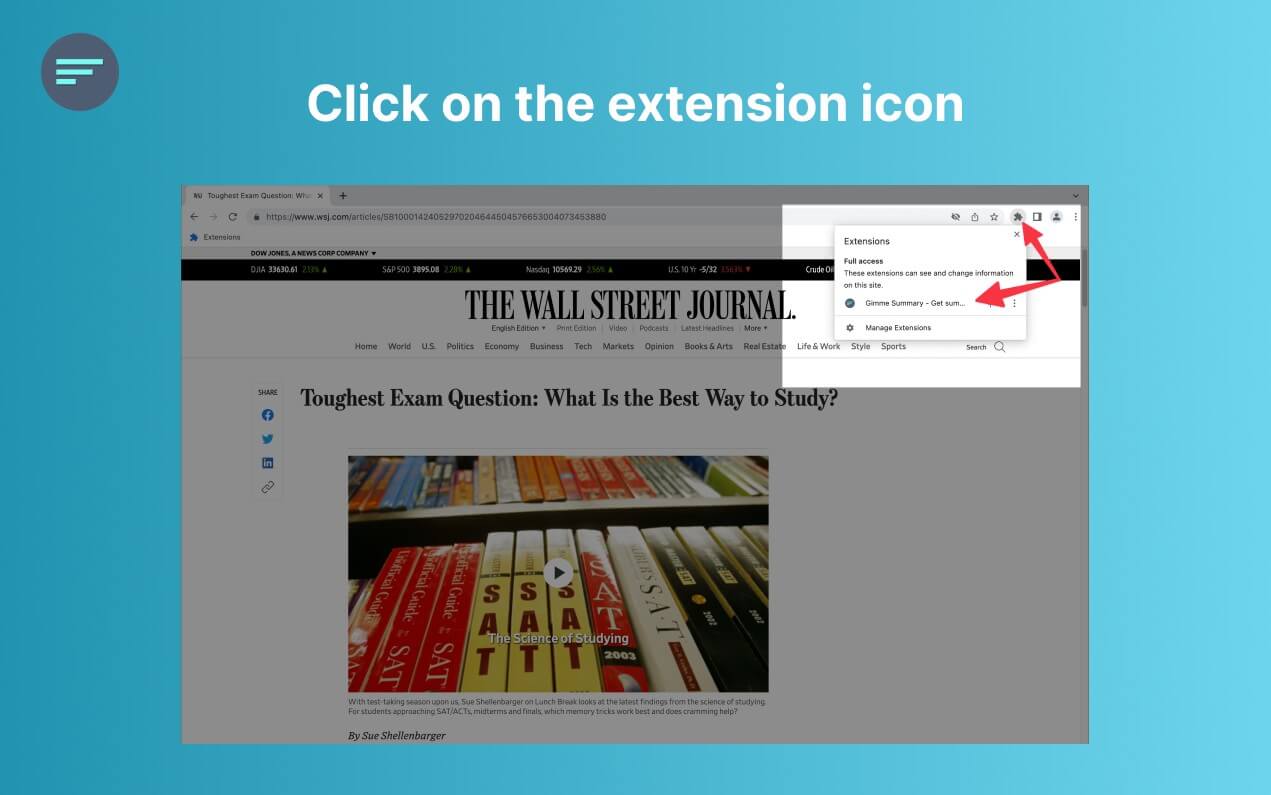
Gimme Summary is a browser extension for summarizing articles on the web. The Chrome Web Store listing describes it as a tool that can “summarize articles on the web using ChatGPT AI” and says it works across sites. The basic workflow is direct: install the extension, click the extension icon, then choose the “Generate Summary” button.
That narrow focus is useful. Many AI browser tools try to handle writing, research, chat, email, PDFs, video summaries, and automation at once. Gimme Summary appears much more limited, but that can be a strength for users who only want article summaries.
Gimme Summary is strongest for quick article skimming. If you read news, blog posts, opinion pieces, documentation pages, essays, or online guides, it can help you decide whether a page is worth reading in full.
The best use case is not deep research. It is triage. You land on a page, generate a summary, scan the key idea, then decide what to do next. That can save time when you are comparing several articles or trying to get the gist of a topic quickly.
It is also useful for readers who dislike copying article text into a separate AI tool. The extension-based workflow keeps the summarization step in the same browser context, which is the main reason to use it over a general chatbot.
The core workflow is built around clicking the extension icon and generating a summary directly from the current article.
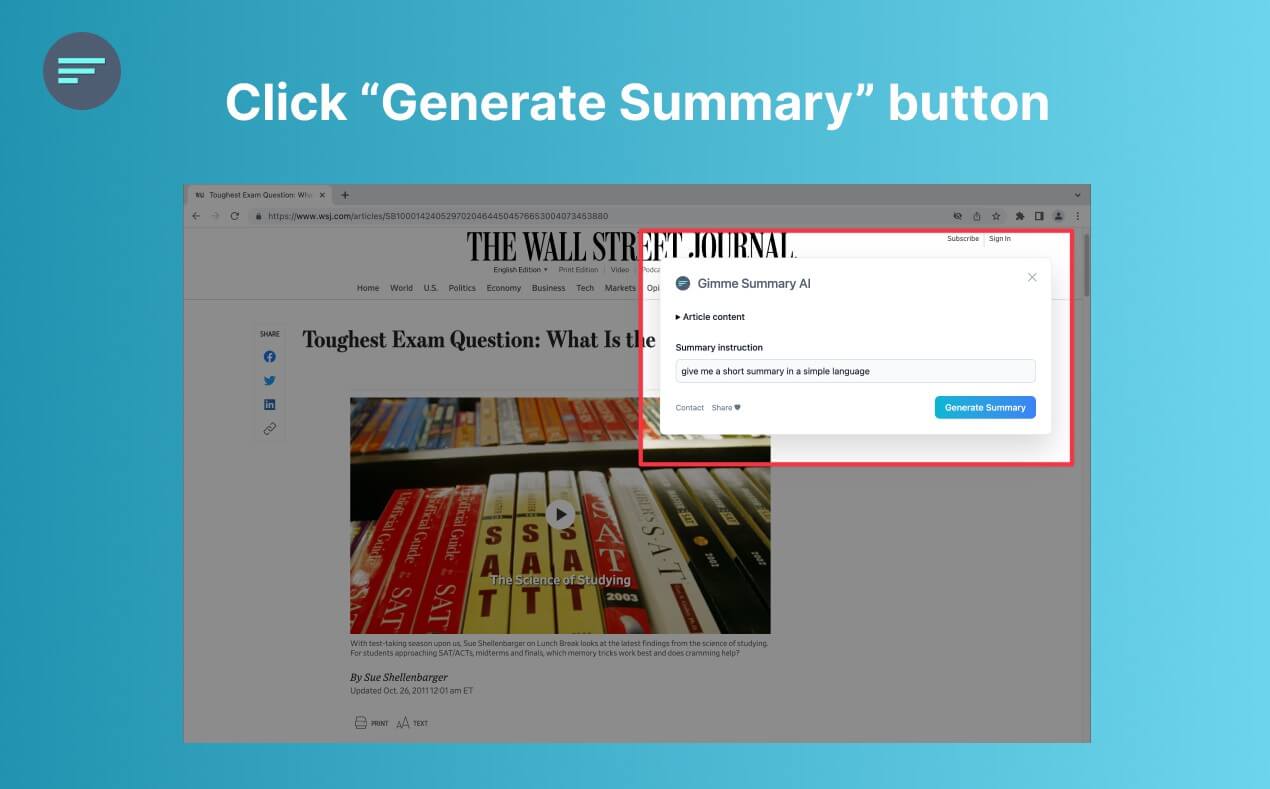
The listing says the extension uses ChatGPT AI to generate article summaries.
The Chrome Web Store overview says it works on all sites, which makes it more flexible than tools tied to specific platforms.
The extension page says it has no ads, analytics, trackers, or cookies, and that it does not collect user data.
The listing says the only information shared with the AI model is the article text needed to generate the summary.
The project’s GitHub page provides places to report bugs and suggest ideas, which is useful for a small browser-extension project.
The workflow is intentionally plain. Install it, open an article, click the extension, and request a summary. That is easy to understand, and it suits the product. A summarizer should not need a complex dashboard.
There is one extra setup note for Brave users. The Chrome Web Store listing says Brave users may need to disable the setting that prevents sites from fingerprinting based on language preferences. That is not a huge issue, but it does show that the extension may depend on browser behavior that privacy-focused browsers can block.
The current web presence is also worth noting. The Chrome Web Store listing points to gimmesummary.ai, but that page currently presents a broader “ChatGPT Writer” assistant for writing, grammar, translation, summaries, and Gmail use cases. It also mentions model switching and launch methods such as extension icon, shortcut, and text selection. That may confuse users expecting a dedicated Gimme Summary product page.
Gimme Summary’s output quality will depend on the article text it can extract and the AI model behavior behind the scenes. For clean article pages, it should be useful for quick summaries. For cluttered pages, paywalled content, interactive pages, long documentation, or pages with heavy navigation text, summaries may be weaker or incomplete.
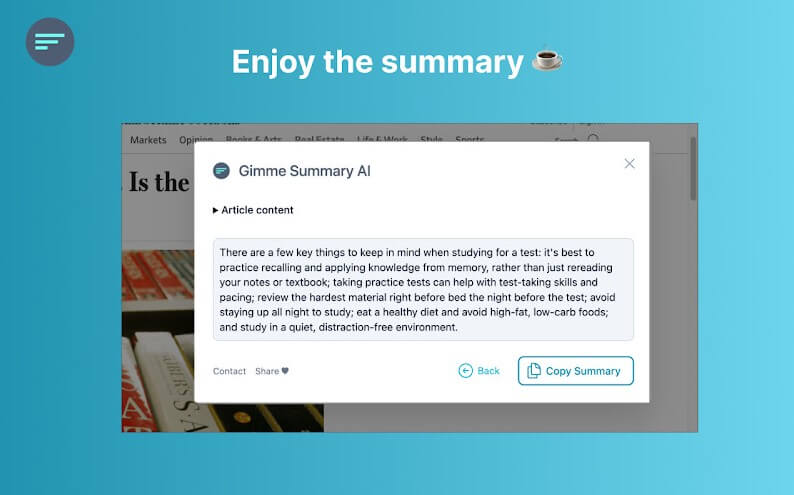
The main limitation is control. The public listing describes a “Generate Summary” workflow, but it does not highlight adjustable summary length, tone, format, citations, key takeaways, follow-up questions, or custom instructions. Users who want more control may prefer a broader AI assistant or a summarizer that supports custom prompts.
Gimme Summary is a good fit for students scanning articles before deeper reading, professionals reviewing industry posts, researchers sorting through search results, and everyday readers who want a faster way to understand long pages.
It is also useful for content marketers, founders, and analysts who review many web pages in a day. The value is not that it replaces reading. It helps decide what deserves attention.
It is less ideal for academic review, legal or medical content, financial decisions, or any situation where exact wording and source context matter. In those cases, summaries can help orient you, but they should not replace careful reading.
The biggest limitation is that Gimme Summary appears narrow and lightly documented compared with newer AI reading tools. There is no strong public evidence of advanced features like PDF summaries, YouTube summaries, chat with page, saved summary history, team workflows, citation extraction, or structured research folders.
The older Chrome Web Store update date may also matter to some users. Browser APIs, AI access patterns, and extension policies change over time, so users should test the extension on their own browser and favorite sites before relying on it.
The privacy statement is a positive sign, but article text still needs to be sent to the AI model for summary generation, according to the listing. Users should avoid summarizing private, confidential, or sensitive pages unless they are comfortable with that data flow.
Gimme Summary is best for readers who want a fast, low-friction way to summarize web articles from Chrome. Its strengths are simplicity, browser-native access, and a privacy-focused listing.
The main caveat is that it looks more like a focused article summarizer than a modern research workspace, so users who need source tracking, custom outputs, or deeper analysis may outgrow it quickly.
TAGS: Research Productivity
Related Tools:

Transforms screen recordings into high-quality product videos

Automates data extraction and organizing documents

AI search engine for research

Automatically plans and organizes your schedule

Enhances web applications by adding automation

Enhances ChatGPT user interaction and functionalities