

Share this tool:
 |
Description:
- Introduction
- What Enjo AI Actually Is
- Where Enjo AI Is Strongest
- Strong Features and Capabilities
- AI Agents and Workflow Automation
- Agent Assist Keeps Humans in Control
- Help Center and Self-Service
- Integrations and Existing Helpdesk Fit
- Insights and Continuous Improvement
- Guardrails, Safety, and Trust
- Best Use Cases
- Limitations and Trade-Offs
- Final Takeaway
Enjo AI is an AI customer and employee service platform for teams that want to reduce repetitive support work without replacing human judgment entirely. The product name on the linked site is Enjo, so this review uses ENJO AI as the product name. Its main value is not just answering questions. It is the combination of AI agents, helpdesk integration, self-service help centers, agent assist, analytics, and guardrails that lets support teams automate safe, repeatable work while escalating exceptions with context.
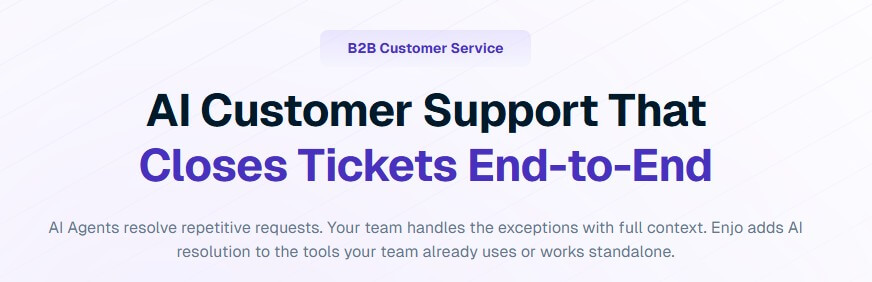
Enjo AI is built as an AI support automation layer. It can work inside existing systems such as Salesforce, Zendesk, Jira, and ServiceNow, or operate through Enjo’s own support workspace. The homepage positions it around AI agents that resolve repetitive requests while human agents handle exceptions with full context.
That distinction matters. Enjo is not only a chatbot pasted onto a website. It is closer to an AI operations layer for support. It can answer from company knowledge, route or create tickets, assist agents while they work, power a customer-facing help center, and use analytics to identify what should be automated next.
The strongest fit is B2B customer service, IT service, and HR service, especially where teams see high volumes of repeated requests such as invoice questions, SSO setup, API troubleshooting, policy questions, account changes, and routine status checks. Enjo’s AI Agent page says the system is designed to automate defined support workflows, complete resolutions when safe, and escalate exceptions with the details agents need.
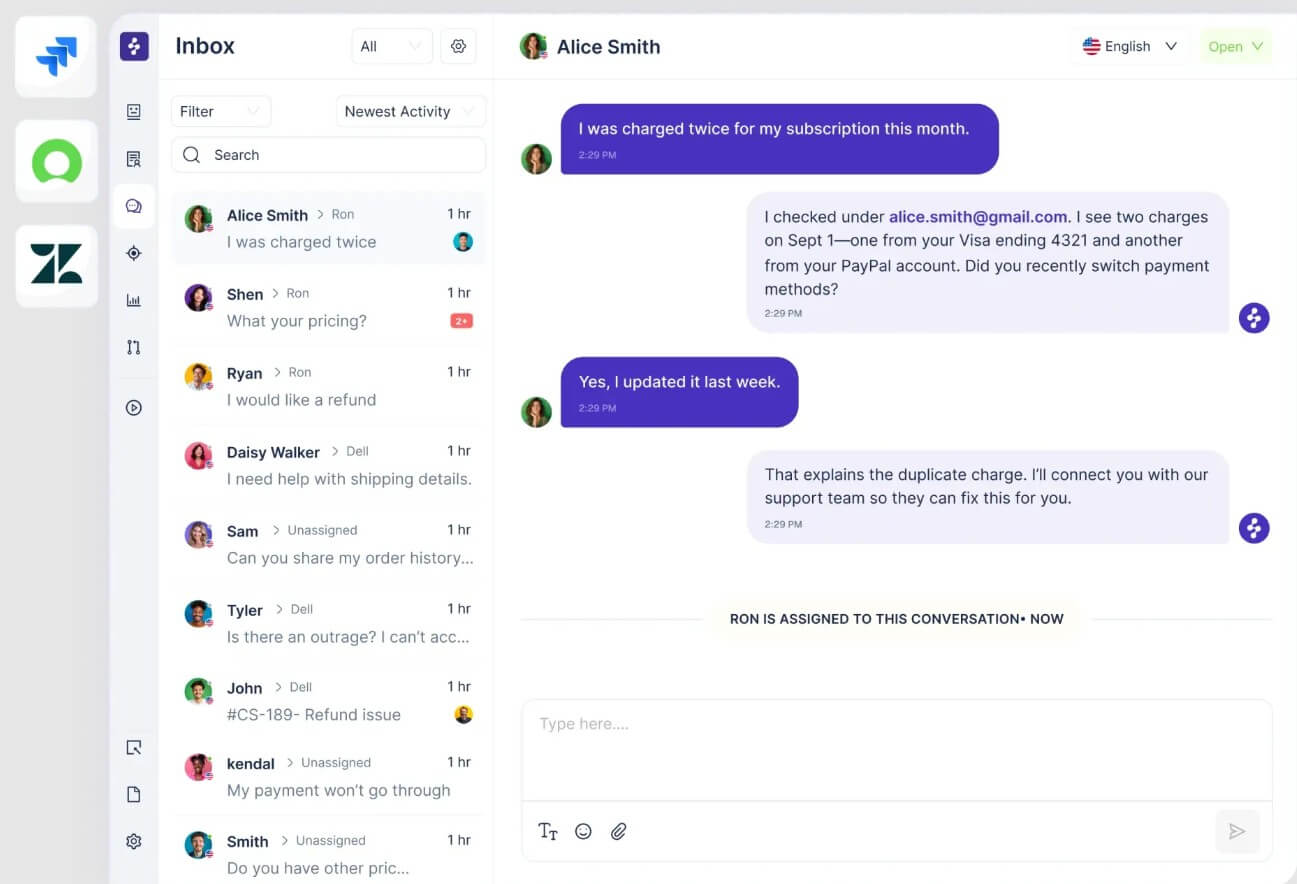
Enjo is strongest when a support team already has useful knowledge but too much of that knowledge is trapped in helpdesk history, docs, Slack threads, internal policies, or experienced agents’ heads. The platform is designed to ground AI responses in trusted sources and past resolutions, then use those answers inside customer conversations and agent workflows.
This makes it more useful for operational support than for generic customer chat. If the main problem is “customers keep asking the same questions, and our team keeps manually finding the same answers,” Enjo has a clear role. If the support motion is low-volume, highly bespoke, or mostly relationship-based, the platform may feel heavier than necessary.
| Feature | What it does | Why it matters |
|---|---|---|
| AI Agent | Resolves defined support workflows end to end when safe | Reduces repetitive manual ticket handling |
| AI Agent Studio | Lets teams build, test, and deploy agents without code | Makes automation easier to configure around real policies |
| AI Flows | Runs multi-step support workflows using natural-language instructions | Handles more than basic FAQ answers |
| Guardrails | Sets permissions, approvals, escalation rules, and policy boundaries | Keeps automation controlled |
| Agent Assist | Summarizes tickets, drafts replies, and surfaces knowledge for agents | Helps humans work faster without giving up control |
| Insights | Shows bottlenecks, automation opportunities, deflection, and workflow impact | Helps teams decide what to improve next |
Enjo’s AI Agent page highlights Agent Studio, AI Flows, and Guardrails as central parts of the automation workflow, with teams defining what the agent can do, what needs approval, and when escalation should happen.
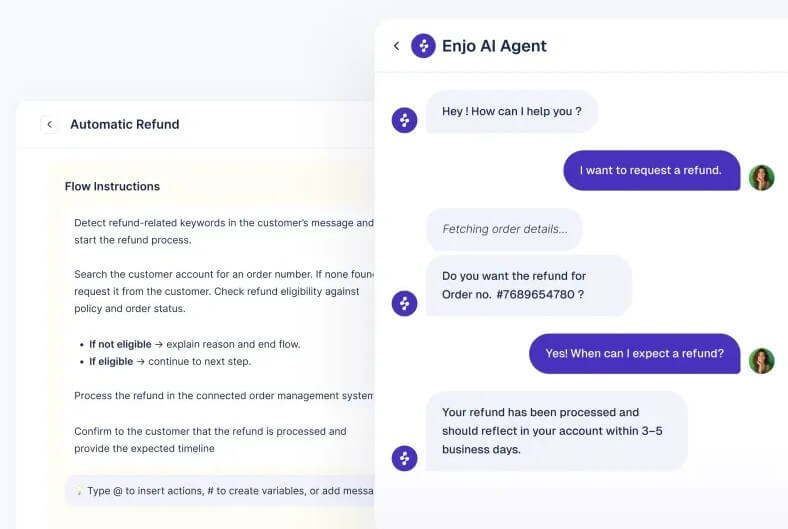
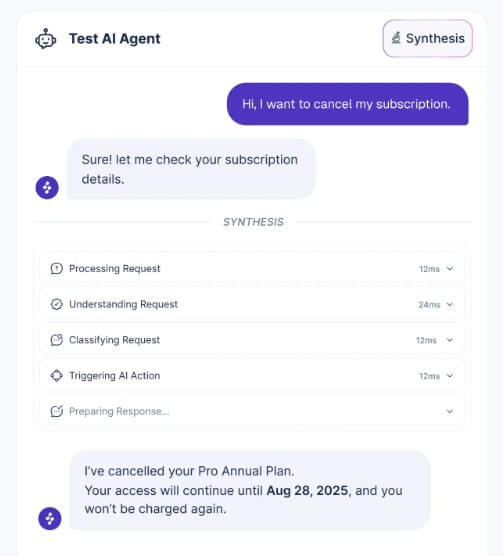
The AI Agent is the center of Enjo’s platform. It is designed to answer from connected knowledge, collect missing information, follow defined workflows, and take action when the action is within approved boundaries. Enjo describes AI Flows as natural-language workflows that plan and execute multi-step support resolutions, with templates that can be customized to company policies.
This is the right direction for support automation because many support issues are not one-question, one-answer tasks. A billing issue may require checking account details. An IT request may need entitlement checks. A customer support case may need routing, clarification, and a policy-based response. Enjo is more interesting when it can handle that sequence, not just return a help article.
The caveat is setup. Teams need to define workflows carefully, connect the right knowledge, and test with real ticket examples. Enjo’s own workflow framing includes build and train, test and deploy, then optimize and scale. That is sensible, but it also means teams should not expect perfect automation on day one.
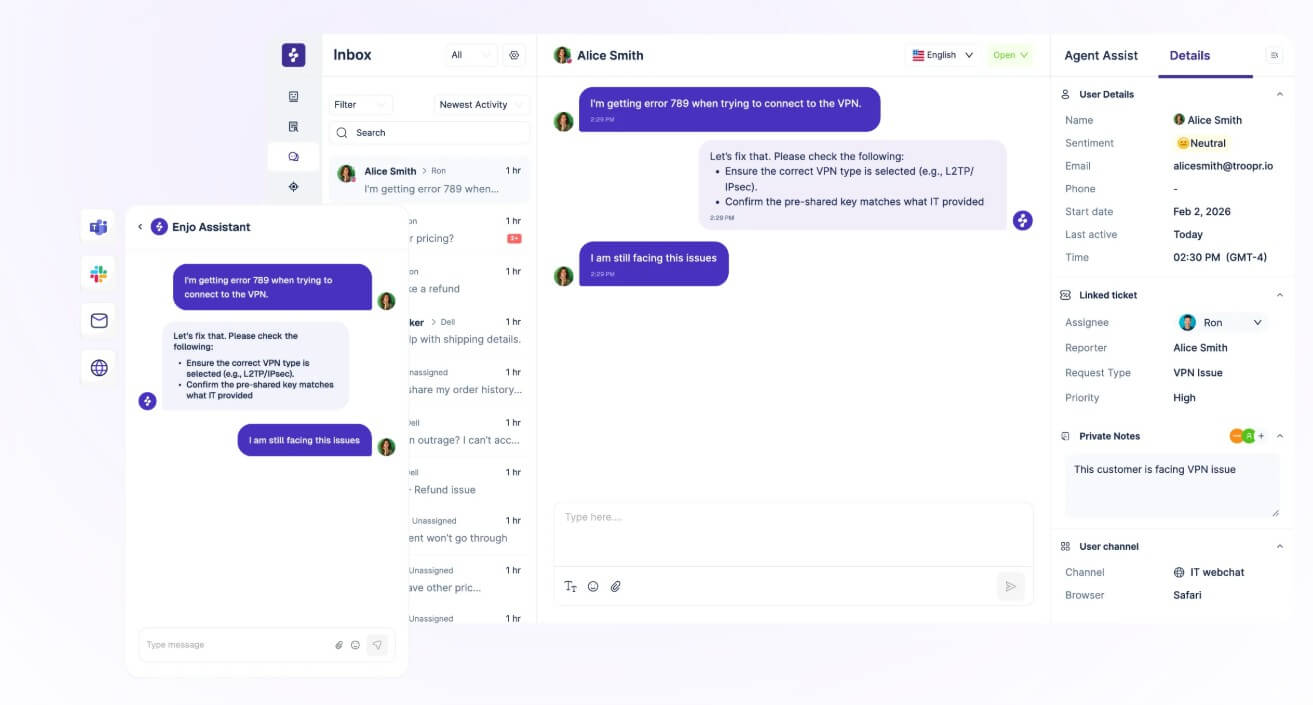
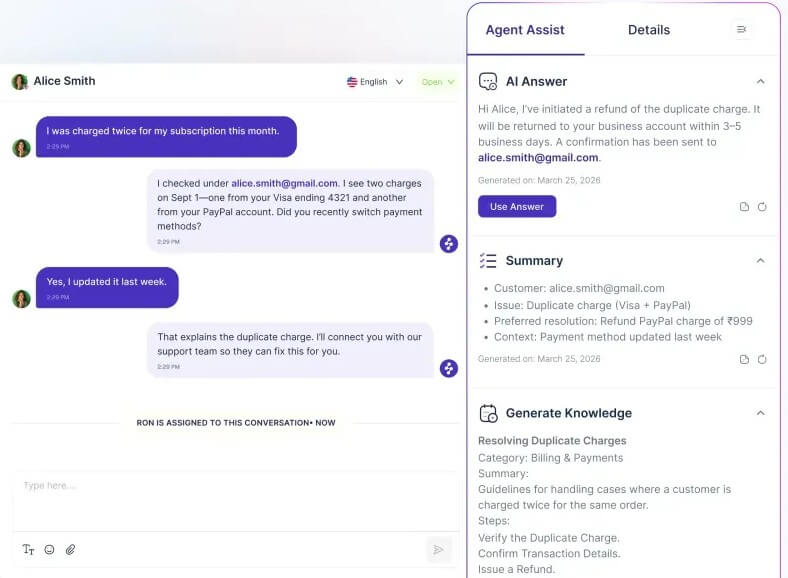
Agent Assist is one of Enjo’s most practical features because it supports human agents rather than trying to bypass them. Enjo says Agent Assist provides running conversation summaries, suggested replies, relevant knowledge cards, and next-step recommendations inside Enjo Inbox or a connected helpdesk.
This matters for real support teams. Agents lose time rereading long threads, searching for the right policy, and rewriting similar responses. A good assist layer can reduce that friction while still letting the agent review, edit, and send the final answer.
The best use case is not replacing skilled support staff. It is helping every agent respond with the context and consistency of the best agents on the team. That can help with new-agent ramping, multi-region support, and teams where response quality varies by person or shift.
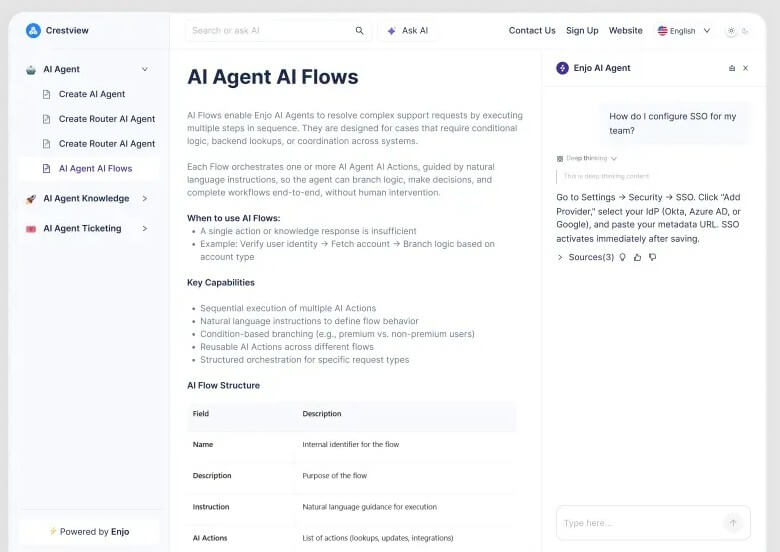
Enjo also includes an AI-native Help Center. Its product page describes a customer-facing portal with articles, collections, AI-powered search, article generation from sources, and automatic article drafts from resolved conversations. Users review and publish the content.
This is useful because traditional help centers often decay. Someone writes articles, the product changes, customers ask questions the docs do not answer, and support volume returns. Enjo’s approach is more active: unanswered questions can become new article drafts, and resolved conversations can feed future self-service coverage. The limitation is that AI-generated help content still needs editorial review. A help center is customer-facing, so accuracy, tone, legal wording, and product details matter. Enjo’s review-and-publish workflow is important here. The AI can speed up maintenance, but it should not publish sensitive or policy-heavy content without human oversight.
Enjo’s biggest practical advantage is that it can sit on top of existing support systems. The site highlights support for Salesforce, Zendesk, Jira, and ServiceNow. Its Salesforce page says Enjo can extend Salesforce Service Cloud with AI agents, embedded Agent Assist, and an AI-native Help Center grounded in Salesforce Knowledge, past cases, and other documents.
The documentation also shows support across channels and sources, including website chat, Slack, Microsoft Teams, Google Drive, Salesforce knowledge, Zendesk, Jira tickets, Confluence, SharePoint, Notion, and API connections. That flexibility matters because few support teams want to migrate everything just to try AI automation. Enjo is more appealing when it can improve the current stack instead of forcing a full platform switch.
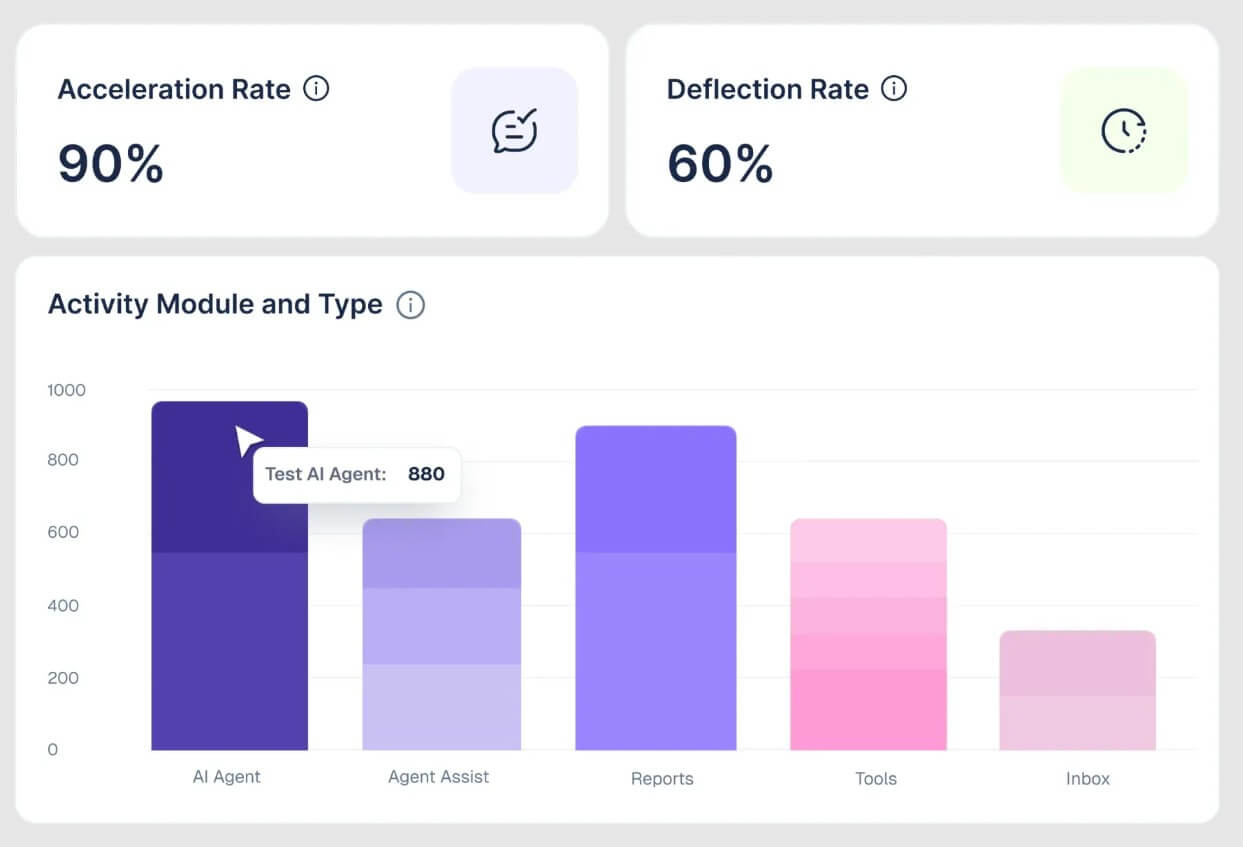
Enjo Insights is designed to show where support work gets stuck and what automation would have the biggest impact. Its product page says Insights can track deflection, accuracy, feedback, agent workflows, queues, channels, and before/after performance by rollout. It also identifies repeatable patterns and proposes automation candidates.
This is useful because support automation should not be static. Teams need to know which requests are still escalating, which knowledge gaps cause repeat tickets, which workflows create delays, and which automations are actually helping. Enjo’s analytics layer helps move AI support from “we launched a bot” to an ongoing improvement process.
Guardrails are essential for any platform that takes action in support workflows. Enjo describes Guardrails as a control plane for AI boundaries across inputs and outputs, including protections against confidential data exposure, restricted topics, harmful content, and unsafe interactions. It also references admin-level global guardrails and stricter per-agent rules.
That is important because the risk in support automation is not only a wrong answer. It can also be the wrong action: changing an account, exposing sensitive information, giving policy-violating advice, or escalating too late. Enjo’s guardrails, approvals, and escalation rules are a key part of making automation usable in real operations.
Enjo is a strong fit for B2B customer support teams with high-volume repetitive tickets, especially when answers depend on internal docs, past cases, and structured workflows.
It also works well for IT service teams handling access questions, account requests, software issues, and routine troubleshooting.
HR teams can use it for employee support around policies, onboarding, benefits, internal processes, and repeated administrative questions.
Customer-facing SaaS teams may get the most value when combining AI Agents, Help Center, Agent Assist, and Insights into one loop: answer what can be answered, escalate what needs judgment, and turn those escalations into better knowledge.
Enjo is not a lightweight FAQ bot. That is a strength for serious teams, but it also means setup matters. The platform needs trusted knowledge sources, clear workflows, test cases, escalation rules, and ongoing tuning.
The second trade-off is operational trust. Teams should roll out automation gradually, starting with narrow workflows where the risk is low and the expected answer path is clear.
The third limitation is content quality. AI agents are only as good as the knowledge and workflows behind them. Outdated policies, messy help articles, and unclear process ownership will weaken the results.
Enjo AI is best for support teams that want to automate repeatable customer, IT, or HR requests while keeping humans in control of exceptions. Its strongest value is the full support loop: AI Agents, Agent Studio, AI Flows, Help Center, Agent Assist, Insights, integrations, and Guardrails. It is a strong fit for B2B teams with growing ticket volume, existing support tools, and enough repeatable work to justify automation. The main caveat is setup discipline. Enjo can reduce repetitive support work, but only if the team invests in clean knowledge, clear workflows, careful testing, and sensible escalation rules.
TAGS: Productivity
Related Tools:

Automates web scraping and data extraction
Lets you ask business questions and instantly get insights

AI-powered note-taking tool
AI-powered writing tool for paraphrasing

Enhances ChatGPT user interaction and functionalities

AI-powered Telegram bot