

Share this tool:
 |
Description:
Guidejar is an AI-assisted documentation and product walkthrough tool for teams that need to explain processes clearly. Its main job is simple: record a workflow once, turn it into a guide, then share it with employees, customers, leads, or support users without rebuilding the same instructions by hand every time.
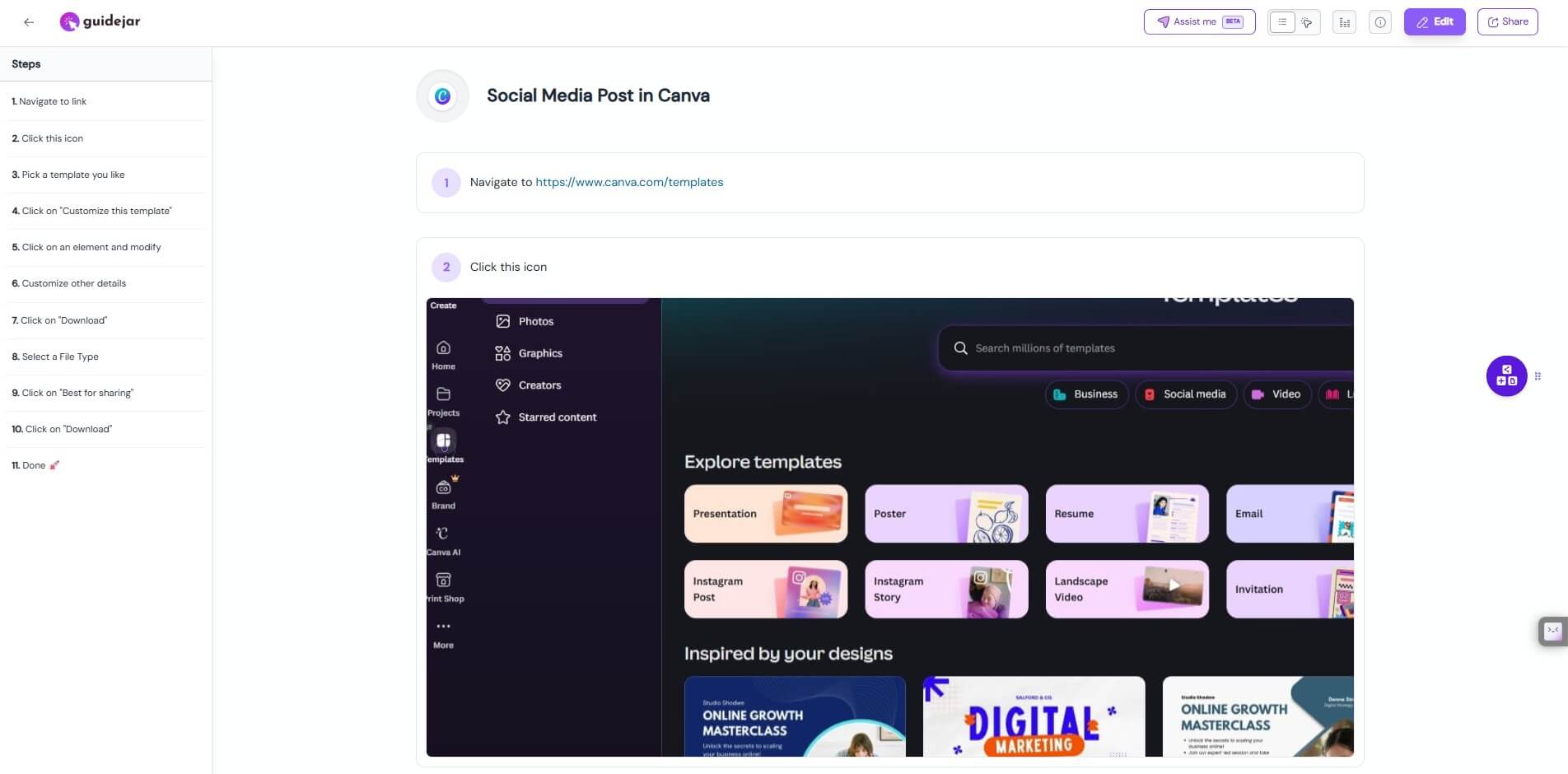
Full interactive guide: View the complete Guidejar walkthrough here.
Guidejar sits between a screen recorder, an SOP builder, a product demo tool, and a lightweight help-center platform. You use it to capture a process, then Guidejar turns the actions into step-by-step documentation. From there, you can edit the steps, adjust click targets, add branding, create interactive demos, add AI voiceovers, translate content, and share the finished guide by link or embed.
That makes Guidejar more workflow-led than prompt-led. The value is not in asking AI to write generic documentation from scratch. The value is in walking through a real process while the tool captures the screens and actions. This is important because process documentation often fails when it is disconnected from the actual interface. Guidejar starts with the real workflow, which gives the guide a stronger foundation.
The platform supports several guide formats, including step-by-step guides, interactive walkthroughs, and video demos. It also includes features for AI translation, AI voiceover, chapters, conditional branching, access control, dynamic variables, help-center widgets, and analytics.
Guidejar is strongest when a team keeps answering the same “how do I do this?” questions. That might be an internal process, a customer support issue, a SaaS onboarding task, or a product feature that needs a quick demo.
The official site positions Guidejar across internal wikis, product marketing, lead generation, and user onboarding. Internal teams can document processes and tools. Product teams can explain features. Marketing teams can use interactive product experiences. Support teams can reduce repeated questions with clearer walkthroughs.
This is the right lane for the product. Guidejar is not trying to be a full learning management system or a complex knowledge management platform. It is strongest at turning specific workflows into clear reusable assets.
| Feature | What it does | Why it matters |
|---|---|---|
| Workflow Capture | Records user actions through the Chrome extension or desktop app | Reduces manual screenshotting and step writing |
| Auto-Generated Instructions | Creates guide steps from the captured workflow | Speeds up SOP and tutorial creation |
| Multiple Guide Formats | Supports step-by-step guides, interactive walkthroughs, and video demos | Lets teams reuse one workflow in different contexts |
| AI Voiceover | Adds AI-generated narration to product demos | Useful for training and customer education |
| AI Translate | Translates guides for global teams or customers | Helps scale documentation across languages |
| Help Center Widget | Embeds guides, articles, and FAQs inside a website | Makes support content easier to access |
| Analytics | Tracks guide engagement | Helps teams see what users actually open and follow |
The strongest feature is still the capture workflow. A lot of AI documentation tools sound impressive until the user still has to manually explain each step. Guidejar’s record, customize, share model is more practical.
Guidejar’s workflow is built around three stages: record, customize, and share. The official site says users click “Start Capture” in the Chrome extension or desktop app, walk through the process, then stop capture when finished. Guidejar records interactions in real time and prepares the guide after capture.
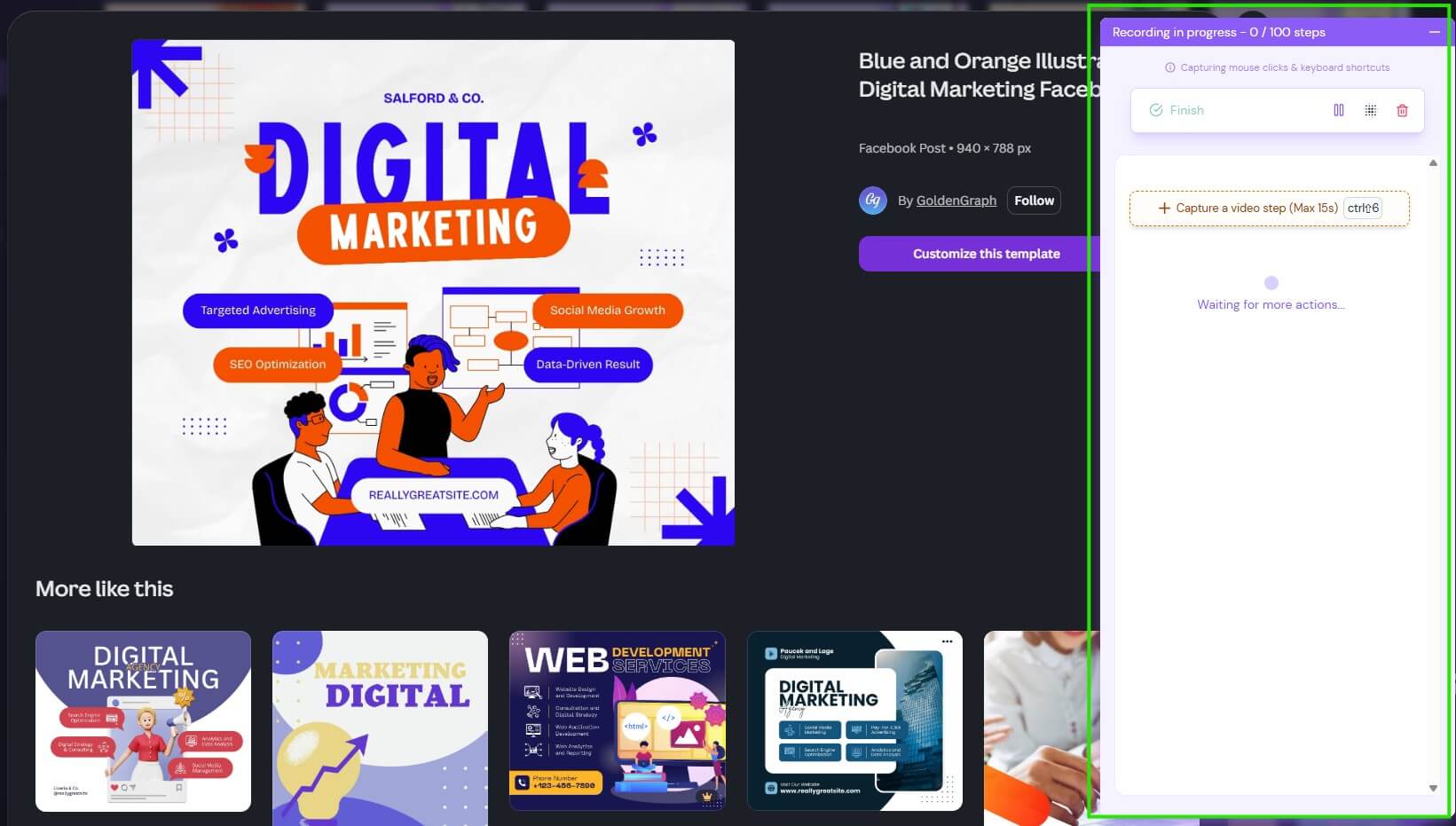
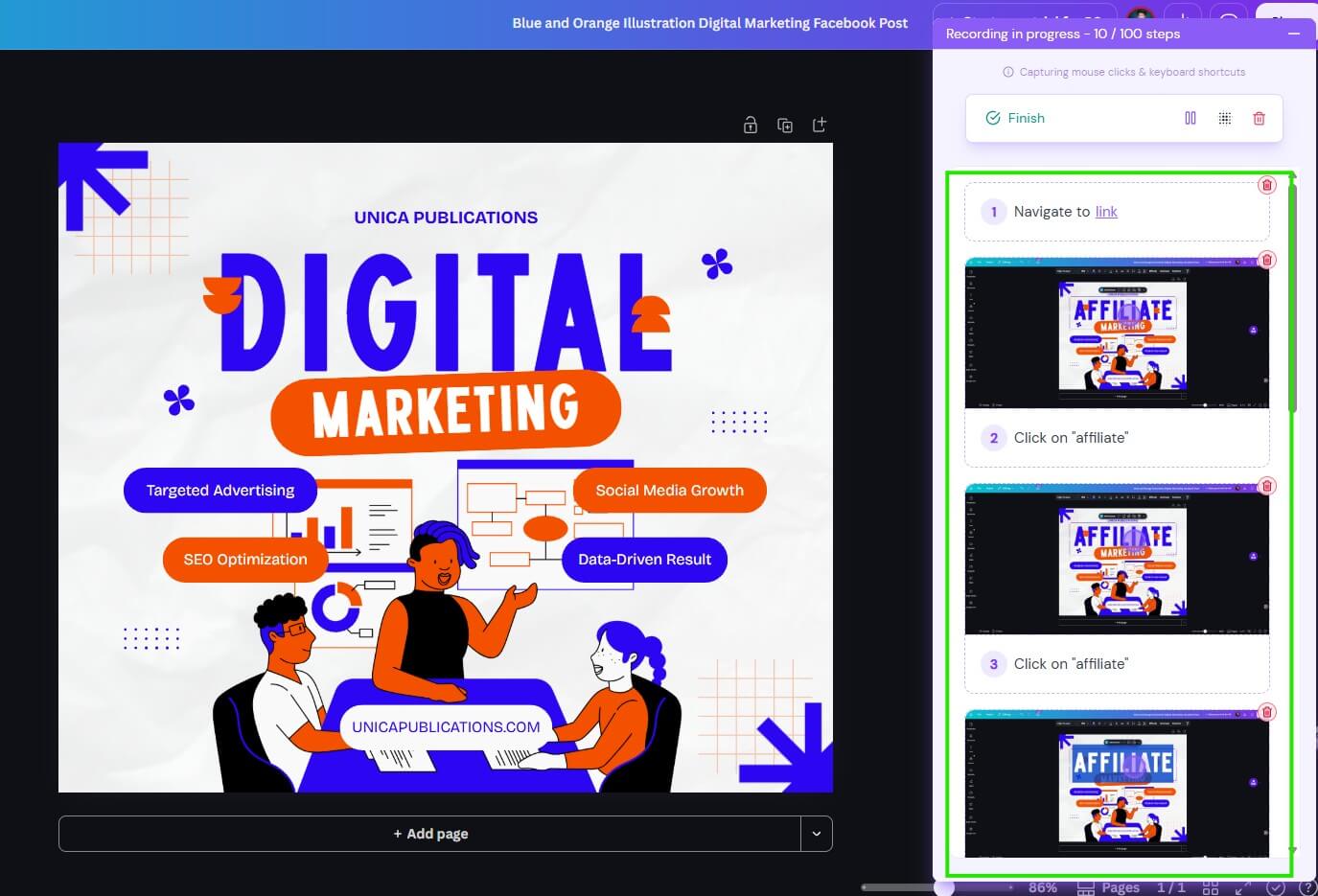
The editing stage is where the guide becomes usable. You can revise steps, adjust click targets, highlight details with pan and zoom effects, add chapters, create branching paths, and align the guide with your brand.
This is a good workflow for busy teams because it matches how documentation usually happens. Someone knows the process, walks through it, and then cleans up the explanation. The tool does not remove the need for review, but it removes much of the repetitive setup work.
The Chrome Web Store listing describes a similar process: record the workflow, let Guidejar capture the steps and generate instructions, then customize branding, click targets, voiceovers, talking heads, translations, and sharing options.
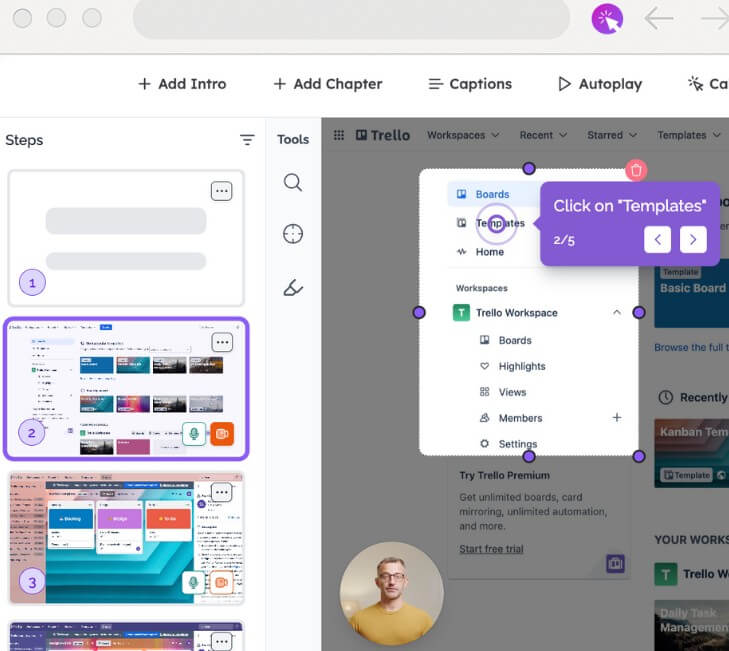
Guidejar becomes more useful when the output needs to do more than sit as a static document. A basic SOP is helpful for internal training, but interactive guides and demos can support customer onboarding, sales, support, and product education.
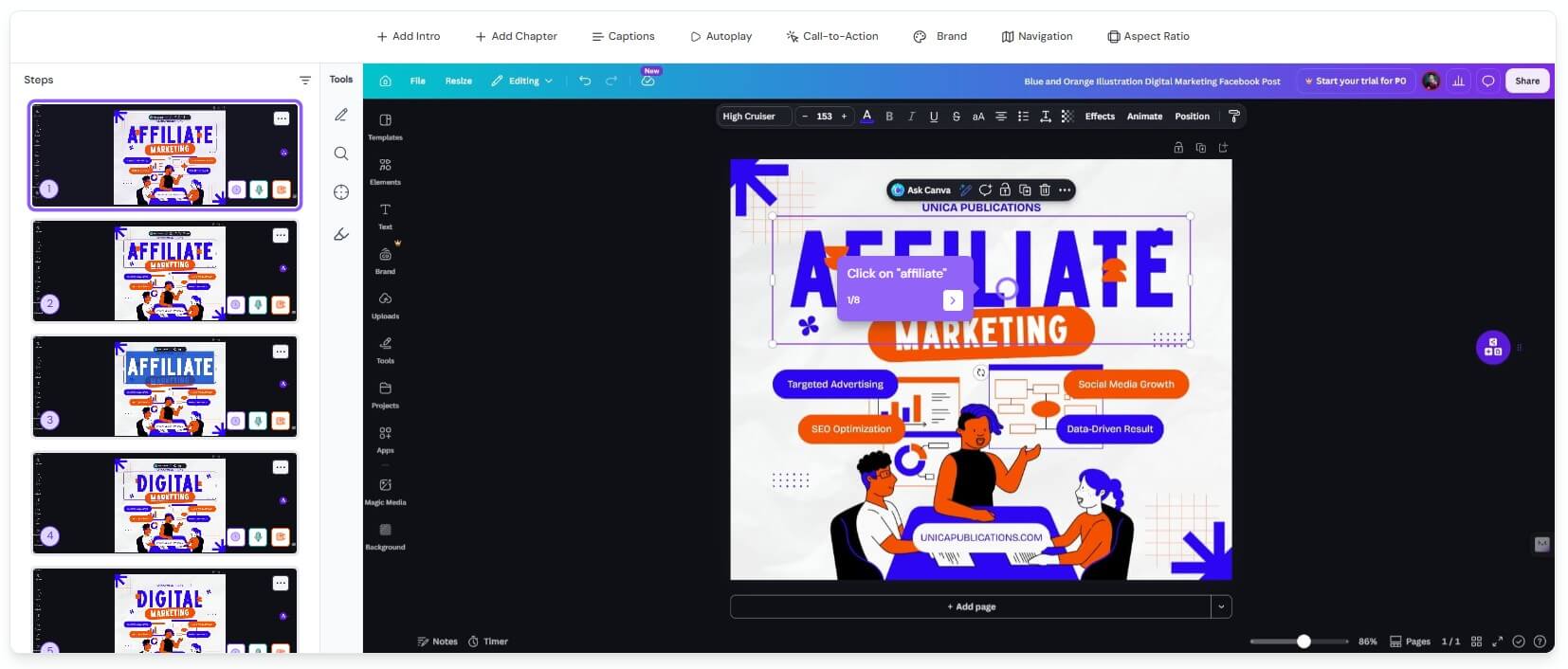
Chapters and conditional branching are especially useful for product demos. A linear guide is fine for a simple task, but software products often have multiple user paths. Branching lets a guide adapt based on what the viewer chooses, while chapters organize longer demos into cleaner sections. Guidejar’s feature page specifically frames chapters as useful for organizing demos and supporting decision points for conditional branching.
The help-center layer also matters. Guidejar lets teams bring guides into a help center with layouts for customer-facing FAQs or internal knowledge bases. It includes drag-and-drop organization, branding, custom domains, and optional authentication for private documentation.
That makes the platform more complete than a screenshot guide generator. It can support both guide creation and guide distribution.
Guidejar is a strong fit for internal SOPs. HR teams, operations teams, support teams, and managers can document recurring processes such as onboarding, tool setup, ticket handling, reporting, approvals, and admin workflows.
It is also useful for SaaS user onboarding. A product team can turn a feature setup process into an interactive walkthrough, then embed it in support docs or onboarding flows.
Product marketing teams can use Guidejar for interactive demos. Instead of sending prospects a long recorded video, teams can build a guided product experience that shows value faster.
Customer support teams can use it to reduce repetitive tickets. If users keep asking where to update billing details, change settings, export data, or configure a feature, a guide can answer the question once and keep working.
Training teams can use AI voiceover and video export when they need more polished materials. The Chrome listing notes that guides can be exported as PDFs or high-quality videos for offline use, decks, training PDFs, or social content.
- Start with common questions, not obscure processes. Guidejar works best when it solves repeated friction.
- Keep guides short when possible. A 10-step guide that answers one task is often more useful than a 60-step master document.
- Review every auto-generated instruction. The capture may be accurate, but the wording still needs to match your team’s language and your customer’s level of knowledge.
- Use chapters for longer walkthroughs. They make the guide easier to scan and reduce the feeling of being trapped in one long sequence.
- Use analytics to clean up documentation. If users open a guide but still ask support questions, the guide may need clearer steps, better labels, or a shorter path.
Guidejar’s biggest limitation is that it depends on the quality of the captured workflow. If the process is messy, outdated, or too long, the guide may still feel confusing. The tool can speed up documentation, but it cannot fix a weak process by itself.
There is also a maintenance burden. Product interfaces change. Internal tools move buttons. Support flows evolve. Any guide tool becomes less useful if teams do not update the content.
Another trade-off is scope. Guidejar is excellent for process walkthroughs, SOPs, demos, and onboarding content. It is less suited to deep policy documentation, complex course design, or long-form editorial knowledge bases where text structure matters more than workflow capture.
Guidejar is a practical AI-assisted tool for turning real workflows into reusable guides, SOPs, product demos, and interactive walkthroughs. Its strongest value is the capture-to-customize-to-share workflow, supported by AI voiceover, translation, branching, help-center publishing, embeds, and analytics. It is best for teams that need clearer internal training, customer onboarding, product education, support documentation, or sales demos. The main caveat is maintenance: Guidejar can make guides faster to create, but teams still need to review, simplify, and keep them current.
TAGS: Productivity
Related Tools:

AI meeting assistant that tracks participation

Summarizes meetings to help teams capture key information
Streamlines note-taking, task organization, and insight generation

Helps users search the web, analyze pages, and complete research tasks

Simplifies presentation and document creation
Assists in creating classroom content