

Share this tool:
 |
Description:
- Introduction
- What Video Highlight Actually Is
- Where Video Highlight Is Strongest
- Strong Features and Capabilities
- Workflow and Ease of Use
- Transcripts, Search, and Research Quality
- Private Videos, Audio, and Meetings
- Best Use Cases
- Comparison to Basic Video Summarizers
- Limitations and Trade-Offs
- Final Takeaway
Video Highlight is an AI video summarizer built for people who need to understand videos faster without watching every minute. It turns long videos into timestamped summaries, key points, searchable transcripts, highlights, notes, and chat-based answers. The main value is not just summarization. It is the way the platform treats video more like a readable, searchable research document.
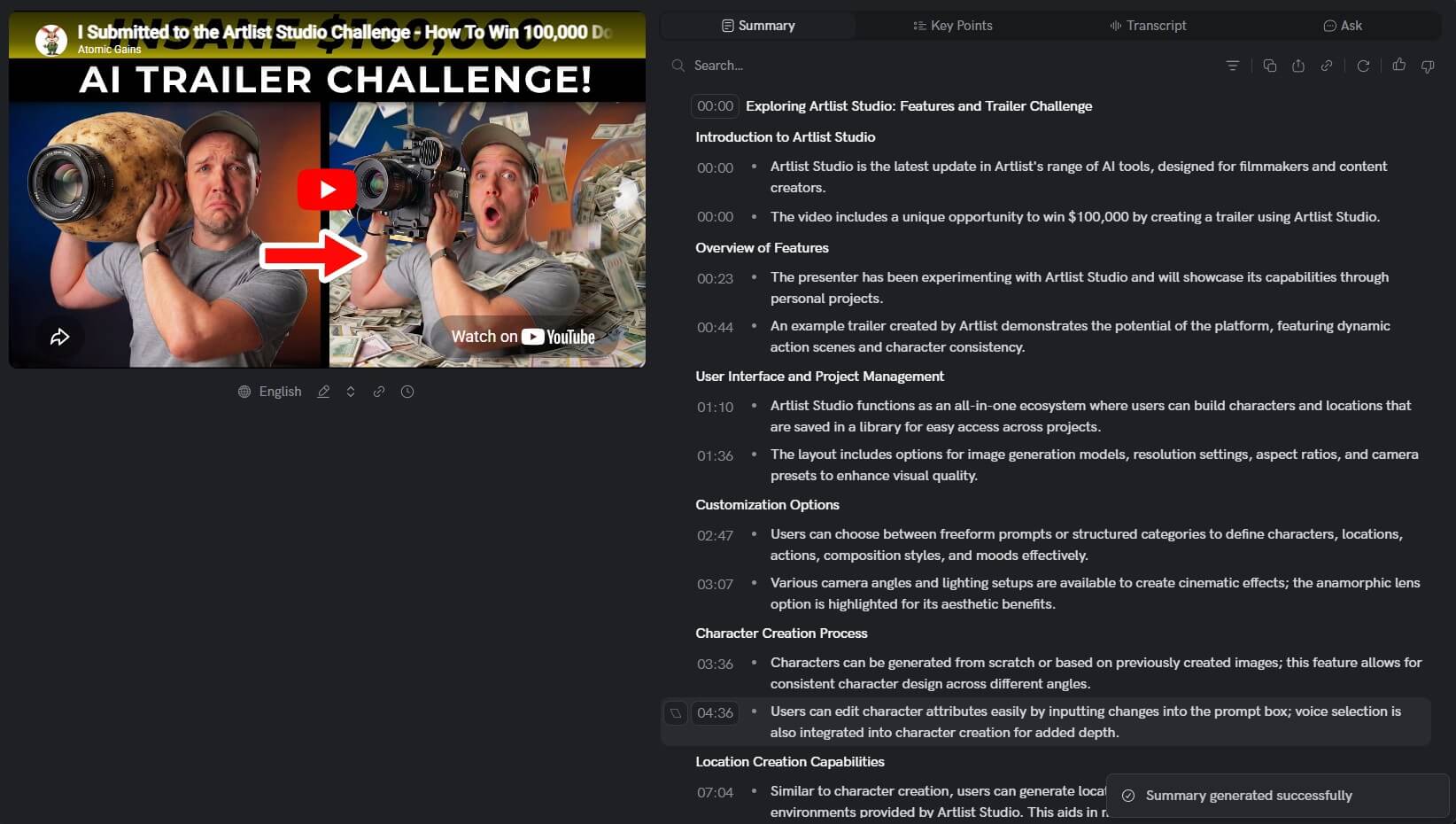
Video Highlight is a video intelligence workspace. You paste a video URL or upload a private file, then the platform generates a transcript, summary, key points, and timestamps. From there, you can search inside the video, ask questions, save highlights, add notes, group videos into playlists, and export what you need.
That makes it different from a basic YouTube summary extension. A simple summarizer gives you a short recap. Video Highlight is closer to a study and research layer for video content. It is designed for lectures, podcasts, interviews, webinars, product demos, tutorials, meetings, and any other long-form video where the important information is buried across time.
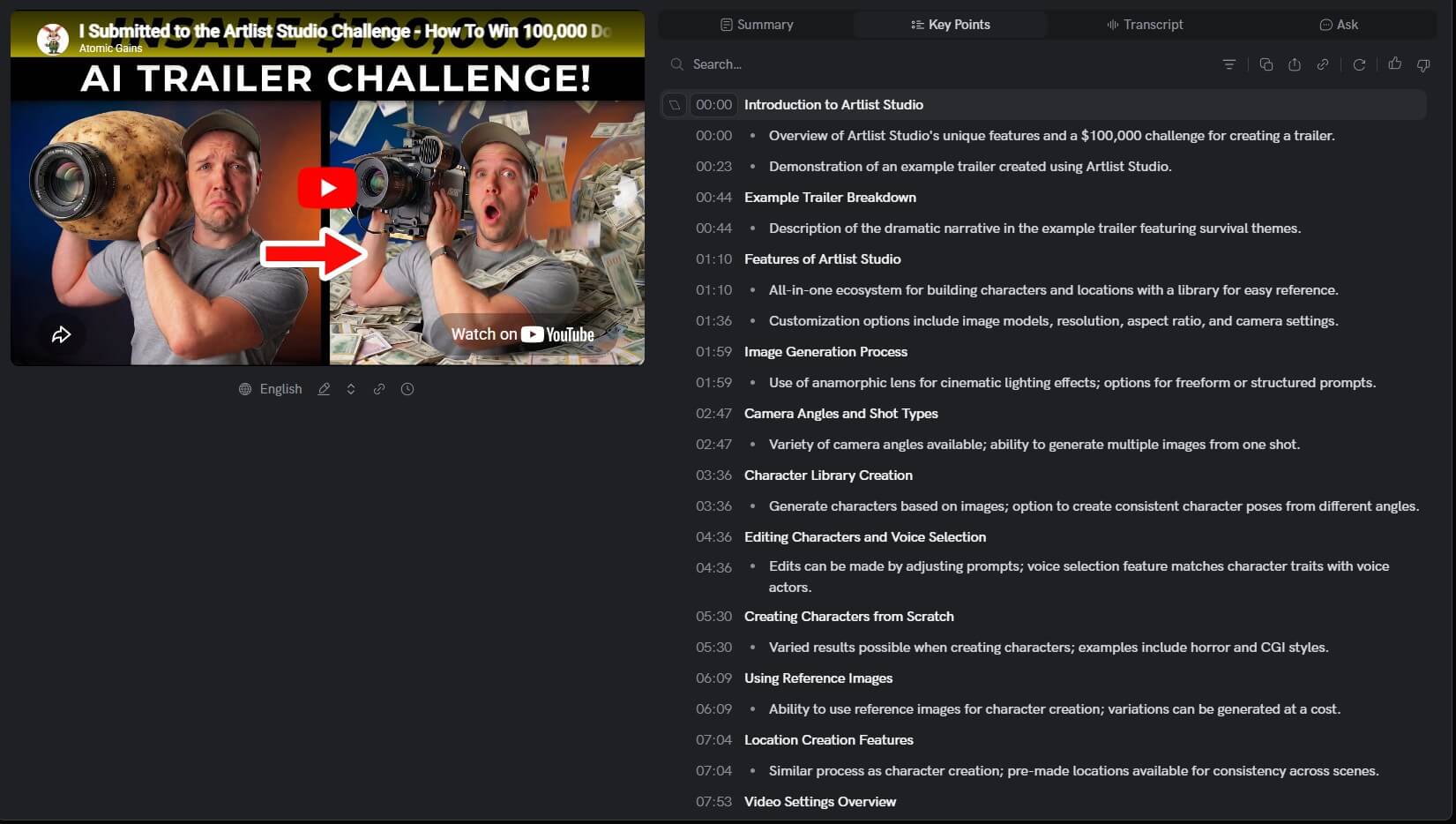
The timestamped structure matters. Instead of giving you one vague paragraph, Video Highlight ties summaries and transcript sections back to specific moments in the video. That makes it easier to verify a point, revisit the original source, or jump straight to the section that matters.
Video Highlight is strongest when the video is long, information-dense, and worth returning to. A five-minute casual clip may not need this kind of tool. A two-hour podcast, university lecture, earnings call, software tutorial, panel discussion, or recorded meeting is a much better fit.
The product’s best use is time recovery. It helps you answer questions like:
| Need | How Video Highlight helps |
|---|---|
| Understand a long video quickly | Generates summaries and key points |
| Find a specific claim or section | Provides transcript search and timestamps |
| Study or research from video | Lets users highlight, annotate, and organize clips |
| Compare several videos | Supports playlists and cross-video search |
| Work with private content | Allows uploaded files with the same AI features |
That last point is important. Video Highlight says private uploads get the same core features as public videos, including timestamped summaries, key points, transcripts, AI chat, search, highlights, notes, and export options.
Summaries and key points link back to moments in the video, so users can move from summary to source quickly.
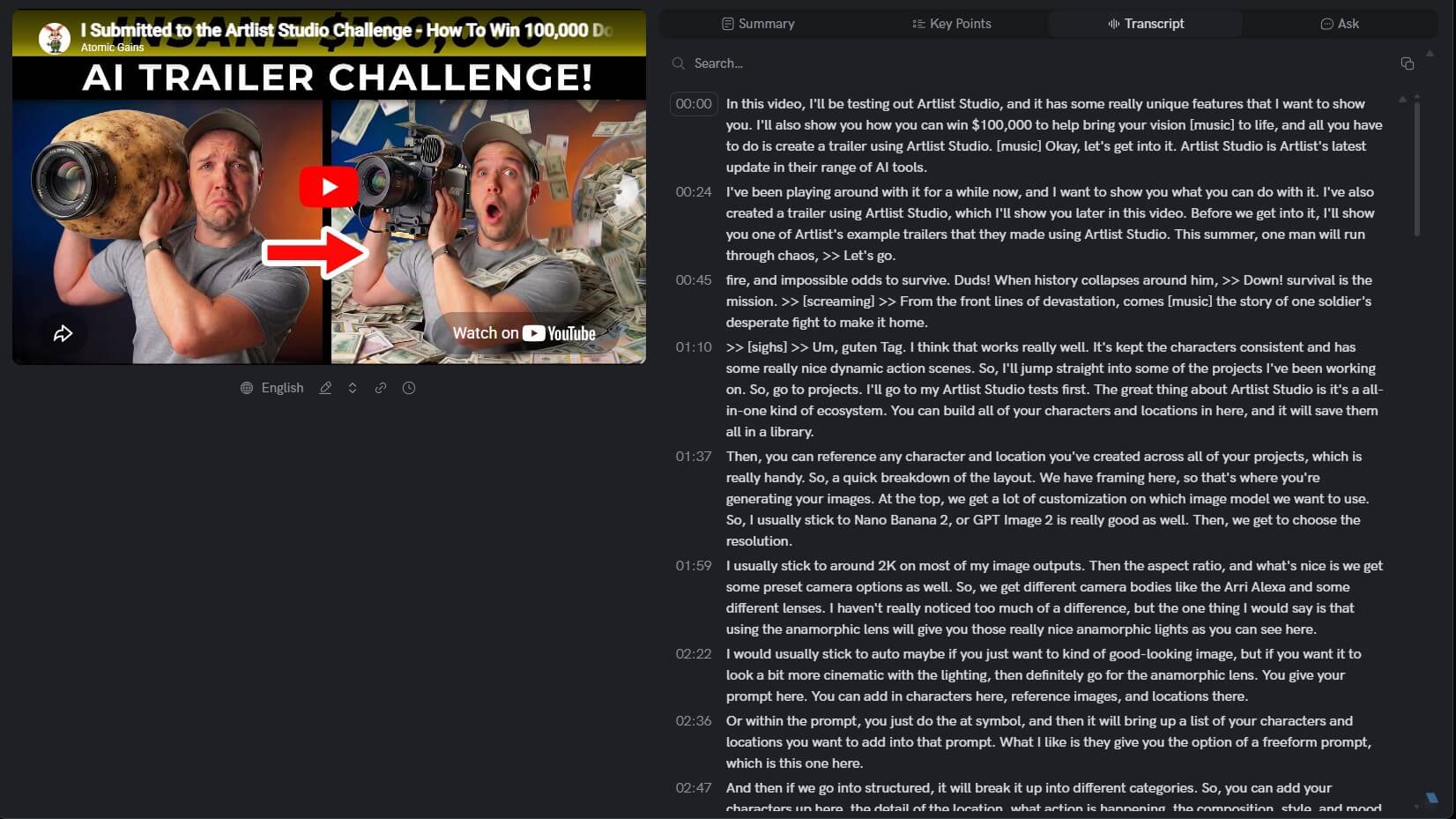
Video Highlight creates transcripts that can be searched, copied, and exported with or without timestamps.
Users can ask questions about a video instead of manually scanning the transcript.

Users can mark important sections, color-code highlights, add notes, and capture video frames through the Chrome extension.
The features page lists cross-video search and playlists, which is useful when research spans multiple videos.
Video Highlight includes video alerts among its listed features, which can help users track new or changing video content.
The basic workflow is simple: paste a video URL, let Video Highlight process it, then review the generated summary, transcript, and key points. For public content, the homepage invites users to paste a YouTube, Vimeo, or Dailymotion URL. For uploaded content, users need to be logged in.
The experience works best when you treat the video like a document. Start with the summary to understand the structure. Use the key points to decide which sections matter. Search the transcript for names, topics, claims, or product terms. Then save highlights and notes for anything you may need later.
That note-taking layer is what makes the product more useful than a quick recap tool. Video Highlight’s highlights system supports color-coded categories such as concepts, questions, insights, and actions. It also lets users add context to highlights, which is useful for study, research, client work, or content repurposing.
The transcript layer is one of the most important parts of Video Highlight. A summary can be useful, but a transcript gives users something they can search, quote from, and verify. The official transcript page says users can search for words or phrases, highlight results across the transcript, and search across multiple videos in a playlist. It also lists transcript export options including Word, Markdown, and CSV, with timestamps included or removed.
That makes Video Highlight valuable for researchers, journalists, students, analysts, and content teams. If you are reviewing several interviews, webinars, or competitor videos, search matters more than a polished recap. You need to find what was said, where it was said, and whether the AI summary reflects the source correctly.
The practical caveat is that transcript quality depends on audio quality. Background noise, accents, poor microphones, overlapping speakers, music, and low-quality uploads can still affect accuracy. Video Highlight can make video easier to use, but users should still verify important claims against the transcript and original video.
Video Highlight is not limited to public video URLs. The private video feature is useful for lectures, internal training, recorded meetings, interviews, user research sessions, webinars, and client calls. The private videos page says uploaded files are encrypted during upload using secure presigned URLs, only the user and team members can access uploaded content, and content is not used for training.
That privacy positioning matters because many video tools are only useful for public content. If you want to summarize an internal meeting or private training file, the upload workflow is more relevant than YouTube support. Still, sensitive files need care. For legal, medical, financial, confidential client, or internal strategy videos, users should check their organization’s policy before uploading.
Video Highlight is a strong fit for students reviewing lectures, researchers analyzing interviews, content creators repurposing podcasts, marketers studying competitor videos, consultants reviewing recorded calls, and teams turning webinars or meetings into notes.
It is especially useful when you need to pull action items or reusable ideas from long videos. A podcast episode can become topic notes. A webinar can become a content brief. A user interview can become research highlights. A tutorial can become a searchable reference.
It is less useful for short entertainment clips, highly visual videos where meaning depends more on images than speech, or cases where you need advanced video editing rather than understanding and organizing content.
The cleanest distinction is depth. Basic video summarizers are good when you want a fast overview. Video Highlight is better when the video matters enough to search, annotate, revisit, and export.
| Tool type | Best fit | Where Video Highlight stands |
|---|---|---|
| Basic YouTube summarizer | Quick recap of one public video | Video Highlight offers more structure, transcript tools, highlights, notes, and playlists |
| Transcript-only tool | Turning speech into text | Video Highlight adds summaries, chat, search, and annotation |
| Meeting assistant | Live meeting capture and team notes | Video Highlight is better for post-meeting video review and uploaded recordings |
| Video editor | Cutting and producing clips | Video Highlight is for understanding video, not editing footage |
That positioning is useful. Video Highlight is not trying to replace video editors. It is trying to make video content readable and reusable.
The first limitation is dependence on spoken content. If a video is mostly visual, silent, music-based, or screen-heavy with little narration, the summary may miss what matters.
The second limitation is AI reliability. Summaries and answers can compress nuance or overlook details. Users should check timestamps and transcripts before using the output in research, reporting, or client work.
The third limitation is workflow fit. If you only summarize the occasional short video, the platform may feel like more than you need. Its value grows when you handle long videos often.
Video Highlight is best for people who treat video as a source of knowledge, not just something to watch once. Its strongest features are timestamped summaries, searchable transcripts, chat with video, highlights, notes, playlists, and export options.
It is a strong fit for students, researchers, creators, marketers, analysts, and teams reviewing long-form video or private recordings. The main caveat is that AI summaries still need verification, especially when accuracy matters.
TAGS: Productivity
Related Tools:
Allows businesses to build, customize, and deploy AI agents
Automates complex tasks by creating customizable, scalable digital agents

Records, transcribes, and summarizes meetings

Lets you ask business questions and instantly get insights
Enhances focus and efficiency in work or study

Provides customizable email templates