

Share this tool:
 |
Description:
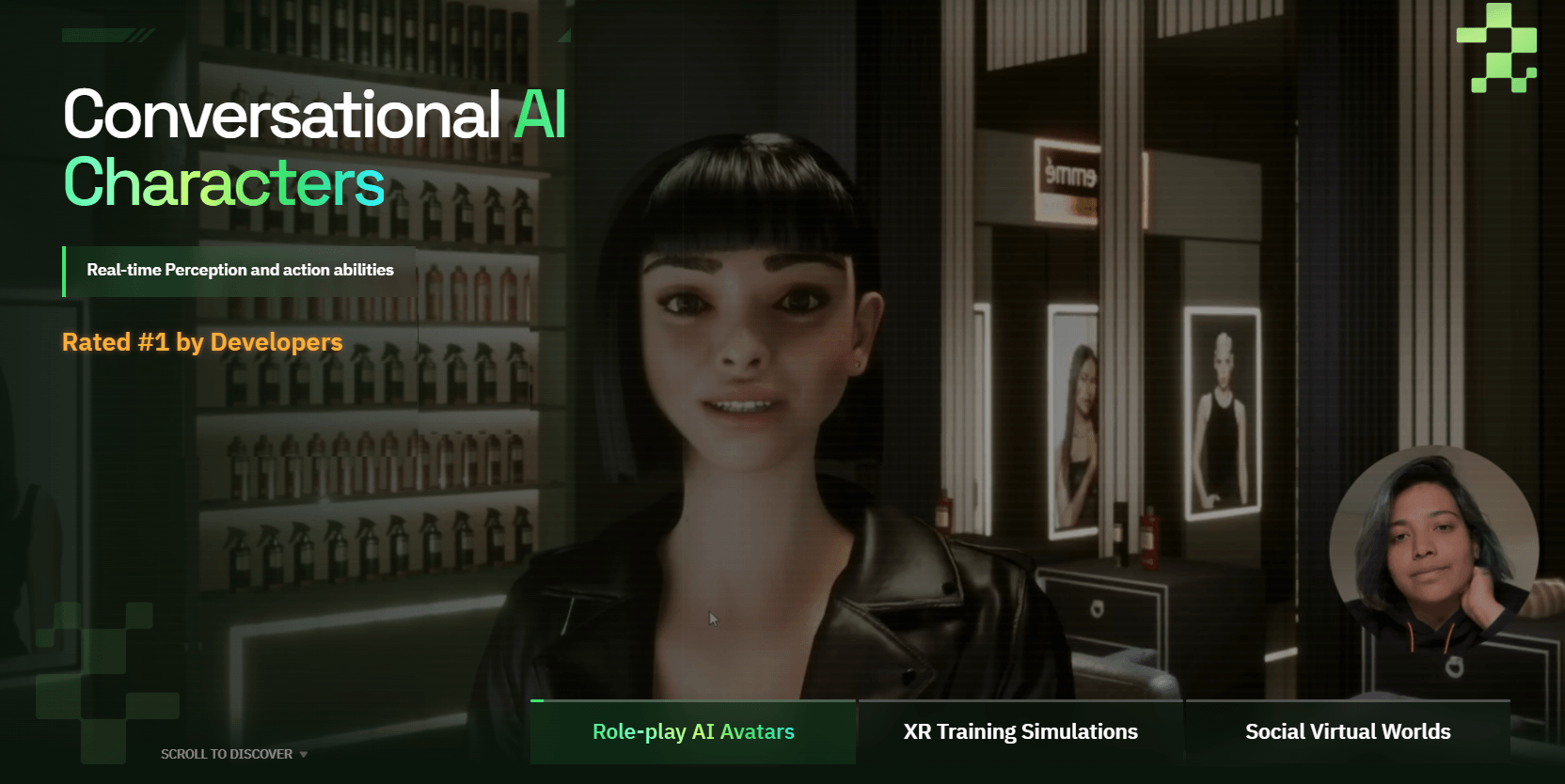
Convai is a conversational AI character platform for building intelligent NPCs, AI companions, virtual guides, training characters, brand avatars, and embodied agents. Its real value is not just that characters can talk. It is that Convai combines dialogue, voice, knowledge, memory, actions, animation, lip-sync, vision, game-engine plugins, and no-code avatar tools into a system designed for interactive worlds rather than static chatbot windows.
Define how a character looks, speaks, thinks, remembers, and responds through personality, voice, knowledge, traits, memory, narrative, and API settings.
Upload or enter knowledge so a character can answer with domain-specific information instead of relying only on general model knowledge.
Review past sessions and enable long-term memory so a character can remember preferences, facts, and choices across conversations.
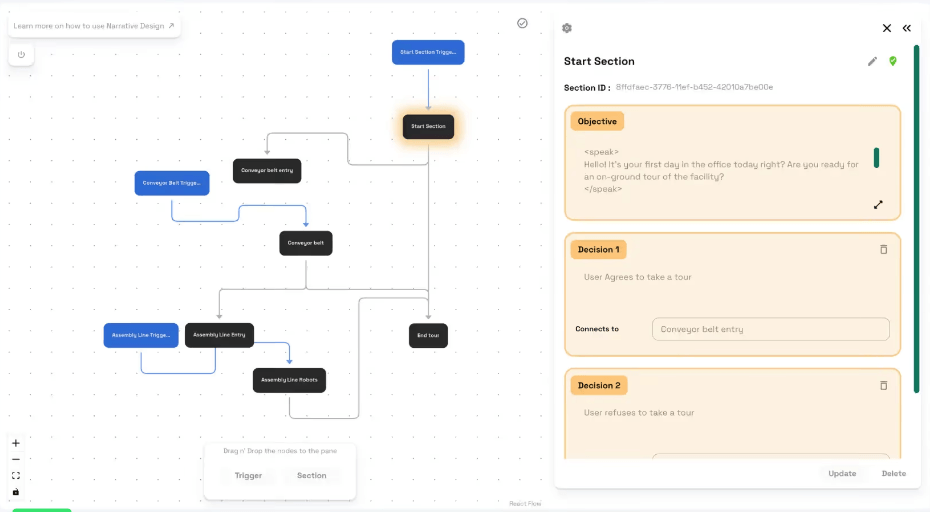
Build goal-oriented conversation flows with sections, decisions, and triggers instead of rigid dialogue trees.
Connect characters to live data sources and third-party systems so they can fetch information, create tasks, or trigger workflows.
Use Convai in engines and interactive environments, including Unity, Unreal Engine, web, VR, and AR workflows.
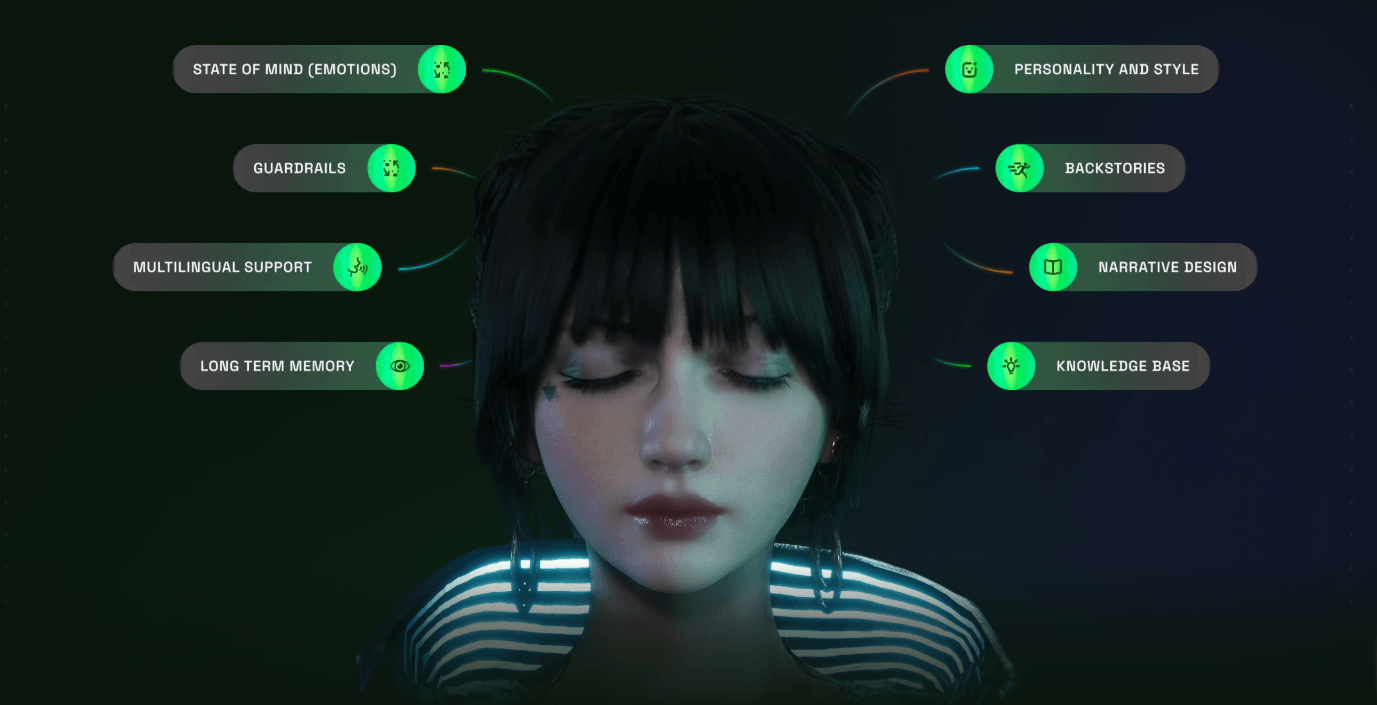
Convai is best understood as an AI character infrastructure platform. It helps creators build characters with a personality, voice, knowledge, behavior settings, memory, narrative structure, and deployment path. The official documentation describes Convai as a platform for creating, customizing, testing, and sharing interactive AI characters through Playground, no-code experiences, plugins, integrations, and API reference.
That makes Convai different from a normal chatbot builder. A chatbot mostly answers messages. A Convai character is meant to exist inside an environment: a game, website, virtual world, training simulation, XR experience, brand activation, or 3D scene. The character can talk, react, remember, use knowledge, perform actions, and in some setups perceive the surrounding scene.
The easiest way to understand Convai is through five layers:
| Layer | What it does | Why it matters |
|---|---|---|
| Convai Playground | Create, customize, and test AI characters. | The main workspace for defining personality, speech, knowledge, memory, and behavior. |
| Avatar Studio | Browser-based no-code avatar creation. | Useful for creators who want interactive 3D avatars without building a full game project. |
| Game-engine plugins | Unity, Unreal Engine, 3JS, and related integrations. | Makes Convai practical for developers building actual interactive worlds. |
| Character intelligence | Memory, Knowledge Bank, Narrative Design, External API, State of Mind. | Gives characters more structure than a generic LLM response. |
| Deployment layer | Websites, mobile apps, video games, physical spaces, VR, and AR. | Supports the “create once, deploy anywhere” direction Convai emphasizes. |
That structure is why Convai feels more like a character system than a chatbot wrapper.
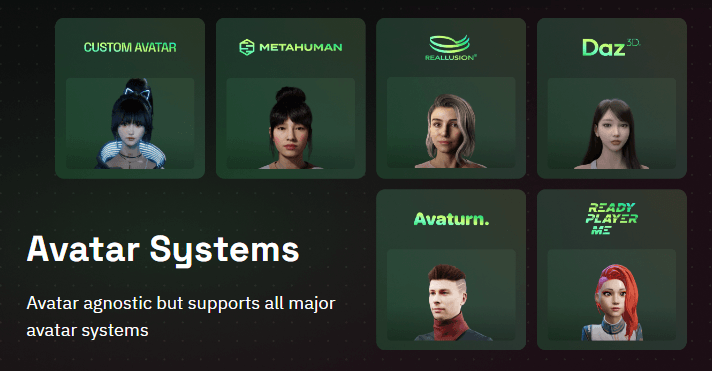
Convai is strongest when a project needs a character, not just an answer engine. The platform is designed for NPCs, companions, virtual humans, AI hosts, tutors, tour guides, customer-facing avatars, and interactive story characters.
Its biggest strength is embodiment. Convai’s homepage lists features such as role-playing, multimodal knowledge, narrative flow, multilingual support, vision perception, lip-sync, embodied animations, and complex actions. It also says characters can use 65+ languages and 500+ voices, enable webcam or point-of-view vision, and use lip-sync and facial animations for lifelike characters.
The second strength is integration depth. Convai is built for developers, not just web demos. Its homepage says it provides integrations with popular game engines such as Unreal Engine, Unity, 3JS, plugins, open APIs, tutorials, documentation, and support.
The third strength is control over character behavior. Convai gives creators systems for description, language and speech, knowledge, traits, AI settings, state of mind, memory, narrative design, external APIs, and publishing. That matters because believable AI characters need more than a clever model. They need boundaries, knowledge, behavior design, environmental context, and testing.
Convai’s workflow depends on whether you are a creator, a game developer, or a product team.
For creators, the starting point is Convai Playground. The official Get Started page describes Playground as the workspace for creating, customizing, and testing AI-powered characters. The quick-start flow includes creating a character, naming it, defining its description, choosing language and voice, setting personality, testing through chat or voice, and using versioning for safer experimentation.
For no-code users, Avatar Studio is the simpler path. Convai describes Avatar Studio as a browser-based platform for creating intelligent 3D conversational avatars without downloads or code. These avatars can speak and respond via voice and text, perform animations, adapt to environments, optionally use vision input, and be customized with appearance, voice, actions, environments, and branding.
For developers, the workflow is more technical but more powerful. Unity and Unreal projects can use Convai’s SDKs and plugins to bring characters into interactive scenes. The Unity documentation describes conversational AI, intelligent NPC behavior that adapts to player actions and the game world, simple SDK integration, and cross-engine support.
The big workflow advantage is that Convai gives both sides a path. Non-technical users can create browser-based avatars and test characters. Developers can connect those characters to game engines, APIs, spatial triggers, animations, and real-time systems. The trade-off is that the more immersive the character becomes, the more setup matters.
This is the part that makes Convai more interesting than a simple “AI NPC chat” wrapper.
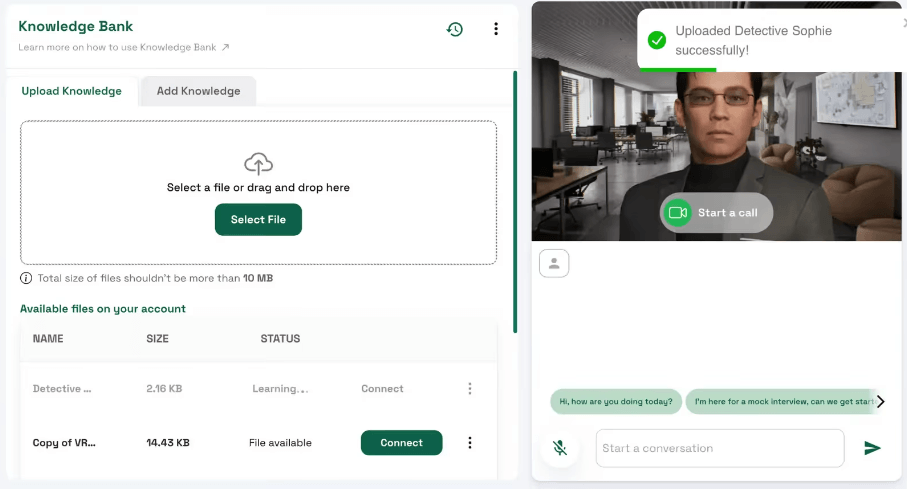
The Knowledge Bank is one of the most practical features. It lets users store and manage information a character can access during conversations. Convai’s docs describe uploading documents or adding text directly so characters can answer with company-specific, product-specific, or topic-specific information. The docs also note that, at least in that Knowledge Bank flow, uploaded files are currently limited to .txt format.
Memory is the next layer. Convai’s Memory section lets users review conversation history, inspect sessions, and enable or disable long-term memory. When enabled, the character can remember preferences, choices, and facts from previous sessions.
Narrative Design gives creators more structure than open-ended chat. Instead of hard-coding a rigid dialogue tree, users define objectives, decisions, and triggers so the character can pursue goals while still responding dynamically. Convai’s documentation explicitly frames this as useful for games, learning simulations, tourism, retail assistants, and customer support kiosks.
External API support is what makes characters operational. Convai says the feature lets characters access real-time data sources and third-party services, including examples like live weather, sports scores, and creating tickets in tools like Jira and Trello. This stack is the reason Convai is stronger for production-style interactive experiences than a basic LLM character prompt.
Convai’s strongest technical fit is game and simulation work. The platform is clearly designed for embodied characters in real-time spaces, not just a floating web chat panel.
The Unreal Engine Plugin Beta is especially important because it shows where Convai is going. Convai’s documentation says the beta plugin is built on a new backend and provides hands-free, low-latency, vision-enabled AI character interactions in Unreal Engine. It includes hands-free conversations, low response latency, voice activity detection, environment vision, a unified in-editor Convai Editor UI, and native Unreal Blueprint integration.
There is also a practical caveat: Convai labels this Unreal Engine Plugin as a beta release. That means it may be powerful, but teams should expect ongoing updates, feedback loops, and possible implementation friction rather than treating it as a frozen production standard.
On the Unity side, Convai’s documentation frames the plugin around conversational AI, NPCs that adapt to player actions and the game world, and quick SDK integration. The Unity Narrative Design tutorial also shows how spatial anchors can guide a 3D AI character through a virtual environment while the character continues open-ended conversation.
Convai’s product direction is increasingly multimodal. The homepage lists vision perception, lip-sync, embodied animations, and complex actions as major AI character features.
Dynamic Context is a good example of how the platform connects AI reasoning to a live world. Convai describes Dynamic Context as a feature that lets AI characters track game-state variables in real time, such as player actions, scores, and environmental changes. It also explains Prompt-to-Action as a pattern where a user prompt or game event maps to a physical action, such as walking to a location, picking up an object, or triggering an animation.

For Unreal Engine, Convai’s recent setup guide says its updated plugin uses WebRTC for low latency, includes Universal NeuroSync for real-time lip-sync and facial animation, supports emotional states that can shift during conversation, and adds streaming vision for environmental awareness. This is where Convai feels different from many chatbot tools. The goal is not only “the AI says a good line.” The goal is “the character behaves like it belongs in the world.”
- Game NPCs: Convai is a strong fit for games that need dynamic characters, companions, shopkeepers, quest-givers, tutorial guides, or roleplay NPCs that can respond beyond fixed dialogue trees.
- Training simulations: Convai’s learning and training use case is clear: interactive role-playing AI characters for immersive training. This is useful for onboarding, safety simulations, customer service training, healthcare roleplay, and industrial walkthroughs.
- Virtual tours and guides: Narrative Design works well for tour-guide characters because it can combine open conversation with spatial triggers, objectives, and step-by-step guidance.
- Brand representatives: Convai positions AI brand representatives as 24/7 assistants that answer questions about products, services, and the company.
- Social virtual worlds: Convai’s homepage says AI characters can improve onboarding, engagement, retention, and personalized experiences in virtual worlds.
- XR and mixed reality: Convai’s platform support across VR and AR, plus browser and engine-based avatar systems, makes it relevant for immersive experiences where characters need to feel present rather than text-only.
- Interactive education: AI tutors, museum guides, language-practice partners, and scenario-based learning characters are a natural fit because Convai combines knowledge, personality, memory, and guided narrative flow.

Convai is strongest when character behavior matters as much as dialogue quality. A normal chatbot can answer a question. A Convai character can be designed with backstory, voice, language, knowledge, emotional state, memory, objectives, triggers, actions, animation, and deployment context.
It is also strong for teams that already build in 3D environments. Unity and Unreal developers get a more natural path to AI characters than they would by wiring together a generic LLM API, separate speech service, lip-sync tool, memory system, animation system, and custom event logic.
The no-code side is another advantage. Avatar Studio gives non-developers a browser-based path to interactive avatars, while Playground gives character designers a way to work on personality, knowledge, memory, and testing before deeper implementation.
The most serious strength is the combination of structure and flexibility. Narrative Design gives characters goals and flow. Knowledge Bank gives them information. Memory gives continuity. External API gives operational reach. Dynamic Context gives awareness of the live environment. Together, those features move Convai beyond novelty NPC chat.
Convai is weaker if you only need a simple chatbot. The platform has more moving parts than a basic support bot, FAQ assistant, or character chat app. If the output does not need animation, spatial context, voice, game integration, or embodied behavior, a simpler tool may be easier.
The second trade-off is implementation complexity. Convai can be used in no-code mode, but its most impressive use cases involve game engines, APIs, spatial triggers, state variables, animations, lip-sync, and character testing. Those workflows require design and development effort.
The third limitation is reliability. Any LLM-driven character can drift, misunderstand player intent, respond too broadly, or behave unpredictably if the character’s knowledge, objectives, and API actions are not tightly designed. Narrative Design helps, but it does not remove the need for testing.
The fourth limitation is maturity around newer plugin layers. The Unreal Engine Plugin Beta is clearly promising, with hands-free conversation, environment vision, and low-latency improvements, but beta status means teams should test carefully before relying on it for a critical production release.
The fifth limitation is content preparation. A great Convai character needs more than a name and a backstory. It needs clean knowledge files, clear objectives, tested behaviors, sensible memory settings, and well-defined API actions. Poor setup will usually create a poor character.
- Start with the character identity before adding advanced systems. Convai’s own customization guidance recommends beginning with character description, language, and speech before moving into advanced behavior.
- Use Knowledge Bank for factual reliability. Characters that need to answer about products, training material, lore, or company policy should be grounded with relevant knowledge instead of relying only on general model knowledge.
- Treat Narrative Design as a guide rail, not a script. Use sections, objectives, decisions, and triggers to keep characters on track while still allowing flexible conversation.
- Test memory deliberately. Long-term memory can make characters feel more personal, but it should be enabled only when continuity is useful and expected.
- Use External API carefully. It can make characters much more capable, but the API action must be specific, tested, and safe. Convai’s docs show that API methods can fetch data or create tasks, which means bad configuration can affect real workflows.
- Prototype in Playground before integrating into Unity or Unreal. It is easier to fix personality, knowledge, and behavior problems before the character is embedded inside a bigger interactive project.
- Plan for latency and interaction rhythm. Real-time voice, animation, perception, and LLM response all affect how natural the experience feels. Convai is actively optimizing this, especially in the Unreal beta plugin, but teams should still test the full interaction loop in the actual environment.
Convai is best understood as an AI character platform for interactive worlds, not a generic chatbot builder. Its strongest value comes from combining character design, voice, memory, knowledge, narrative flow, external actions, animation, lip-sync, vision, and game-engine integration into one system.
It is best for game developers, XR teams, simulation builders, educators, virtual-world creators, and brands that need AI characters to feel present, responsive, and useful inside an environment.
The main caveat is that Convai rewards thoughtful setup. The more lifelike the character needs to be, the more carefully you need to design its knowledge, memory, actions, narrative goals, and integration path.
TAGS: Voice/Audio Modulation
Related Tools:

Create and implement dynamic audio systems for games

Enhances voice in real-time

Transforms written texts to voiceovers
Game development tool for Nintendo Switch

Automates voice interactions to enhance communication

Improve speech clarity and reduces noise