
Share this tool:
 |
Description:
- Introduction
- Core Features and Capabilities
- What Ssemble Actually Is
- What Ssemble Does Best
- Workflow and Ease of Use
- Clip Selection and Virality Scoring
- Captioning, Formatting, and Retention Tools
- Multi-Language and Audio Options
- Publishing, Scheduling, and Channel Automation
- Developer API and Automation
- Best Use Cases
- Where Ssemble Is Strongest
- Where It Is Weaker
- Practical Tips
- Final Takeaway
Ssemble is an AI video clipping and repurposing platform built for creators, social media teams, clipping agencies, podcasters, educators, streamers, and businesses that want to turn long-form content into TikTok, YouTube Shorts, and Instagram Reels faster. Its main value is not traditional timeline editing. It is the ability to upload or paste a long video, let AI find the strongest moments, add captions and short-form formatting, then review, customize, schedule, or automate the output.
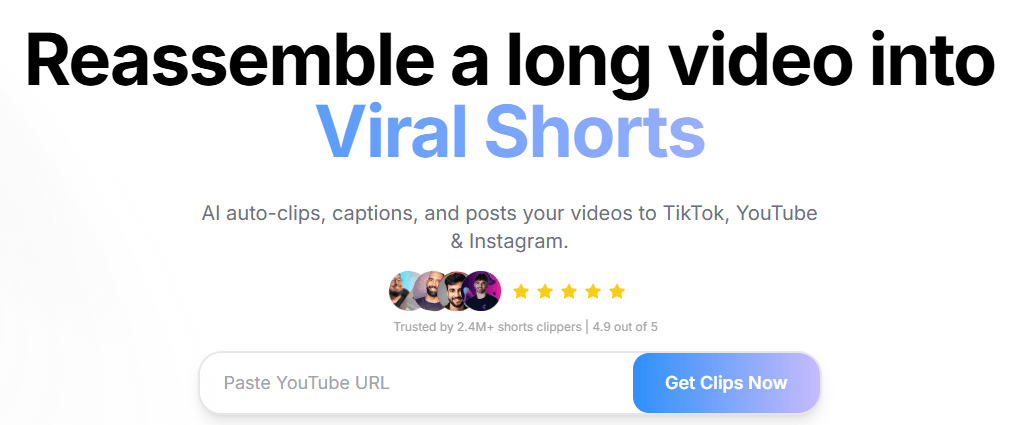
Automatically detects moments that are likely to work as short clips and turns them into short-form videos.
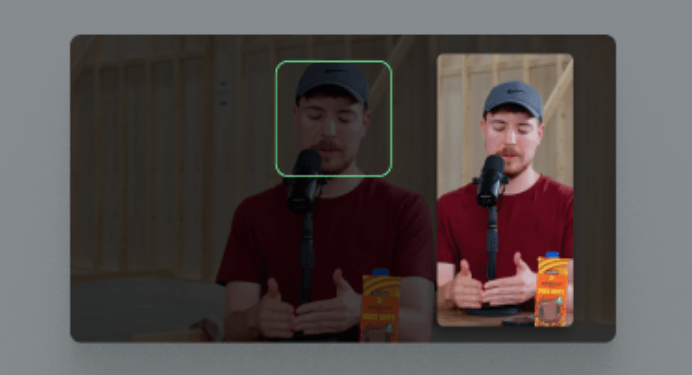
Keeps faces centered when reframing horizontal content into vertical formats.
Generates captions automatically, with Ssemble’s clip-maker page describing animated captions and support for 100+ languages.
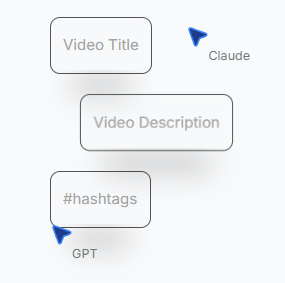
Creates hooks, call-to-action overlays, titles, descriptions, and hashtags to support short-form engagement.
Adds stock B-roll, engagement-focused sound effects, smooth transitions, and zoom animations to make clips feel more polished.
Supports multi-platform scheduling in the web workflow and exposes clipping automation through the official API.
Ssemble is best understood as an AI clipping system, not a full creative video editor. A traditional editor gives you a timeline, tracks, keyframes, manual trimming, and precise control. Ssemble is built around a different job: finding short-form clips inside longer videos and packaging them for social platforms quickly.
The core workflow is simple. You paste a YouTube URL or upload a video file, Ssemble analyzes the content, creates short clips, adds captions, keeps faces centered, generates hooks, and prepares the result for short-form publishing. The official homepage describes the basic flow as pasting a YouTube URL, letting AI create clips with captions, face tracking, and hooks, then posting to TikTok, YouTube Shorts, and Instagram Reels.
That makes Ssemble especially useful for people who already have long-form content. If you are recording podcasts, livestreams, webinars, educational videos, gaming sessions, interviews, or YouTube videos, Ssemble gives you a faster way to extract social assets from material you already produced.
| Layer | What it does | Why it matters |
|---|---|---|
| AI Clipping | Finds short-form moments inside long videos. | Saves the time normally spent scrubbing through footage. |
| Auto Captions | Adds animated captions to clips. | Makes clips more watchable on silent mobile feeds. |
| Vertical Formatting | Reframes content for short-form platforms. | Helps convert horizontal content into Shorts, Reels, and TikTok format. |
| Engagement Add-ons | Adds hooks, CTAs, overlays, B-roll, sound effects, and transitions. | Makes clips feel more native to social platforms. |
| Publishing Workflow | Schedules and posts across major short-form platforms. | Reduces the gap between clip creation and distribution. |
| API Layer | Creates clips programmatically. | Useful for agencies, tools, and teams automating repurposing at scale. |
That structure is why Ssemble is most useful as a repurposing workflow rather than a general video editor.
Ssemble is strongest when the problem is speed and volume. If you have a long podcast episode and need ten short clips, a conventional editor can absolutely do the job, but it takes manual judgment, caption work, cropping, formatting, and exporting. Ssemble’s pitch is that AI can handle much of that first pass.
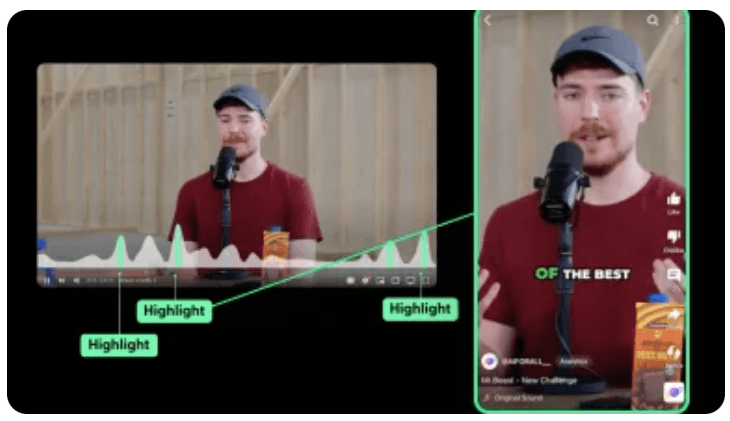
The most important feature is AI highlight detection. Ssemble says its AI can identify engaging moments such as hooks, reactions, and key insights, then rank clips by engagement potential with a virality score. That is the real center of the product. It is not only cutting random segments. It is trying to select moments that can stand alone as short-form content.

The second strength is packaging. Ssemble is not just “clip this video.” It also adds captions, creates vertical clips, inserts optional B-roll, adds transitions, uses meme hooks or gameplay overlays, and can generate CTA overlays. That matters because a raw clip from a podcast or webinar often does not feel ready for TikTok or Reels. It needs movement, captions, structure, and a reason to keep watching.
The third strength is workflow continuity. Ssemble includes scheduling and direct publishing to TikTok, YouTube Shorts, and Instagram Reels, which means users do not have to stop after exporting files. For creators and social media managers, that turns the tool from a clipping assistant into a lightweight repurposing pipeline.
Ssemble’s workflow is intentionally built around avoiding timeline editing. The AI video editor page frames the product as “No Timeline. AI Does It For You,” and compares traditional editing tasks like clipping, captioning, cropping, title writing, and publishing with AI-assisted automation.
For a normal creator, the process is straightforward. Upload a video or paste a YouTube link. Let Ssemble process the content. Review the suggested clips. Adjust captions, hooks, overlays, or formatting. Then export, schedule, or publish. The AI Clip Maker page describes this as a three-step flow: upload, generate clips, then customize and publish from one dashboard.
That simplicity is one of the main reasons to use it. Ssemble is not aimed at editors who want to manually craft every transition. It is aimed at people who need a strong first pass quickly. A podcaster can turn an episode into multiple Shorts. A coach can turn a webinar into bite-sized lessons. A streamer can turn a VOD into shareable highlights. A social media manager can build a week of posts from one long recording.
The trade-off is that users give up some precision. An AI clipping tool can save time, but it does not always know your brand, audience, humor, context, or strategy as well as a human editor. The best workflow is not “generate and publish blindly.” It is “generate, review, refine, then publish.”
The clip-selection layer is the most important part of Ssemble. A caption generator is useful, but many tools can caption videos. What Ssemble needs to get right is moment selection.
Ssemble’s API documentation gives a clearer look at how this works behind the scenes. Generated clips can include AI-generated titles, descriptions, reasons for selection, timestamps, duration, video URL, and a viral score. The docs say the viral score is based on factors such as content engagement, pacing and delivery, completeness, and shareability.
That is useful because short-form success often depends on whether the segment works as a complete micro-story. A good clip usually needs a hook, payoff, clear context, and a reason to keep watching. Ssemble’s scoring system is trying to make that judgment visible.
The limitation is that virality scores should be treated as prioritization signals, not guarantees. A segment can have a high predicted score and still miss the target audience. A lower-scored clip can perform well if it fits a niche, trend, or community reference. The score is helpful for deciding what to review first, but it should not replace human judgment.
Ssemble’s captioning workflow is one of its most practical features. Short-form platforms are heavily caption-driven because many users watch without sound or decide within seconds whether to keep watching. Ssemble’s clip-maker page describes animated captions with multiple styles, fonts, and colors, along with support for 100+ languages.

Face tracking is another important part of the workflow. When horizontal videos become vertical clips, the subject can easily end up off-center. Ssemble’s feature page says AI detects faces and keeps them centered in vertical formats. That is especially useful for podcasts, interviews, talking-head videos, webinars, and creator monologues.
The retention add-ons are more platform-specific. Ssemble can add gameplay overlays, meme hooks, CTA overlays, B-roll, sound effects, transitions, and zoom animations. These features are clearly built for TikTok and Reels culture, where visual variety can help hold attention. They are also easy to overuse. A serious B2B clip may not need meme hooks or game overlays. A gaming or entertainment clip might benefit from them.


The best way to use these tools is to match the format to the audience. A podcast clip may need clean captions and a strong title. A streamer highlight may benefit from a game overlay or reaction-style pacing. A business webinar may need simple captions, light B-roll, and a clear CTA.
Ssemble also includes multi-language support in a few different places. Its feature page says captions can be translated while keeping the original audio, and the AI Shorts Maker page says caption translation supports 30+ languages. The clip-maker page also describes auto-captions with support for 100+ languages.

There is also a multi-language audio workflow tied to source videos that already have multiple audio tracks. Ssemble’s feature page says that if the original YouTube video has multiple audio tracks, users can select the preferred language track to use in Shorts. The page gives examples of replacing original English audio with Hindi, Spanish, French, or Portuguese dubbed tracks from YouTube.
That is useful for international repurposing, but it is important to understand the distinction. Caption translation is different from full dubbing. Selecting an existing YouTube audio track is also different from generating a new dub. Ssemble can help adapt multilingual content, but users should check the exact workflow they need before assuming it handles every localization scenario.
Ssemble becomes more valuable when users treat it as a distribution workflow, not just a clip generator. The homepage says Ssemble can schedule and auto-post clips to TikTok, YouTube Shorts, and Instagram Reels. The features page describes a calendar-style workflow for scheduling posts to multiple platforms and generating optimized titles, descriptions, and hashtags.
Channel Automation is the more hands-off layer. Ssemble says it can watch a YouTube channel for new uploads, clip new videos, and auto-post qualifying clips to connected YouTube, TikTok, and Instagram accounts. This is one of the more interesting parts of the product for high-volume creators and agencies. It turns Ssemble into an always-on repurposing assistant.
The caution is quality control. Auto-posting is convenient, but it can also publish clips that technically score well but do not match brand tone, compliance requirements, or content strategy. For casual creator accounts, this may be fine. For brands, educators, finance creators, legal creators, healthcare creators, or corporate teams, review should stay in the loop.
Ssemble’s API makes the tool more serious for agencies, clipping businesses, and software builders. The API documentation says developers can programmatically create AI-powered shorts from YouTube videos or uploaded files, using the same AI clipping capabilities available in the web app.
The API supports a full repurposing pipeline: submit a video, let AI identify the strongest segments, customize output with caption templates, music, gameplay overlays, meme hooks, and CTA text, control clip length, choose layout, track processing, retrieve generated clips, and integrate via webhooks with tools like n8n, Zapier, and Make.
That gives Ssemble a different value proposition from a simple web editor. A solo creator may only need the web app. A clipping agency could use the API to process client videos at scale. A SaaS company could integrate Ssemble into a creator dashboard. A media team could build a workflow where new webinars automatically become short-form clip candidates.
The API results are also detailed enough to be operational. The Get Shorts endpoint returns generated clips with video URLs, AI-generated titles, metadata, timestamps, duration, dimensions, descriptions, viral scores, and selection reasons. That matters because automation is much easier when the output includes structured metadata, not just a finished MP4.
- Podcasters: Ssemble is a strong fit for turning long interview episodes into short highlight clips with captions, vertical framing, and social-ready titles.
- YouTubers: It is useful for repurposing long YouTube videos into Shorts without manually cutting the best moments.
- Streamers and gamers: Ssemble supports Twitch-style and gaming highlight use cases, including gameplay-style overlays and short-form clip packaging.
- Educators and course creators: Lectures, tutorials, workshops, and webinars can become bite-sized teaching clips for social platforms or community promotion.
- Businesses and coaches: Long webinars, presentations, interviews, and thought-leadership videos can be turned into LinkedIn-style or short-form social assets, though brand review is still important.
- Social media managers: Scheduling, captions, titles, hashtags, and multi-platform publishing make Ssemble useful for teams managing regular short-form output.
- Clipping agencies and automation builders: The API layer is especially useful for teams that want to create programmatic clipping pipelines rather than process every video manually.
Ssemble is strongest when the source video already contains good moments. That sounds obvious, but it is the key to the product. AI clipping can find and package strong segments, but it cannot create substance from a weak recording. A great podcast, stream, tutorial, or presentation gives Ssemble more to work with.
It is also strongest when speed matters more than frame-level control. Ssemble is excellent for the first pass: clip discovery, captioning, reframing, titles, social formatting, and scheduling. That first pass is often the slowest part of repurposing, especially for creators who publish frequently.
The API is another strength because it opens the platform to agencies and tools. Many creator apps are locked inside their own interface. Ssemble’s API allows clipping to become part of a larger workflow, including automation platforms and custom dashboards.
Finally, Ssemble is strongest for social-native editing. It understands the short-form packaging layer: captions, hooks, CTAs, vertical video, overlays, and platform scheduling. That is different from being a general-purpose video editor.
Ssemble is weaker for cinematic editing, narrative editing, brand films, documentaries, and videos that require detailed manual construction. Its own AI video editor page frames traditional editors as still better for cinematic projects, while Ssemble is positioned around faster social clip creation.
It is also limited by AI judgment. The system can detect hooks and rank potential clips, but it may miss inside jokes, niche audience references, brand-sensitive context, or strategic moments that matter more than general engagement signals. Human review is still valuable.
Caption quality is another area to check. Automatic captions are useful, but names, slang, technical terms, accents, overlapping speakers, and noisy audio can produce errors. If the clip is going on a brand account, captions should be reviewed before posting.
The social add-ons can also become too much. Game overlays, meme hooks, zooms, sound effects, and CTA overlays can help in some niches, but they can make professional content feel cheap if used without restraint. The right level of editing depends on the audience.
There is also a localization caveat. Ssemble supports caption translation and multi-language audio workflows, but not every multilingual need is the same. Users should distinguish between translated captions, selecting an existing YouTube audio track, and full AI dubbing.
- Start with strong long-form content. Ssemble works best when the source has clear insights, strong reactions, emotional moments, or concise explanations.
- Review the clips before publishing. Viral scoring is useful, but it should be treated as a ranking tool rather than an automatic truth.
- Use captions as a quality checkpoint. Fix names, technical terms, brand language, and awkward line breaks before posting.
- Choose overlays based on audience. Meme hooks and game overlays may help entertainment clips, but clean captions and simple titles often work better for business, education, and professional content.
- Use scheduling for consistency, but keep review in the workflow. Auto-posting is helpful, but not every AI-selected clip should go live without a human check.
- Use the API only when volume justifies it. The web app is simpler for individual creators. The API is more valuable for agencies, tools, and automated content operations.
- Download and store important outputs. Ssemble’s API docs note that rendered video URLs are temporary and should not be relied on for long-term storage.
Ssemble is best understood as an AI repurposing platform for short-form video. Its biggest strength is turning long videos into social-ready clips with AI-selected moments, vertical formatting, captions, hooks, overlays, scheduling, and API automation.
It is best for creators, podcasters, YouTubers, streamers, educators, agencies, and social teams that already produce long-form content and want to turn it into more short-form output with less manual editing.
The main caveat is that Ssemble is not a replacement for careful editorial judgment. It can find and package promising clips quickly, but the best results still come from reviewing the output, correcting captions, and choosing formats that match the audience.
TAGS: Social Media Tools
Related Tools:

Generates engaging and personalized comments

Creates posts for social media

Mange social media presence by providing real-time analytics

Streamlines social media strategies

Helps users grow on Reddit by finding the best subreddits

Creates engaging bios for social media