

Share this tool:
 |
Description:
Zapier is one of the best-known automation platforms for moving work between business apps without building every integration from scratch. Its classic trigger-and-action workflows, called Zaps, are still the foundation, but the product now stretches into AI by Zapier, Tables, Forms, Canvas, and MCP. Zapier currently supports more than 9,000 apps, which remains one of its biggest practical advantages.
Zapier works best when a process crosses several tools and someone is still handling the handoffs manually. A lead arrives, the CRM needs updating, Slack needs a notification, and a follow-up task needs creating. Those are the jobs Zapier handles well.
The visual editor keeps that logic fairly easy to follow. A Zap starts with a trigger, then adds actions. Filters, paths, loops, formatting, and scheduling make the flow more selective. Copilot and the AI Zap builder can also suggest a workflow from a plain-language description.
It is still friendly to non-developers, but it does not force every workflow to stay basic.
AI by Zapier is now the main AI layer inside Zaps. It can summarize, classify, extract information, draft text, or return structured data. More importantly, an AI step can be given app actions as tools, allowing the model to decide which tool to use while completing a task.
Knowledge sources can be attached from services such as Google Drive, Notion, Dropbox, SharePoint, and uploaded files. Sensitive tool actions can also be set to require approval before they run.
That combination makes sense. AI is useful when the input is messy or requires interpretation, while deterministic steps are better when something must happen the same way every time.
Imagine a company receives leads through a website form.
The submission triggers a Zap. An AI by Zapier step reads the message, summarizes what the prospect wants, and returns structured fields such as inquiry type and urgency.
A filter then decides what happens next. A strong sales lead can be added to HubSpot or Salesforce, assigned to the right salesperson, and posted to Slack with the AI summary. A lower-priority inquiry can follow another route.
Zapier can then create a follow-up task or prepare an email draft. For a higher-risk action, the workflow can require approval before the AI tool runs.
This is where Zapier feels most sensible. Routine steps stay predictable. AI handles the part that benefits from interpretation instead of controlling the entire process.
Zapier Tables provides lightweight data storage for automations. Forms, previously called Interfaces, can collect user input and trigger workflows. Together, they can support small internal systems such as request forms, onboarding flows, lead intake tools, and approval processes without introducing another database and form builder.
Canvas solves a different problem. It maps larger business systems, including manual steps, Zaps, Tables, Forms, and connected apps. AI can generate an initial map from a description, but the real value is documentation once automation spreads across a team and individual Zaps no longer show the whole process.
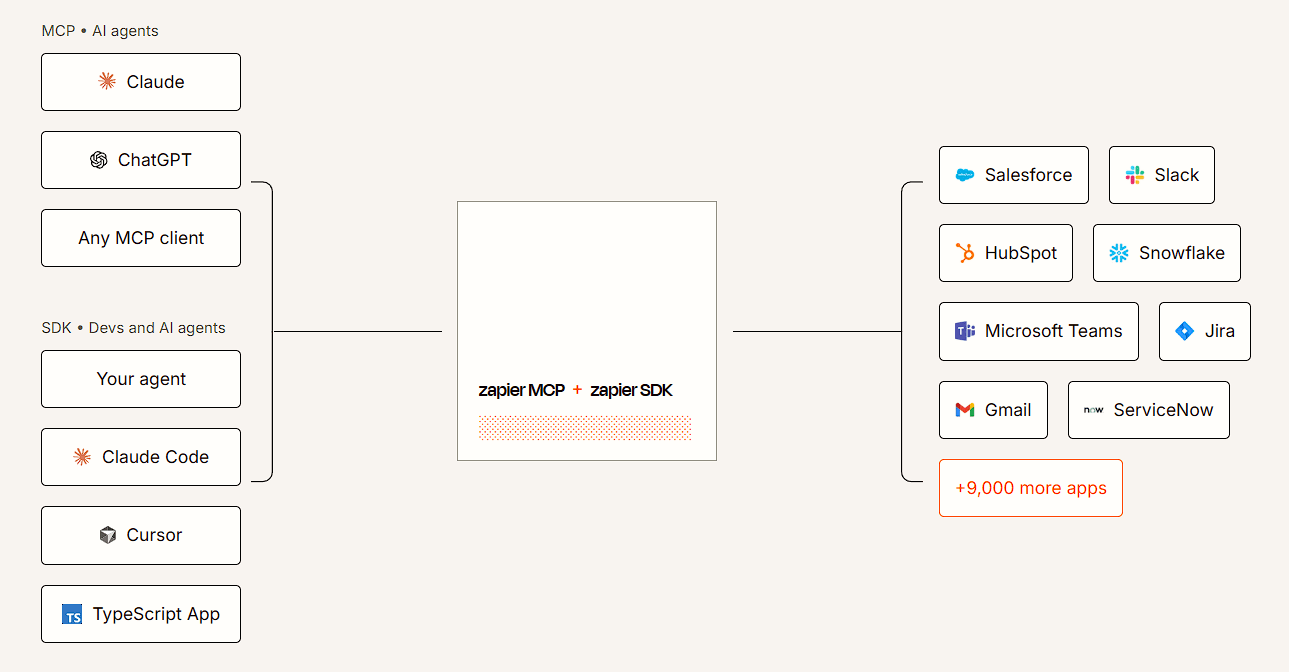
Zapier MCP connects compatible AI clients to Zapier actions. Current documentation says it gives AI clients access to more than 40,000 actions across 9,000+ apps, with Zapier handling app connections, credentials, and rate limits.
That means an AI assistant such as ChatGPT or Claude can take actions in business apps through Zapier rather than needing a separate custom integration for every service.
Zapier is a strong fit for sales operations, marketing workflows, customer support, onboarding, reporting, approvals, and processes where information needs to move between several SaaS tools.
It also works well for teams adding AI to existing automations. Reliable business rules can stay intact while AI handles classification, extraction, drafting, or decisions that genuinely need interpretation.
Zapier is easy to start with, but large automations can become difficult to reason about. Branching logic, mappings, loops, AI tool calls, and dependencies across several apps still need careful testing and maintenance.
Integration depth varies too. An app being available in Zapier does not mean every feature of that app is exposed.
AI by Zapier has another important limit: its documentation says the AI does not learn from previous actions. Each run starts from its configured context rather than building persistent memory from earlier runs. That matters if you are comparing Zapier with dedicated agent platforms.
Zapier is strongest as the connective layer between tools a business already uses. Its huge app catalog is still the main draw, but AI by Zapier, MCP, Tables, Forms, and Canvas make it much broader than the basic trigger-and-action product many people remember.
It is best for teams that want practical automation without maintaining a custom integration stack. The main caveat is that convenience does not remove workflow complexity. Important automations still need clear logic, sensible AI boundaries, and regular testing.
TAGS: AI Automation
Related Tools:
Connects apps and automates workflows

Creates voice agents capable of handling real business phone calls

Creates custom browser extensions and web automations
Converts brand guides into structured skill packs
Turns Google Sheets into intelligent workflows

Automates customer support and provides accurate responses