

Share this tool:
 |
Description:
- Introduction
- What WanderMaps Actually Is
- Where WanderMaps Is Strongest
- Strong Features and Capabilities
- Travel Planning Workflow
- Social Saving Workflow
- Destination Guides and Local Organizations
- Workflow and Ease of Use
- How It Compares to Other Travel Tools
- Best Use Cases
- Limitations and Trade-Offs
- Final Takeaway
WanderMaps, branded in the app stores as Wander: Maps & Navigation, is a travel-planning tool built around a modern travel habit: saving places from social media, then trying to turn those scattered ideas into a real trip. Its main promise is straightforward. Take Instagram posts, reels, and videos, extract the places mentioned, and put them on a map so travelers can plan around them instead of keeping everything buried in saved posts.
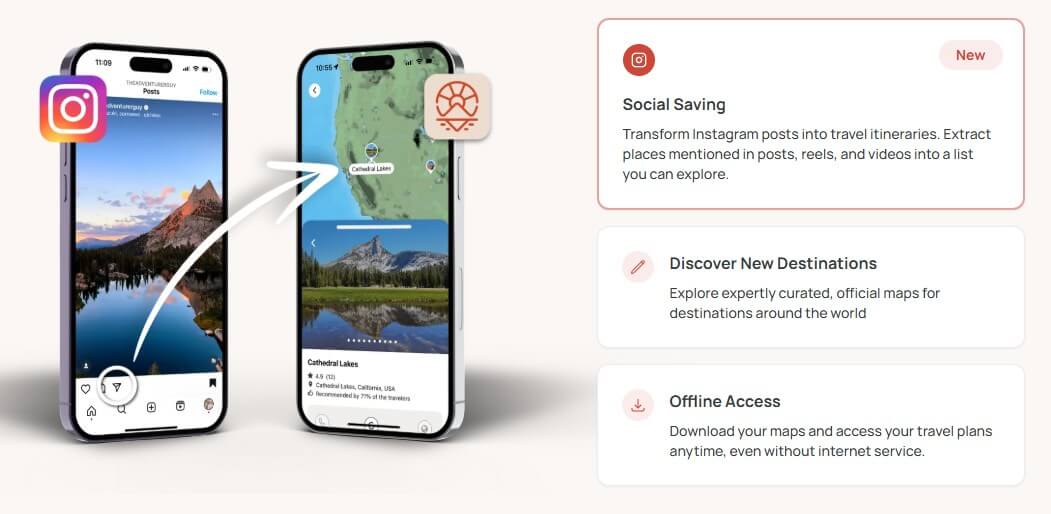
WanderMaps is part personal trip map, part itinerary builder, and part digital visitor guide. For travelers, it helps convert social inspiration into places they can explore on a map. For destinations, tourism offices, parks, chambers of commerce, resorts, and local organizations, it offers a platform for publishing official interactive maps, itineraries, and visitor guides.
That split is important. WanderMaps is not only competing with consumer travel planners. It is also trying to become a distribution layer for destination marketing. A traveler may use it to save places from Instagram. A tourism organization may use it to publish a curated map, embed it on a website, distribute QR codes, and update destination information in one place.
The AI piece is focused. WanderMaps is not a broad conversational trip planner where you type, “Plan me five days in Tokyo,” and expect a full itinerary from scratch. Its more specific AI value is extracting points of interest from social media content and turning them into a usable map-based planning layer.
WanderMaps is strongest when the traveler already has inspiration but needs structure. That is a common problem. People save restaurant reels, road-trip clips, neighborhood guides, beach recommendations, and hidden-gem lists, then struggle to remember where any of those places are when planning starts.
The app’s “social saving” feature directly addresses that gap. The official site says Wander can transform Instagram posts into travel itineraries by extracting places from posts, reels, and videos into a list that users can explore. The app store description adds that saved Instagram content can become mapped destinations with a single tap.
This is a useful angle because travel planning is often messy before it becomes organized. WanderMaps helps at the messy stage, when the user is still collecting ideas, deciding what is nearby, and turning scattered inspiration into a route.
| Feature | Practical value |
|---|---|
| Social Saving | Extracts places from Instagram posts, reels, and videos into a list and map view. |
| Personalized Maps | Helps travelers collect saved places into a visual trip-planning map. |
| Curated Destination Maps | Lets users explore official maps for destinations around the world. |
| Offline Access | Allows travelers to download maps and access plans without internet service. |
| Interactive Itineraries | Supports mapped itineraries and destination guides, with newer app updates adding itinerary and tour features. |
| Destination Platform | Helps tourism and stewardship organizations publish maps, visitor guides, QR-linked resources, embeds, and real-time updates. |
The strongest feature is still social-to-map conversion. Offline access and official guides make the app more useful once the trip is underway, but the clearest reason to try WanderMaps is saving places from content and seeing them spatially.
The best WanderMaps workflow starts before the itinerary is polished. A traveler sees a reel about cafés in Seoul, a road-trip clip in Utah, or a creator’s restaurant list in Lisbon. Instead of saving the video and hoping to revisit it later, they send it into WanderMaps. The app extracts the places mentioned, stores them, and shows them on a map.
From there, the user can start making decisions. Which places are close together? Which ones are out of the way? Which locations belong on the same day? Which ideas are just nice to know, and which are worth building the trip around?
That is where a map-first tool earns its place. A list of recommendations is not enough for travel. Distance, clusters, neighborhoods, and routes matter. WanderMaps is most useful when it turns “this looks interesting” into “this can fit into Tuesday afternoon.”
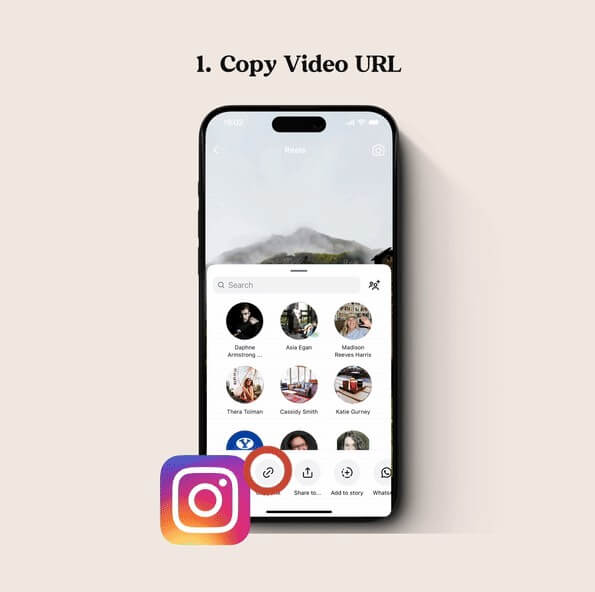
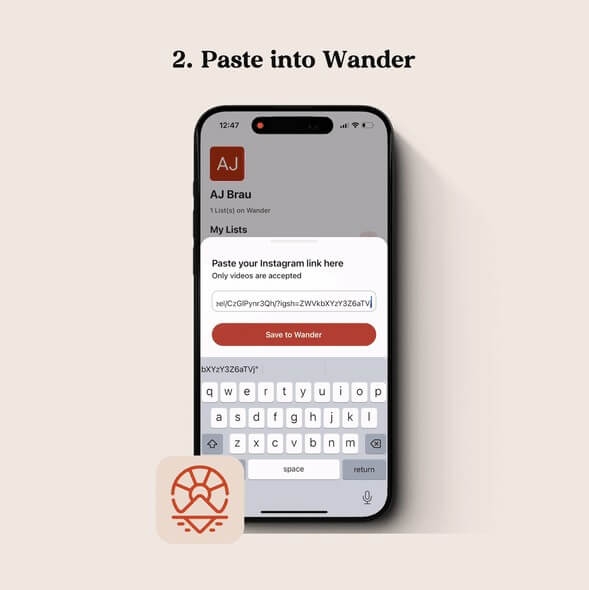
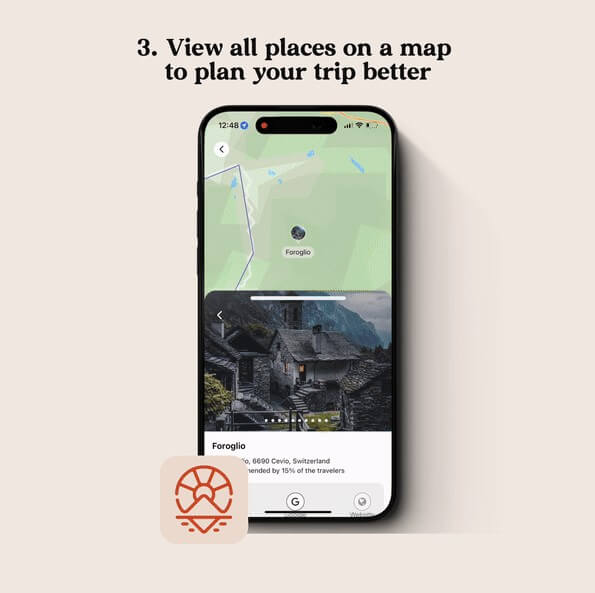
The destination side of WanderMaps may be just as important as the traveler app. Wander’s destination page is aimed at Destination Marketing Organizations, parks and recreation offices, municipalities, chambers of commerce, state parks, resorts, and similar groups. These organizations can use Wander to publish official maps, curate local experiences, collaborate with stakeholders, embed guides on websites, distribute QR codes, and share interactive resources through physical and digital touchpoints.
This matters because travel information is often fragmented. A city may have one visitor guide, several local business pages, event calendars, PDF maps, printed brochures, and social posts that age quickly. Wander’s pitch to destinations is that official resources can become interactive and easier to update. Real-time updates are especially useful for events, closures, seasonal activities, and local recommendations that change often.
For travelers, this means WanderMaps can be more trustworthy when a map is officially maintained by a destination partner. For destinations, it creates another way to guide visitor behavior, highlight local businesses, and understand planning patterns.
WanderMaps should feel natural to users who already plan trips from Instagram. The value is immediate: save content, extract places, view them on a map, and keep building a travel plan. That is easier than manually copying restaurant names into notes, searching each one in a map app, and trying to remember which video inspired each stop.
The app is also trying to support real trip execution, not only inspiration. Offline access is a practical feature for road trips, rural destinations, parks, international travel, and areas with spotty coverage.
The caution is that travel planning tools live or die by reliability. If extraction misses places, maps load slowly, saved links fail, or location details are hard to manage, the workflow loses its edge. Public Android reviews show a small review base and some recent user complaints around map loading, URL import, zooming, and general usability, so the app experience may still feel uneven for some users.
WanderMaps is more social-inspiration focused than a traditional itinerary planner. Wanderlog, for example, emphasizes full-trip planning with itinerary and map views, reservation imports, collaboration, route optimization, budgets, packing checklists, flight status, and travel guides.
Google Maps is still the stronger everyday navigation and place-search tool. It is where many travelers will ultimately check directions, hours, reviews, and live routing. WanderMaps is not trying to replace that whole ecosystem. Its better role is earlier in the planning chain: capture inspiration, map saved places, and organize destination ideas.
That makes WanderMaps easier to understand as a bridge. It connects social discovery to map-based planning. If you already plan from travel videos, that bridge is useful. If you plan mostly from guidebooks, spreadsheets, or booking confirmations, another planner may fit better.
WanderMaps is best for travelers who save a lot of Instagram travel content and want a cleaner way to turn it into a trip. It is especially useful for city breaks, food trips, weekend road trips, creator-inspired itineraries, and destination browsing before a route is final.
It is also a strong fit for tourism organizations, chambers of commerce, parks, resorts, and local destination teams that want interactive visitor guides instead of static PDFs. The website embed, QR distribution, stakeholder collaboration, and destination analytics features make more sense for those groups than for casual travelers.
The main limitation is focus. WanderMaps is strong at social saving and mapped discovery, but it does not appear to be as broad as full trip planners that manage bookings, expenses, group collaboration, detailed scheduling, and packing lists.
The second trade-off is dependency on social content quality. If a reel mentions vague locations, outdated businesses, or places without clear names, extraction may need manual cleanup.
The third issue is app maturity. WanderMaps has a promising concept, but users should test it with their own travel content before relying on it for a full trip. Map reliability, offline behavior, and import accuracy matter more in travel than they do in casual bookmarking.
WanderMaps is best for travelers who collect trip ideas from social media and want those ideas turned into a usable map. Its strongest feature is the social saving workflow, supported by curated destination maps, offline access, and interactive guides. It is also interesting for destination organizations that need modern digital visitor guides. The main caveat is that WanderMaps feels more like a focused social-to-map travel tool than a complete travel operating system, so users should test the app experience before making it their only planning hub.
TAGS: Productivity
Related Tools:

Streamlines project coordination and automates invoicing

Designed to automate data analysis and preparation

Detects and fixes critical software vulnerabilities

Automates the creation of detailed, easy-to-follow digital guides

Designed to enhance learning and productivity

Improves team communication and project management