

Share this tool:
 |
Description:
Vital is an AI wellness app built around one core promise: you tell it what is on your mind, choose how you want the session to feel, and it generates a spoken meditation for that moment. Its public site frames this as more than a basic meditation library, with personalized audio sessions, coach voices, multiple meditation techniques, ambient sound options, and a broader “mental fitness” angle that leans into support, clarity, routine, and self-reflection.
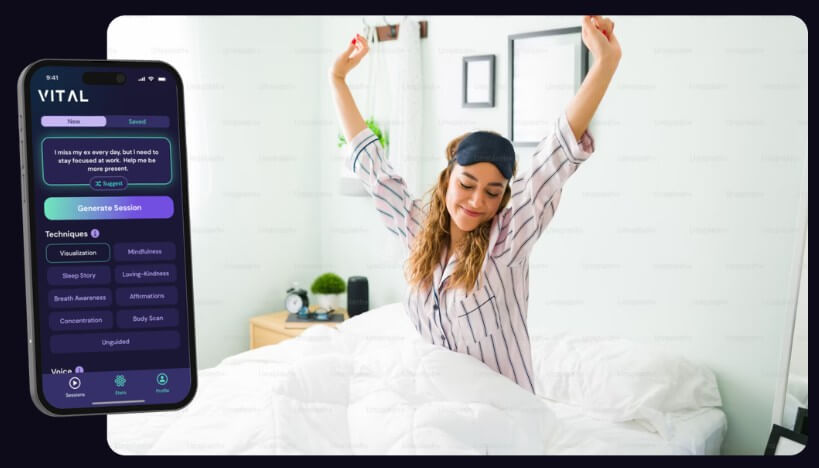
The easiest way to understand Vital is as a meditation generator with a light coaching layer. You begin with a written prompt, which can be as short as a keyword or as detailed as a journal-like description of what you are dealing with. Then you choose preferences such as voice, meditation technique, background sound, and session length, and the app produces a spoken session tailored to that input. The company also positions the product as always-available support, with accountability features like streaks, consistency scores, points, reminders, and saved sessions on iOS.
That distinction matters. Vital is not a therapy platform, not a clinical mental health product, and not a large static content library in the style of a traditional meditation app. The public material points instead to real-time personalization: every session is described as new, with the user shaping the result through the prompt and session settings. That makes it more flexible than a fixed catalog, but also more dependent on whether the generated guidance feels useful to you in practice.

You type what you want help with, and Vital uses that to generate a tailored spoken meditation.
The site says you can choose from six voices, eight techniques, ambient sound options, and different session lengths.
Public examples include visualization, mindfulness, loving-kindness, affirmations, breathing exercises, and body scan meditation.
Vital highlights streaks, consistency scores, points, reminders, and replayable sessions on iOS.
The site shows use cases around anxiety, focus, career stress, relationships, decisions, burnout, and sleep.
Vital looks strongest for people who do not want to scroll through a huge meditation library looking for the one session that fits their mood. Its biggest advantage is responsiveness. If you are stressed about a presentation, spiraling after a hard day, struggling to sleep, or trying to calm down before a difficult conversation, the app is built to let you describe that exact situation and get something tailored back quickly. That feels more personal than picking a generic “stress relief” track and hoping it matches the moment.
It also helps that the product is not locked into one meditation style. Visualization, mindfulness, loving-kindness, affirmations, breathing, and sleep-oriented formats all appear in the official material, which gives users a more practical way to match the technique to the problem. Someone trying to settle down for sleep may want a different tone and structure than someone preparing for a work challenge or trying to get out of an anxious loop. Vital’s customization layer is one of the clearer reasons to use it.

The workflow is simple enough to feel approachable. The product pages break it into three parts: write a prompt, select preferences, then hit generate. Suggested prompts are available when you do not know what to type, and the site explicitly encourages detailed, personal context so the session can be more specific. That lowers the barrier for beginners while still rewarding users who are willing to be more thoughtful about what they need.
Vital also does a decent job of making the session itself adjustable. You can pick a preferred voice, select ambient audio like melodic, binaural, silent, or nature, and choose a session length of up to 60 minutes. There is one practical limitation, though: the how-it-works page says the spoken portion only lasts about seven to nine minutes, with music continuing afterward. That means Vital may feel more like a guided launch into meditation than a long-form coaching session.


The biggest trade-off is depth. Vital looks useful for support, reflection, and personalized guided meditation, but the public materials do not make it look like a substitute for therapy, crisis support, or deep human coaching. The language across the site centers support, clarity, transformation, and daily practice, which is helpful framing, but it also signals a product that sits closer to guided self-help than to structured care.
There are also a few workflow rough edges. The how-it-works page notes that audio playback on the web app can stop if you navigate away on mobile, and it advises users to keep the ringer on or use headphones. It also says saving sessions is available on iOS after the spoken words finish. Those are not major flaws, but they do suggest the experience is cleaner on some access paths than others.
Vital is a strong fit for people who want personalized meditation without booking a coach, for users who prefer describing their real situation instead of choosing a canned session, and for anyone trying to build a more regular mindfulness habit with accountability features layered in. It also makes sense for sleep support, emotional reset sessions, work stress, relationship reflection, and mental rehearsal before difficult events.
- Start with a specific prompt: The more clearly you describe the moment, the more likely the generated meditation will feel relevant.
- Match the technique to the situation: Use sleep-oriented formats for rest, visualization for goals, loving-kindness for relationship tension, and mindfulness or breath awareness for stress.
- Treat it as self-guidance, not therapy: Vital can help with reflection and calm, but deeper mental health needs still call for qualified human support.
- Use routine features deliberately: Streaks, points, reminders, and saved sessions are most useful when they help you build a consistent practice instead of just checking off a habit.
Vital’s best idea is simple: instead of making you adapt to a meditation library, it adapts the session to you.
That makes it more flexible and more immediately relevant than many static wellness apps. The strongest parts are the personalized prompt-to-audio workflow, the technique and voice controls, and the light habit-building system around routine use.
The main caveat is that it looks best as an on-demand meditation and self-guidance tool, not as a replacement for deeper human support.
TAGS: Self Improvement
Related Tools:

AI-powered language learning tool

Assists users in solving mathematical problems
Provides interview questions and feedback

Enables teams to capture, access, and verify information

Facilitates English language learning

AI-powered mental health companion