

Share this tool:
 |
Description:
Spikes Studio is an AI video repurposing tool built for turning long videos into short clips for platforms like TikTok, Instagram Reels, and YouTube Shorts. Its main value is speed: upload longer content, let the AI find strong moments, add captions, reframe the output, and prepare clips for social publishing without doing every edit manually.

Spikes Studio finds standout moments in longer videos and turns them into short, social-ready clips.
It can add caption styles to make short clips easier to watch without sound and more visually engaging.
It can reframe videos into common social formats like 9:16, 16:9, and 1:1.
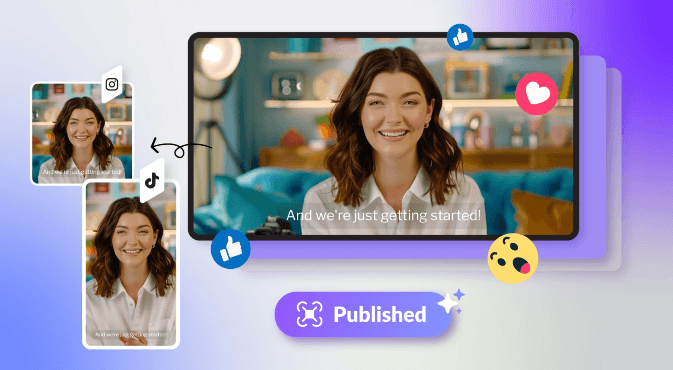
The platform includes scheduling, one-click publishing, smart posting recommendations, and a visual content calendar.
Spikes Studio includes AI B-roll and AI voiceover features for making clips feel more complete than a raw cutdown.
It includes performance tracking, project folders, content search, team collaboration tools, and workflow organization.
Spikes Studio is strongest when you already have long-form video and need to extract short-form content from it quickly.
That is the clearest use case.
A podcast episode, livestream, interview, webinar, sermon, course lesson, product demo, coaching call, or YouTube video usually contains several smaller moments that could work as standalone clips. The problem is that finding those moments manually takes time. You have to scrub through the footage, mark interesting segments, cut them down, resize them, caption them, polish them, and prepare them for each platform.
Spikes Studio is built to compress that workflow. Its homepage says the AI video editor finds the best moments in a video and turns them into clips for social platforms. It also highlights AI-powered clip detection, automatic transitions and zooming, branded caption styling, multi-format exporting, and customizable templates.
That makes it more of a repurposing system than a traditional video editor. You are not opening Spikes Studio because you want to build a complicated timeline from scratch. You are opening it because you want your existing footage turned into usable shorts faster.
The strongest fit is creators and teams with recurring long-form content. If you publish one long video a month, the benefit is useful. If you publish several long recordings every week, the benefit becomes much more obvious.
The Spikes Studio workflow is built around a simple content pipeline.
| Stage | What Spikes Studio helps with | Why it matters |
|---|---|---|
| Upload | Bring in long-form video | Removes the need to start with a blank edit |
| Detect | AI finds clip-worthy moments | Saves time reviewing footage manually |
| Edit | Captions, reframing, B-roll, voiceover, trimming | Turns raw clips into social-ready assets |
| Customize | Templates, branded captions, titles, hashtags, emojis | Helps content match the platform and brand |
| Publish | Scheduling, one-click publishing, calendar | Reduces platform switching |
| Analyze | Dashboard, engagement tracking, growth data | Helps decide what to create next |
This is where Spikes Studio feels more practical than a basic clipping tool. The product is not only about cutting videos shorter. It also covers what happens after the cut: captions, formatting, scheduling, and analytics. The homepage specifically lists instant resizing, pre-designed brand templates, AI-generated titles and hashtags, audience-tailored emojis, and platform-specific formatting.
That matters because short-form content is not just a shorter version of long-form content. A clip usually needs a strong opening, clean framing, visible captions, tight pacing, and a format that matches the platform. Spikes Studio tries to handle those pieces in one workflow instead of forcing users to move between a clipping tool, caption tool, design tool, scheduling tool, and analytics tool.
The workflow is especially useful for creators who do not want to become editors. A solo podcaster, coach, streamer, or educator can use it to turn existing recordings into multiple posts. A social media manager can use it to keep a content calendar active without manually rebuilding each clip.
Spikes Studio is strongest when the edit is obvious: find the highlight, crop it correctly, add captions, and make it feel ready for social.
That is different from precision editing.
The product emphasizes AI-powered clip detection, automatic transitions and zooming, on-brand caption styling, and multi-format exports. It also says its in-house AI has been trained on hundreds of thousands of broadcasts to identify moments that can hold attention.
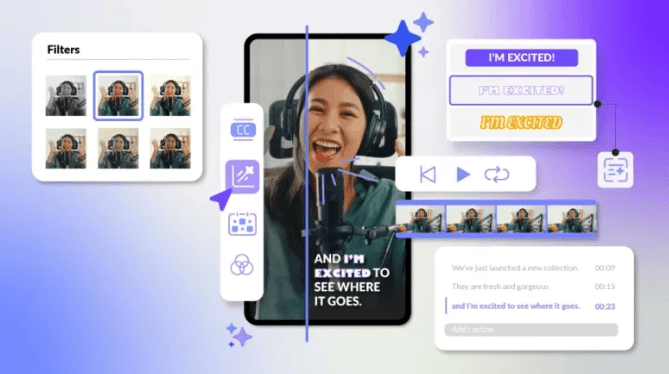
Spikes Studio is also built around social customization. The available workflow supports branded captions, visual formatting, platform-ready clip sizes, and social publishing steps after the AI finds the clip-worthy moments.

The publishing layer matters because repurposed clips still need to move into the right channels. Spikes Studio includes scheduling, one-click publishing, smart posting recommendations, and a visual content calendar.
Spikes Studio includes analytics and content management tools so users can understand which clips perform and organize the content pipeline after clips are generated.


This makes the platform more useful for recurring content workflows, because the goal is not only to make clips faster. The goal is to learn which short-form moments, formats, captions, and posting patterns are worth repeating.
- Podcasts and interviews: Spikes Studio is useful when long conversations need to become short highlight clips for TikTok, Reels, Shorts, and similar platforms.
- Livestreams and webinars: The AI clip detection workflow helps find shareable moments inside longer recordings.
- Educators and coaches: Course lessons, coaching calls, sermons, and teaching videos can be cut into shorter educational clips.
- YouTubers and creators: Existing long-form videos can be turned into short social assets without rebuilding each edit manually.
- Social media teams: Scheduling, publishing, analytics, and visual customization make Spikes Studio useful for teams managing recurring content calendars.
Spikes Studio is best understood as an AI repurposing system for turning long-form video into short, social-ready clips.
Its strongest value comes from AI clip detection, captions, reframing, branded customization, publishing support, and analytics in one workflow.
The main caveat is that the uploaded article text ended midway and then switched into unrelated Reface content, so this conversion is based only on the available Spikes Studio material.
TAGS: Video Editing
Related Tools:

Automates tasks like removing video silences and adding captions

Offers advanced keyword analysis

Automates editing tasks like silence removal and camera switching

Enhances website optimization trough detailed audits
Simplifies video captioning by automatically generating accurate subtitles

Animates static images and characters using text prompts