

Share this tool:
 |
Description:
2short.ai is a focused AI repurposing tool, not a full social media operating system. Its job is straightforward: take long-form videos, find the strongest spoken moments, reframe them into short-form clips, add subtitles, and get them ready for YouTube Shorts, TikTok, or Reels. That narrow focus is also the main reason people still use it. It is trying to save editing time on one very specific problem, and the public product page still centers almost entirely on that workflow.
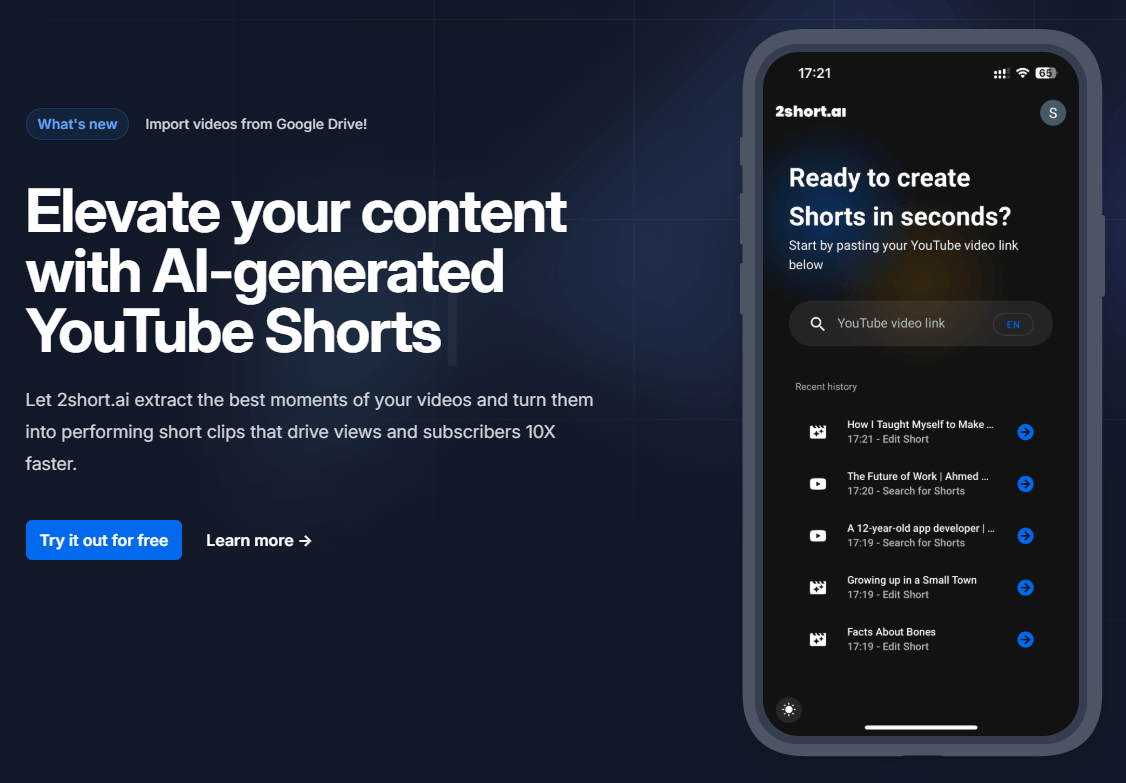
2short.ai scans long videos and pulls out short moments it thinks are worth repurposing for Shorts, Reels, and TikTok.
The platform automatically keeps active speakers centered, which matters for vertical repurposing from wider source footage.
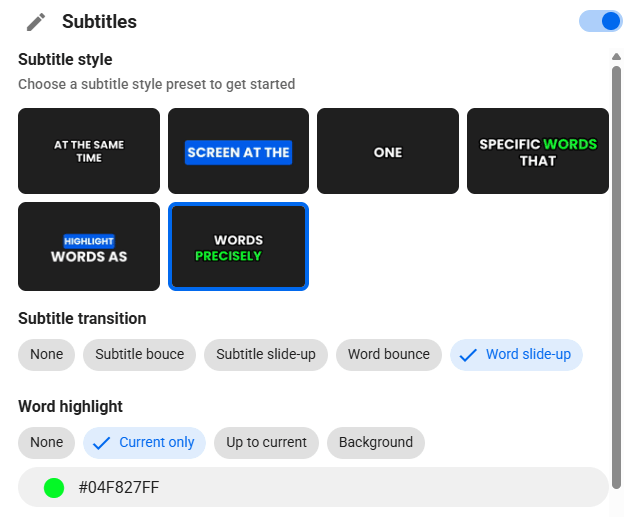
Subtitles are a core part of the product, not an afterthought, and the public site presents them as a major watch-time and engagement feature.
2short.ai is not purely one-click; it also offers editing and crop adjustment when the automatic framing is not enough.
You can add logos and overlays to exported videos, which makes it more usable for repeat creator branding than bare-bones clipper tools.
The platform supports vertical, square, and horizontal outputs and positions 1080p export as standard.
The easiest way to think about 2short.ai is as a spoken-video clipping machine. The official site says it works by extracting the best moments from your videos, and its FAQ says it thrives on videos that contain spoken words because the AI uses that speech to understand what to cut. The examples it gives are podcasts, educational videos, commentary, product reviews, and motivational speeches. That tells you almost everything about where the tool fits.
That also means 2short.ai is narrower than some of the broader “AI content” platforms now on the market. Based on the public site, this is not primarily a scheduler, a publishing suite, or a social analytics dashboard. It is a repurposing tool first: identify good moments, subtitle them, crop them for short-form platforms, export, and move on. That narrower scope is not a weakness by itself. For many creators, it is the whole appeal.
The onboarding flow appears intentionally simple. 2short.ai’s FAQ says the basic starting point is to copy a YouTube link into the app, and the app search surface also publicly says you can start by pasting a YouTube or Google Drive link. Paid plans add Google Drive and public-URL imports explicitly, which suggests the workflow is still built around linked source media rather than a big all-purpose media management system.
In practice, the workflow seems built to remove the most repetitive part of short-form editing: scrubbing through long footage to find usable sound bites. The platform then layers on facial tracking, subtitles, aspect-ratio changes, cropping controls, and branding. That is a good fit for creators who already know their long videos contain useful moments and just need a faster path to extracting them. It is a less exciting fit for creators who need story restructuring, hook rewriting, script generation, or heavy creative re-editing. That is an inference from the product surface 2short.ai publicly emphasizes.
2short.ai looks strongest for talking-head and voice-led content. The official FAQ is unusually direct about this: the system works best with spoken-word videos and requires captions on the source video. That makes it a natural match for podcast clips, interviews, commentary channels, tutorials, lectures, webinars, and educational content. If your long-form workflow already lives on YouTube, the entry point is especially simple.
It also looks strongest when speed matters more than deep edit control. The value proposition is very clear on the homepage: save time, repurpose long videos faster, and grow reach by turning existing content into clips. If your bottleneck is volume and consistency rather than fine-grained editing craft, 2short.ai makes sense. If your bottleneck is narrative shaping, motion design, scene construction, or advanced short-form storytelling, the tool’s public feature set looks much lighter. That second point is an inference from what the official site does and does not emphasize.
A quieter advantage is that 2short.ai supports a fairly broad list of languages. The FAQ lists English, French, German, Japanese, Korean, Spanish, Portuguese, Turkish, Ukrainian, and many others. So while the product is tightly focused, it is not English-only, which matters for creators repurposing multilingual spoken content.
This is where 2short.ai appears practical rather than ambitious. The public site promises advanced editing and cropping options, but it frames those as a support layer around automatic facial tracking, not as a replacement for a full editor. That is a useful distinction. You should expect enough control to rescue framing mistakes, tune crops, add subtitles, choose aspect ratios, and apply branding. You should not expect a deep timeline editor with the flexibility of a serious NLE.
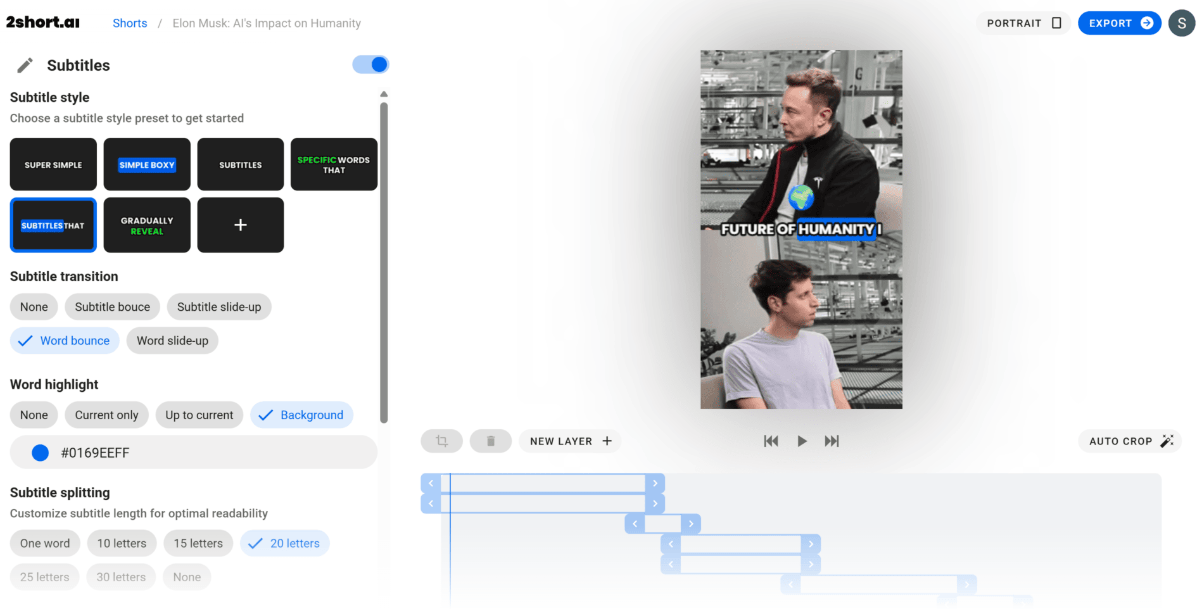
The subtitle system is one of the strongest reasons to use the tool at all. 2short.ai treats animated subtitles as a core engagement feature, and that matches how short-form clips are actually consumed. Many viewers watch muted first or rely on captions to stay engaged. In that sense, subtitles here are not decorative. They are part of the product’s core retention logic.
Brand presets also make the tool more useful than a generic auto-clipper. Being able to add logos and overlays means you can keep a more consistent identity across exported clips without rebuilding the same finishing touches every time. That is especially useful for podcast networks, coaches, educators, and creator businesses that post high clip volume and want a repeatable look.
Export quality is also clearly positioned. The site promises watermark-free 1080p exports and supports vertical, square, and horizontal aspect ratios. That covers the common delivery formats most creators actually need, even if the product is still clearly optimized around vertical short-form distribution.
- Podcasters and interview channels: 2short.ai is a natural fit for long conversations that contain short, quotable moments.
- Educators and coaches: Lessons, tutorials, webinars, and advice-based videos can be turned into shorter clips for discovery platforms.
- Commentary and product review channels: The tool fits channels where spoken explanations and reactions are the main value.
- Solo creators: It is useful for creators who do not want to spend hours manually searching for clip-worthy moments.
- High-volume repurposing workflows: The more you already believe your long-form videos contain short-form highlights, the more attractive the tool becomes.
It is a weaker fit for channels built around montage, music-first edits, cinematic B-roll, or footage without reliable speech and captions. The FAQ makes the caption dependency very clear, so users with messy audio, no transcription, or non-speech-heavy formats should treat that as a real limitation, not a small footnote.
- Use 2short.ai on videos where the spoken content is already strong. The tool’s core value is finding and packaging good spoken moments faster, not manufacturing them from weak material.
- Treat subtitle readability as part of the creative decision, not just a default checkbox. Since animated subtitles are one of 2short.ai’s main strengths, videos that rely on voice clarity, punchy lines, and viewer retention should benefit most from that layer.
- If you need Google Drive or public-URL imports, do not assume the free plan covers them. The public pricing page explicitly adds those inputs at Lite and above.
- Use the crop and subtitle controls after generation. The automatic pass saves time, but exported clips still need review for framing, text readability, and clip context.
- Keep branding simple. Logos and overlays can help consistency, but too much visual clutter can weaken the short-form viewing experience.
- The biggest limitation is right in the FAQ: 2short.ai depends on captions and works best on spoken-word videos. That makes it less flexible than tools that can transcribe messy audio more aggressively, work from raw uploads more broadly, or handle non-verbal footage better.
- The second limitation is scope. Based on the public site, 2short.ai is not trying to be your full creator stack. It does not publicly lead with ideation, scripting, social scheduling, approval workflows, or deeper analytics.
- The third limitation is edit depth. You should expect practical crop, subtitle, aspect-ratio, and branding controls, but not the flexibility of a serious timeline editor.
- The last limitation is public-page clarity. The Starter allowance inconsistency is small, but it matters because plan limits are the main thing being sold. When a product’s value is defined largely by hours of AI analysis and export throughput, those details need to be clean.
2short.ai is a focused, useful repurposing tool for turning long spoken videos into subtitle-ready short clips quickly.
It is best for podcasters, educators, interview channels, commentators, and any creator who already has good long-form material and wants a faster path to Shorts, Reels, and TikTok.
The main caveat is that it is caption-dependent, narrower than broader creator suites, and not built for people who need deep editing control or a full social content system.
TAGS: Social Media Tools Video Editing Generative Video
Related Tools:
Automates creation of short videos

Automates captioning and video translations

Email marketing platform designed for creators

Mange social media presence by providing real-time analytics

Simplifies personalized video creation
Transforms YouTube videos into short clips