
Share this tool:
 |
Description:
Seedance 2.0 is a unified multimodal audio-video model that supports text, image, audio, and video inputs, with stronger motion stability, better physical plausibility, more controllable camera behavior, and broader reference-based creation than earlier versions. This is a tool for people who want more control over cinematic video generation, not just pretty random clips.
Seedance 2.0 supports text, image, audio, and video inputs in one workflow, which is one of its biggest practical advantages.
ByteDance says users can combine up to 9 images, 3 video clips, and 3 audio clips with natural-language instructions for more controlled generation.
The official launch emphasizes improved handling of complex motion, multi-subject interactions, physical plausibility, and more controllable camera behavior.
Seedance 2.0 supports synchronized audio-video generation and dual-channel audio, which makes it more useful for ads, social content, and cinematic clips where sound matters.
The model is positioned not only for fresh generation but also for stable extension, targeted editing, and more iterative video workflows.
Seedance 2.0 is not really a big public family of separate versions. The better practical question is: which Seedance 2.0 workflow should you use for the prompt?
- Text-to-Video: best when you want to generate a full scene from scratch with no visual reference.
- Image-to-Video: best when you want subject anchoring, composition anchoring, or more control over the first frame.
- Multimodal Reference: best when you want to combine storyboard, character, scene, motion, camera, or audio references.
- Video Editing / Continuation: best when you want to extend, modify, or steer an existing clip instead of starting over.
ByteDance’s official positioning is that Seedance 2.0 supports all four major input types and broader editing/reference workflows than earlier models.
Action-heavy sports realism test
Best mode: Text-to-Video
Prompt: A championship boxing match in a packed arena. Start with a tight close-up of the boxer’s gloves and breathing, then cut to a low-angle shot as he steps into the ring. Show realistic footwork, sweat, rope movement, and crowd reaction. Cinematic lighting, dramatic atmosphere, precise body mechanics, ultra-realistic motion, powerful impact sounds, and subtle audience ambience.
Why this mode: This is a strong test of athletic motion, impact timing, and cinematic camera placement, which makes it useful for checking how well Seedance handles fast body movement under pressure.
Luxury beauty commercial prompt
Best mode: Text-to-Video
Prompt: A premium perfume bottle rotates slowly on a glossy black pedestal. Soft studio light glides across the glass, a mist spray disperses in the air, and the camera pushes in for a luxury beauty shot. Add subtle glass clicks, soft atmospheric sound, and elegant ad pacing. High-end commercial look, precise reflections, rich textures, clean brand-film style.
Why this mode: This prompt fits Seedance well because it combines product detail, controlled camera movement, and sound-aware commercial pacing in one short branded scene.
Reference-driven fantasy character animation
Best mode: Image-to-Video
Before using this prompt: Upload the provided character image first so Seedance can preserve identity, styling, and first-frame composition.
Prompt: A young mage in a glowing crystal forest walks slowly through drifting blue mist. Her robe moves naturally with each step, floating particles swirl around her, and the camera tracks beside her at eye level. Preserve facial identity, costume details, and overall mood from the uploaded character image while adding cinematic motion and magical atmosphere.
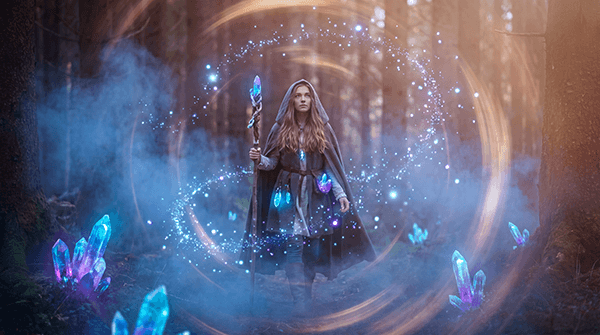
Why this mode: Image-to-video is the right fit here because the base character image helps anchor identity, costume details, and the overall fantasy look while Seedance adds motion and atmosphere.
Editorial portrait turned into motion
Best mode: Image-to-Video
Before using this prompt: Upload the provided fashion reference image first so Seedance has a clear visual anchor for the subject and styling.
Prompt: Turn the uploaded fashion portrait into a luxury editorial video: the model stands in a wind-lit rooftop setting at sunset, fabric moving in the breeze, subtle head turns, confident eye contact, slow camera orbit, rich golden-hour shadows, polished magazine-style movement.
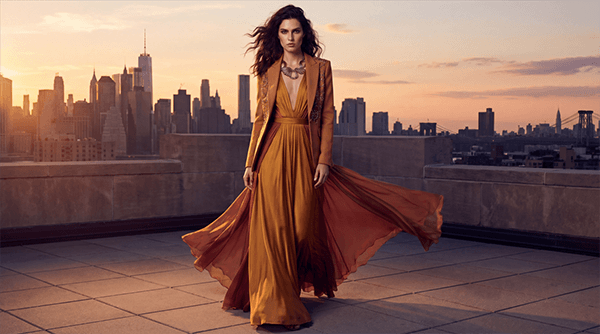
Why this mode: This works best as image-to-video because the starting portrait helps preserve the model’s look, styling, and composition while adding fashion-film motion.
High-energy anime clash sequence
Best mode: Image-to-Video
Before using this prompt: Upload the provided anime battle image first so Seedance can preserve the original character designs, framing, and visual style.
Prompt: Animate the uploaded anime battle image into a high-energy fantasy fight scene. The two characters charge at each other, release energy attacks, and clash with explosive impact effects. Preserve the original character designs, colors, and anime style while adding glowing aura motion, debris, speed lines, and dramatic camera movement.
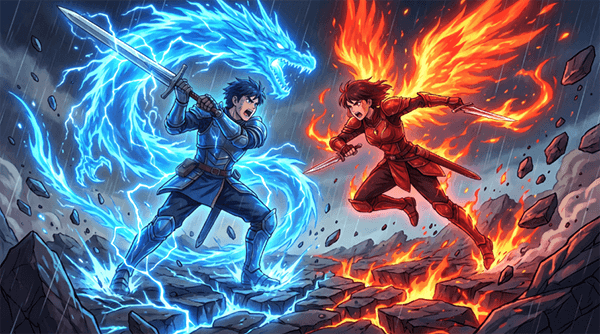
Why this mode: This is best as image-to-video because the uploaded anime image gives Seedance a fixed starting frame for character consistency, while the prompt pushes motion, effects, and camera energy much further.
Noir atmosphere edit from a reference visual
Best mode: Image-to-Video
Before using this prompt: Upload the provided reference image first so Seedance has the base scene, subject, and framing to transform.
Image-to-video prompt: Edit the uploaded clip while preserving the subject and camera movement. Transform the scene into a rainy noir evening with wet reflections on the ground, cool blue shadows, light rainfall, subtle streetlight glow, and distant traffic ambience. Keep the action timing the same.
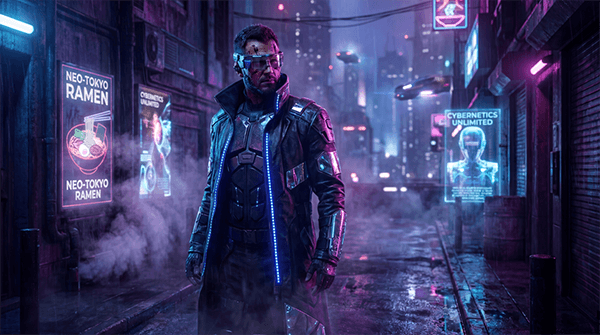
Why this mode: Image-to-video is the best fit when you want to keep the original scene structure but transform the mood through lighting, weather, and environmental atmosphere without rebuilding everything from scratch.
Fast-moving food commercial prompt
Best mode: Text-to-Video
Prompt: A close-up food commercial for hot crispy fried chicken. Start with steam rising, then a hand tears the chicken apart to reveal the juicy inside. Add crunchy sound detail, sizzling oil ambience, shallow depth of field, bright appetizing lighting, and smooth ad-style camera motion. Make it feel fast, premium, and social-ready.
Why this mode: This is a useful commercial test because it checks food texture, micro-motion, and short-form ad pacing in a format that needs to feel fast, clean, and appetizing.
Environment transformation for existing footage
Best mode: Video Editing
Before using this prompt: Upload the base vehicle clip first, then use the same motion and framing as the foundation for the transformation.
Video-to-video prompt: Edit the uploaded clip while preserving the vehicle, action timing, and camera movement. Transform the environment into a post-apocalyptic wasteland with dusty air, damaged surroundings, desaturated tones, drifting debris, and distant wind ambience. Keep the original motion the same.
Why this mode: Video editing is the right mode here because the goal is to preserve the original vehicle motion, camera path, and timing while transforming the world around it.
Animated fantasy environment test
Best mode: Text-to-Video
Prompt: A glowing underwater fantasy kingdom with coral towers, luminous fish, and a child explorer drifting past ancient ruins. Sunlight beams filter through the water, bubbles rise naturally, and the camera moves gently through the environment like a dream. Stylized 3D animation, vibrant colors, cinematic underwater lighting, detailed textures, magical adventure mood.
Why this mode: Text-to-video makes sense here because there is no required reference input, and the prompt is mainly testing Seedance’s ability to build a rich stylized 3D world, camera movement, and environmental depth from text alone.
Coordinated multi-character kitchen scene
Best mode: Text-to-Video
Prompt: Two chefs work together in a busy open kitchen during dinner rush. One plates dishes while the other calls orders, reaches for pans, and moves around the station. Show coordinated hand movement, realistic body spacing, utensil interaction, steam, fire flare, and natural kitchen sound. Fast but believable pacing, documentary-style camera.
Why this mode: This is a strong capability test because it stresses multi-subject coordination, realistic spacing, and busy scene timing instead of a simple single-character shot.
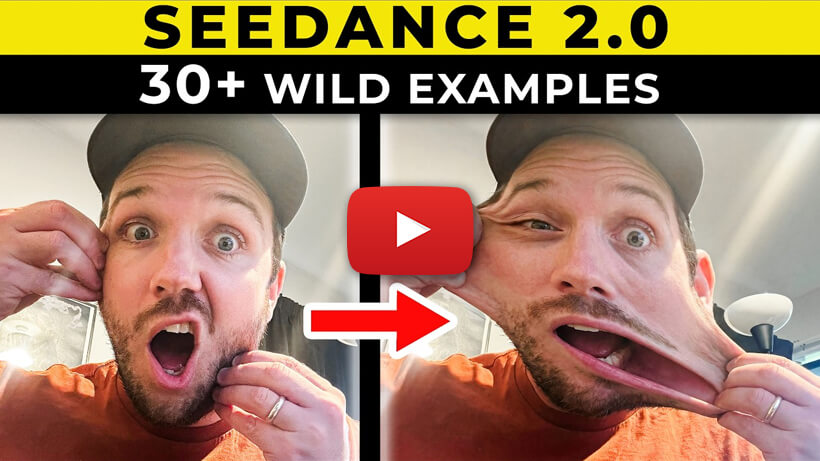
If you want to see Seedance 2.0 in action beyond the prompt examples above, check out the video below.
- Cinematic short-form video: Strong fit when you want more directed, polished motion rather than random AI clip generation.
- Social media ads with sound: Native audio-video support makes Seedance 2.0 especially relevant for short commercial content where sound design matters.
- Product commercials: Controlled camera movement, cleaner reflections, and synchronized audio make it a better fit for premium product shots than simpler generators.
- Storyboard-based short films: Multimodal references make it much more useful for creators who want shot order and scene structure to matter.
- Image-to-video character shots: Good when subject identity, first-frame composition, or character anchoring matters.
- Music-driven video generation: One of the more interesting use cases because Seedance 2.0 officially emphasizes synchronized audio-video workflows.
- Clip continuation and targeted editing: Stronger choice when you want to improve or extend a result instead of starting over from scratch.
- Sports and action scenes: Motion stability, body mechanics, and multi-subject handling are some of its most important claims.
- More controllable multimodal video workflows: Best when you want to steer the result with more than text alone.
- Use text-to-video when the idea is simple and visual reference is not essential.
- Use image-to-video when character look, composition, or product appearance matters.
- Use multimodal reference when you want to control more than one element at once, such as character, scene, pacing, and sound.
- Use editing or continuation when the first result is close and you want iteration rather than a full restart.
- Be explicit about camera movement, timing, sound, and action order. Seedance 2.0 is built to respond to more detailed directing language than many simpler video tools.
Seedance 2.0 looks strong on paper, but ByteDance’s own launch notes still mention weaknesses. The team says it still needs improvement in detail stability, hyper-realism, dynamic vitality, occasional audio distortion, multi-subject consistency, text rendering accuracy, and complex editing effects. That matters because the tool’s biggest promise is high control; when it misses, those misses may show up most clearly in the exact areas advanced users care about.
Another practical limitation is that Seedance 2.0’s most impressive workflows rely on multimodal references and editing, which may or may not be exposed equally on every platform where you access the model. The model itself supports rich reference inputs officially, but your actual front-end may expose only part of that workflow.
Seedance 2.0 is one of the more compelling AI video tools right now because it pushes beyond basic text-to-video into multimodal reference, native audio-video generation, editing, and continuation. The best reason to use it is not just output quality, but control: it is designed more like a creative directing system than a simple prompt box.
That makes it especially interesting for ads, cinematic shorts, storyboard-led videos, and any workflow where you want to steer motion, camera, and sound more deliberately.
TAGS: Text to Video Generative Video
Related Tools:

Creates cinematic videos from text prompts and images
Creates cinematic videos from text, images, and frames

Turns text, images, and footage into cinematic videos
Creates realistic videos from text prompts and images
Creates realistic videos from text prompts and images

Creates cinematic videos from text and images