

Share this tool:
 |
Description:
Kling is an AI video generation tool that can generate real, moving, cinematic video, with camera work, lighting, character motion, and visual atmosphere that are built entirely from your description.
It also has a motion control feature that lets you fine-tune how movement behaves after a clip is generated. And it supports audio integration, so you can sync voiceover and ambient sound directly to your output.
The best way to understand what Kling is capable of is to look at real prompts, so that is exactly where we will start.
The following prompts were submitted to Kling as written. Each sample shows the prompt type, the base image when image-to-video is used, the output, and a short explanation of what the prompt is testing.
These are useful for evaluating how well Kling handles motion, preservation, camera control, lighting, reflections, atmosphere, and overall scene consistency across different styles.
Image to Video
Prompt:
A young woman stands on a city rooftop at sunrise, wind moving her coat and hair, soft golden light breaking over skyscrapers, camera starts wide then slowly pushes in for an emotional cinematic close-up, realistic lens flare, dramatic but grounded film look.
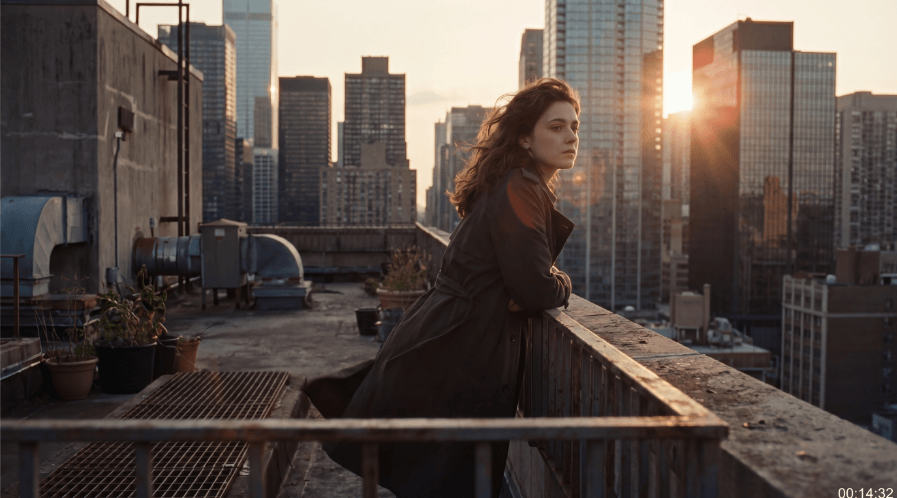
What this prompt tests: This prompt is about a cinematic character moment with controlled camera language. It tests image preservation, natural cloth and hair motion, lens flare behavior, and whether Kling can execute a smooth wide-to-close-up push-in without breaking realism.
Image to Video
Prompt:
A caravan of travelers crosses glowing golden dunes at sunset, long shadows stretching across the sand, camera glides beside them before rising overhead, then the desert changes into a miniature world inside a glass globe on a desk, smooth magical transition, cinematic fantasy style.

What this prompt tests: This prompt is about scale, transformation, and visual storytelling. It tests scene continuity, camera movement across multiple angles, transition quality, and whether Kling can preserve the original desert elements while shifting into a fantasy miniature-world reveal.
Text to Video
Prompt:
A woman in a white dress walks slowly through a glowing crystal forest. Soft blue and purple light. Floating particles drift around her. Camera moves alongside her at eye level. Dreamlike. Fantasy.
What this prompt tests: This prompt is about atmosphere and fantasy consistency. It tests particle motion, lighting stability, character proportions during movement, and whether Kling can hold a dreamlike mood without the environment drifting or collapsing.
Image to Video
Prompt:
Animate the uploaded anime battle image into an exciting fight scene. Add fast movement, impact flashes, speed lines, dust bursts, flowing hair and clothing, and dynamic camera motion. Preserve the character designs, costume details, and anime art style while making the combat feel energetic and cinematic.
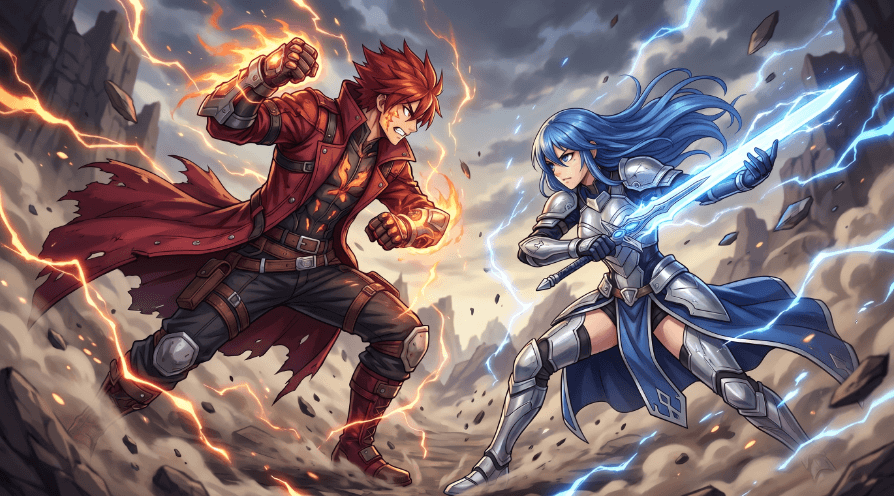
What this prompt tests: This prompt is about stylized action and anime preservation. It tests character identity retention, costume detail preservation, impact effects, speed-line handling, and whether fast action can stay readable without muddying the original anime look.
Text to Video
Prompt:
A heroic warrior standing on a cliff beside a dragon at sunrise, cape moving in the wind, clouds drifting below, dragon breathing slowly, golden light shining across the armor and scales, slow dramatic camera push-in, epic fantasy cinematic style, high-detail concept-film atmosphere.
What this prompt tests: This prompt is about epic fantasy staging and large-subject composition. It tests motion layering across the cape, clouds, and dragon, plus lighting on reflective armor and scales, while checking whether Kling can keep both the human figure and creature stable in one cinematic frame.
Text to Video
Prompt:
A surreal underwater world with glowing jellyfish, drifting light rays, elegant fish swimming through ancient ruins, floating particles, soft blue-green lighting, smooth cinematic camera movement, dreamlike fantasy atmosphere, immersive magical underwater scene.
What this prompt tests: This prompt is about environmental immersion and layered motion. It tests volumetric lighting, underwater particle behavior, creature movement, and whether Kling can create a smooth floating camera feel while keeping the ruins readable.
Image to Video
Prompt:
Animate the uploaded cyberpunk image into a cinematic night scene. Add flickering neon lights, drifting steam, light rain, moving holograms, subtle clothing motion, and a slow push-in camera. Preserve the character design, facial identity, and neon city mood while making the environment feel alive and immersive.
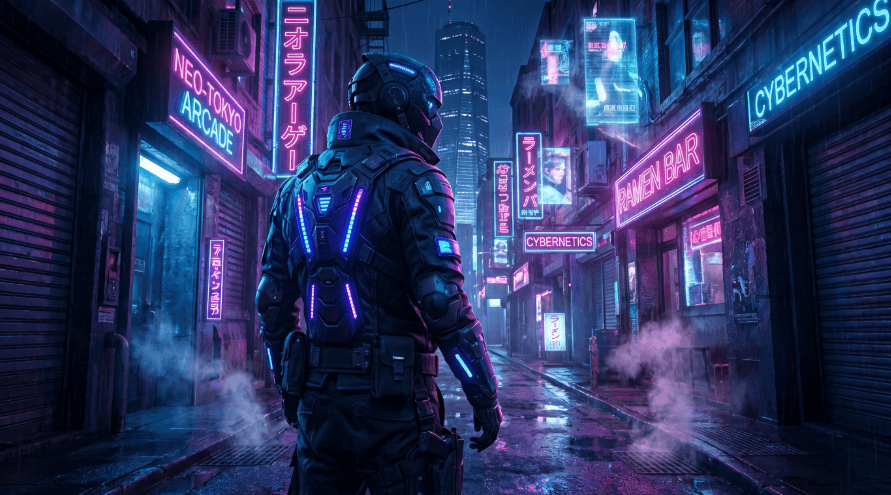
What this prompt tests: This prompt is about urban atmosphere and identity preservation. It tests neon reflections, rain and steam effects, hologram motion, subtle character animation, and whether Kling can keep the face and overall cyberpunk mood intact during the push-in.
Image to Video
Prompt:
Animate the uploaded 3D character image into a playful animated scene. Add bouncing movement, blinking, cheerful gestures, soft environmental motion, floating sparkles, and a gentle cinematic camera glide. Preserve the character design, proportions, and stylized 3D render quality while making the scene feel lively and adorable.
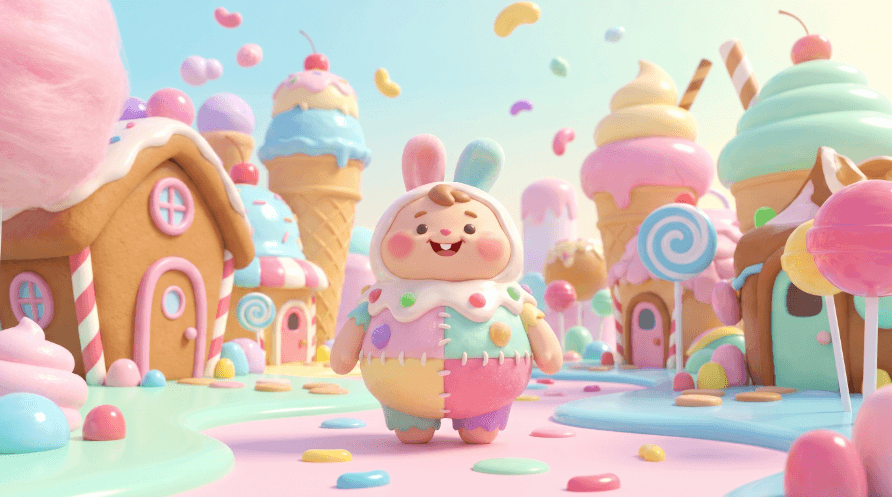
What this prompt tests: This prompt is about stylized character animation rather than realism. It tests rig-like movement quality, blinking and gesture timing, proportion preservation, and whether Kling can animate a 3D-rendered subject without flattening its original look.
Text to Video
Prompt:
A stylized 3D young mage walking through a glowing crystal forest, robe flowing with each step, mist drifting through the trees, floating magical particles, blue crystal light reflecting on the ground, cinematic side-tracking camera, polished animated feature-film style, rich fantasy atmosphere.
What this prompt tests: This prompt is about polished animated-film style. It tests side-tracking camera consistency, robe motion, mist and particle layering, and reflected crystal light across the environment while checking whether Kling can sustain a premium 3D fantasy aesthetic.
Image to Video
Prompt:
Animate the uploaded product image into a premium studio commercial. Keep the headphones and matching case fixed on a seamless light gray surface while the camera performs a very slow smooth orbit around them, revealing multiple angles. Preserve the minimalist monochrome styling, soft diffused lighting, subtle shadows, and polished silver reflections. Clean luxury product-ad look, no extra objects, no text, calm elegant motion.
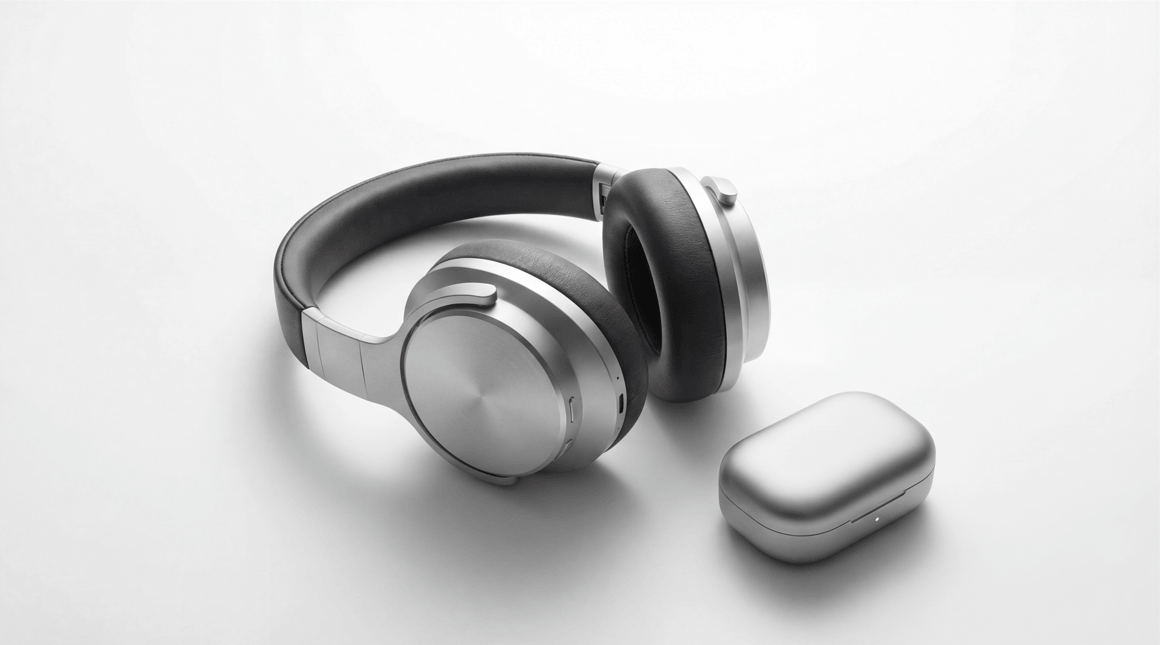
What this prompt tests: This prompt is about controlled product advertising. It tests object preservation, reflective surface handling, soft studio shadows, orbit-camera smoothness, and whether Kling can keep the product geometry locked while adding elegant motion.
Text to Video
Prompt:
A rockstar with electric guitar performing on a large concert stage, synchronized lights flashing with the beat, crowd cheering, dynamic camera movement, realistic lip-sync, haze in the air, LED screens glowing behind the performer, polished concert-film atmosphere, energetic live-show look.
What this prompt tests: This prompt is about performance energy and stage complexity. It tests lip-sync, instrument handling, synchronized lighting, crowd atmosphere, and whether Kling can manage fast concert motion without losing the performer’s identity.
Text to Video
Prompt:
A grand gothic castle hallway lit by flickering candles and moonlight through stained-glass windows, dust drifting in the air, long shadows moving across the stone floor, slow forward camera tracking, dark fantasy cinematic atmosphere, rich moody detail, elegant mysterious tone.
What this prompt tests: This prompt is about architectural mood and subtle motion. It tests candle flicker, shadow movement, stained-glass lighting, airborne dust, and whether Kling can maintain fine gothic detail during a slow tracking shot.
Based on the six prompts above, here is where Kling works best.
- Product ads and commercial content: The perfume and smartwatch prompts show that Kling understands product-focused framing. The camera work is intentional, and the output looks polished enough for real campaign use.
- Atmospheric and cinematic scenes: The noir alley and cyberpunk chase both show strong control over mood, lighting, and motion. If the scene needs to feel like a film, Kling can deliver that.
- Fantasy and sci-fi visuals: The crystal forest prompt shows that complex environments with particle effects and surreal lighting stay consistent. This is well suited for music videos, trailers, and creative storytelling.
- Character-focused and creator content: The podcast host clip shows that talking-head style content is achievable. Useful for creator promos, testimonial-style ads, and brand storytelling with a human face.
Prompt Writing Principles
- Be specific about camera direction. Terms like "slow dolly," "orbit," "push-in," or "tracking shot" land well. Vague prompts produce vague results.
- Include lighting in every prompt. Kling responds well to lighting descriptions such as "warm side light," "neon reflections," or "soft window light." This shapes the mood immediately.
- Add a style reference at the end. Words like "cinematic," "product ad style," "film noir," or "creator-style video" help the output land in the right visual territory.
- Keep motion simple when consistency matters. Complex character actions over long clips can drift. For character-focused content, keep movements subtle, a look, a gesture, a walk, and you will get cleaner results.
- Processing time on complex prompts can take several minutes per generation. This is fine for planned content, but less ideal if you need fast iteration.
- Prompt interpretation is inconsistent. Some prompts generate excellent results on the first try. Others take two or three attempts before the output matches what you intended. This is true across most AI video tools, but worth expecting going in.
- Long clips with detailed dialogue still need post-production lip sync work. Kling handles short character clips well, but extended speaking scenes are a weaker area.
- Hands and fine detail under heavy motion can soften or distort. If your content needs sharp close-ups of fingers, on-screen text, or intricate objects in fast movement, results can vary.
The table below gives a practical summary of how Kling sits alongside the tools it is most commonly compared to.
| # | Tool | Strongest At | When to Use It |
|---|---|---|---|
| 1 | Kling | Cinematic output, camera behavior, visual polish | When visual quality and atmosphere are the priority |
| 2 | RunwayML | Editing control, workflow integration, precision | When you need hands-on control over the output |
| 3 | Pika | Fast iteration, short animated clips, social content | When speed and quick turnaround matter more than fidelity |
| 4 | Synthesia | AI presenter avatars, training video, business formats | When you need a consistent speaking avatar for structured content |
Kling vs RunwayML: RunwayML gives you more editing control and workflow integration. Kling produces more cinematic-looking output from a single prompt with less manual adjustment.
Use RunwayML when you need precision editing.
Use Kling when you want strong visual results quickly.
Kling vs Pika: Pika is faster to iterate and works well for short animated clips and social content. Kling produces higher visual fidelity and better camera behavior.
Use Pika for quick social content.
Use Kling when the visual quality needs to hold up at a higher standard.
Kling vs Synthesia: Synthesia is built specifically for AI presenters and training video avatars. Kling is a general video generator that handles character content as one of several strengths.
Use Synthesia for business and training presentations.
Use Kling for creative and commercial video work.
Kling is a strong choice for anyone who needs cinematic-quality AI video, whether that is product ads, atmospheric scenes, creative storytelling, or character content.
The camera work is one of its biggest strengths. The outputs look like someone with a visual eye made them, not just a machine following instructions.
The overall assessment is straightforward: if visual quality and cinematic feel matter for what you are making, Kling earns a spot in your workflow. Run the prompts from this chapter, test your own ideas, and let the results guide you from there.
TAGS: Text to Video Generative Video
Related Tools:

Simplifies video editing and creative content production
Creates realistic videos from text prompts and images
Creates cinematic videos from text, images, and frames

Turns text, images, and audio into stylized videos
Turns text, images, and clips into cinematic videos

Turns text or images into animated, cinematic video clips
Related Videos:
KLING 3.0 - Ultimate Guide with Pro tips and 50 creative prompts
I test Kling 3.0 against Kling 2.6 and other top video generators, I've created multiple categories like dialogue, storytelling, sound, product ads and more to really push these ai video models to their limits.
I Pushed Kling 3.0 Motion Control Further Than Anyone Else
I've been pushing Kling motion control to its limits with hundreds of tests, and the results are truly surprising.
Higgsfield Just Dropped a Cinema Game-Changer
I’ll also show you how to use the awesome Kling motion control, which let’s you turn into any character with perfect body motion and lip-syncing.
KLING 2.6 - Ultimate Guide with Pro tips and 60 creative prompts
I will share over 60 pro prompts you need to try with Kling 2.6, plus loads of tips and tricks.
How to Create Amazing Full Animated Stories Using ChatGPT & Kling AI
Bring your stories to life with this incredibly simple method, which creates professional looking animated videos.
KLING 2.0 INSANE VFX Videos | How-To Tutorial | 4 Pro Prompts
Kling has some incredible new updates that allow you to create some incredible VFX, I’ll show the best methods on how to create amazing VFX videos.
Kling Ai New Features | How To Use Them & Pro Tips
I will show you how to use the awesome new ‘Virtual Try-On’ feature in Kling ai and I’ll show you how to get the most out of Kling ai’s awesome tool
Kling Ai Model 1.5 Update | New Features | Motion Brush is Here
Kling Ai has added some exciting new features, and I will go over them all and show you loads of examples and how to use them.