

Share this tool:
 |
Description:
Salina is an AI content workflow platform built for creators who want more value from long-form material. Its main focus is podcast and video content: transcribing it, translating it, turning it into written assets, organizing research, and helping creators publish across more formats without rebuilding everything manually.
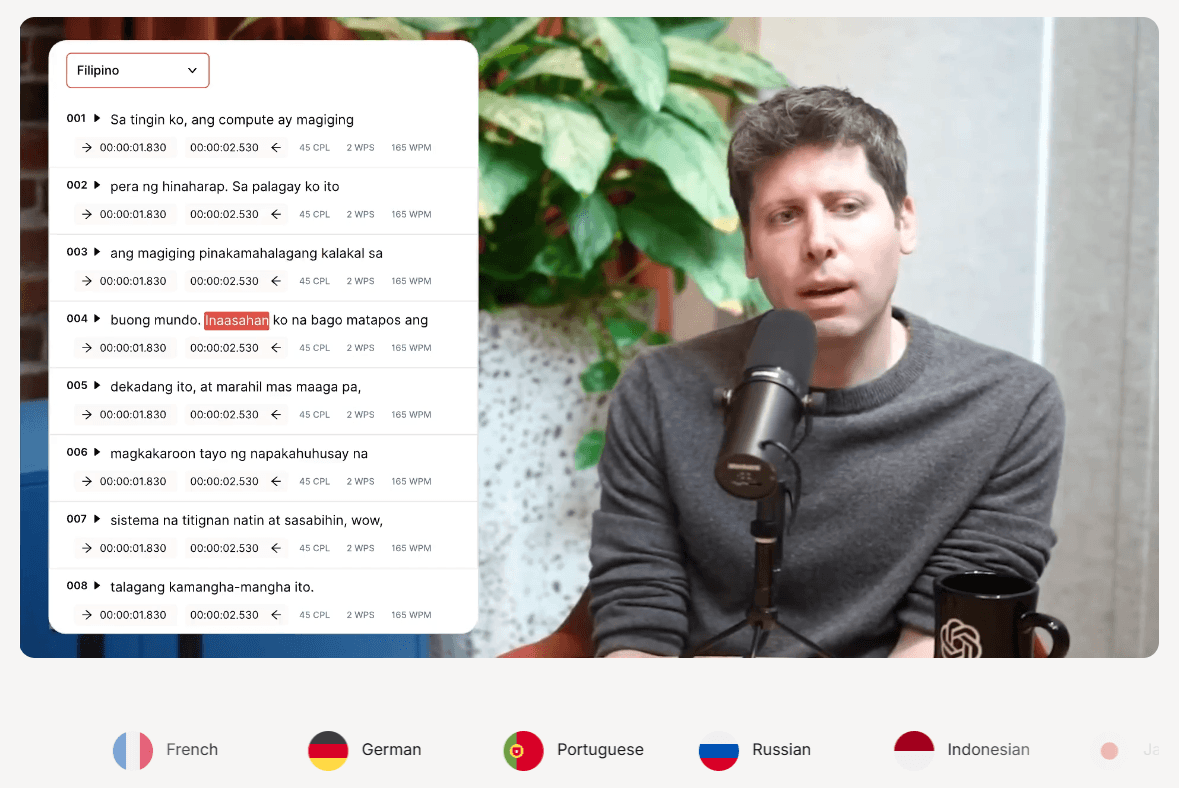
The easiest way to understand Salina is not as one single AI feature. It is closer to a content operations workspace for podcasters, educators, marketers, and research-heavy creators.
Salina’s official site frames the product around transcription, translation, and content creation from one upload. The homepage says Salina helps creators translate podcasts without losing their voice, reach listeners in 85+ languages, and move from transcription to translation so creators can focus on the next episode.
The platform currently breaks down into five important layers:
| Layer | What it does | Why it matters |
|---|---|---|
| Transcription | Converts audio or video into editable text. | Creates the foundation for captions, show notes, summaries, and repurposed content. |
| Translation | Localizes episodes and written content into other languages. | Helps creators expand beyond one language without rebuilding the original content. |
| Content Repurposing | Turns episodes into show notes, posts, newsletters, articles, quotes, timestamps, and key topics. | Solves the post-production bottleneck that comes after recording. |
| Salina Assistant | Searches, analyzes files, understands videos, and works with documents. | Adds a research and analysis layer to the content workflow. |
| Salina Extension | Saves web pages, sections, screenshots, and notes from the browser. | Makes research easier to collect and reuse inside projects. |
That mix is Salina’s main advantage. It is not just a transcription app, and it is not just a generic writing assistant. Its strongest use case is taking one source asset and turning it into many usable outputs.
Salina is strongest when you already have source material. A podcast episode, interview, webinar, lecture, YouTube video, or recorded discussion becomes the starting point. From there, Salina helps turn that material into transcripts, translations, summaries, platform-specific posts, show notes, timestamps, and article-style content.
The transcription layer is useful because it does not stop at plain text. Salina says users can upload common audio and video files, generate transcripts in minutes, edit the transcript, fix names and punctuation, and export into formats such as SRT and TXT.
The translation layer is also more creator-focused than basic machine translation. Salina positions translation as a way to preserve jokes, idioms, style, timestamps, and cultural meaning instead of only converting words from one language to another. Its translation page says users can upload an episode, choose languages, review translations, and keep multilingual subtitles and chapters synced with audio timestamps.
The content repurposing layer is where the platform becomes especially practical. Salina’s “Create with Salina” page focuses on turning recordings into show notes, descriptions, timestamps, platform-specific posts, quotes, insights, discussion starters, newsletters, and articles.
Upload audio or video and turn it into editable transcripts that can be cleaned up, exported, and reused across content formats.
Translate episodes while preserving tone, slang, idioms, jokes, and timestamp alignment for subtitles or chapters.
Generate show notes, social posts, blog articles, LinkedIn content, X threads, newsletters, pull quotes, key topics, and timestamps from one episode.
Chat with documents, analyze files, understand videos, search the web, surface YouTube material, explore Reddit discussions, and search academic sources.
Save full pages, selected sections, screenshots, highlights, notes, and tagged research into organized projects.
Use saved research, transcripts, and content materials as context for later summaries, outlines, drafts, and content creation.
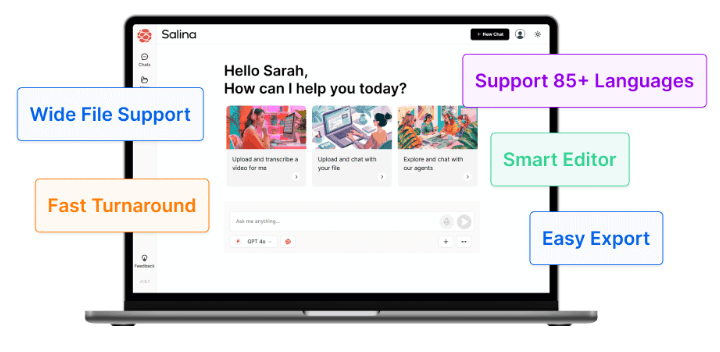
Salina’s workflow is built around a simple sequence: upload, transcribe, edit, translate, repurpose, and organize.
The first step is the upload. Salina says it supports major audio and video formats, including MP3, WAV, FLAC, WMV, MP4, AVI, and MOV, which matters because creators should not have to convert files before starting.
The second step is transcript cleanup. This is an important part of the workflow because automated transcription is rarely perfect. Names, acronyms, overlapping speakers, industry terms, and casual speech often need review. Salina’s transcription page specifically mentions an editor for correcting punctuation, adding names, and polishing the transcript with familiar controls.
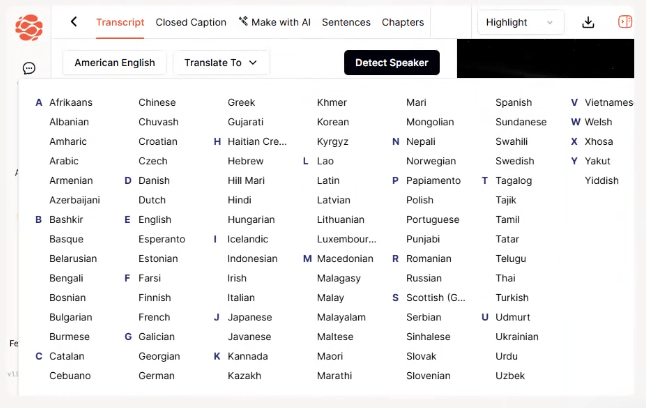
The third step is repurposing. Once the transcript is usable, Salina can help transform it into the materials creators usually need after publishing: show notes, descriptions, chapter markers, summaries, posts, articles, newsletters, quotes, and key takeaways.
The fourth step is localization. Salina’s translation workflow is built for creators who want their content to work across languages while keeping the original personality intact. This is especially relevant for podcasts, interviews, and educational content, where the way something is said often matters as much as the literal meaning.
The final step is research reuse. The Assistant and Extension make Salina more than a post-production tool. A creator can save pages and notes during research, use that context with the Assistant, and then turn the material into outlines, summaries, drafts, or future content ideas.
Salina’s transcription value comes from its combination of speed, format flexibility, editing, and export. The official transcription page says it can transcribe files in minutes, supports many file types, lets users fine-tune the transcript, and exports transcripts for uses like video subtitles or written articles.
The translation side is more ambitious. Salina’s translation page emphasizes “transcreation,” meaning it aims to adapt the message for different cultures rather than translating everything literally. That matters for podcasts because jokes, idioms, slang, personality, and local references can easily become awkward when translated too mechanically.
There is one detail worth watching: Salina’s public pages are not fully consistent on language count. The homepage and translation page repeatedly mention 85 or 85+ languages, while another official product page says content can be multiplied across 94+ languages and that transcription supports over 94 languages and dialects.
That does not weaken the overall use case, but it does mean creators should verify the exact language they need inside the app before building a multilingual workflow around it.
Salina Assistant is one of the more useful parts of the product because it expands Salina beyond transcription and repurposing. The assistant is described as a chat companion with research tools built in, including web search, file analysis, video understanding, document chat, Reddit insights, YouTube discovery, and academic research.
This makes Salina especially relevant for creators who do research before recording. For example, a podcast host could collect articles, analyze videos, search academic papers, save web notes, then use that context to prepare episode outlines or follow-up content.
The Assistant also connects back to Salina projects. Salina says users can access transcripts, chat with specific transcript sections, switch between research and content creation, and view projects from one central place.
That connected workflow is the real strength. A normal chatbot can help with research, but it usually requires copy-pasting. Salina is more useful when the source materials, transcript, research notes, and content outputs all live closer together.
The Chrome Extension is a practical addition because content research often happens in messy browser sessions. Salina’s extension page says users can save full pages, capture specific sections, grab screenshots, highlight text, add notes, group research into projects, tag content, and search across saved material.
This is useful for podcast preparation, newsletter research, YouTube scripting, course planning, and article writing. Instead of leaving research scattered across bookmarks, screenshots, and half-finished notes, the extension gives creators a way to collect material and later use it inside Salina.
The best use of the extension is not just “save this page.” It is saving research into a project with enough context that it can later support a script, article, episode plan, or content cluster.
- Podcasters: Salina is a strong fit for hosts who want transcripts, show notes, timestamps, social posts, newsletters, and translated content from each episode.
- YouTube creators: Video creators can use Salina to turn long-form videos into written summaries, articles, posts, captions, key moments, and research-backed follow-up content.
- Educators and course creators: Lectures, workshops, and training sessions can become transcripts, summaries, resource lists, lesson notes, and multilingual supporting materials.
- Coaches and consultants: Recorded calls, interviews, webinars, and thought-leadership sessions can be converted into articles, LinkedIn content, newsletters, and reusable knowledge assets.
- Small marketing teams: Teams with limited production bandwidth can turn one source asset into platform-specific content for multiple channels.
- Research-heavy creators: The Assistant and Extension make Salina useful for people who gather references, analyze documents, and build content around structured research.
| Tool | Stronger Fit | Where Salina Fits Differently |
|---|---|---|
| Otter | Meeting notes, live meeting transcription, summaries, and meeting integrations. | Salina is more creator-focused, while Otter is more meeting-productivity-focused. Otter emphasizes recording and transcribing Zoom, Google Meet, and Microsoft Teams meetings in real time. |
| Descript | Podcast and video editing, text-based editing, filler-word removal, captions, and publishing workflows. | Salina is better framed as a repurposing and localization workspace, while Descript is stronger when timeline editing and media production are central. Descript describes itself as a tool for recording, transcribing, editing, and publishing video and audio. |
| Rask AI | Video and audio localization, dubbing, subtitles, voice cloning, and API-based localization. | Salina is broader for creator repurposing and research, while Rask is more specialized for localization at scale. Rask positions itself around translating video and audio into 130+ languages and localizing content with API support. |
The practical difference is clear. Choose Salina when the goal is to turn one recording into many written, translated, research-supported assets. Choose Descript when editing is the core job. Choose Otter when meetings are the core job. Choose Rask when dubbing and large-scale localization are the core job.
- Start with the cleanest audio possible. Salina can automate transcription, but clear audio still improves transcript accuracy, speaker clarity, summaries, and downstream content quality.
- Edit the transcript before generating final outputs. Fix names, technical terms, brand phrases, guest titles, and punctuation first. Every summary, post, translation, and article becomes stronger when the transcript is clean.
- Use Salina as a repeatable publishing workflow. A strong sequence might be: transcript, cleaned transcript, timestamps, show notes, summary, pull quotes, LinkedIn post, X thread, newsletter, blog article, and translated version.
- Review translations before publishing. Salina’s transcreation positioning is useful, but jokes, idioms, technical vocabulary, legal claims, health claims, and culturally sensitive phrasing still need human review.
- Use the Extension before recording. Save research pages, quotes, screenshots, and notes into a project before the episode. That gives Salina better context when you later create scripts, summaries, or follow-up content.
- Do not treat every generated output as final copy. Salina is best as a production accelerator. The strongest results will usually come from reviewing, tightening, and adapting the AI draft to the creator’s actual voice.
Salina’s biggest limitation is that it is not a full media editor. It can help with transcripts, translation, summaries, show notes, platform posts, research, and content drafts, but it is not positioned as a deep audio or video editing suite like Descript. Descript is stronger when the user needs multitrack editing, text-based video edits, filler-word removal, captions, and publishing controls in one media production workflow.
The second trade-off is that AI translation still needs review. Salina’s emphasis on preserving tone, idioms, and cultural meaning is the right direction, but multilingual publishing still carries risk. A creator should review subtitles, translated posts, and localized articles before publishing, especially for expert content or brand-sensitive messaging.
The third trade-off is documentation clarity. Salina’s public pages describe a strong product direction, but the language-count messaging varies between 85+ and 94+ across official pages. That is not a dealbreaker, but it is something teams should check before committing to a specific multilingual workflow.
The fourth limitation is that Salina’s value depends on having source material. If you mainly need a blank-page writing assistant, a general AI writing tool may be enough. Salina becomes more useful when you feed it recordings, transcripts, videos, documents, web research, and episode materials.
Salina is best for creators and small teams who want to turn long-form content into transcripts, translations, show notes, articles, newsletters, social posts, research summaries, and reusable assets.
Its strongest advantage is the full workflow: capture the source material, convert it into text, localize it, repurpose it, and keep research connected to the content process.
It is not the best choice if you mainly need advanced audio or video editing. It is also not a replacement for human review in serious translation work. But for podcasters, educators, consultants, YouTubers, and marketers who regularly turn one recording into many content pieces, Salina is a practical and well-focused AI workflow tool.
TAGS: Translation
Related Tools:
Translates video speech into multiple languages

Translates text and media into over 130 languages
AI-driven translation across multiple languages
Creates realistic multilingual avatar videos
Translates app content into over 100 languages

Generates and translates subtitles for videos