

Share this tool:
 |
Description:
Puppetry is an AI talking video generator built around a simple idea: upload or choose a face, add a script or audio, pick a voice, and generate a lip-synced talking avatar video. It is aimed at creators, educators, marketers, course builders, and anyone who wants a presenter-style video without filming themselves, hiring actors, or using a full video production setup.
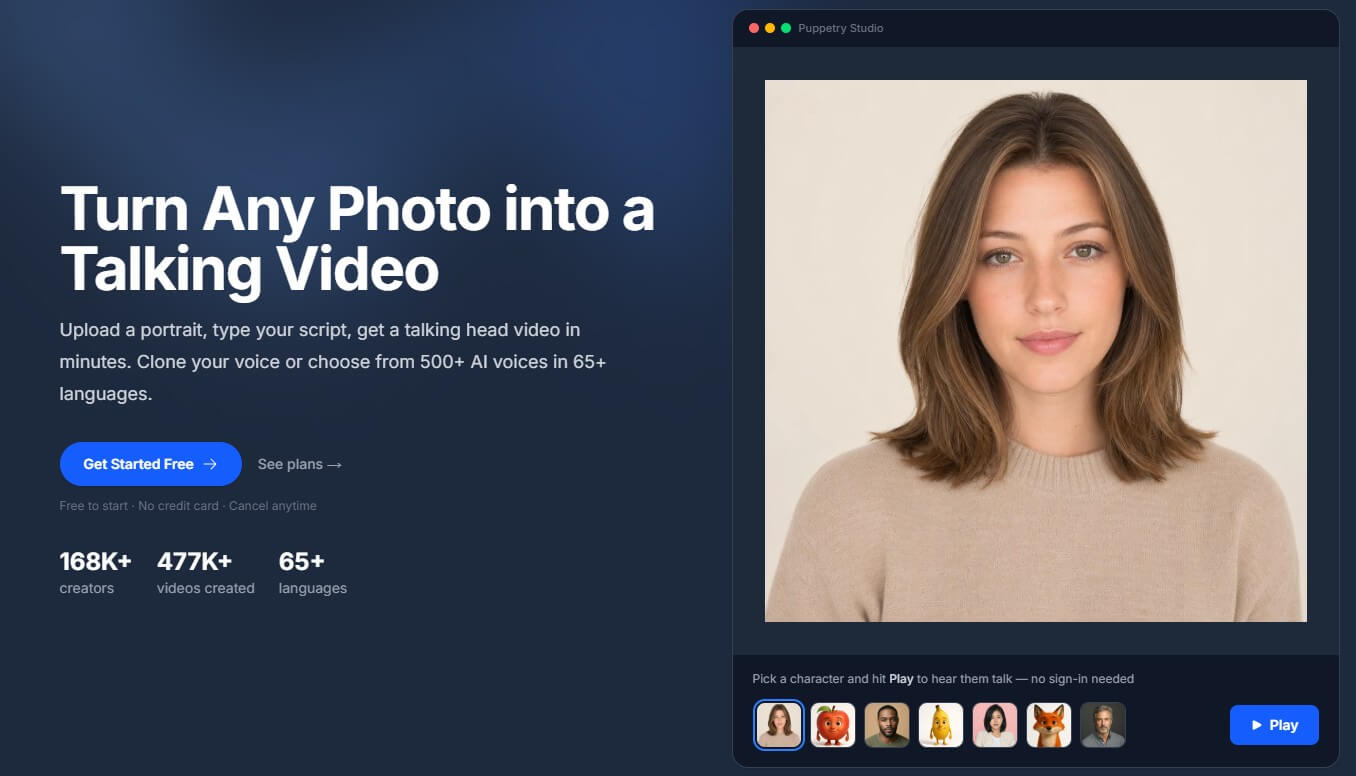
Puppetry sits in the AI avatar and talking-photo category. The product turns a still face into a moving speaker, using text-to-speech or uploaded audio to drive the mouth movement, head motion, and facial expression. The official site describes the core flow in three steps: upload a portrait, type a script, then generate a video with natural lip sync.
That makes Puppetry different from a full AI video editor. It is not mainly about building complex scenes, editing timelines, or producing cinematic video from scratch. Its center is the talking character. You bring the face, choose the voice or audio, and let the platform create the performance.
The useful part is that Puppetry is flexible about what a “face” can be. It can work with selfies, headshots, illustrations, cartoon characters, AI-generated faces, animals, fantasy characters, or brand mascots, as long as the input has a recognizable face structure.
Puppetry is strongest when you need a quick talking presenter, mascot, or character-led clip. It makes the most sense for short explainers, social posts, course intros, lesson videos, product updates, FAQ videos, faceless YouTube content, and multilingual avatar clips.
Its strongest advantage is speed. Puppetry says users can create a first talking video in under two minutes, with typical rendering described as roughly 30 to 60 seconds depending on the video. That matters because many users in this category are not trying to produce a polished commercial. They want a fast, reusable way to turn written content into a person or character speaking.
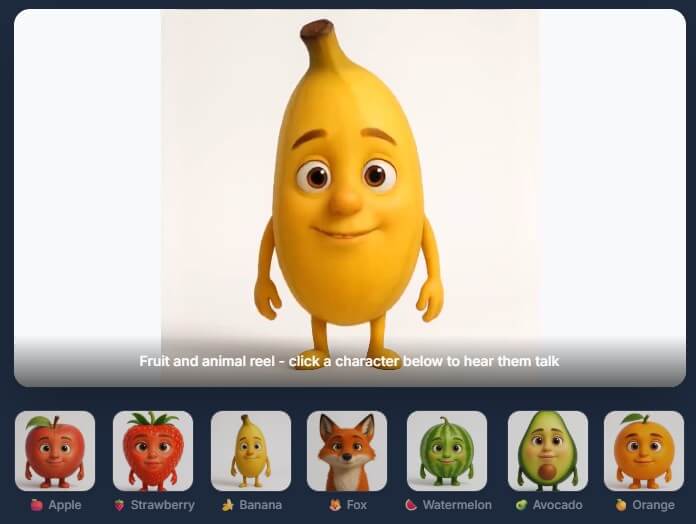
The second strength is character range. Puppetry includes a large gallery of ready-made characters, while also letting users upload their own portraits or use AI-generated characters. The avatar page describes gallery characters, AI-generated characters, and brand mascots as supported starting points.
Upload a portrait and turn it into a speaking character with lip sync, head movement, and expression.
Animate an avatar by typing text or by uploading your own audio file.
Puppetry promotes 500+ AI voices across 65+ languages, which makes it useful for multilingual content and fast voice matching.
Users can choose from a large character gallery, including people, animals, fantasy characters, and other puppet-style options.
Puppetry supports uploaded images, a Puppet Generator, an Image Generator, and a Cartoonify feature for turning photos into stylized characters before animation.
Puppetry’s avatar page describes multi-scene narrative videos with different avatars per scene, which helps it stretch beyond one-off talking-head clips.
The workflow is one of Puppetry’s better qualities. You do not need to start with a camera, microphone, or editing project. The basic process is: choose or upload a character, add the script or audio, pick a voice, then generate and download the result.
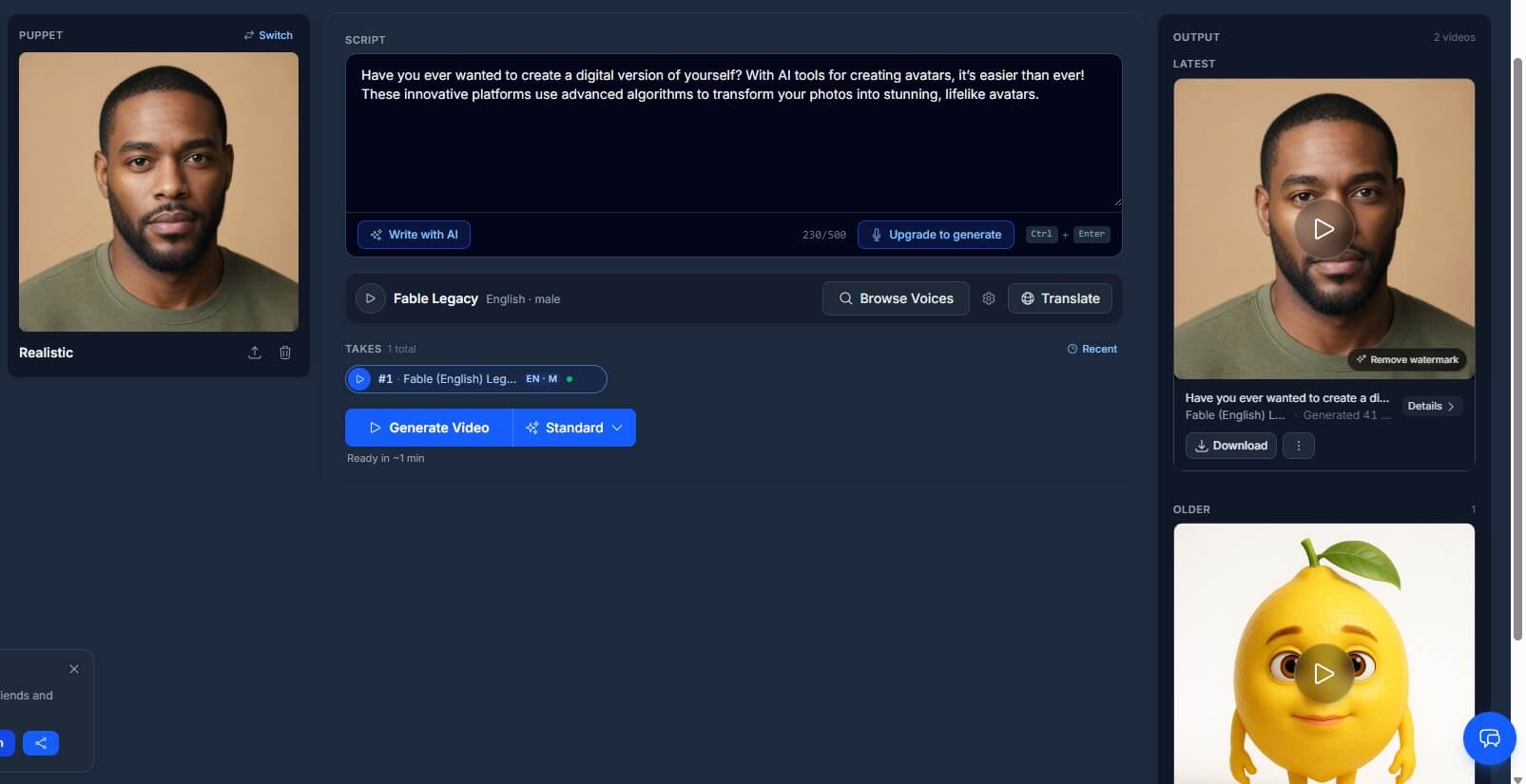
The Getting Started page gives useful practical guidance. It recommends clear, front-facing portraits for the most realistic results, and it notes that shorter scripts tend to produce better quality. That is a small detail, but it matters. Talking-avatar tools can look odd when the input face is too angled, low-resolution, heavily obscured, or emotionally mismatched with the performance.
Puppetry also supports uploaded audio, which gives users more control than text-to-speech alone. If you already have a voiceover, you can use the avatar as the visual layer instead of relying on generated speech. That makes the tool more useful for creators who care about voice style, pacing, or personal narration.
Puppetry’s output quality will depend on three things: the source image, the voice or audio, and the length of the script. A clean portrait with a neutral expression is the safest starting point. The company’s FAQ specifically suggests starting with a neutral face because the model can better determine how to move the image correctly.
The best results will usually be short, direct, and presenter-like. A 30-second product explanation, welcome message, lesson intro, or social caption is a better fit than a long emotional monologue. Puppetry says videos can be several minutes long, but also notes that shorter scripts often produce better quality.
The tool is less about deep performance control. You are not directing detailed gestures, full-body motion, camera angles, lighting, or scene blocking the way you might in a larger AI video platform. Puppetry gives you a fast talking face, not a full synthetic production studio.
Puppetry is best compared with tools like HeyGen, Synthesia, and D-ID, but it has a simpler, more character-first feel.
| Tool | Strongest fit | How Puppetry compares |
|---|---|---|
| Puppetry | Fast talking photos, characters, mascots, simple avatar videos | Easier to understand for quick photo-to-video clips and playful character content |
| HeyGen | Broader AI video creation from text, images, audio, templates, avatars, and branding | HeyGen feels more like a complete video generation platform; Puppetry feels lighter and more direct for talking avatars |
| Synthesia | Business video, training, localization, and avatar-led enterprise content | Synthesia is broader for structured business video; Puppetry is better suited to lightweight creator and character clips |
| D-ID | Speaking portraits and photo-based avatar presenters | D-ID is a closer category match; Puppetry stands out through its ready-made character angle and playful creator positioning |
The simple version: choose Puppetry when you want a fast talking character. Choose a broader platform when you need brand templates, team workflows, advanced editing, or large-scale training content.
Puppetry is a good fit for educators turning lesson notes into short explainer videos, creators making faceless social clips, marketers creating mascot-led product updates, YouTubers adding avatar presenters, and small teams producing quick FAQ or onboarding clips.
It is also useful for character-based content. A fruit mascot, animal host, cartoon teacher, or AI-generated spokesperson can feel more engaging than a plain text slide. Puppetry’s public site leans into education, marketing, YouTube, multilingual content, corporate training, and AI avatars as core use cases.
- Use a clear, front-facing image with good lighting. Avoid faces that are turned too far sideways or covered by hair, glasses glare, hands, masks, or heavy shadows.
- Keep early videos short. Test a 20 to 45 second script before building longer clips.
- Match the voice to the character. A playful mascot, professional instructor, and serious sales spokesperson should not use the same delivery style.
- Use uploaded audio when tone matters. Text-to-speech is convenient, but your own recording can give better pacing and emphasis.
Puppetry’s main limitation is scope. It is strong at animating faces, but it is not a full video editor, AI film tool, or enterprise video platform. Users who need templates, collaboration, brand systems, analytics, translation workflows, or detailed scene design may outgrow it.
The second limitation is realism. Talking-avatar tools can still produce small artifacts around lips, teeth, eyes, head movement, or expression timing. This is especially likely with poor input images, long scripts, unusual faces, stylized art, or emotional delivery.
The third concern is consent. Because Puppetry can animate uploaded portraits and clone voices in some workflows, users should be careful with likeness rights, voice rights, and disclosure. The technology is useful, but it can be misused if people animate real individuals without permission.
Puppetry is best for fast, character-led talking avatar videos. Its strengths are clear: easy photo animation, text or audio input, many voice options, multilingual support, ready-made characters, and a workflow that does not require filming or editing skills.
It is best for educators, creators, marketers, course builders, and small teams that need short presenter-style videos. The main caveat is that it is more of a talking-avatar generator than a complete video production platform, so users who need deeper editing or enterprise-grade workflows may need a broader tool.
TAGS: Productivity
Related Tools:
AI-powered meeting assistant that enhances productivity

Provides features for managing PDF documents
Helps users search the web, analyze pages, and complete research tasks
Simplifies creation of educational content
Generates summaries of webpage content
Turns data, text, and visuals into dynamic spreadsheets