
Share this tool:
 |
Description:
PocketPod is an AI podcast app built around a simple idea: instead of searching for something useful to listen to, you receive a podcast made for you. It turns news, topics, calendar context, reminders, and personal interests into short daily audio briefings that feel closer to a personalized radio show than a normal podcast subscription.
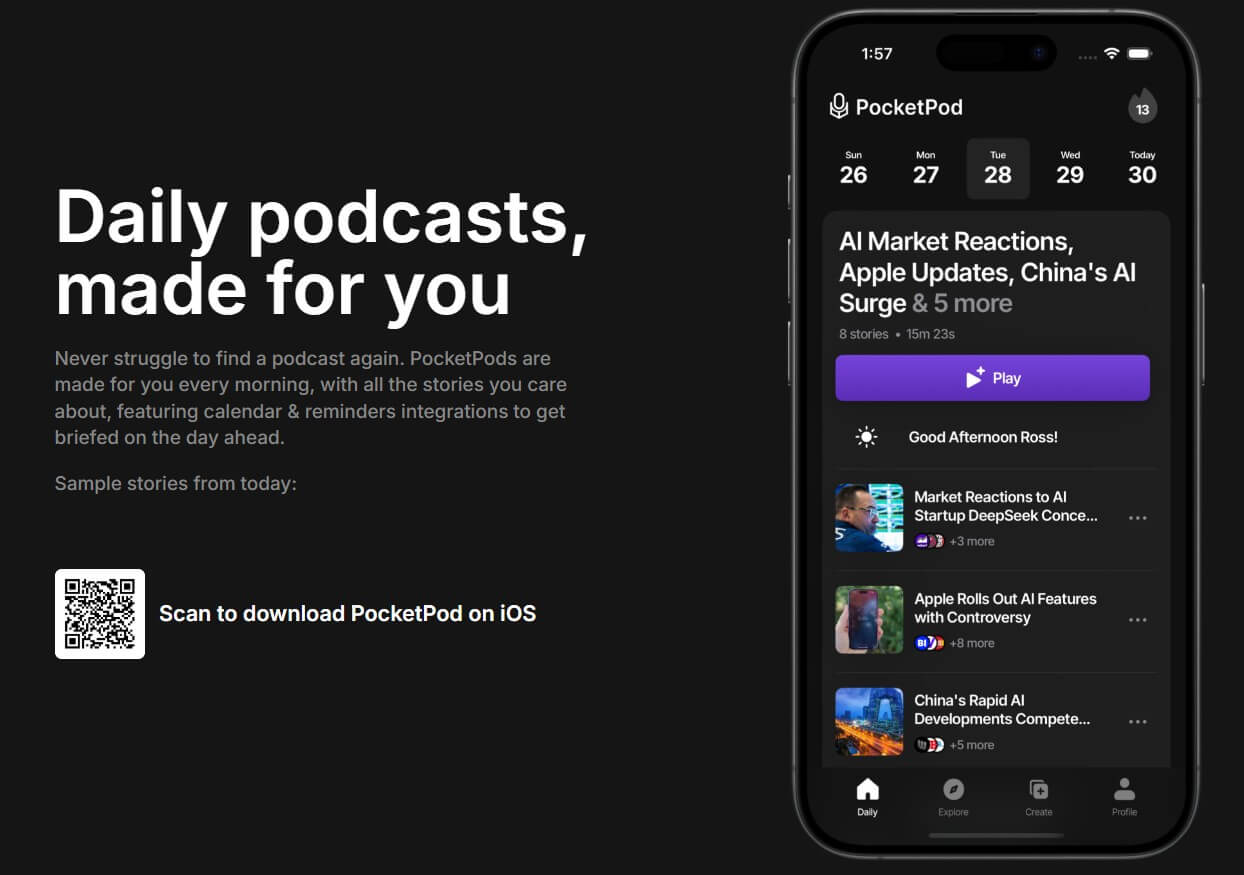
PocketPod is not a traditional podcast player. Apps like Apple Podcasts, Spotify, Overcast, and Pocket Casts help you follow human-made shows. PocketPod is different because it generates podcast-style audio from information selected around your interests.
The official site says PocketPods are made every morning with stories you care about, and it highlights calendar and reminders integrations for getting briefed on the day ahead. Its Y Combinator launch page explains the broader pitch: PocketPod uses AI to turn information into personalized podcast formats, starting with daily news podcasts delivered through familiar listening channels such as Spotify.
That makes PocketPod part podcast app, part AI news briefing tool, and part personal audio assistant. The product’s real value is not just summarizing articles. It is packaging relevant information into a format that fits into commuting, walking, chores, or morning routines.
PocketPod creates daily audio episodes based on the stories and topics a user cares about.
Public examples include dedicated feeds such as AI News, AI Papers, Startup News, and Guide to Startups, which show how PocketPod can package a niche into repeatable audio updates.
PocketPod can use calendar and reminder information, with user permission, to help create a more relevant daily briefing. Its privacy policy says calendar data may be shared with AI models to create the podcast script when the user allows it.
The YC launch page describes the product as using LLMs and text-to-speech models to process information and turn it into podcast-style audio.
PocketPod’s launch messaging mentions personalized podcasts delivered to Spotify, which lowers friction for users who already listen there.
The site positions PocketPod around morning listening, which gives the product a clear use case instead of being a vague AI audio generator.
PocketPod is strongest at turning information overload into a manageable listening habit.
That sounds simple, but it is the main problem the product solves. Most people do not lack information. They lack a clean way to keep up with the right information. Newsletters pile up. Articles sit unread. Podcasts run too long. Social feeds are noisy. PocketPod tries to compress that mess into a personalized audio stream.
This works best for topics that change often: AI, startups, markets, tech news, product updates, research, policy, and industry trends. A daily AI-generated podcast can help a listener stay current without opening five websites or scanning dozens of headlines.
The more interesting part is the personal angle. A generic news podcast serves everyone. PocketPod is built around making the episode feel more relevant to one listener. That is the difference between “here are today’s headlines” and “here is what you should know this morning.”
PocketPod’s workflow appears designed for low effort. The user selects interests, connects optional context such as calendar or reminders, and receives a generated audio briefing. The product’s homepage does not frame the experience around prompt writing or manual episode production. It frames it around waking up to a made-for-you podcast.
That is the right direction for this category. If a personal audio briefing tool requires too much setup every day, it loses the advantage. PocketPod works best when it becomes part of a routine: open it in the morning, press play, and get the main stories before the day gets crowded.
| Workflow Layer | What It Does | Why It Matters |
|---|---|---|
| Interests | Guides the topics PocketPod follows | Keeps the briefing relevant |
| Daily generation | Creates a fresh episode each morning | Builds a repeatable habit |
| Calendar and reminders | Adds day-ahead context when permitted | Makes the briefing feel more personal |
| AI script and narration | Turns selected information into audio | Saves reading and browsing time |
| Podcast-style delivery | Uses a familiar listening format | Reduces learning curve |
The workflow is not about editing a podcast. It is about receiving one.
- Busy professionals: PocketPod is useful for people who want a daily update while commuting, exercising, walking the dog, or getting ready for work.
- Startup and tech followers: Public feeds like Startup News, AI News, and AI Papers show that PocketPod fits people tracking fast-moving industries.
- Students and researchers: A daily topic briefing can help users stay aware of new papers, ideas, and trends before deciding what to read in detail.
- Founders and operators: PocketPod can work as a lightweight morning briefing for market changes, competitor news, AI releases, funding updates, or product trends.
- People who prefer listening over reading: The format is useful for anyone who saves articles but rarely reads them.
PocketPod should not be judged as a full replacement for a traditional podcast app. It does not appear designed to manage a large library of human-made shows with deep playback controls, playlists, queues, and archive features. Its center of gravity is generated audio.
That makes the comparison clearer. Use a normal podcast app when you want to follow specific creators, long-form interviews, narrative shows, or entertainment podcasts. Use PocketPod when you want information turned into a short, personalized audio format.
It also differs from tools like PodSnap.AI. PodSnap summarizes existing podcast episodes. PocketPod creates a personalized podcast briefing from information sources and interests. Both reduce listening overload, but they approach the problem from opposite directions.
- Start with a narrow set of interests: If the briefing tries to cover too much, it may become another noisy feed.
- Use it for fast-moving topics first: AI, startups, research, business news, and industry updates are a better fit than evergreen subjects that do not change daily.
- Treat calendar access carefully: The feature can make the briefing more useful, but calendar data is sensitive. PocketPod’s privacy policy says calendar data can be used with AI models to create scripts when allowed, so users should only enable that if they are comfortable with the trade-off.
- Use the podcast as a filter, not a final source: When a story matters, follow up with the original article, paper, announcement, or source.
- PocketPod’s biggest limitation is trust: AI-generated briefings are convenient, but they can miss nuance, over-compress details, or present uncertain information with too much confidence. That matters for health, finance, law, politics, and technical research.
- The second limitation is control: A personalized briefing is only useful if the system understands your interests well. If the topic mix is too broad, too shallow, or too repetitive, the user may still need to tune preferences or supplement it with other sources.
- There is also a privacy trade-off: Calendar and reminder integrations can make the product feel more useful, but they involve personal data. Users should review permissions and only connect what they need.
- PocketPod is not a substitute for deep listening: It is good for staying current. It is less suited for long interviews, narrative storytelling, expert debate, or complex topics that need full context.
PocketPod is best for people who want a personalized daily audio briefing without hunting through news sites, podcast feeds, newsletters, and saved links.
Its strongest value is the morning routine: stories you care about, packaged as an AI-generated podcast, with optional calendar and reminder context.
The main caveat is that PocketPod should be treated as a smart filter, not a final authority. It can help you keep up, but important stories still deserve source checking and deeper reading.
TAGS: Podcast
Related Tools:

Generates concise, human-reviewed summaries
Provides concise text and audio summaries of podcast episodes
Turns written content into conversational podcast episodes

Enhances online communication by eliminating background noise
AI tool that generates personalized daily podcasts
Simplifies video and podcast editing