

Share this tool:
 |
Description:
- Introduction
- What Scribbler Actually Is
- Strong Features and Capabilities
- Where Scribbler Is Strongest
- Workflow and Ease of Use
- Output Quality and Control
- Best Use Cases
- Practical Tips for Better Results
- Limitations and Trade-Offs
- How Scribbler Compares to General AI Tools
- Who Should Use Scribbler
- Final Takeaway
Scribbler is an AI-powered summarization tool for people who want the value of long-form audio and video without always sitting through the full episode. Its core promise is straightforward: take podcasts and YouTube videos, extract the main ideas, provide summaries, expose transcripts, and make the content easier to search and revisit. The public product page positions it around podcast and YouTube summaries, a built-in library, and on-demand summaries.
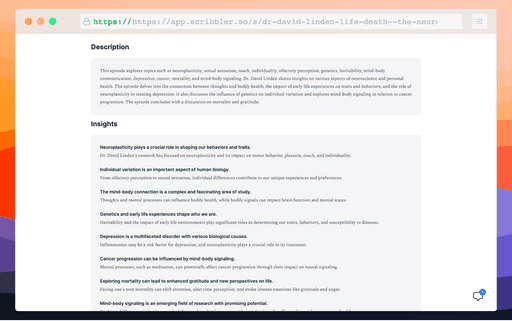
Scribbler sits somewhere between a podcast discovery tool, a transcript viewer, and an AI research assistant for long-form media. It is not a podcast player in the traditional sense, and it is not a general chatbot. Its value comes from turning spoken content into something you can skim, search, quote, and ask questions about.
The main workflow is simple: find a podcast or YouTube video, generate or open a summary, read the key takeaways, use the transcript when you need detail, and chat with the content when you want a more specific answer. Scribbler’s public site describes this as “Search, Synthesize, & Chat,” with features for discovering content, generating quick summaries, viewing full transcripts with timestamps, and asking questions directly against the content.
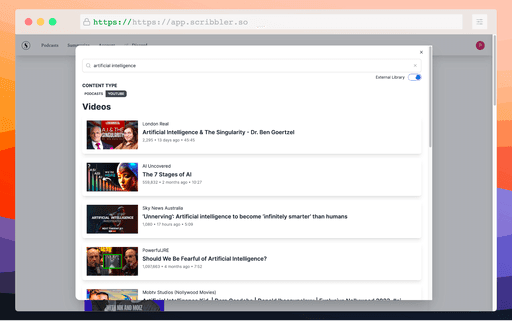
That makes it most useful for information-heavy content: founder interviews, market commentary, educational podcasts, long YouTube explainers, health and fitness interviews, business episodes, investing discussions, and niche expert conversations. It is less about entertainment and more about extracting usable knowledge from content that usually takes 30 minutes to two hours to consume.
| Area | What It Helps With | Why It Matters |
|---|---|---|
| AI summaries | Pulling out the main ideas from podcasts and YouTube videos | Saves time before committing to full content |
| Search | Finding relevant episodes or topics faster | Useful when you follow many shows |
| Transcripts | Reviewing exact sections with timestamps | Helps with quotes, references, and deeper review |
| Content chat | Asking questions about a specific episode or video | Turns passive listening into active research |
| Subscriptions and digests | Keeping up with selected content through email | Better for recurring learning habits |
| On-demand summaries | Requesting summaries for content outside the existing library | Makes the tool more flexible |
The strongest part of Scribbler is its focus. A lot of AI summarizers try to handle every document type, meeting, PDF, webpage, and video at once. Scribbler narrows the job to podcasts and YouTube-style content. That gives the product a clearer use case: you use it when the content is worth learning from, but not always worth watching or listening to in full.
The transcript layer is especially important. Summaries are helpful, but they can flatten nuance. A timestamped transcript gives users a way to check context, jump back into the source, and avoid relying only on the AI’s compressed version. Scribbler’s public site says users can access full transcripts and navigate through episodes by clicking timestamps.
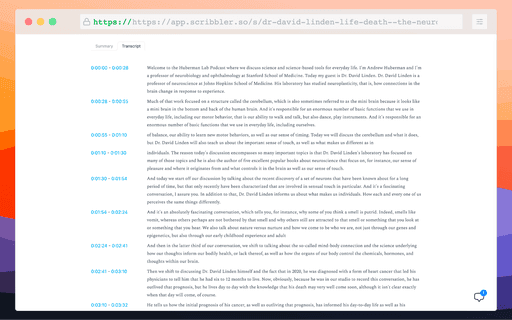
Scribbler works best when the user has too much content and not enough time. That sounds obvious, but it matters. The tool is not trying to replace every listening experience. It is better for triage.
For example, a founder might use it to skim several business podcasts and decide which interviews are worth listening to fully. A researcher could use it to scan YouTube lectures before taking notes. A marketer could follow competitor interviews and pull recurring themes. A newsletter writer could review a week of podcast episodes and spot useful trends.
The content-chat feature is also useful for follow-up questions. Instead of scanning a transcript manually, you can ask about a topic from the episode and get an answer based on that content. Scribbler describes this as having “conversations with the content” and getting answers directly from the source material.
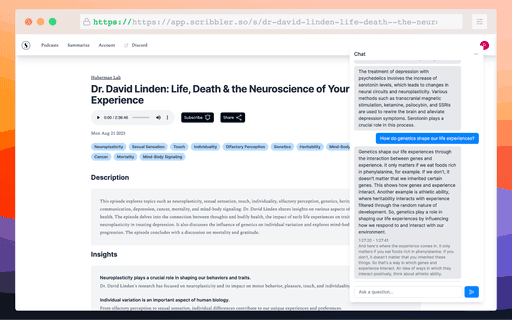
That is the feature that makes Scribbler feel more like a lightweight research layer than a plain summarizer.
Scribbler’s workflow appears built around three habits: discover, summarize, and revisit. The public homepage highlights an intuitive search experience, quick summaries, transcripts, content chat, podcast subscriptions, email digests, and on-demand summary requests.
That combination makes sense. Long-form content is not just hard to consume. It is hard to organize. You hear a useful idea in a podcast, then lose it a week later. You remember a guest said something useful, but not the timestamp. You subscribe to too many shows and stop checking them. Scribbler’s feature set is aimed at that mess.
The subscription and digest angle is practical. If the summaries arrive in your inbox, Scribbler becomes less of a tool you remember to open and more of a filter for ongoing content. That is a better fit for busy users than a one-off summarizer.
The quality of a tool like Scribbler depends on three things: transcript accuracy, summary judgment, and how well the chat feature stays grounded in the source. The public site does not name the underlying AI models, transcription models, or evaluation methods, so users should judge it by testing content they already know well.
A good Scribbler summary should not just list topics. It should tell you what the episode was actually about, what the guest argued, what examples mattered, and whether the content is worth deeper attention. The best summaries for podcasts usually include themes, key claims, practical takeaways, and enough context to avoid misleading compression.
The transcript and timestamp layer helps offset one of the biggest risks of AI summaries: overconfidence. If a claim looks important, users can jump into the transcript and check the surrounding discussion. That matters for journalists, analysts, students, and anyone using summaries for professional work.
Use Scribbler to decide which episodes deserve full listening time. This is useful for people who subscribe to more shows than they can realistically follow.
Long explainers, interviews, product breakdowns, and educational videos can be scanned faster through summary and transcript views.
Scribbler can help collect first-pass insight from interviews, panels, lectures, and expert conversations before deeper note-taking.
Writers can monitor podcasts and videos in a niche, then pull recurring points, guest opinions, or emerging trends.
A manager could share summaries of relevant interviews or industry videos with a team instead of asking everyone to watch the full source.
The tool is a good fit for users who treat podcasts as a learning feed, not just background audio.
Use Scribbler first as a filter, not as the final source. Read the summary to decide whether the content matters. Then use the transcript for any claim, quote, statistic, or detail you plan to reuse.
For dense episodes, ask narrow follow-up questions rather than broad ones. “What did the guest say about customer retention?” will usually be more useful than “Summarize this episode again.” The value of content chat is specificity.
It also helps to build a habit around recurring sources. Subscribe to the podcasts that consistently matter to you, then use digests to stay aware without turning every episode into a time commitment.
Scribbler’s biggest limitation is that summarization is not the same as understanding the full episode. Tone, hesitation, disagreement, humor, and context can disappear when content is compressed. For entertainment, storytelling, debates, and sensitive topics, the full source still matters.
The public site is also fairly light on technical detail. It explains the product’s core features, but it does not give much public information about model names, transcript accuracy benchmarks, supported languages, export options, integrations, workspace features, or how summaries are evaluated. That does not mean those features are absent, but they are not clearly presented on the homepage at the time of review.
There are also some rough edges in the public site copy and footer content, including generic placeholder-style text and inconsistent naming in the footer. That may not affect the product itself, but it does make the public presentation feel less polished than more mature research tools.
You can paste a transcript into a general chatbot and ask for a summary. That works, but it adds friction. You need to find the transcript, copy it, manage length limits, preserve timestamps, and keep track of sources yourself.
Scribbler’s advantage is convenience around the media workflow. It is built for podcast and YouTube content from the start. The search, transcript, timestamp, subscription, digest, and content-chat pieces are more useful together than they would be as separate manual steps.
Its trade-off is flexibility. A general AI assistant may handle more formats, broader research tasks, and custom workflows. Scribbler is better when the job is specifically: “Help me get value from this audio or video content faster.”
Scribbler is best for podcast-heavy learners, YouTube researchers, founders, marketers, analysts, students, newsletter writers, and professionals who follow long-form expert content. It is especially useful for people who want to keep learning from audio and video but need a faster way to filter, revisit, and extract ideas.
It is probably not the right tool if you mainly listen to podcasts for entertainment, prefer full-context listening, or need a deeply documented enterprise knowledge system. It is also not a replacement for careful source review when accuracy matters.
Scribbler is best understood as a time-saving research layer for podcasts and YouTube videos. Its strongest value is not just summary generation. It is the combination of summaries, searchable discovery, timestamped transcripts, content chat, subscriptions, and digests.
The main caveat is that the public product information is still light on technical specifics, so serious users should test it with familiar content before relying on it for high-stakes research.
TAGS: Podcast
Related Tools:
Simplifies video and podcast editing
Generates concise, human-reviewed summaries
Provides concise text and audio summaries of podcast episodes
Turns customer calls into podcast-style audio summaries
AI tool that generates personalized daily podcasts

Enhances online communication by eliminating background noise