

Share this tool:
 |
Description:
- Introduction
- What Krisp Actually Is
- What Krisp Does Best
- Core Features and Capabilities
- Workflow and Ease of Use
- Audio Quality and Real-Time Voice Control
- Meeting Notes, Transcripts, and Summaries
- Accent Conversion and Global Communication
- Call Center and Enterprise Voice AI
- Developer SDK and Voice AI Infrastructure
- Security and Privacy Notes
- Best Use Cases
- Where Krisp Is Strongest
- Where It Is Weaker
- Practical Tips
- Final Takeaway
Krisp started as a real-time noise-cancellation tool, but it is now broader than that. The current product stack covers AI noise cancellation, meeting transcription, meeting recording, AI notes, summaries, action items, accent conversion, call center voice AI, and developer SDKs for embedding real-time voice cleanup into other products.
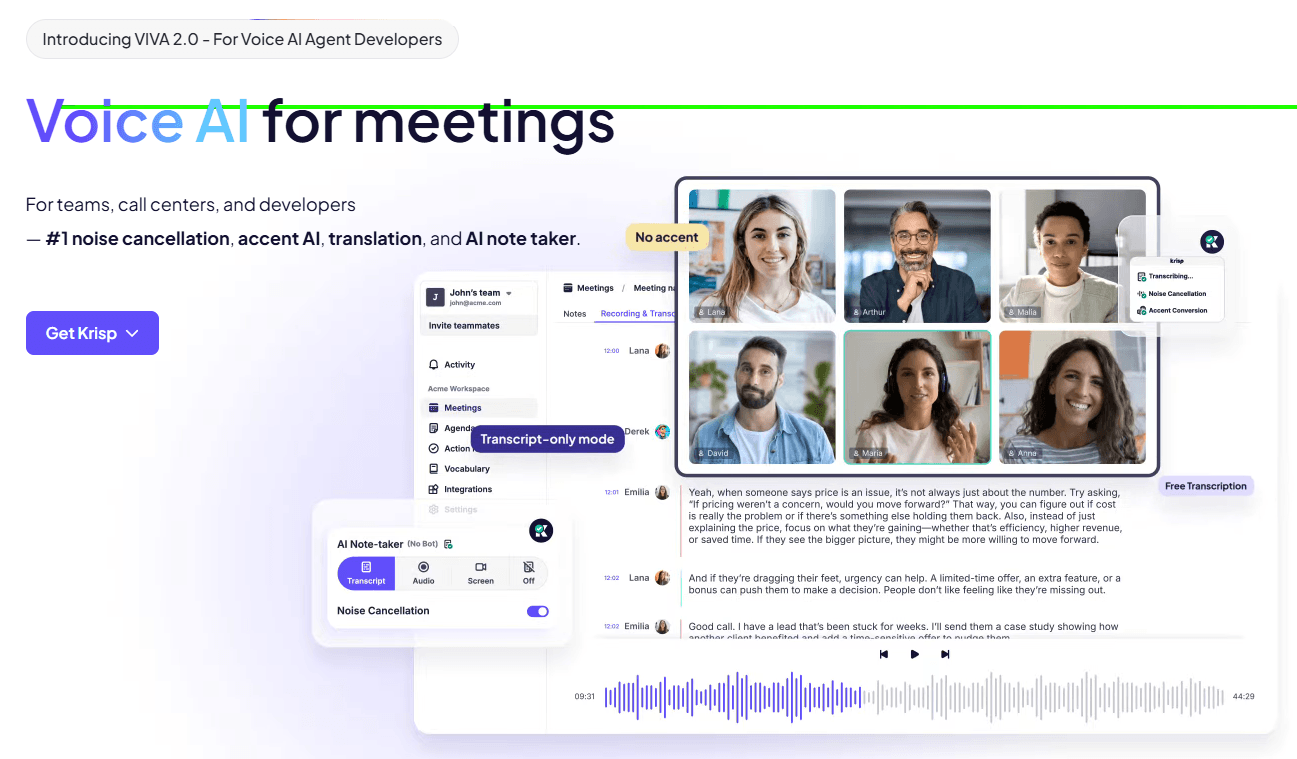
Krisp is a Voice AI platform for making spoken conversations clearer and easier to document. Krisp describes its products as running on the same AI voice engine for background-noise removal, accent conversion, real-time transcripts, and notes, while also noting that its products are separate and installed individually.
That distinction matters. Krisp is not just a meeting bot, and it is not just a noise filter. It works more like an audio layer that sits between your microphone, speakers, meeting apps, and documentation workflow. For everyday users, that means cleaner calls and automatic notes. For teams, it means meeting records, searchable transcripts, summaries, and action items. For call centers and developers, it means real-time voice enhancement, accent conversion, voice translation, agent assist, and SDK-level integration.
| Layer | What it does | Why it matters |
|---|---|---|
| Noise Cancellation | Removes background noise from calls. | Makes live meetings, support calls, and remote work sound cleaner. |
| AI Meeting Assistant | Records, transcribes, summarizes, and captures action items. | Turns meetings into usable follow-up material without a visible meeting bot. |
| Accent Conversion | Adjusts or adapts accented speech in real time. | Helps global teams and call centers reduce misunderstandings. |
| Meeting Recording | Captures meetings across conferencing apps. | Useful for review, accountability, and async follow-up. |
| Call Center AI | Adds speech assist, agent assist, and analytics. | Built for high-volume customer conversations. |
| AI Voice SDK | Embeds Krisp voice models into other products. | Useful for apps, voice agents, audio meetings, streaming, and communication platforms. |
Krisp is strongest when the problem is live voice quality. If you have keyboard clicks, traffic, office noise, background voices, echo, or inconsistent call environments, Krisp is built to clean the conversation before it reaches the meeting app or transcript system. Its noise-cancellation product page positions Krisp around noise cancellation, call transcription, and accent conversion for clear call-center and meeting communication.
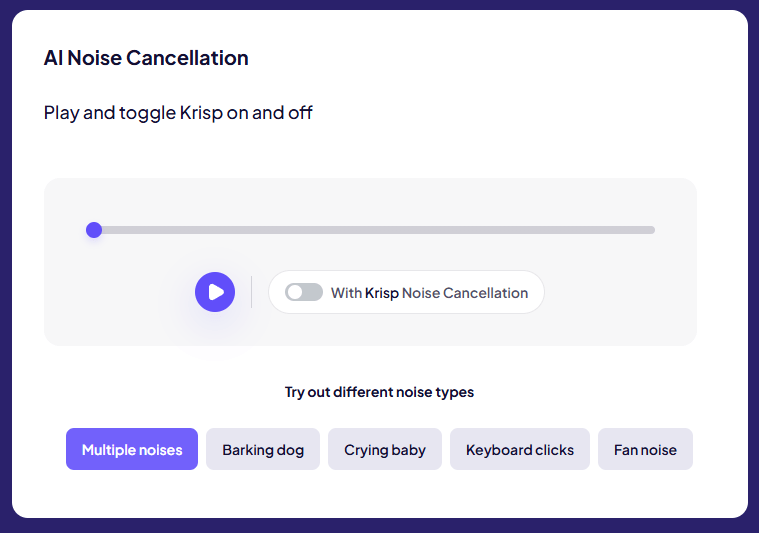
The second strength is that Krisp connects audio cleanup with meeting documentation. Its AI Meeting Assistant combines real-time noise cancellation and AI note-taking, and Krisp specifically says cleaner transcripts improve note quality because the audio is already cleaned before documentation happens.
The third strength is that Krisp does not depend on a meeting bot joining the call. Its AI Note Taker page describes a bot-free experience, and the meeting recorder page says Krisp records and transcribes meetings across any conferencing platform. That is important for teams that find visible meeting bots distracting, awkward, or restricted by meeting settings.
Removes background noise from speech in real time, with Krisp’s SDK also supporting inbound and outbound noise removal.
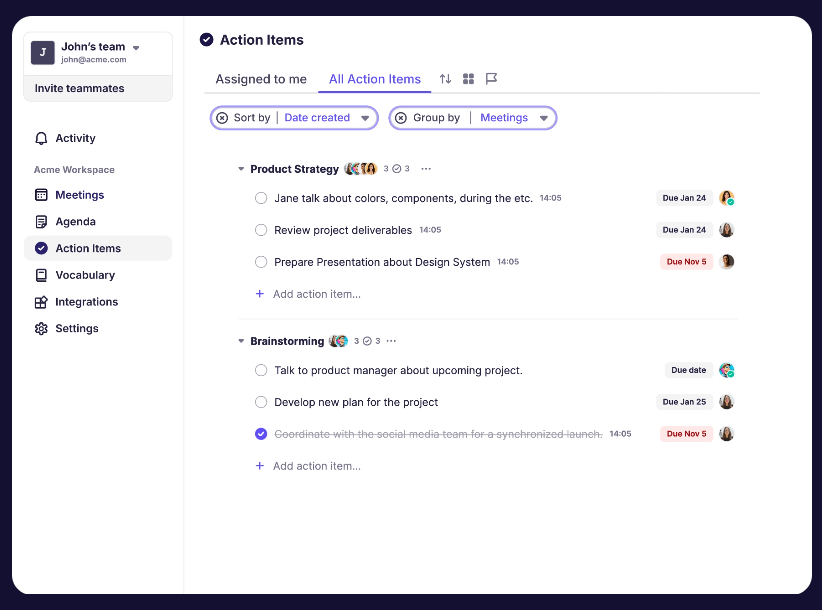
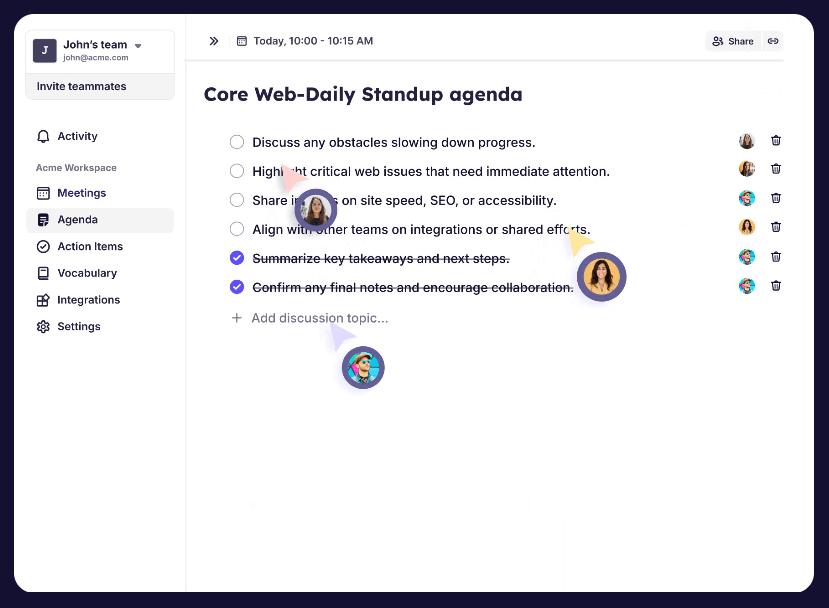
Captures online and in-person meetings, then generates notes, summaries, discussion points, and action items.
Creates searchable transcripts, supports speaker labels and timestamps in some workflows, and can generate summaries and action items from the transcript.
Records and transcribes meetings across conferencing apps without requiring a bot to visibly join the call.
Adjusts LatAm-English, Indian-English, and Filipino-English accents in real time on the speaker side, while listener-side Accent Conversion adapts others’ accents only for the listener.
Gives developers real-time models for voice isolation, turn-taking, noise cancellation, background voice cancellation, and accent conversion.
Krisp’s normal workflow is easy once you understand the routing. You install Krisp, select it as your microphone and speaker inside your meeting app, and let it process audio in the background. For Google Meet, Krisp’s own setup description says users sign up, download the app, and change microphone and speaker settings in Google Meet to Krisp so the audio technology can integrate with meetings.
For meeting notes, the workflow is also fairly direct. Enable the AI note-taking or recording feature, join the meeting, and Krisp captures the conversation. Afterward, the user can review transcripts, summaries, recordings, action items, and shareable notes. For Teams, Krisp describes a three-step setup: download and install, configure by selecting Krisp as speaker and microphone, then collaborate by sharing recordings and transcriptions.
The benefit is that Krisp works across meeting environments rather than requiring every platform to provide the same native feature set. Krisp’s recording page says it records and transcribes meetings on any app, including Zoom, Google Meet, Microsoft Teams, and more.
The trade-off is that audio routing needs to be set correctly. If the wrong microphone or speaker is selected, Krisp may not process the right stream. This is not unique to Krisp; it is common with virtual audio tools. But it means users should test the setup before an important call.
Krisp’s strongest technical value is real-time speech enhancement. Its SDK documentation says its AI Voice SDK is designed for real-time communication applications such as voice AI agents, online video and audio meetings, mobile calls, streaming, broadcasting, and podcasting.
The audio-quality caveat is important. Krisp’s own quality documentation says its AI models are primarily designed for close-proximity, near-field environments with a mouth-to-microphone distance under 50 cm. Effectiveness in more distant environments depends on factors like distance, echo, signal-to-noise ratio, and the device’s audio system.
That means Krisp can help a lot, but it is not a replacement for basic recording discipline. A laptop mic across the room in a reflective space will still be harder to clean than a close headset microphone. Krisp is best when the voice is already reasonably present and the main problem is noise, background voices, or call clarity.
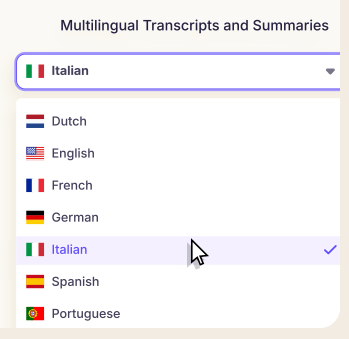
Krisp’s meeting assistant is strongest because it combines audio cleanup with documentation. The AI Note Taker page says Krisp handles online and in-person meetings, provides flexible short or long summaries, captures action items automatically, documents discussion points, and transcribes meetings in 17+ languages.
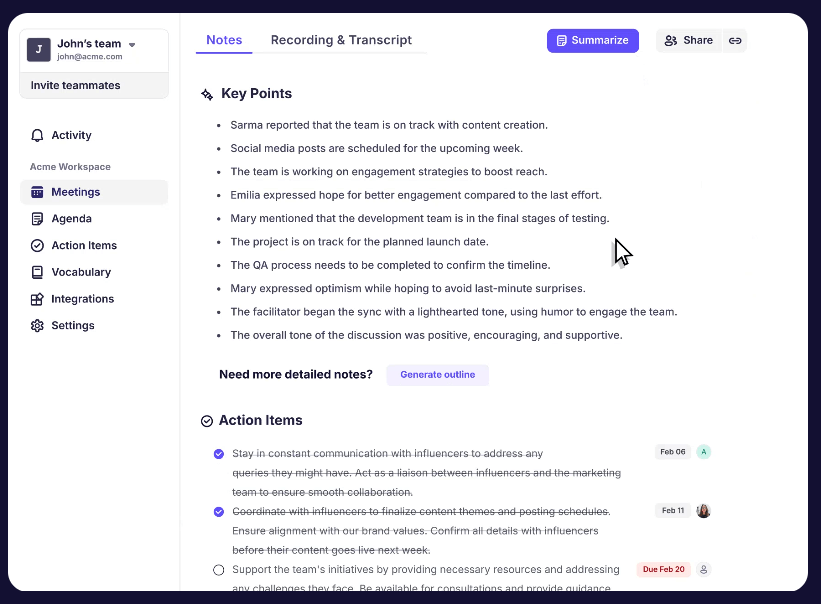
The transcription workflow is useful because Krisp does not stop at raw text. Its meeting transcription page says it turns transcripts into easy-to-read highlights, generates short summaries and overviews, and identifies action items and discussion points for follow-up.
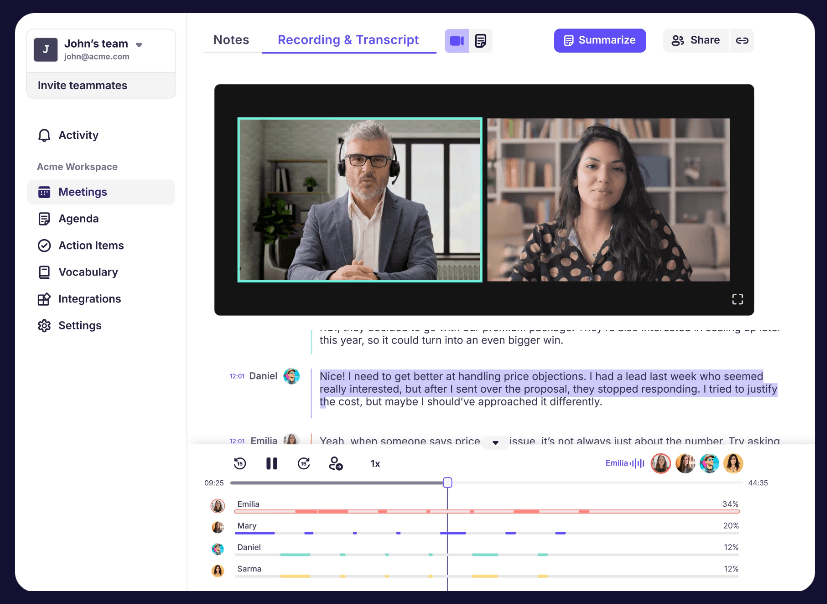
For teams, that matters more than transcription alone. A transcript is useful, but it can still be long and hard to scan. Krisp’s strongest meeting output is the combination of transcript, speaker structure, summary, action items, and shareable follow-up. Its Google Meet transcription page also describes structured notes, live or recorded transcription, action item extraction, AI chat over meeting notes, speaker labels, and timestamps.
Accent Conversion is now one of Krisp’s most distinctive features. Speaker-side Accent Conversion adjusts LatAm-English, Indian-English, and Filipino-English accents in real time while keeping the speaker’s natural voice characteristics.
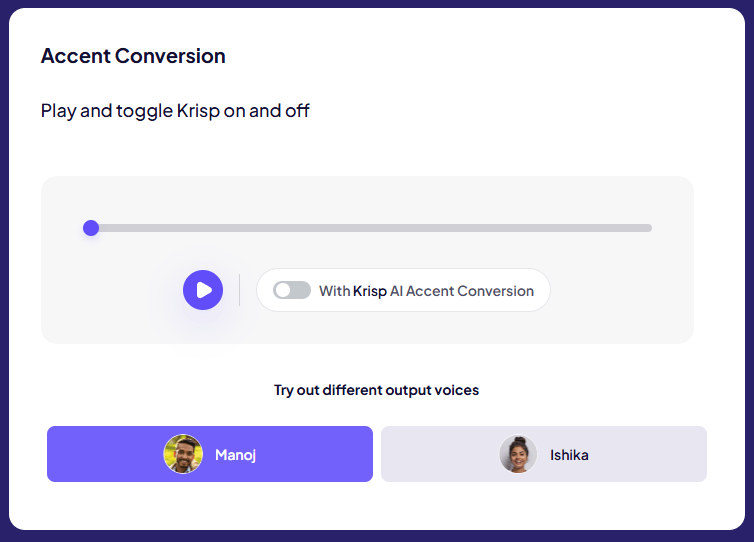
Listener-side Accent Conversion is different. Instead of changing how one speaker sounds to everyone, it adapts incoming accented speech only for the listener who enables it. Krisp says the speaker does not install anything, does not change how they talk, and other people do not hear the adapted audio.
That is a meaningful product distinction. Speaker-side conversion is useful when one person wants to make their speech clearer to everyone else. Listener-side conversion is useful when one listener wants help understanding accents without asking others to change their speech. Krisp says the listener-side feature runs on-device, is designed for near-real-time use around 200 ms or less, and does not store or send conversations to external servers for that processing.
The practical caution is that accent AI is sensitive territory. Krisp frames the listener-side feature as comprehension-first rather than voice standardization, but users and teams should still roll it out thoughtfully. It should reduce friction, not pressure people to erase their speech identity.
Krisp has a separate call-center layer that goes beyond ordinary meeting notes. Its call-center page lists Speech Assist features like Accent Conversion, Voice Translation, and Noise Cancellation; Agent Assist features like call summaries, compliance macros, and knowledge chat; and Speech Analytics features such as call scoring and compliance monitoring.
That makes Krisp especially relevant for BPOs, offshore teams, and high-volume customer support operations. The same page says Krisp’s call-center platform includes real-time accent conversion, voice translation, noise cancellation, agent assist, and more. It also describes real-time voice translation for call center agents with support for 80+ languages.
This is a different buyer than a solo remote worker. For a freelancer, Krisp is mostly about cleaner calls and better notes. For a call center, it is about reducing misunderstandings, improving agent focus, documenting calls, supporting compliance, and making distributed voice operations easier to manage.
Krisp’s SDK is important because it shows that the company is not only selling an end-user app. The AI Voice SDK includes models for voice isolation, turn-taking, noise cancellation, background voice cancellation, and accent conversion. Krisp says the SDK is deployed on 200M+ devices and processes 75B+ minutes of speech every month.
The browser SDK is built for web communication products. Krisp’s JavaScript SDK uses WebRTC and Web Audio as a noise audio filter, runs the neural network through WASM for performance, processes audio buffers in chunks, and uses a worker to offload the main thread.
For voice AI agents, the VIVA SDK is especially relevant. Krisp says it is designed to improve turn-taking and speech-to-text accuracy using small CPU-based models for voice isolation, turn-taking, and voice activity detection.
That makes Krisp useful for companies building AI agents, call platforms, meeting tools, WebRTC products, streaming products, or voice-enabled apps. The end-user app solves personal meetings. The SDK solves product-level voice quality.
Krisp’s security page says the company prioritizes security and confidentiality across meeting notes, noise cancellation, accent localization, and speech translation workflows.
For listener-side Accent Conversion specifically, Krisp says the audio is processed on the user’s device in real time, and conversations are not stored or sent to external servers for that feature.
Recording still needs judgment. Krisp’s meeting recorder page explicitly notes that recording policies vary by company, region, and platform, and users should check local regulations and let participants know if they are recording. That last point matters. Krisp can make recording and note-taking easier, but it does not remove consent, workplace policy, or compliance responsibilities.
- Remote workers: Krisp is useful for people taking calls from home offices, coworking spaces, shared apartments, or inconsistent travel setups.
- Sales and customer success teams: The combination of clean audio, transcripts, summaries, action items, and CRM-style workflow integrations makes Krisp practical for external calls and follow-up-heavy work. Krisp’s Google Meet note taker page specifically mentions syncing notes with CRMs and project-management tools like Salesforce, Pipedrive, Affinity, HubSpot, Asana, Monday, Jira, and Zapier.
- Managers and meeting owners: Krisp is useful when the person running the meeting also needs a record of decisions, follow-ups, and discussion points without manually taking notes.
- Global teams: Accent Conversion, multilingual transcription, and real-time clarity features make Krisp especially relevant for teams working across accents, languages, and noisy environments.
- Call centers and BPOs: Krisp’s call-center product is a natural fit for large voice operations that need noise cancellation, accent conversion, translation, agent assist, summaries, and analytics.
- Developers building voice products: The SDK layer is useful for teams adding noise suppression, voice isolation, turn-taking, and accent conversion into communication apps, voice agents, or WebRTC products.
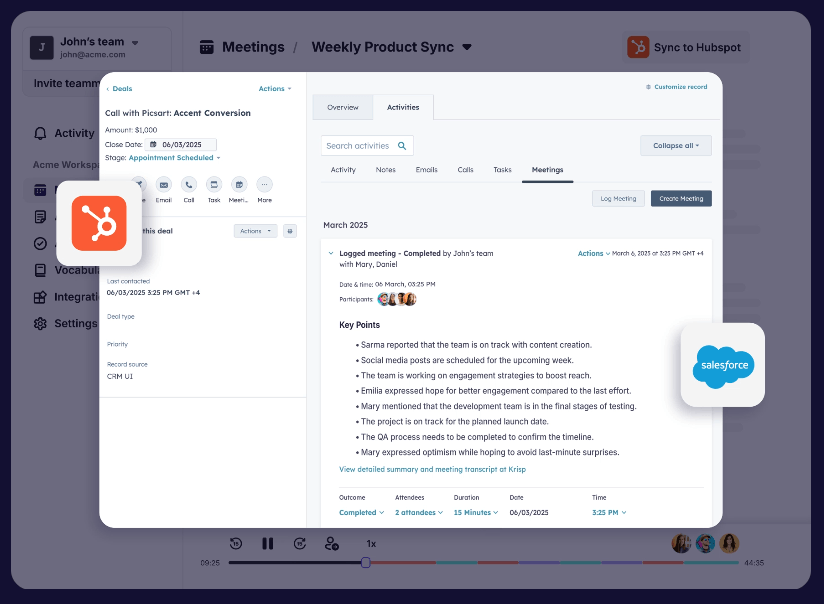
Krisp is strongest when voice quality and documentation are connected. Plenty of tools can transcribe meetings after the fact. Krisp’s advantage is that it improves the audio path first, then turns the meeting into transcripts, summaries, notes, action items, and searchable follow-up material.
It is also strong for people who do not want a meeting bot joining every call. The bot-free design makes Krisp feel less intrusive than tools that appear as a separate participant.
The third strength is platform flexibility. Krisp works across common meeting tools because it operates through the audio layer rather than depending entirely on native app integrations. Krisp’s meeting recorder page says it is compatible with any conferencing app, and its Google Meet page says it works with Google Meet, MS Teams, Zoom, Webex, and Slack Huddle.
Krisp is weaker when the microphone setup is poor. Its own speech-quality guidance says performance is strongest in close-proximity microphone conditions and may vary with distance, echo, signal-to-noise ratio, and device characteristics.
It is also weaker if the user only needs simple meeting notes and does not care about audio quality. In that case, a basic meeting assistant may be enough. Krisp’s advantage is clearest when noisy environments, accents, speaker clarity, or audio reliability are part of the problem.
The setup can also create friction for less technical users. Krisp must be selected correctly as a microphone and speaker in meeting tools, and users need to know when recording or note-taking is active. That is manageable, but it is still more setup than joining a call and doing nothing.
Accent Conversion also needs careful use. Krisp says listener-side conversion is designed to preserve meaning and speaker identity, but it also notes that results depend on input quality and users can toggle it off if it is not helping in a specific moment.
- Use a close microphone. Krisp performs best when the voice is captured clearly near the mic rather than from across the room.
- Test your input and output before important meetings. Make sure Krisp is selected as both microphone and speaker where needed, especially in Zoom, Google Meet, Teams, or Webex.
- Use Krisp when noise affects transcript quality. The biggest payoff is not just nicer audio; cleaner speech can improve transcripts, notes, and summaries downstream.
- Review summaries before sending them. Krisp can extract action items and key decisions, but important client, legal, medical, or executive notes should still be checked.
- Treat Accent Conversion as an optional comprehension tool. It can help reduce misunderstandings, but it should be used in a way that respects speakers rather than making accent reduction feel mandatory.
- For teams, set recording expectations clearly. Krisp itself notes that recording rules vary and participants should be informed when recording is happening.
Krisp is best understood as a real-time Voice AI platform, not just a noise-cancellation app. Its strongest value comes from combining cleaner audio with meeting transcription, bot-free notes, summaries, action items, accent conversion, recording, and developer-grade voice infrastructure.
It is best for remote workers, global teams, sales teams, managers, call centers, and product teams building voice experiences.
The main caveat is that Krisp works best when the audio setup is sensible and the workflow is clear. It can make meetings cleaner and easier to follow, but good microphone habits, consent practices, and human review still matter.
TAGS: Podcast Voice/Audio Modulation
Related Tools:
AI voice changer and soundboard tool
AI tool that generates personalized daily podcasts
Enables users to create and publish engaging 2D games

Enables users to create 2D and 3D games without coding

Enables users to create 2D games quickly and easily

AI for audio recording, cleanup, transcription, and browser-based editing