

Share this tool:
 |
Description:
Pinokio is a local AI app launcher for people who want to run tools like image generators, voice models, video tools, agents, and utilities on their own machine without manually setting up every dependency from scratch. Its biggest value is not that it creates AI outputs by itself. It gives users a cleaner way to discover, install, launch, and manage open-source AI apps that would otherwise require terminal commands, GitHub cloning, Python environments, CUDA setup, package installs, and troubleshooting.
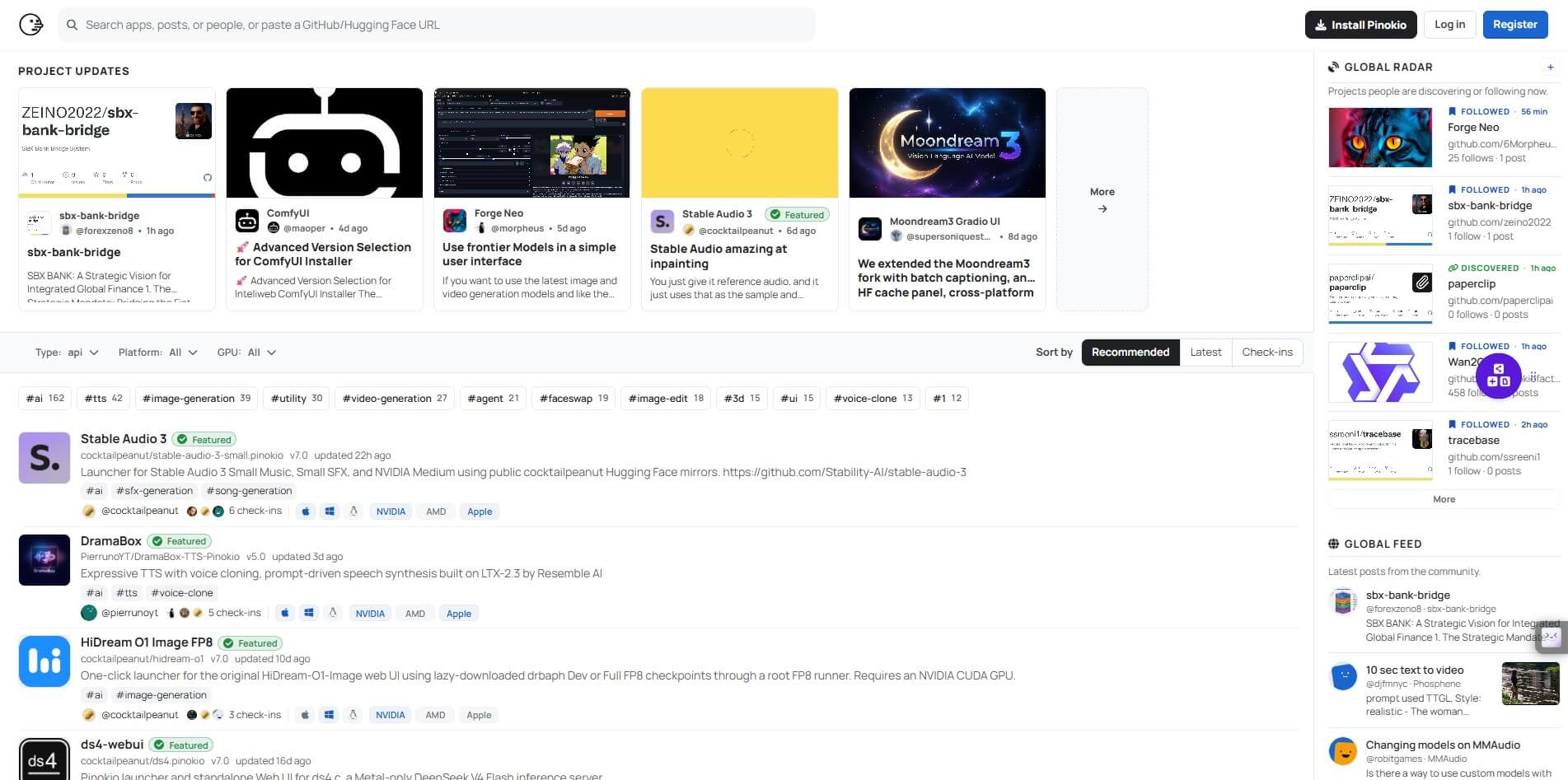
The clearest way to understand Pinokio is this: it is a desktop launcher for local web apps and AI servers. The official site calls it a “Universal One-Click Launcher” and a “localhost platform for humans and AI,” with support for macOS, Windows, and Linux.
That matters because many open-source AI tools are powerful but painful to install. Pinokio wraps much of that setup into scripts. Instead of copying commands from a GitHub README, users can browse a directory, install an app, and launch it from a graphical interface.
It is not a polished single-purpose AI tool like an image generator or chatbot. It is closer to an operating layer for local AI experimentation.
Pinokio is strongest for users who want local AI apps but do not want to manage every environment by hand. The official site highlights four core jobs: discovering open-source apps, launching them with one-click launchers, managing multiple versions, and letting agents control apps or workflows.
| User Type | Why Pinokio Helps |
|---|---|
| AI hobbyists | Easier access to local image, video, voice, and agent tools |
| Creators | Quick testing of tools like ComfyUI-style workflows, TTS apps, and video models |
| Developers | Local app sandboxes without rebuilding the setup every time |
| Educators and testers | Faster demos of open-source AI tools on owned hardware |
| Privacy-conscious users | More workflows stay on the local machine when the app itself supports local use |
The key phrase is “when the app itself supports local use.” Pinokio can simplify setup, but it does not magically make every model lightweight, private, or offline.
Pinokio’s main feature is turning complex open-source app installs into guided launcher workflows.
The desktop site says Pinokio keeps runtimes, logs, and files on the user’s machine, which is important for local testing and file control.
The Pinokio directory includes filters for platform, GPU type, and categories such as AI, TTS, image generation, video generation, agents, image editing, and 3D.
Pinokio supports installing and switching between multiple copies or versions of the same app side by side.
Pinokio positions itself as a place where AI agents can control apps and workflows without extra setup.
Its GitHub README describes Pinokio as a terminal-like app with a user-friendly interface that can run scripts, download files, and execute commands.
Pinokio’s workflow is more approachable than installing AI apps manually, but it still expects some patience. The usual flow is simple: install Pinokio, search the app directory, choose an app, run the installer, then launch the app locally.
The official directory shows a wide range of apps, including audio generation, TTS, image generation, LLM, video generation, 3D, metadata utilities, and agent-related tools. Some listings also state hardware needs, such as NVIDIA GPU requirements or Apple Silicon support.
That variety is part of the appeal. It also creates the main catch. Pinokio is only as smooth as the app script, hardware match, model download, and dependency setup behind it. A clean launcher can still fail if the model requires more VRAM than your system has, if drivers are wrong, or if an upstream project changes. For beginners, Pinokio lowers the wall. It does not remove the wall completely.
Security deserves more attention with Pinokio than with most consumer AI apps because Pinokio scripts can run commands. The GitHub README is direct about this: Pinokio scripts can run anything a terminal script can run, including commands that download and execute files.
The positive side is that Pinokio’s README also explains its isolation approach. By default, scripts are stored under ~/pinokio/api, and built-in package managers install binaries under ~/pinokio/bin. Scripts are public Git repositories, written in readable JSON, so users can inspect them before running.
That is useful, but users should still treat Pinokio like a local software installer, not like a harmless browser extension. Install from trusted listings, check what an app is downloading, and be cautious with unknown repositories.
Pinokio makes the most sense when the setup process is the biggest barrier.
It is a strong fit for local generative image workflows, TTS experiments, local voice tools, video model testing, LLM interfaces, model utilities, and app stacks that normally require command-line setup. It is also useful when you want separate installs of the same app for different workflows, since Pinokio supports multiple versions side by side.
It is less ideal for users who only want one polished cloud app. If someone wants a finished image generator with account login, cloud rendering, and support staff, Pinokio may feel too hands-on. It is built for people who want local control and are willing to manage local trade-offs.
- Start with well-known or featured apps before installing obscure projects. This gives you a better read on how Pinokio behaves when the script is maintained.
- Check hardware notes before installing. The directory includes GPU filters and some listings mention requirements such as NVIDIA, AMD, Apple, or specific GPU needs.
- Keep model storage in mind. Local AI tools can download large files, and Pinokio does not change the size of the models themselves.
- Treat each app as its own product. Pinokio installs and runs apps, but the quality, interface, speed, and output depend on the app you choose.
Pinokio’s main limitation is that it simplifies installation more than it simplifies AI itself. Local models still need the right hardware. Some apps will run slowly. Some will fail. Some will need manual fixes.
The second limitation is trust. Pinokio provides a cleaner launcher and has verification processes for featured scripts, but it still deals with scripts that can execute commands. That means cautious users should stay selective.
The third limitation is polish. Pinokio is not one unified AI workspace. It is a launcher for many different apps, so the user experience changes from app to app. One tool may feel clean, another may feel experimental.
Pinokio is best for people who want to run open-source AI apps locally without spending half the day in setup instructions. Its strongest value is reducing install friction for local AI tools across image, video, voice, LLM, agent, and utility workflows.
The main caveat is that Pinokio does not remove hardware limits, script trust issues, or app-level complexity. It makes local AI more reachable, but users still need to treat it like real software running on their machine.
TAGS: Aggregators Productivity
Related Tools:

AI assistant that delivers real-time insights and transcription

Create fashion models and backgrounds from simple descriptions

Interact with PDF documents conversationally
Offers features like advanced content generation

Email tool that summarizes long threads and offers smart reply

Simplifies presentation and document creation