

Share this tool:
 |
Description:
- Introduction
- What OneSky Actually Is
- What OneSky Does Best
- Core Features and Capabilities
- How the Localization Workflow Feels
- Context Is the Real Control Layer
- AI Quality Assessment and Human Review
- Developer Workflow and Automation
- Apps, Websites, and Games
- Languages, File Formats, and Coverage
- Best Use Cases
- Practical Tips
- Limitations and Trade-Offs
- Final Takeaway
OneSky is a localization platform built around OLA, the OneSky Localization Agent. Its current product direction is clear: help teams translate and review multilingual content with AI agents, while keeping brand voice, context, glossaries, translation memory, screenshots, and human review close to the workflow.
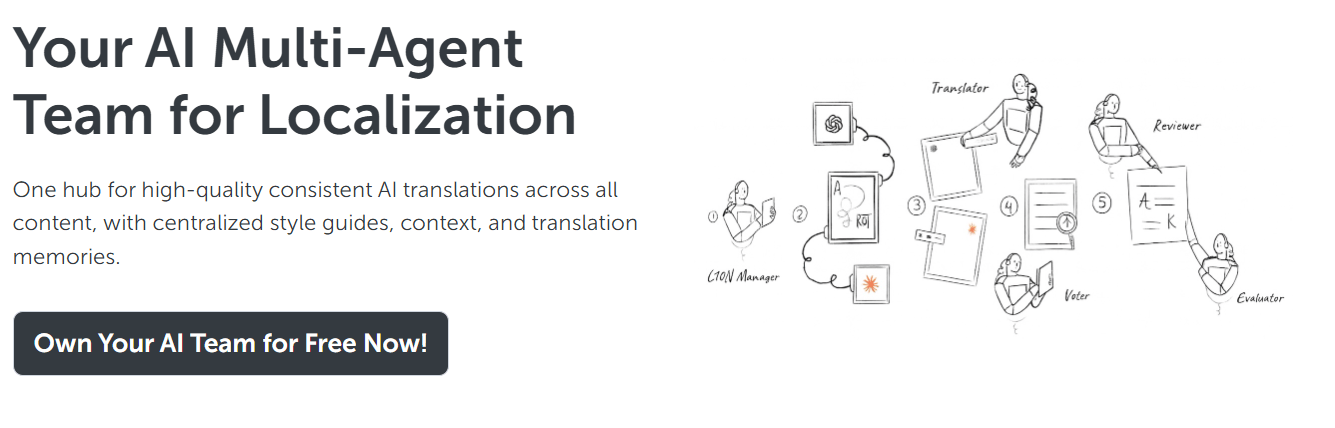
OneSky is not just a basic machine translation tool. Its current platform is centered on OLA, which OneSky describes as an AI multi-agent team for localization. The platform is designed to centralize AI translation and QA across content, while using style guides, context, and translation memories to keep output consistent across websites, apps, documents, and campaigns.
The easiest way to understand OneSky is to split it into five layers.
| Layer | What it does | Why it matters |
|---|---|---|
| AI Localization Agent | Uses role-based AI agents for translation, review, evaluation, and feedback loops. | Better fit for localization than a single generic AI translation prompt. |
| Context System | Uses project descriptions, tone, glossaries, screenshots, string descriptions, translation memory, and length limits. | Helps translations fit the actual product instead of treating every string as isolated text. |
| LQA Layer | Screens AI-drafted translations, fixes what it can, and flags issues for human follow-up. | Keeps quality control inside the localization workflow. |
| Developer Workflow | Supports API, webhooks, CLI, and file-based localization processes. | Makes it useful for product teams shipping updates continuously. |
| Human Translation Support | OneSky’s legacy service includes professional translators and localization support. | Useful when AI translation still needs human judgment or final polish. |
That combination makes OneSky more specialized than a general AI translator. It is built for teams that need localization as an operational system, not just a one-time translation task.
OneSky’s strongest idea is multi-agent localization. Instead of sending source text to one model and accepting the result, OLA uses multiple role-specific agents. OneSky describes agents for localization management, translation, voting between translation options, reviewing translated content, evaluating quality, and looping feedback until further AI optimization is no longer possible.
That matters because localization is rarely just “translate this text.” A product string may need to fit inside a button. A game line may need to preserve tone. A help-center sentence may need to stay clear. A marketing headline may need to match brand voice. OneSky is strongest when those constraints matter.
The second major strength is context. OneSky’s context-aware translation page says users can provide style guides, glossaries, UI screenshots, metadata, project descriptions, tone, string descriptions, translation history, length limits, and translator notes. That context helps the AI agents understand not only the words, but also the job those words are doing.
The third strength is quality screening. OneSky’s LQA page says its AI-driven Language Quality Assessment can detect translation issues, automatically correct what it can, flag unfixable errors for human review, and produce reports and flagged bundles for post-editing.
OLA uses specialized AI agents for translation, review, voting, evaluation, and feedback instead of relying on one generic translation pass.
Project descriptions, tone, glossaries, screenshots, string notes, translation history, and length limits help translations stay accurate and on-brand.
OneSky can screen AI-drafted translations, auto-fix some issues, and flag higher-risk strings for human review.
OneSky supports REST API, webhooks, and CLI tooling for localization workflow automation.
OLA supports many string and document formats, including iOS, Android, JSON, XLIFF, PO, RESX, YAML, TMX, TXT, XLS, and XLSX formats.
OneSky still maintains a professional translation service layer, with in-house translators covering 70+ languages for apps, games, and websites.
OneSky’s workflow is built around delegation. The platform asks you to provide the content, context, and preferences, then lets OLA handle much of the translation and review process.
A typical product workflow looks like this:
| Step | What happens | Why it matters |
|---|---|---|
| Prepare source content | Upload string files, documents, or app/site content. | Gives OLA the material to translate. |
| Add context | Provide style guide, glossary, tone, screenshots, descriptions, and length limits. | Reduces blind translation guesses. |
| Let OLA process the work | AI agents translate, compare, review, and evaluate translations. | Moves the workflow beyond one-pass machine translation. |
| Review flagged issues | Human reviewers focus on items the system could not safely resolve. | Keeps review effort focused where it matters. |
| Export or sync | Use platform exports, API, webhooks, CLI, or connected workflows. | Helps localization keep up with product releases. |
The strongest part of this workflow is that OneSky does not expect you to hand-edit every string from scratch. It tries to use AI for first-pass translation, review, and quality triage, while still leaving room for human attention where the system detects risk.
That makes it especially practical for teams with frequent content updates. A mobile app, game, web product, or SaaS platform can quickly accumulate thousands of UI strings, error messages, onboarding flows, settings labels, and help text. A plain translator can handle the words, but a localization system has to handle context, consistency, file formats, release timing, and review workflow.
The most important thing about OneSky is not that it uses AI. It is how much context it tries to feed into the AI system.
OneSky’s context-aware page gives several useful examples. A project description can explain that the product is a playful mobile app aimed at Gen Z. Tone controls can guide word choice and punctuation. Glossary terms can preserve brand names and preferred terminology. String descriptions can clarify whether “Apple” is a fruit or a company. Screenshots can show where a phrase appears in the UI. Length limits can keep button text from breaking layouts.
That is exactly what localization tools need. Many translation errors happen because the translator, machine or human, cannot see the product. Short strings are especially risky. “Back,” “Share,” “Draft,” “Save,” “Post,” and “Report” can all mean different things depending on the interface.
OneSky’s value is highest when teams actually use this context system. If you only upload raw strings with no project description, glossary, screenshots, or notes, you are not using the platform at its best.
OneSky’s LQA layer is one of its more important features because AI translation still needs quality control. The LQA page describes a workflow where OLA screens translation quality, flags problematic translations, auto-fixes what it can, and creates downloadable reports or flagged bundles for human post-editing.
This is the right direction for AI localization. The goal is not to pretend AI translation is perfect. The goal is to use AI to handle the obvious work, detect likely problems, and help humans focus on the strings that actually need judgment.
That matters for teams localizing product interfaces, app store metadata, help content, games, and marketing pages. A single mistranslated button can confuse users. A bad error message can make troubleshooting harder. A tone mismatch can make a brand feel inconsistent across markets. LQA helps reduce that risk before content goes live.
The practical caveat is that LQA is still a support layer, not a guarantee. Human review remains important for legal content, medical content, regulated claims, humor, emotionally sensitive copy, and anything that carries brand or compliance risk.
OneSky is clearly designed for teams that need localization to fit into a development workflow. Its automated localization page lists REST API access, webhooks, and CLI tooling. The page describes the API as a way to manage localization workflow and objects, webhooks as a way to update component statuses in response to localization events, and the CLI as a command-line tool for localization workflow management.
That matters because localization becomes painful when it is disconnected from product releases. Developers ship new strings. Product managers update onboarding flows. Designers change labels. Marketing teams update pages. If every update requires a manual export, email thread, translation order, download, and re-import, localization slows down the entire release cycle.
OneSky also supports DevOps-oriented localization sync with GitHub, GitLab, and Bitbucket on its file-format pages, along with API support, webhooks, and CLI tools.
For product teams, this is one of the most important reasons to consider the platform. OneSky is not only for translators. It is also for developers and release teams that need translation updates to move through the same rhythm as product updates.
OneSky’s current pages highlight web apps, sites, mobile apps, and games as major use cases. For web localization, OneSky positions OLA around translating web apps and sites, supporting multilingual SEO, and preserving brand consistency with glossaries, tone, style, and translation memory.
For mobile apps, OneSky emphasizes cross-platform translation consistency, multilingual ASO, iOS and Android string file support, and developer tooling for continuous localization.
This is a strong fit because apps and games have localization needs that are more complex than normal document translation. They involve UI strings, placeholders, character limits, app store metadata, screenshots, release cycles, updates, and user-facing support content. OneSky’s file support and automation tools make more sense in those environments than in a simple “translate this paragraph” workflow.
The older OneSkyApp site also shows the company’s background in app, game, and website localization, including professional translators, screenshot management, glossary tools, and on-device testing.
OneSky says OLA supports 100+ languages and 800+ dialects for AI translation and review services.
The file-format coverage is also broad. The main OneSky page lists support for more than 30 string file and document types, including iOS .plist, .strings, .stringsdict, .xcstrings, Android XML, i18next JSON/HJSON variants, INI, Require.js, PHP arrays, PO files, Java properties, RESX, TypeScript QTTS, XLIFF, YAML, TMX, TXT, XLS, and XLSX.
That breadth is important for teams managing several platforms. A company with iOS, Android, web, and help content does not want separate localization processes for every format. OneSky’s strongest users are likely teams that need to unify those workflows.
- Mobile app teams: OneSky is a strong fit for teams translating iOS and Android apps, especially when they need string files, screenshots, character limits, app store metadata, and release automation handled in one workflow.
- Web apps and SaaS products: Teams with dashboards, onboarding flows, error messages, settings pages, help content, and marketing pages can use OneSky to keep multilingual product copy more consistent.
- Game developers: Games often need tone, story context, UI limits, character names, and consistent terminology. OneSky’s context system and legacy game/app localization background make it relevant here.
- Teams replacing manual localization files: If localization still happens through spreadsheets, email attachments, and manual imports, OneSky’s API, webhooks, CLI, and connected workflow are a major step up.
- Companies using AI translation but worried about quality: OneSky’s LQA layer is useful for teams that already use AI translation but need a better way to screen, flag, and review risky strings.
- Brands with strict terminology: Glossaries, style guides, tone settings, translation memory, and translation history make OneSky valuable when consistency matters across markets.
- Start with context before translation. OneSky’s best results will come from style guides, glossaries, screenshots, tone settings, string descriptions, translation memory, and length limits. Without those inputs, you reduce the platform to a more ordinary AI translation workflow.
- Use length limits for UI strings. Buttons, tabs, labels, and mobile interface text can break layouts when translated into longer languages. OneSky’s context page specifically supports length limits, which is useful for product copy.
- Keep glossary terms clean. Brand names, feature names, technical terms, and recurring product phrases should be added before large translation batches. This helps OLA keep terminology consistent across locales.
- Review flagged strings first. OneSky’s LQA workflow is built to detect issues, auto-fix some problems, and flag items for human review. Use that triage system instead of reviewing every string with equal effort.
- Connect localization to development early. API, webhooks, CLI, and Git-based workflows are most useful when added before localization becomes a release bottleneck.
- Do not skip human review for sensitive content. AI localization is useful, but legal copy, health claims, financial wording, safety instructions, cultural references, and brand-defining messaging still need human judgment.
The biggest trade-off is that OneSky’s strongest workflow depends on setup quality. The platform can use glossaries, screenshots, tone, descriptions, translation memory, history, and length limits, but the team has to provide that context. If the setup is weak, the output will be less reliable.
The second limitation is that OneSky is not just a simple translation app. Teams that only need occasional document translation may find the platform heavier than necessary. It makes the most sense when localization is recurring, product-connected, and operationally important.
The third caveat is that AI quality assessment is not the same as final human assurance. OneSky’s LQA system can flag and correct issues, but important content should still be reviewed by people who understand the market, product, and brand.
The fourth trade-off is product clarity across OneSky’s web presence. The newer onesky.ai site focuses heavily on OLA, AI agents, context-aware translation, LQA, and automation, while the older oneskyapp.com site still presents OneSky as a professional translation service for apps, games, and websites. Both are official, but buyers should treat the current OneSky.ai positioning as the main product direction and verify any legacy workflow expectations during onboarding.
The fifth limitation is that claims around translation quality should be treated as directional, not absolute. OneSky says OLA uses multiple models, built-in LQA, and multi-agent workflows to improve quality, but real-world results will still vary by language pair, domain, source quality, context, and review process.
OneSky is best for product teams, app developers, game studios, SaaS companies, and localization teams that want AI-assisted translation with more control than a generic LLM or machine translation tool.
Its strongest advantages are OLA’s multi-agent workflow, context-aware translation, LQA screening, broad file support, developer integrations, and human review path.
It is not the best fit for users who only need occasional casual translation. OneSky makes the most sense when localization is ongoing, multilingual, context-heavy, and connected to product releases. The main caveat is that its output quality depends heavily on how well your team supplies context, maintains glossaries, and reviews flagged work before publishing.
TAGS: Translation
Related Tools:
Transcribes and translates audio into text
Writing assistant that improves text clarity and translations
Streamlines localization and translation processes
Translates video speech into multiple languages
Generates subtitles and dubbing in multiple languages
Transcribe, translate, and localize multimedia content