

Share this tool:
 |
Description:
MindStudio is a visual platform for building AI agents and automated workflows. It falls somewhere between a traditional automation tool and a developer-focused agent framework.
Users can connect AI models to business apps, add decision logic, arrange the process through a visual interface, and deploy the finished agent in several forms. There is no need to build the entire system from scratch.
MindStudio currently promotes more than 100 templates, over 1,000 integrations, and a sizable catalog of AI models. Standard workflows can be built without code, while JavaScript, Python, APIs, and custom functions are available for projects that need more control.
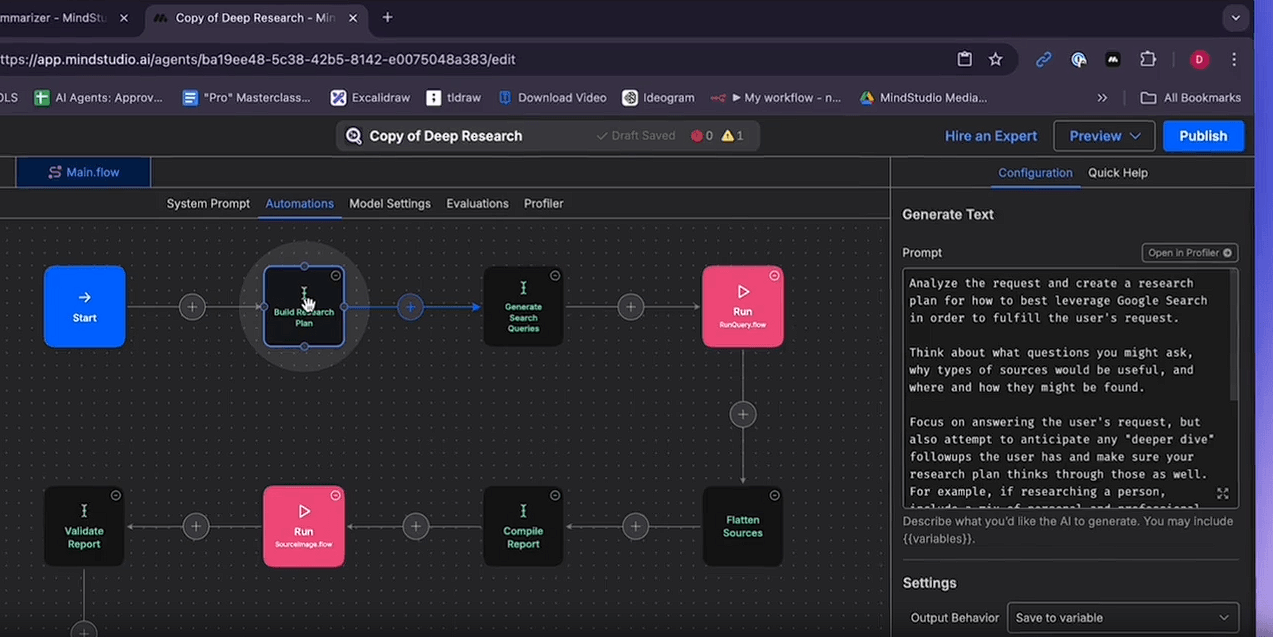
MindStudio turns an AI process into a visible workflow instead of burying it inside one enormous prompt.
Its catalog contains more than 200 building blocks, covering model calls, user input, routers, variables, child workflows, custom functions, web research, document processing, image generation, database queries, CRM actions, email, Slack, Google Workspace, and other operations.
That layout starts to earn its keep when a task has several stages. A research agent could search the web, analyze the results with one model, format its findings, create a document, pause for review, and then send the approved output elsewhere.
The Checkpoint block handles that pause. It lets a person inspect or revise the current state before execution resumes. For business processes where an incorrect action has consequences, that is more than a convenience.
MindStudio is not tied to a single model provider. Its public catalog currently lists more than 400 models for text, vision, image and video generation, transcription, speech, music, embeddings, reranking, and document extraction.
Available providers include OpenAI, Anthropic, Google, DeepSeek, Meta, Mistral, Kling, ElevenLabs, Runway, Stability AI, and others.
| Capability | Why It Matters |
|---|---|
| Multiple AI models | Choose different models for reasoning, writing, vision, or media |
| Visual workflows | Connect AI tasks with decision logic and business actions |
| Custom code | Add Python, JavaScript, and external API logic |
| RAG/data sources | Let agents retrieve information from stored documents |
| Human checkpoints | Review important steps before execution continues |
| Multiple deployment modes | Turn one workflow into an app, automation, API, or another agent experience |
The benefit is not simply having a very long model menu. Different stages can use tools suited to the work, so a writing model does not also have to handle image creation, transcription, and every other part of the process.
Of course, more choice also means more decisions.
MindStudio becomes much more practical when an agent needs to do something with its output.
Current workflow actions cover Gmail, Google Calendar, Drive, Sheets, Slack, Notion, Airtable, HubSpot, ActiveCampaign, Apollo, LinkedIn, X, YouTube, Telegram, databases, and external APIs. Existing automations in Zapier, Make, and n8n can also be triggered.
This puts MindStudio between a chatbot and a conventional automation platform. AI models can interpret information or choose what should happen next, while workflow blocks handle concrete actions such as creating CRM records, drafting emails, querying databases, generating files, or publishing content.
The Agent Skills Plugin pushes the same idea further. It allows Claude Code, LangChain, CrewAI, Cursor, and custom agents to call MindStudio capabilities as an action layer.
A finished agent does not have to remain inside MindStudio’s builder.
It can be deployed as an interactive web app, a scheduled background automation, a browser-extension tool, an email-triggered assistant, a webhook or API endpoint, or an agentic MCP server. Developers can also build custom front ends, including React-based interfaces.
This is a smart design choice. The workflow logic can be built once and presented in whatever form makes sense for the people using it.
For organizations with tighter infrastructure requirements, MindStudio advertises self-hosting, custom model connections, access controls, audit logs, and private-cloud or on-premises deployment.
MindStudio’s scope now extends beyond text-based agents. Workflow blocks can generate images, video, speech, music, charts, PDFs, webpages, and other assets. The platform also includes an AI Media Workbench aimed at image and video production.
The company is developing Remy, an alpha product agent intended to turn an idea into a specification and then build, test, and prepare a complete application.
It is an interesting experiment, but still an emerging part of MindStudio. The established workflow builder remains the better reason to consider the platform today.
Internal business agents are an obvious fit, particularly for research, reporting, document handling, data analysis, and repetitive operational work.
Marketing and sales teams can build agents for lead research, content production, monitoring, CRM updates, and personalized assets.
Agencies and automation consultants may benefit from creating reusable systems for different clients without maintaining a separate AI stack for every engagement.
Technical teams can treat MindStudio as an orchestration layer, then extend it with code, APIs, MCP connections, or their own models.
“No code” does not mean “no complexity.”
A workflow with several branches, models, external systems, stored data sources, and autonomous actions still requires careful process design. A visual canvas makes the pieces easier to see; it does not decide how they should fit together.
The enormous model and feature catalog may also overwhelm beginners. Choosing the right model, deciding when AI judgment is appropriate, and debugging a multi-step process take more thought than setting up a simple chatbot.
Then there is the unpredictability of AI itself. A workflow can be assembled correctly and still make a poor decision or generate an unexpected result. Checkpoints and monitoring remain necessary when the task matters.
MindStudio is a good fit for people who want to build capable AI agents without committing to a completely code-driven framework. Its visual builder, broad model access, large action library, custom-code options, RAG tools, and flexible deployment methods support both quick experiments and serious automation projects.
Its breadth is both the attraction and the complication. MindStudio makes advanced agent building easier to approach, but turning a convincing demo into a dependable business process still takes sound workflow design, testing, and ongoing supervision.
TAGS: AI Automation
Related Tools:

Answers business calls and books appointments,

Build and manage teams of AI agents
Connects apps and services to create automated workflows

Automates content creation and data-driven processes

Lets you extract structured data from any website

Creates intelligent agents to automate tasks