

Share this tool:
 |
Description:
- Introduction
- Strong Features and Capabilities
- What Ghost Cut Actually Is
- The Core Workflow
- Subtitle Removal and Text Cleanup
- Video Translation and Dubbing
- Subtitle Generation and SRT Editing
- Voice Cloning and Multi-Speaker Dubbing
- Image Translation and Image Text Removal
- Video Repurposing and Smart Soundtrack
- Workflow and Ease of Use
- Which Ghost Cut Workflow To Use
- Best Use Cases
- Practical Tips
- Limitations and Trade-Offs
- Final Takeaway
Ghost Cut is an AI video localization and repurposing platform built around one practical idea: take existing video content, clean it, translate it, subtitle it, dub it, and prepare it for new audiences with less manual editing. Its strongest use case is not simple one-off video editing. It is the full chain of global content adaptation, especially when you need hardcoded subtitle removal, AI translation, subtitle generation, voice cloning, dubbing, soundtrack handling, and batch processing inside one workflow.

Ghost Cut combines subtitle generation, subtitle translation, subtitle removal, SRT editing, voice cloning, dubbing, and final export in one pipeline.
The platform can remove hardcoded subtitles, visual text, logos, stickers, and watermarks using automatic detection or selected-area erasure.
Ghost Cut supports source/target language workflows, ASR or OCR recognition, translated subtitles, AI dubbing voices, voice cloning, and background audio handling.
Users can generate subtitles with ASR/OCR, download SRTs, edit timings, proofread translations, and use speaker recognition inside the subtitle editor.
Ghost Cut supports AI voice cloning and dubbing, including speaker/role marking and AI role recognition for multi-speaker videos.
The platform supports batch processing and API access for teams handling larger video volumes, especially short video, ecommerce, localization, and translation workflows.
The easiest way to understand Ghost Cut is to stop thinking of it as a single “video editor.” It is closer to an AI localization workstation.
A normal editor helps you cut clips, add captions, adjust audio, and export. Ghost Cut focuses on a more specific problem: you already have videos, and you need to adapt them for another language, platform, market, or campaign. That often means removing old subtitles, extracting speech, translating text, generating new subtitles, dubbing the video, adjusting music, and exporting a cleaner localized version.
That is why Ghost Cut’s product menu is wider than a typical subtitle tool. Its official site lists video translator, hardcoded subtitle translator, voice cloning and dubbing, smart text removal, video remover, video repurposing, short film narration, smart soundtrack, subtitle generator, subtitle translator, SRT editor, subtitle removal, image translator, and image text removal.
The result is a tool that makes the most sense for creators, agencies, ecommerce teams, short-drama publishers, course creators, translators, and content operations teams. It is less useful if you only need occasional trimming or manual creative editing. Ghost Cut is at its best when the job is repetitive, multilingual, and production-oriented.
Ghost Cut’s main workflow is built around a sequence that many localization teams already follow manually.
| Workflow Stage | What Ghost Cut Handles | Why It Matters |
|---|---|---|
| Upload / Import | Upload local videos or paste supported social links | Reduces the setup friction for repurposing existing content. |
| Recognition | Uses ASR for speech and OCR for hardcoded/on-screen text | Helps with both spoken dialogue and embedded subtitles. |
| Cleanup | Removes hardcoded subtitles, logos, watermarks, and visual text | Creates a cleaner base before adding new subtitles or dubbing. |
| Translation | Translates subtitles and on-screen text into target languages | Speeds up multilingual adaptation. |
| Editing | Lets users review, edit, style, and proofread subtitles | Important because AI translation still needs human checking. |
| Dubbing | Uses AI voices or voice cloning for translated speech | Makes the output more complete than subtitle-only localization. |
| Export | Produces final video, SRT files, audio, music, and project assets | Useful for teams that need editable deliverables, not just one file. |
Ghost Cut’s video translation flow includes uploading or pasting a link, selecting source and target languages, choosing ASR or OCR recognition, choosing dubbing or voice cloning options, handling background music, then previewing, editing, and downloading translated videos or SRT files.
That structure is the product’s biggest strength. Many tools can do one piece of this. Ghost Cut tries to connect the pieces.
This is one of Ghost Cut’s most important features. The platform is especially focused on hardcoded subtitle removal, which is harder than deleting a normal subtitle track. Hardcoded subtitles are burned into the video image, so removing them requires the tool to identify the text region and reconstruct the background behind it.

Ghost Cut separates this into different workflows. For text or subtitles, the platform says its AI can automatically detect and remove text without manual marking. For graphic watermarks, station IDs, stickers, or logos, users can use Video Erase mode and frame the area to remove.
That distinction matters in real use. A subtitle line at the bottom of the frame behaves differently from a logo in the corner. A text-removal model can search for caption-like text across frames. A logo remover may need a framed region and active time range. Ghost Cut supports multiple processing areas and time ranges for selected erasure, which is useful when a watermark appears only during part of a video.
The main caveat is quality. Ghost Cut markets the feature heavily around seamless restoration and “no blur,” but users should still expect results to depend on the footage. Text over a plain wall, blurred background, table, sky, or static surface should be much easier than text over faces, hands, fast movement, clothing patterns, grass, water, or detailed product shots. Ghost Cut’s own FAQ notes that effects vary and that smaller erasures are closer to blur-free results.
Ghost Cut’s translation feature is broader than basic subtitle translation. It can work from speech recognition, hardcoded subtitle OCR, or uploaded subtitles. Users can choose source and target languages, generate new subtitles, erase original subtitles, create AI dubbing, retain background music, keep sound effects, or replace the original track.
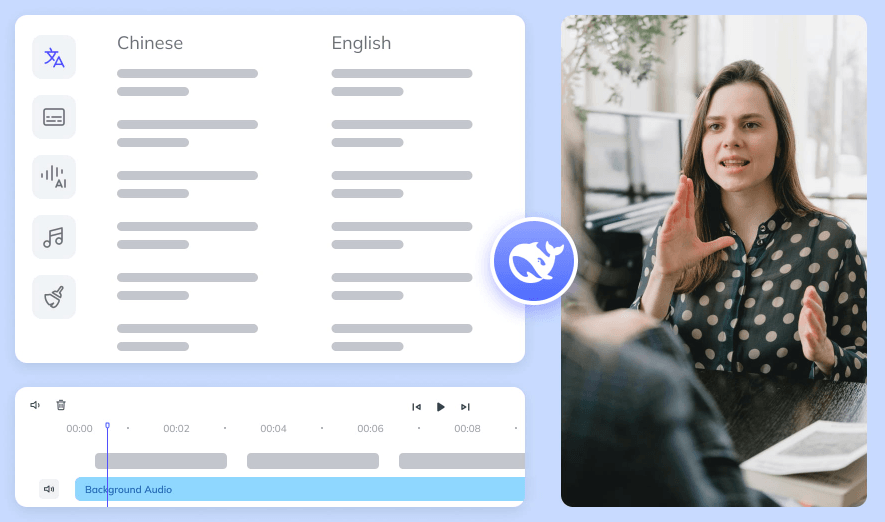
That makes it useful for several different localization styles:
| Localization Style | Best Ghost Cut Workflow |
|---|---|
| Subtitle-only translation | Generate or upload SRT, translate, edit, export subtitles. |
| Hardcoded subtitle replacement | OCR old subtitles, remove them, translate, re-embed new subtitles. |
| Dubbed video | Translate speech, generate AI voiceover, sync timing, export video. |
| Voice-cloned dubbing | Mark speakers, clone voices, generate multi-language dubbed output. |
| Content repurposing | Remove old captions, rewrite or translate, add new voiceover or subtitles. |
The stronger version of this workflow is when Ghost Cut combines cleanup and localization. For example, a short drama clip with burned-in Chinese subtitles can be processed so the old subtitles are removed, the dialogue is translated, new subtitles are added, and voice dubbing is generated. Ghost Cut’s hardcoded subtitle translator specifically says it extracts, erases, translates, and embeds new subtitles in a style close to the original.
That is a more useful workflow than a plain translation app because the final result can look like a new localized video, not just the old video with extra text layered on top.
Ghost Cut’s subtitle workflow is also worth separating from its video translation workflow. The subtitle generator supports ASR speech recognition, OCR hard-subtitle recognition, and subtitle upload as input methods. It can generate subtitles with timestamps, then let users download original or translated SRTs, edit online, or move into dubbing.
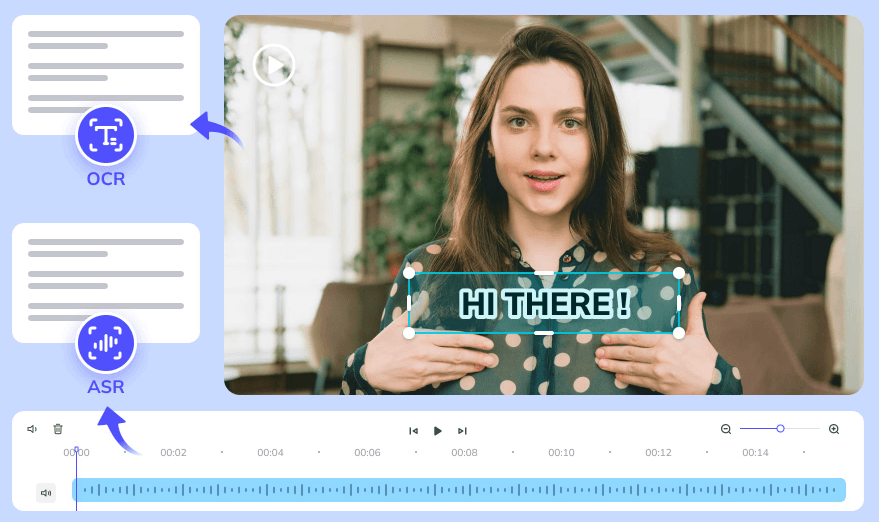
The online SRT editor is one of the more practical parts of the platform because it gives users a correction layer. It supports uploading or generating subtitles, adjusting text and timing on a visual subtitle timeline, using AI speaker recognition, previewing changes, exporting SRT files, and translating subtitles with synced proofreading.
This matters because subtitle accuracy is never just about transcription. A usable subtitle needs correct line breaks, timing, speaker context, terminology, punctuation, and readability. Ghost Cut’s editor gives users a place to review and polish output rather than treating AI output as final.
For teams, this is especially important. A localization workflow without review creates risk. A workflow with SRT editing, speaker labels, side-by-side translation, and batch tools is much more practical for real publishing.
Ghost Cut’s voice cloning and dubbing feature is aimed at users who want localized speech, not just translated captions. The workflow includes uploading videos and SRTs, marking speakers or using AI role recognition, enabling high-emotion cloning or using a public voice library, then exporting the dubbed video and separate assets.

The most interesting part is the multi-role angle. For simple creator videos, one narrator voice may be enough. But for dramas, interviews, podcasts, courses, explainers, documentaries, or multi-person clips, speaker identity matters. Ghost Cut positions its dubbing system around multi-role content and project-level consistency, especially for episodic dubbing.
The likely trade-off is review time. AI dubbing can save time, but it still needs human listening. Names, emotional tone, timing, speaker assignment, and cultural phrasing can all drift. The more voices and roles a project has, the more important human review becomes.
Ghost Cut is not only video-focused. It also includes image translation and image text removal tools. The image translator supports many source and target languages and includes product text protection, which is meant to avoid translating text that should stay untouched on a product.
The image text removal tool automatically detects and erases text from images, supports many languages, and uses inpainting to remove detected text. Ghost Cut also highlights ecommerce and marketing use cases, with product text protection for cases where operational copy should be removed but product labels should remain.
This makes sense for cross-border ecommerce. A product image may contain promotional text, marketplace labels, screenshots, stickers, or language-specific copy that needs to be removed or translated. Ghost Cut is useful when that work needs to happen repeatedly across many images, not just one graphic.
The limitation is the same as video removal: AI inpainting is best when the background is predictable. If the removed text covers complex artwork, product details, small labels, faces, or patterns, manual checking is still needed.
Ghost Cut also includes a video repurposing engine. The official page describes it as recognizing video semantics and recreating visuals, copy, voiceover, rhythm, subtitles, music, effects, templates, and other elements.
This is useful for teams that do not only translate content but also need to adapt it for new platforms. For example, a long video might need short-form cuts, translated versions, new subtitles, different aspect ratios, or a rewritten voiceover. Ghost Cut’s repurposing page specifically mentions formats like commentary, highlights, translated versions, different sizes, and subtitle replacement.
The smart soundtrack feature adds another production layer. Ghost Cut says users can upload a video, choose a music category, adjust style, and let the system match music rhythm to the video. It is especially positioned for videos with fast-paced transitions. These features move Ghost Cut beyond translation. They make it closer to a content operations tool for teams that are constantly recycling, localizing, reformatting, and publishing videos across channels.
Ghost Cut’s strongest usability advantage is that most workflows are built around three or four steps. Upload a video, choose settings, process, preview, and download. That same structure appears across video translation, subtitle removal, hardcoded subtitle translation, subtitle generation, and soundtrack workflows.
For beginners, this is much easier than using a stack of separate tools: one for OCR, one for transcription, one for translation, one for subtitle editing, one for audio dubbing, one for background repair, and one for final rendering.
For power users, the value is batch processing. Ghost Cut repeatedly frames itself around batch uploads, batch downloads, project-level work, and simultaneous processing for larger video sets.
The interface trade-off is breadth. Because Ghost Cut has many modules, users may need time to learn which workflow to use. “Video Translator,” “Hardcoded Subtitle Translator,” “Smart Text Removal,” “Subtitle Removal,” “SRT Editor,” and “Video Repurposing” overlap in real projects. The product becomes more powerful once you understand the differences, but the first-time experience may feel less obvious than a single-purpose remover.
| Need | Best Workflow |
|---|---|
| Translate spoken video into another language | Video Translator |
| Replace burned-in subtitles with translated subtitles | Hardcoded Subtitle Translator |
| Remove captions, logos, or on-screen text from footage | Smart Text Removal or Video Remover |
| Generate SRT files from video | Subtitle Generator |
| Fix subtitle timing, speaker labels, or translations | SRT Online Editor |
| Create translated voiceover or multi-speaker dubbing | Voice Cloning and Dubbing |
| Adapt one video into new formats or localized versions | Video Repurposing |
| Translate ecommerce or marketing images | Image Translator |
| Remove text from product or social images | Image Text Removal |
| Add matched background music quickly | Smart Soundtrack |
This distinction matters because Ghost Cut is not one button. It is a toolkit. Using the right module is the difference between a smooth job and unnecessary reprocessing.
- Short drama and episodic content localization: Ghost Cut is a strong fit for serial content because subtitle removal, speaker recognition, voice cloning, dubbing, and batch workflows all matter when many episodes need to be localized consistently.
- YouTube, TikTok, and social video globalization: Creators can use Ghost Cut to remove old subtitles or platform text, translate videos, create new subtitles, generate dubbed versions, and repurpose the same idea across markets.
- Cross-border ecommerce videos and images: Ecommerce teams can translate product videos, remove old promotional copy, protect product text in images, adapt captions, and prepare localized marketing materials.
- Online courses and training content: Course creators can generate subtitles, translate lessons, add dubbing, and export SRT files for accessibility and multilingual distribution.
- Translation agencies and localization teams: Ghost Cut is useful as a first-pass automation system. It can handle extraction, OCR, translation, dubbing setup, and subtitle editing, while humans focus on QA, terminology, cultural adaptation, and final review.
- Content operations teams with volume: The API and batch tools make the most sense when teams process many videos or images rather than occasional one-off files.
- Start with the cleanest source video available. If the video is heavily compressed, noisy, cropped, or already re-uploaded several times, subtitle removal and OCR accuracy may suffer.
- Use subtitle generation before dubbing. Clean transcript timing makes the dubbing stage easier to review and reduces sync problems later.
- Use the SRT editor as a required review step. AI subtitles and translations are useful, but proper names, brand terms, jokes, idioms, and technical language still need human checking.
- Separate “text removal” from “logo removal.” Use automatic text/subtitle removal for caption-like text, but use selected-area erasure when the distracting element is a logo, sticker, watermark, or station ID.
- Check video cleanup in motion. A removed subtitle may look fine in one frame but flicker or smear during playback.
- Be careful with background music settings. Retaining BGM, removing music, keeping sound effects, or replacing the audio track can change the feel of the video. Choose based on the publishing platform and rights situation.
- Use batch workflows only after testing one file. Process a sample first, confirm that the settings are right, then scale the workflow to more videos.
- Use Ghost Cut only on content you own or are authorized to modify. Ghost Cut’s watermark remover page explicitly warns users to get authorization before using others’ videos and to avoid improper use of original content.
- Ghost Cut is powerful, but it is not magic. The biggest limitation is output variability. Subtitle removal depends on background complexity, text size, motion, compression, and how much important detail is hidden behind the text. AI can reconstruct a plausible background, but it cannot truly recover information that was never visible.
- Translation quality is another area where human review matters. Ghost Cut promotes LLM-assisted translation and calibration, but localization is not only literal translation. Tone, context, slang, cultural references, character voice, and industry terminology can still require human editing.
- Dubbing has similar caveats. Voice cloning and AI dubbing can make localization faster, but timing, emotion, pronunciation, speaker matching, and sync should be checked before publishing. Multi-speaker content especially needs review because one speaker assignment error can affect an entire scene.
- The platform’s breadth can also create some workflow complexity. Because Ghost Cut includes many adjacent modules, users need to understand which one fits the job. A beginner who only wants to remove one watermark may find the platform broader than needed. A team doing full localization will likely appreciate that same breadth.
- Finally, Ghost Cut is not a full creative video editor. It is not meant to replace Premiere Pro, DaVinci Resolve, After Effects, CapCut, or a professional NLE for detailed timeline editing. It is better understood as an AI processing layer for cleanup, localization, subtitle work, dubbing, and repurposing.
Ghost Cut is most useful when video localization is the job, not just video editing.
Its strongest advantage is the way it connects hardcoded subtitle removal, OCR/ASR subtitle extraction, translation, SRT editing, AI dubbing, voice cloning, soundtrack handling, image text workflows, batch processing, and API access into one broader system.
It is especially strong for short-drama publishers, global creators, ecommerce teams, course creators, translation agencies, and content operations teams working across languages and platforms. It is less ideal for users who only need basic trimming or one-off manual edits.
The main caveat is quality control. Ghost Cut can automate a lot of the tedious work, but removal results, translation accuracy, speaker labeling, and dubbing quality should still be reviewed before anything important is published. Used with that expectation, Ghost Cut is a practical AI localization platform for turning existing content into cleaner, multilingual, more reusable video assets.
TAGS: Video Editing
Related Tools:

Simplifies editing profeessional-quality videos

Automates captioning and video translations

Creates customizable face swap videos

Comprehensive plugin for WordPress

Enables instant search and retrieval of video footage

Generates and translates subtitles for videos