

Share this tool:
 |
Description:
- Introduction
- Strong Features and Capabilities
- What OpusClip Actually Is
- Workflow and Ease of Use
- AI Clipping Quality
- AI Copilot, Prompt to Clip, and ClipAnything
- Captions, Reframing, and Visual Polish
- AI B-Roll, Voiceover, and Audio Cleanup
- Brand Templates and Consistency
- Social Publishing, Scheduler, and Analytics
- Best Use Cases
- Practical Tips
- Limitations and Trade-Offs
- Final Takeaway
OpusClip is an AI video clipping and editing platform built for turning long-form videos into short-form social content. Its main promise is simple: upload or link a long video, let the AI find strong moments, turn those moments into short clips, add captions and formatting, then publish or schedule them for social platforms. That makes it most useful for creators, podcasters, coaches, agencies, marketers, livestreamers, and media teams that already produce long content but need a faster way to create Shorts, Reels, TikToks, and LinkedIn-style video posts.
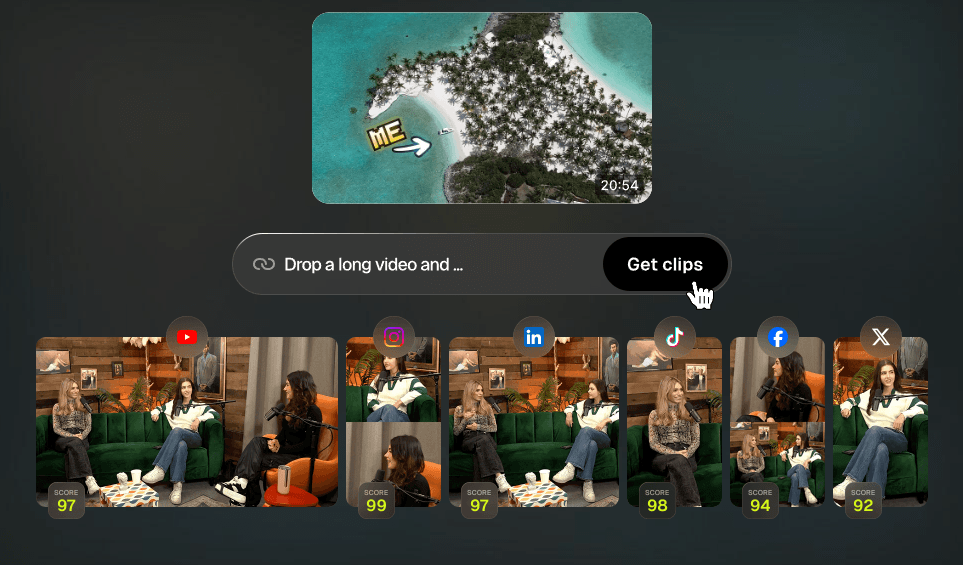
OpusClip analyzes long videos and turns them into short clips designed for social platforms.
Pro-level workflows include controls for timeframe, clip length, topic search, and prompt-based clipping refinement.
Automatically adds animated captions, emoji, keyword highlights, and multilingual transcription support.
Reformats video into vertical, square, or widescreen layouts, with stronger controls on higher plans.
Adds relevant B-roll, voiceover, speech enhancement, and filler-word or pause removal.
Lets users publish, schedule, and manage social posts from one place.
OpusClip is not just an automatic clip cutter. The product has grown into a broader short-form video workflow. The core still starts with long-form content, but the platform now covers clipping, reframing, captions, editing, B-roll, voiceover, audio cleanup, templates, brand assets, publishing, scheduling, and analytics.
The easiest way to understand it is this:
| Layer | What It Does | Why It Matters |
|---|---|---|
| AI clipping | Finds short-form moments inside long videos | Saves the most time for podcasts, webinars, livestreams, interviews, and talks. |
| Editing layer | Lets users adjust clips with text and timeline tools | Helps turn auto-generated clips into usable final assets. |
| Visual polish | Adds captions, B-roll, layouts, overlays, logos, fonts, and templates | Makes clips feel social-ready instead of raw. |
| Publishing layer | Schedules and posts to social platforms | Reduces the gap between clipping and distribution. |
| Team/business layer | Adds workspaces, storage, API/integration options, and security features on higher tiers | Useful for agencies, media teams, and larger content operations. |
That layered structure is the reason OpusClip is more valuable than a simple “cut this video” tool. It is trying to handle the full path from source video to social post.
The basic workflow is straightforward. You upload a video or paste a supported video link, choose clipping settings, let OpusClip generate clips, review the results, edit the best ones, then export or publish. The official site lists Pro-plan source support for platforms including YouTube, Google Drive, Vimeo, Zoom, Rumble, Twitch, Facebook, LinkedIn, Twitter/X, Loom, Riverside, StreamYard, and more. It also says the tool supports English, German, Spanish, French, Portuguese, and more than 20 additional languages.
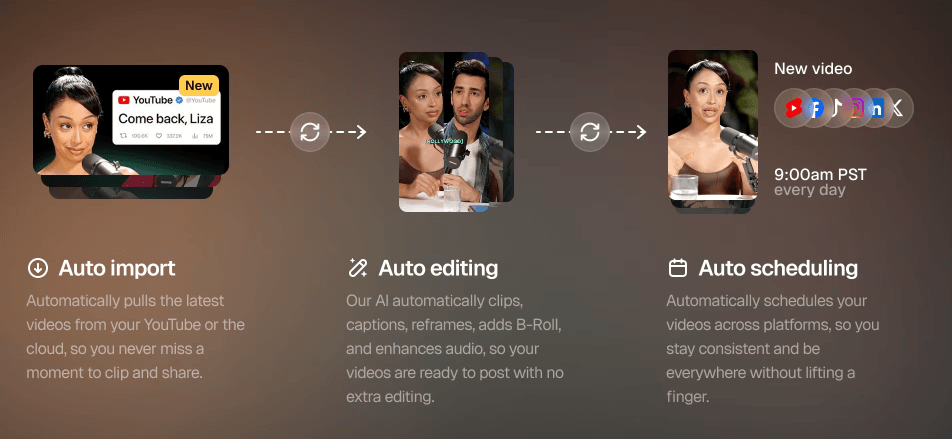
The strongest part is how much of the first pass is automated. OpusClip says it analyzes long videos, identifies highlight moments, rearranges them into short clips, adds captions, applies relayout, uses transitions, and ends with a call-to-action structure. That is the core reason creators use it: it compresses a long manual process into a faster review-and-edit workflow.
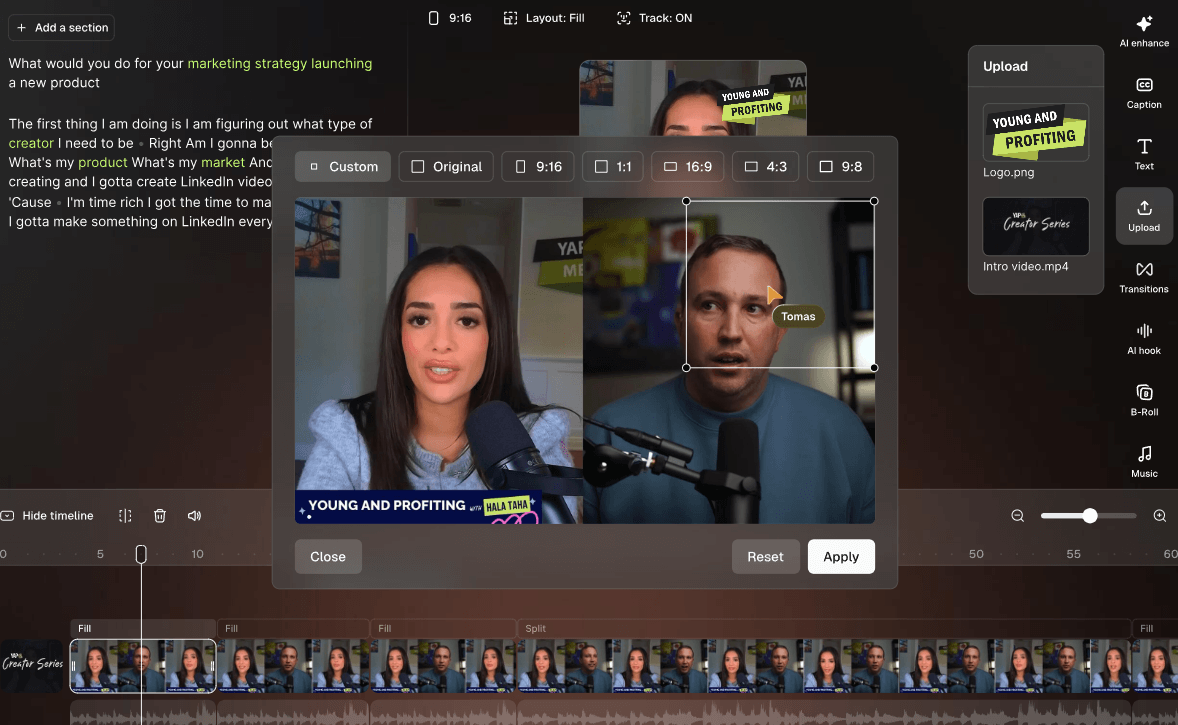
The editing experience is also built for non-editors. OpusClip describes its editor as text-based and timeline-based, so users can change words, timing, scenes, transitions, layouts, and styling without needing a full traditional editing suite. That matters because many creators do not want Premiere Pro-level complexity just to post clips every day.
OpusClip is strongest when the source video already has clear spoken moments, emotional peaks, strong lessons, reactions, arguments, stories, or audience-friendly soundbites. Podcasts, interviews, educational videos, business talks, commentary, livestreams, webinars, and coaching content are natural fits.
The current product also goes beyond basic speech detection. Its pricing page references clipping by spoken words, visual objects, sound, emotion, and genre-specific curation models on paid tiers. That is important because not every good clip is just a clean quote. Some clips work because of a reaction, a visual moment, a gameplay event, or a shift in emotion.
The caveat is that AI clipping is still judgment-based. OpusClip can surface strong candidates, but it cannot always know your brand, audience, inside jokes, business goals, or what your viewers already saw in previous videos. The best workflow is to let OpusClip generate options, then have a human choose and refine the clips that actually match the channel.
The newer OpusClip experience gives users more control than the older “generate clips and hope” workflow. The Learning Center mentions using Copilot to customize output, ClipAnything, and prompt-based clipping.
On Pro, the pricing page lists topic search and Prompt to Clip under AI Copilot, along with settings for clipping timeframe, clip length, and reprompting to fine-tune results.
That matters because the practical weakness of many AI clipping tools is over-selection. They may find clips, but not always the clips you wanted. Prompt to Clip and topic search help solve that by letting you guide the AI toward a specific section, subject, or moment type. For example, a podcaster could look for “the guest’s advice about pricing,” while a webinar host could search for “the part where we explain the three-step framework.”
ClipAnything is also meaningful because OpusClip says it can work with more than just talking-head content, including vlogs, sports, TV-style content, and videos with little or no dialogue.
Captions are one of OpusClip’s most practical strengths. The platform automatically adds captions, and paid features include animated caption templates, multilingual transcription, emoji and keyword highlights, speaker-based caption colors on higher tiers, and custom fonts on Pro.
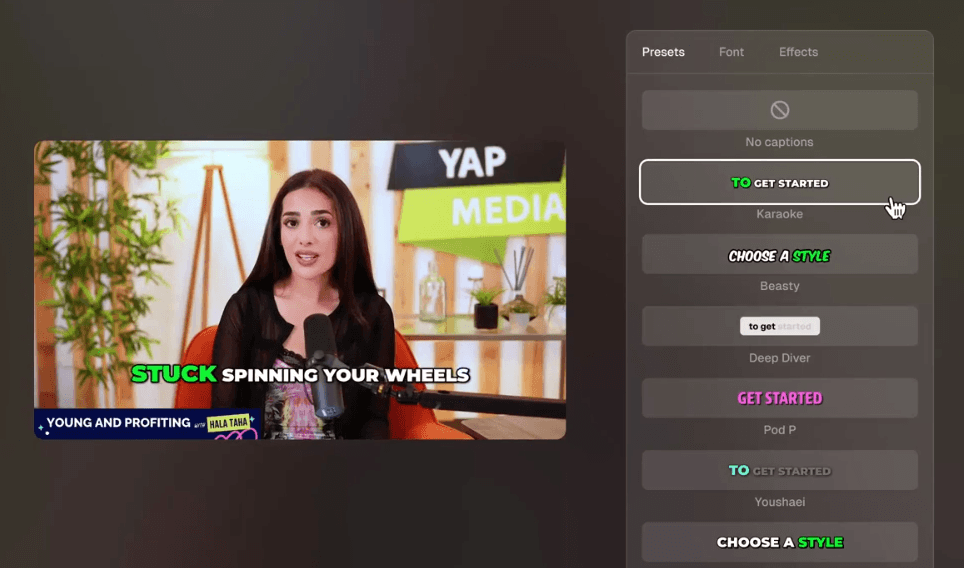
This is important because short-form clips often need to work without sound. Captions are not just accessibility. They are part of the hook, pacing, and visual rhythm of the clip.
AI reframe is the second major polish layer. OpusClip can reframe videos for 9:16, 1:1, or 16:9 formats, depending on the plan. It also supports features like moving object tracking, dynamic layout switching, screenshare/gameplay layouts, and custom reframing on higher plans.
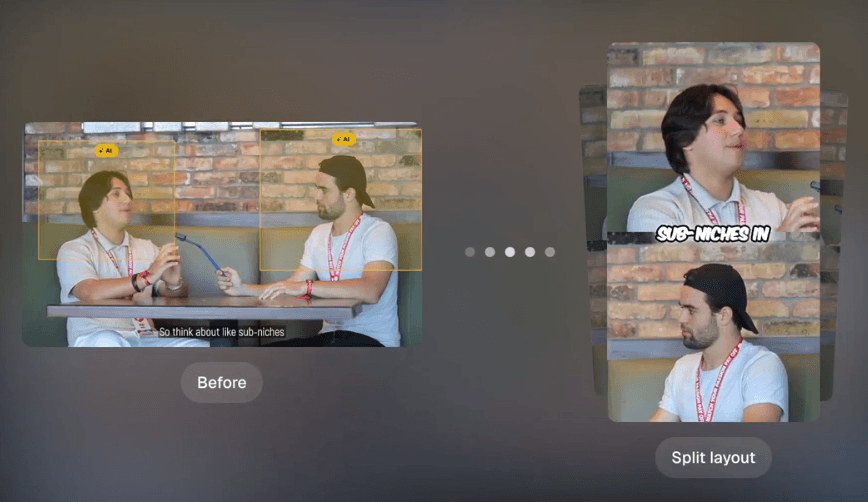
That makes the tool especially useful for podcasts, interviews, tutorials, reaction videos, gaming clips, and screen-share content. The 30/70 gameplay-style layout and split layouts matter because not every video should be cropped into a simple talking-head vertical frame.
OpusClip’s B-roll system is one of the bigger upgrades beyond basic clipping. The editor can add contextually relevant B-roll, and the help documentation says users can select B-roll type, toggle it on, regenerate B-roll with a revised prompt, move it on the timeline, extend or trim it, and search the stock library.
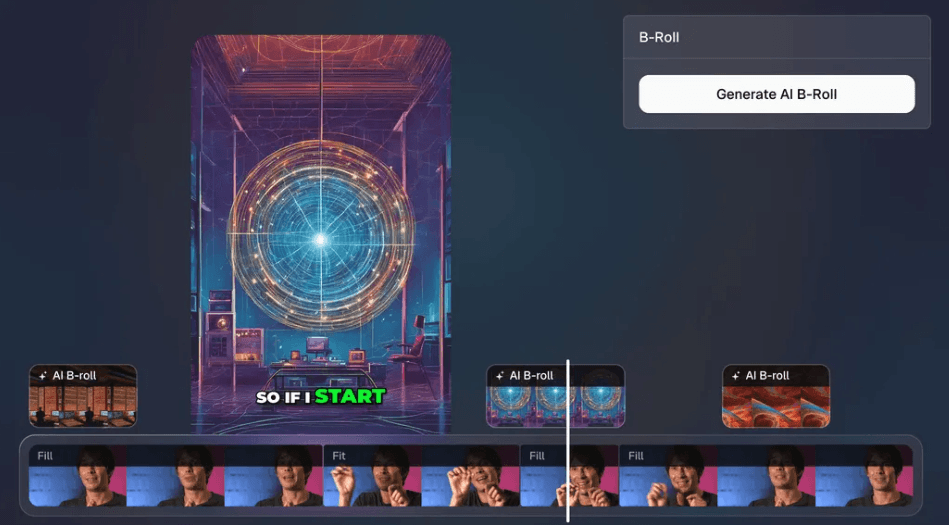
That helps with one of the biggest problems in talking-head clips: visual fatigue. A clip may contain a strong idea, but if the viewer only sees the same face for 45 seconds, retention can drop. B-roll gives the clip more movement and context.
The current limits matter, though. The help page lists AI B-roll limits by plan, including no AI B-roll on Free, three clips per day on Pro Trial, three clips per day on Starter, and 50 clips per day on Pro. It also notes that adding B-roll for all clips through a brand template is not supported in the beta version, so users still need to apply it clip by clip.
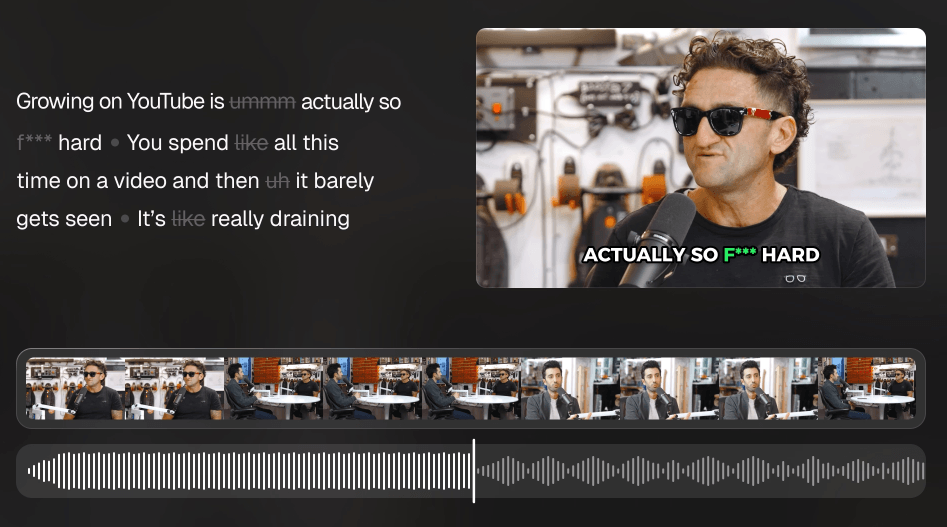
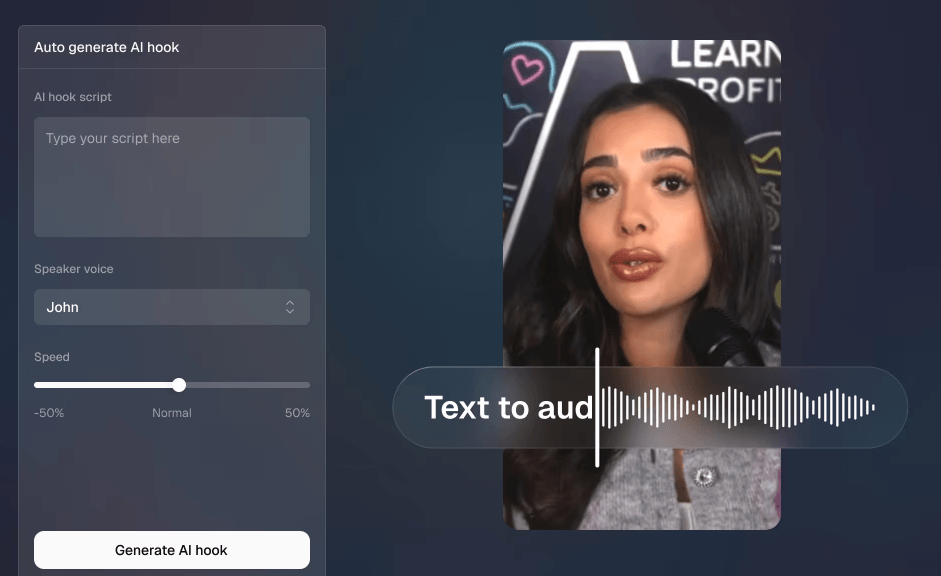
Audio tools are also practical. OpusClip includes speech enhancement, filler-word removal, pause removal, and AI voiceover. These are not the same as deep audio production, but they are useful for cleaning clips quickly before posting.
Brand templates are useful if you publish often. OpusClip says users can upload logos and colors, and the system can recommend templates, layouts, and fonts that match the content style.
This matters more for teams than casual users. If you are posting one clip occasionally, manual styling is fine. If you are posting 20 clips a week across multiple channels or clients, templates help keep the output from looking inconsistent.
The best use of templates is not to overdesign every video. It is to create a repeatable format: caption style, logo position, intro/outro card, font, colors, and maybe a few layout rules. That keeps production fast without making every clip look generic.
OpusClip now pushes beyond editing into publishing. The platform includes a social media calendar where users can publish, schedule, and manage social posts in one place. It also lists analytics as part of the broader video workflow.
This is valuable because clipping alone does not solve distribution. Many creators generate clips, download them, forget to post them, or post inconsistently. A built-in scheduler helps close that gap.
That said, OpusClip should not be mistaken for a full social media management suite. It is strongest when publishing short clips generated inside the platform. If a team needs heavy campaign planning, social listening, inbox management, approvals, and advanced reporting, they may still need a dedicated social tool.
- Podcasts and interviews: This is one of the clearest fits. Long conversations usually contain many short moments that can become Reels, Shorts, TikToks, and LinkedIn clips.
- Educational creators: Teachers, coaches, consultants, and course creators can turn lessons, webinars, and tutorials into short clips that explain one idea at a time.
- Business and marketing teams: OpusClip works well for webinars, founder videos, customer interviews, event recordings, product explainers, and thought leadership content.
- Livestreamers: Long streams can be mined for highlights, reactions, or teachable moments without manually reviewing the full recording.
- Agencies: The Pro and Business tiers make more sense when teams are clipping for multiple brands, managing repeated workflows, and exporting to professional editing tools.
- Gaming and screen-share creators: Layout options, screenshare/gameplay formatting, and reframing controls make OpusClip more useful than simple talking-head-only clipping tools.
- Start with strong long-form source material. OpusClip can find moments, but it works better when the original video has clear sections, strong points, good audio, and visible emotion.
- Use topic search or Prompt to Clip when you already know what you want. This is better than letting the AI generate too many broad clips and sorting through everything later.
- Review the hook manually. Auto hooks are useful, but the first two seconds of a short clip are too important to leave fully untouched.
- Use B-roll selectively. Adding B-roll to every clip can make the output feel busy. Use it when it clarifies the topic, breaks up a static shot, or improves retention.
- Create a template before scaling. Once caption style, logo, font, and layout are consistent, bulk clip production becomes much cleaner.
- Watch credit usage closely. Since credits are tied to the length of the original video, a few long uploads can consume a plan quickly.
- OpusClip is fast, but it is not a full replacement for a skilled editor. A good human editor still understands pacing, narrative setup, brand voice, comedic timing, and audience context better than an automated system.
- Clip selection can also vary. AI may choose moments that seem energetic but are missing context, or it may skip quieter moments that would perform well for a specific niche. This is why the review step still matters.
- The credit system is another real trade-off. Since credits are charged by source video length, long podcasts, webinars, and livestreams can burn through credits quickly. A creator uploading multiple hour-long videos every week should calculate usage before choosing a plan.
- Some advanced polish features are plan-limited. B-roll is not available on Free, Starter has lower B-roll limits, and Pro is where the platform starts feeling more complete for serious production.
- Finally, OpusClip is strongest when repurposing existing video. If you need to generate an original video from an idea, script, or blog post, that is more in the territory of Agent Opus, the newer OpusClip-related AI video agent that turns text, links, audio, blogs, and prompts into social-ready videos.
OpusClip is one of the strongest AI tools for turning long-form video into short-form social clips. Its biggest value is the full workflow: AI clipping, virality scoring, captions, reframing, B-roll, text and timeline editing, templates, social scheduling, and analytics.
It is best for creators, podcasters, educators, marketers, livestreamers, and agencies that already produce long videos and need a faster way to create short-form content consistently. The main caveat is that OpusClip speeds up editing, but it does not remove the need for judgment. The best results still come from reviewing the clips, improving the hook, checking context, and choosing the outputs that actually fit the audience.
TAGS: Social Media Tools Video Editing
Related Tools:

Social media analysis tool that extracts actionable insights

Transforms YouTube videos into short clips
AI-powered photo and video editing tool

Analyzes webpage performance
Streamlines social media strategies

Automates video scriptwriting, shot selection and editing