

Share this tool:
 |
Description:
Cubeo AI is a no-code platform for building agents that can answer questions, work with private company information, use outside tools, and carry out business tasks.
It is aimed at builders, operations teams, and product managers who want to automate work with AI without first developing the underlying infrastructure themselves.
You can create a single-purpose assistant, such as a researcher or customer-support agent. The more distinctive option is to assemble several specialists into an AI Team that works toward a shared goal.
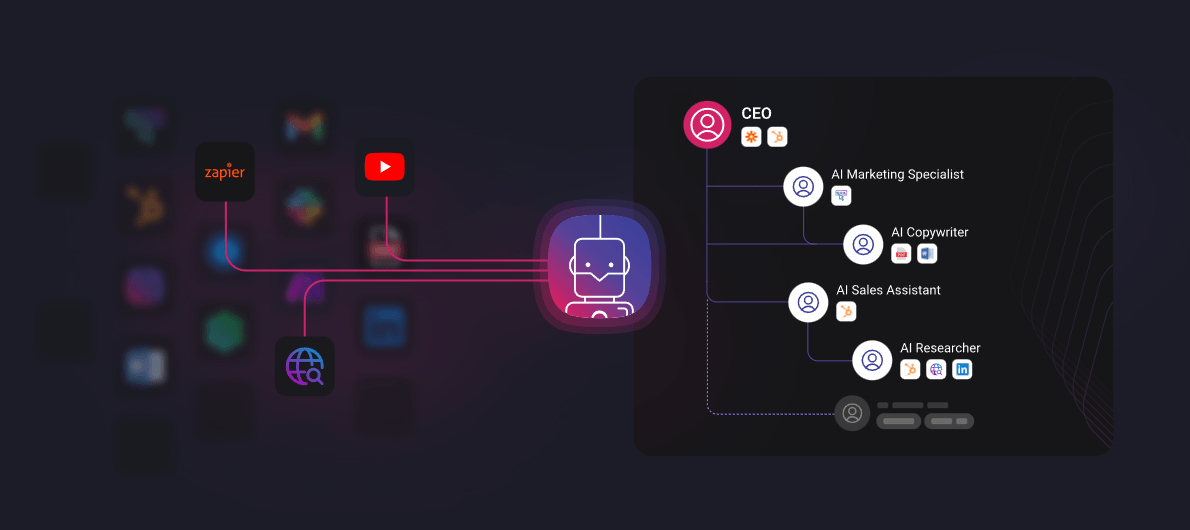
A Cubeo agent has four main parts: instructions, knowledge bases, tools, and integrations.
Instructions define how the agent should behave. Users can choose models from providers including OpenAI, Google Gemini, and Anthropic Claude, then adjust the temperature to make responses more predictable or more creative.
Agents can also return structured JSON instead of ordinary chat text. This may sound like a technical detail, but it is important for automation. A predictable data structure is much easier to pass into a CRM, database, or another step in a workflow.
Cubeo also lets users restrict an agent to its training data and display sources with its answers. For an internal knowledge assistant, saying “I couldn’t find that information” is usually better than inventing a confident answer.
Cubeo can build knowledge bases from uploaded files, websites, question-and-answer pairs, and YouTube content. Its website lists support for formats including PDF, DOCX, audio, and video.
This gives the platform more range than a basic document-chat tool. A customer-service agent could draw from product documentation and public website content. An internal assistant might use training materials, policies, and company procedures.
Separate knowledge bases also make specialization easier. Rather than pouring everything the organization knows into one oversized assistant, teams can give each agent the material needed for a particular department or job.
Cubeo agents can act on information, not merely talk about it. According to the current documentation, they can call APIs, search the web, scrape pages, interact with CRMs, invoke other agents, and connect to MCP servers.
Integrations are managed at the team level. A business can connect HubSpot or an MCP server once and make the resulting tools available to several agents. Individual agents still use only the tools assigned to them.
Custom APIs are supported as well. That matters for companies whose most useful systems are internal and will never appear in a standard integrations directory.
Cubeo’s AI Teams place several specialist agents under a supervisor agent.
The supervisor is the main point of contact. It can send a job to one specialist, call several agents in sequence, or bring multiple specialists into related parts of the same task.
An e-commerce company, for example, could have separate agents for general questions, product recommendations, and post-purchase support. The post-purchase agent might connect to an order-management API, while the general assistant relies mainly on company information.
This division keeps every agent from accumulating every instruction, tool, and dataset in the business. Smaller roles are generally easier to understand and control.
Cubeo documents Human-in-the-Loop controls for actions that require approval before a tool runs. Agents can also display tool activity inside the chat, including the information sent to a tool and the response returned.
That visibility is useful when an agent can update a CRM, call an API, or set another business process in motion. In those cases, full autonomy is not necessarily a virtue. Sometimes the right design is to let the agent prepare the action and have a person approve it.
The wider management environment also includes documented dashboards and evaluation tools for monitoring how agents perform.
| Use case | Why Cubeo fits |
|---|---|
| Customer support | Knowledge-based answers combined with tool actions |
| Sales operations | Research, CRM updates, and prospect analysis |
| Marketing | Research, content, SEO, and campaign workflows |
| Recruiting | Candidate research, screening, and HR tasks |
| Internal automation | Agents can work with private data, APIs, and webhooks |
| Multi-step workflows | Specialist agents can collaborate under a supervisor |
No-code does not mean no setup.
A single agent may be straightforward, but several agents connected to multiple tools, integrations, knowledge sources, and supervisor rules are harder to debug. When something goes wrong, the cause may sit several steps earlier in the workflow.
AI Teams also depend on clear delegation. Overlapping responsibilities can leave agents unsure about who should handle a task, while broad tool permissions give mistakes more room to spread.
Cubeo removes much of the programming required to build these workflows. More advanced setups still benefit from someone who understands APIs, structured data, permissions, and process design.
Cubeo AI is a no-code platform for businesses that want agents to do more than answer questions. It combines private knowledge, several model options, structured output, external tools, MCP connections, approval steps, and specialist AI Teams.
Operations teams, product managers, agencies, and businesses with repeatable processes are the clearest fit.
The trade-off is complexity. Cubeo becomes more useful as agents gain knowledge, tools, and responsibilities, but those same additions demand clearer roles, tighter permissions, and more careful testing.
TAGS: AI Automation
Related Tools:

Manages agents to automate complex business tasks
Turns Google Sheets into intelligent workflows

Automates customer support and provides accurate responses

Connects AI agents to real-world apps and services

Build and manage teams of AI agents

AI tool that gives agents persistent memory