

Share this tool:
 |
Description:
Content Credentials is not an AI generator or a classic AI detector. It is a provenance system for digital media. Its job is to show where a piece of content came from, how it was made, and what happened to it along the way. That makes it one of the more practical answers to AI image confusion, but only when creators, tools, publishers, and platforms support it.
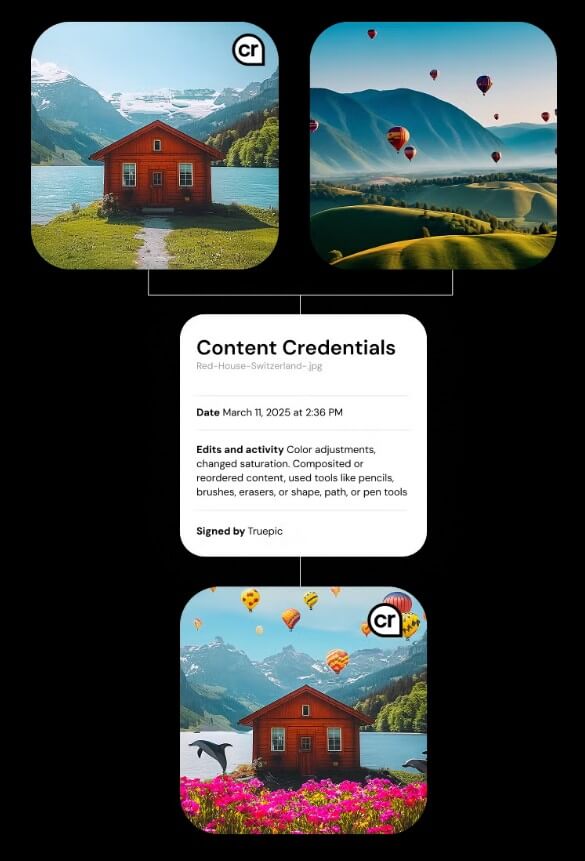
Content Credentials is the user-facing name for provenance metadata based on the C2PA standard. In the C2PA specification, a “Content Credential” is described as the preferred non-technical term for a C2PA Manifest, which stores information about the provenance of an asset.
That sounds technical, but the idea is simple. A photo, video, audio file, or document can carry a tamper-evident record that says things like: who created it, what device or software was used, whether generative AI was involved, and which edits happened later. The official Content Credentials site describes the CR pin as a signal that a file contains provenance information and can show creation method and editing history.
The most important distinction is this: Content Credentials does not “detect” AI in the usual sense. It does not scan pixels or text and guess whether something is fake. It works more like a digital nutrition label, attached by participating tools and checked later by viewers.
A Content Credential can be created by a camera, editing app, AI tool, publishing system, or another supported service. The C2PA technical specification describes a system of assertions, claims, digital signatures, and manifests that bind provenance data to the media file.
In normal use, the technical layer stays hidden. A viewer sees the CR icon, hovers or clicks, and gets a summary of the file’s history. The official icon announcement describes this as a “digital nutrition label” that can include creator or publisher details, creation date, tools used, generative AI use, and edits made along the way. Identity details are optional, which matters for privacy.
Adobe’s documentation gives a good example of how this appears in creative workflows. It describes Content Credentials as durable, industry-standard metadata that can show whether content was captured by a camera, generated by AI, or edited in tools like Photoshop. Adobe also says Content Credentials are used across apps such as Photoshop, Lightroom, Adobe Stock, and Premiere, and are applied automatically to content generated through Adobe Firefly and APIs.
The strongest thing about Content Credentials is that it shifts the conversation away from guessing. AI detectors can be useful, but they often work by probability. Content Credentials is different. It gives viewers a record to inspect.
That is especially useful for newsrooms, photographers, creators, agencies, brands, and public institutions. A newsroom can show that an image came from a real camera. A creator can attach attribution to work that gets shared online. A brand can disclose when generative AI was used. A viewer can decide whether a viral image deserves trust before sharing it.
It also helps separate “AI-generated” from “edited.” Those are not the same thing. A photo may be authentic but cropped. A video may be real but color-corrected. A campaign image may combine photography, retouching, and AI fill. Content Credentials can make those layers easier to inspect.
| Feature | Why It Matters |
|---|---|
| CR icon | Gives viewers a visible signal that provenance data exists |
| Creation history | Shows how the media was made or captured |
| Edit history | Helps explain changes made after creation |
| AI-use disclosure | Can show when supported tools used generative AI |
| Digital signatures | Help make provenance records tamper-evident |
| Optional identity | Lets creators choose how much personal information to include |
For viewers, the workflow is fairly simple: look for the CR icon, open the details, and review the media history. On supported websites and tools, this can feel natural. The official site says that when Content Credentials are present, anyone can view content history from origin to consumption.
For creators, the experience depends on the app. In Adobe tools, the workflow is becoming more integrated. In other ecosystems, support varies. That is one of the biggest practical issues. Content Credentials is only useful when the content is created, edited, exported, hosted, and displayed in ways that preserve the credential.
There are browser tools too. The C2PA Content Credentials Chrome extension listing says it can verify and display manifests for images, audio, and video that embed C2PA Content Credentials, and it can add a CR pin when a valid manifest is found.
The main limitation is adoption. Content Credentials works best when the whole chain supports it: device, editing software, export process, publishing platform, and viewing environment. If a social platform strips metadata, or if a file is copied in a way that removes credentials, the signal can disappear.
It also does not prove that content is “true.” The C2PA specification says the standard should not make value judgments about whether provenance data is good or bad, only whether included assertions can be validated and are free from tampering. That is a healthy limit. A verified file can still be misleading, staged, selectively cropped, or posted without context.
There is another important caveat: bad actors can avoid using the system. The official site acknowledges that some people will still try to label synthetic content as authentic, while the goal is to give good actors a way to demonstrate authenticity.
Content Credentials works best for publishers, photographers, creators, marketers, AI image platforms, camera makers, and media organizations that need a practical way to show provenance.
It is also useful for viewers who want more context before trusting or sharing media. The best use is not blind trust. It is informed judgment.
Content Credentials is best at adding transparency to digital media.
It gives creators a way to attach provenance, and it gives viewers a clearer way to inspect origin, edits, and AI involvement.
The main caveat is ecosystem support. It is useful when credentials are present and preserved, but it cannot verify everything on the internet, and it should not be treated as a truth machine.
TAGS: AI Detection
Related Tools:
Distinguish human-written and AI-generated texts

Detects plagiarism and identifies AI-generated text
Verifies authenticity of online content
Identifies wether images are AI-generated

Detects GPT-generated content
Identifies AI-generated content on web pages