
Share this tool:
 |
Description:
- Introduction
- Core Features and Capabilities
- What Pismo Actually Is
- What Pismo Does Best
- Workflow and Ease of Use
- Writing Quality and Control
- Translation and Multilingual Use
- Models, BYOK, and Platform Control
- Privacy and Data Handling
- Best Use Cases
- How Pismo Compares
- Practical Tips
- Limitations and Trade-Offs
- Final Takeaway
Pismo is an AI writing assistant for Mac and Windows that helps you improve text wherever you already write: email, documents, messengers, browsers, editors, and work apps. Its main value is not that it can rewrite a sentence. Many AI tools can do that. Its value is that it turns rewriting, grammar correction, translation, tone adjustment, summarization, and custom prompts into a fast desktop workflow that can run on selected text without copying everything into a separate chatbot.
Fixes typos, grammar issues, punctuation problems, and general writing errors quickly.
Rewrites sentences to improve clarity, flow, readability, and professional polish.
Changes writing tone toward professional, friendly, persuasive, casual, or other context-specific styles.
Condenses long text into shorter formats such as bullet points, making it useful for articles, reports, notes, and long messages.
Translates selected text without leaving the active window, with support for multilingual writing and communication.
Lets users create reusable AI instructions and assign shortcuts for faster access.
Pismo is a native desktop AI writing app. The official help docs describe it as standalone software, not just a browser extension, and say it works across applications including browsers, email apps, and text editors. That is the key product idea: Pismo is designed to sit on top of your everyday writing environment rather than asking you to move all writing into a new editor.
The easiest way to understand Pismo is to split it into four layers.
| Layer | What it does | Why it matters |
|---|---|---|
| Writing enhancement | Improves clarity, flow, grammar, spelling, and style. | Useful for emails, reports, posts, notes, essays, and everyday communication. |
| Transformation tools | Shortens, expands, summarizes, simplifies, translates, and changes tone. | Handles the repetitive editing tasks people normally copy into ChatGPT. |
| Desktop workflow | Runs on selected text through widgets, menu bar access, and keyboard shortcuts. | Reduces tab switching and keeps the AI closer to where the writing happens. |
| Customization | Lets users create prompts, assign shortcuts, set Quick Prompt behavior, and use BYOK through OpenRouter. | Makes Pismo more personal than a fixed grammar checker. |
That combination makes Pismo closer to a desktop writing utility than a full content platform. It is not trying to manage documents, publish content, build campaigns, or run a team editorial workflow. It is meant to help you write, rewrite, translate, and clean up text faster inside the apps you already use.
Pismo is strongest at everyday text improvement. The homepage highlights improving writing, translating into any language, making text shorter or longer, changing tone, fixing spelling and grammar, and creating custom prompts with hotkeys in any app.
That makes it especially useful for people who write across many surfaces in a day. A typical workflow might be polishing a Slack message, translating an email, rewriting a LinkedIn comment, shortening a report paragraph, simplifying technical text, and drafting a cleaner response to a client. Pismo’s advantage is that those edits do not need to start inside a separate AI workspace.
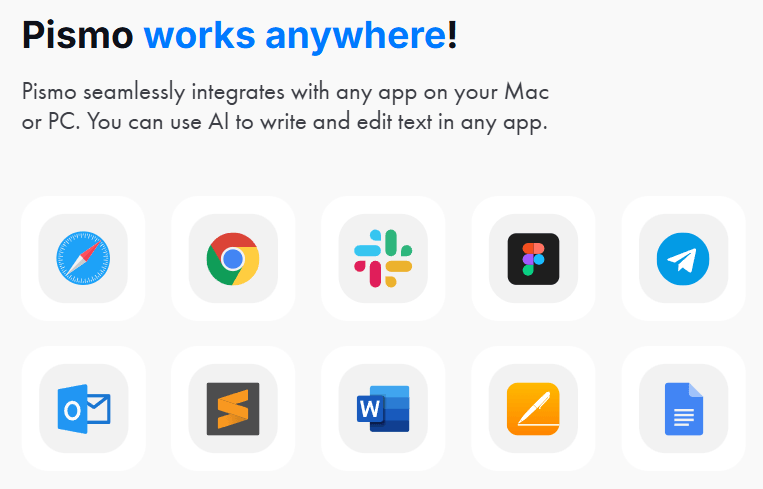
The “works everywhere” positioning matters. Pismo’s features page says it functions within apps such as Word, Slack, Discord, VS Code, and browsers, and that users can trigger AI actions on selected text without manually opening another window or copy-pasting.
That is the real reason to consider it. If you already use ChatGPT or another AI assistant, Pismo is not necessarily replacing that deeper chat experience. It is trying to remove the friction around small, repetitive writing actions.
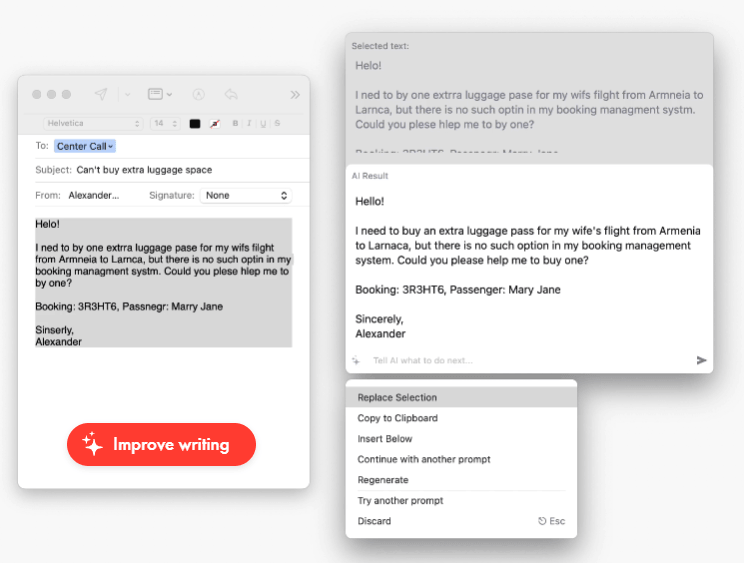
Pismo’s workflow is built around selected text. Instead of opening a chatbot, pasting your paragraph, explaining the task, copying the result, and returning to the original app, you select text and run an action directly. That is the main workflow difference versus a normal AI chat window.
At the simplest level, Pismo works like this: write something in any supported desktop environment, highlight the text, trigger Pismo, choose the action, then apply or copy the result. That makes it a strong fit for short, frequent improvements. Emails, replies, captions, documentation snippets, resumes, cover letters, product descriptions, and academic paragraphs all fit the use case Pismo describes.
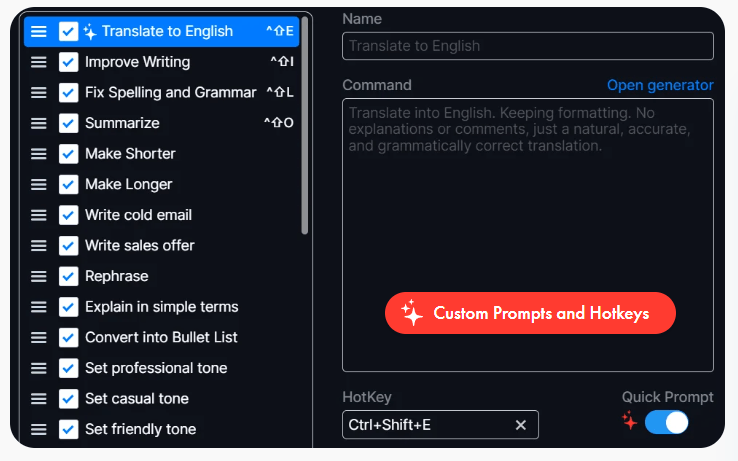
The hotkey system is one of the most important parts of the product. Pismo’s FAQ says users can create custom prompts in settings, write their own instructions, and customize prompts for different languages, tones, or writing styles. It also says keyboard shortcuts can be assigned to prompts for quick access.
Quick Prompt adds another useful layer. Pismo’s docs describe Quick Prompt as the default prompt activated when a Windows user clicks the widget or a Mac user accesses Pismo through the menu bar, and users can choose which prompt is assigned to that behavior in settings. This is small, but important. It means frequent tasks can become one-action workflows instead of menu hunting.
Pismo’s writing quality will depend heavily on the task and model choice, but the tool is built around practical editing rather than long-form autonomous writing. It is best at improving existing text: making it cleaner, clearer, shorter, more formal, more readable, or easier to understand.
That matters because many writing assistants struggle when asked to create full original content from nothing. Pismo can help draft and compose content, but its strongest workflow is “take this text and improve it.” The features page positions it around grammar, spelling, smart rephrasing, tone adjustment, summarization, translation, and content generation for emails, blog posts, academic papers, cover letters, resumes, and product descriptions.
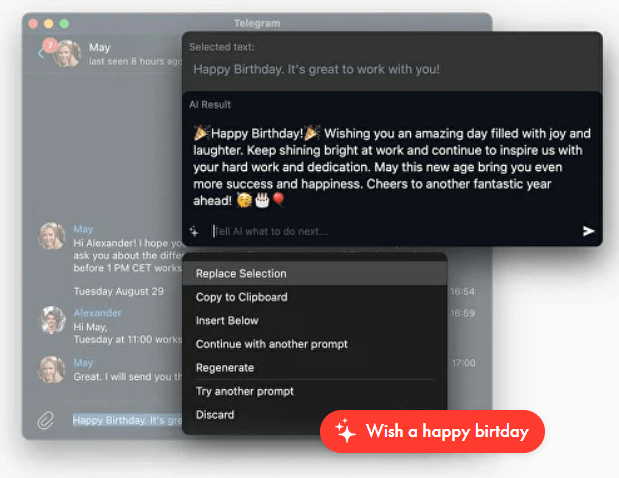
The control layer is stronger than it first appears. Pismo supports pre-made prompts for common tasks, custom prompts for recurring needs, and shortcuts for specific actions. That means a sales professional could build a “make this warmer but concise” shortcut. A support agent could create a “turn this into a calm customer reply” shortcut. A developer could create a “explain this code comment clearly” shortcut. A multilingual user could create a “translate this into natural English” shortcut.
That flexibility is what gives Pismo more range than a basic grammar checker. It is not only flagging mistakes. It can reshape the text based on your chosen instruction.
Translation is one of Pismo’s more useful everyday workflows. The product page says Pismo can translate selected text to and from any language instantly, and the FAQ says it supports multiple languages for text improvement and translation. The interface itself is listed as supporting languages including German, Spanish, Japanese, Italian, Hindi, Dutch, Polish, Simplified Chinese, Danish, and Vietnamese.
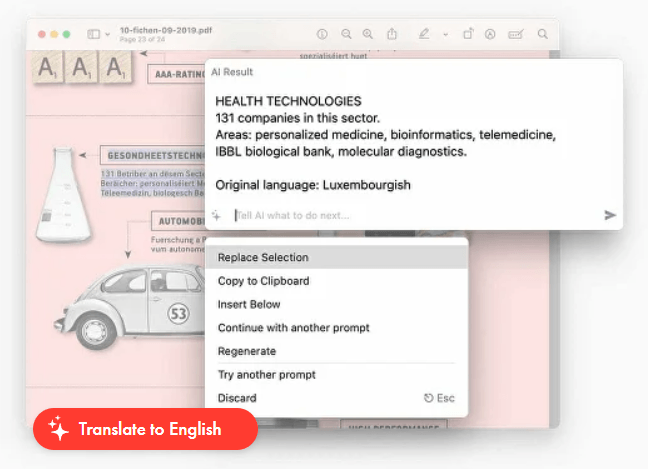
The best use case here is fast communication. Reading a foreign article, replying to an international client, translating a message from a colleague, or turning rough multilingual writing into cleaner English are all good fits. Pismo is not a professional localization platform, but it is practical for everyday multilingual communication.
The translation limitation is also clear from Pismo’s own FAQ: translation quality may vary depending on the complexity of the text and the language pair. That is the right caveat. Simple emails and messages are easier. Legal documents, technical manuals, medical content, cultural references, humor, and brand-sensitive copy still need review.
Pismo’s help docs currently say the app operates using GPT-4o Mini and that the model is upgraded as AI develops. That gives users a clearer baseline than tools that simply say they use “advanced AI.”
The more interesting layer is BYOK, or Bring Your Own Key. Pismo’s docs say it supports BYOK through OpenRouter, allowing users to connect their own OpenRouter API key and access models from providers such as OpenAI, Anthropic, Mistral, and others. The same page notes that Pismo does not currently support a direct OpenAI connection.
That distinction matters for advanced users. Most people can use Pismo as a normal writing assistant without thinking about models. But power users who care about model choice, specific writing behavior, or backend control may appreciate the OpenRouter option.
| Layer | Best for | Why it matters |
|---|---|---|
| Default Pismo model | Everyday grammar, rewriting, translation, and summaries. | Easiest option for normal users. |
| Custom prompts | Repeatable tone, formatting, translation, support, sales, or editing workflows. | Makes Pismo feel personalized rather than generic. |
| BYOK via OpenRouter | Users who want model choice and more backend control. | Adds flexibility for advanced workflows. |
| Quick Prompt | One-click or fast-access default action. | Speeds up the task you use most. |
Privacy matters for any writing assistant because people often use these tools on emails, internal messages, client notes, and sensitive drafts. Pismo’s homepage says it does not store or process the texts users work with, and the FAQ gives a more specific explanation: Pismo only takes text when the user activates a shortcut or clicks the widget on Windows, and it says the app does not access the clipboard on its own.
Pismo also says it is based in the EU and complies with GDPR. The features page says its servers are located in Belgium, and the DPA page says Pismo acts as a processor under GDPR for personal data processed through its SaaS services.
The most important practical note is this: privacy claims reduce concern, but they do not remove judgment. If you work with confidential legal material, regulated health data, unreleased financial information, private customer records, or internal company secrets, you should review Pismo’s privacy policy, DPA, and your organization’s AI policy before using any AI writing assistant on that content. Pismo’s privacy policy also says some account and usage information is collected, including usage data and email.
- Professionals writing many short messages: Pismo is a strong fit for people who spend their day in email, Slack, Teams-style chats, CRM notes, documents, and browser-based writing. The biggest gain is speed: fewer copy-paste loops and faster polishing.
- Non-native English writers: The combination of grammar correction, tone adjustment, simplification, and translation makes Pismo useful for writing more confidently in English or another working language.
- Sales and customer support teams: Pismo can help turn rough notes into professional replies, soften tense messages, shorten long responses, and make customer-facing communication clearer.
- Freelancers and solo operators: It is useful for emails, proposals, product descriptions, bios, cover letters, client messages, and small content tasks where polish matters but a full writing platform would be overkill.
- Students and academic users: Pismo can help simplify complex text, improve essays, summarize long passages, and clean up awkward phrasing. The caveat is that students still need to follow academic integrity rules and verify meaning.
- Power users who like shortcuts: Custom prompts, hotkeys, Quick Prompt, and BYOK make Pismo more attractive for users who want repeatable AI actions rather than one-off chat sessions.
| Tool | Stronger Fit | Where Pismo Fits Differently |
|---|---|---|
| Grammarly | Grammar checking, tone feedback, rewrites, brand-aware writing, and broad writing assistance. | Grammarly is more established as a writing correctness layer; Pismo is more appealing when you want a lightweight native desktop assistant with custom prompts and hotkeys across apps. |
| LanguageTool | Multilingual grammar checking and paraphrasing. | LanguageTool is strong for multilingual grammar correction; Pismo feels more workflow-oriented because of selected-text actions, custom prompts, and native desktop use. |
| QuillBot | Paraphrasing, rewriting, grammar checking, fluency, and translation tools. | QuillBot is stronger as a focused writing toolbox; Pismo is better for users who want AI actions available directly in desktop apps. |
| ChatGPT | Deep drafting, brainstorming, research, reasoning, and long-form generation. | ChatGPT is stronger for complex thinking and full conversations; Pismo is better for fast editing inside the app where the text already lives. |
The practical difference is simple. Choose Pismo when you want AI writing help at the operating-system level. Choose a broader AI chat tool when you need deeper ideation, research, or long-form reasoning. Choose a dedicated grammar tool when your main need is detailed correction and suggestion review.
- Set up custom prompts early. Pismo becomes more useful when it reflects your real workflow, not just the default actions. Build prompts for the tasks you repeat most: “make this more concise,” “make this client-friendly,” “translate into natural English,” “simplify without losing meaning,” or “turn this into a polite but firm reply.”
- Assign hotkeys to your highest-frequency actions. If you use Pismo mainly for translation, summarization, or professional rewrites, those actions should be one shortcut away. Pismo’s docs specifically support custom keyboard shortcuts for prompts.
- Process long text in sections. Pismo says there may be practical limits depending on complexity and length, and it recommends processing smaller sections when needed. That is also better editorial practice because you can preserve meaning and structure more carefully.
- Use Pismo for polishing, not fact-checking. It can improve the wording of a claim, but that does not mean the claim is true. For factual, legal, medical, financial, or technical content, verify the substance separately.
- Use BYOK only if you understand the trade-off. OpenRouter support gives more model flexibility, but Pismo’s DPA says client-directed integrations using your own API keys make the client responsible for the chosen third-party service’s data protection practices.
The biggest limitation is that Pismo is not a full writing environment. It does not replace a document editor, team workspace, content calendar, research assistant, or long-form drafting platform. It is best used as an enhancement layer over the apps you already use.
The second limitation is that it requires an internet connection. Pismo’s FAQ says it relies on cloud-based AI models for text processing and translation, so it cannot be used offline.
The third trade-off is that native desktop workflows depend on app compatibility. Pismo says it works across many applications, but real-world behavior can vary by app, operating system permissions, text field behavior, and update changes. Its FAQ even includes troubleshooting topics for copying text, VPN issues, window behavior, and specific editor behavior, which suggests users may occasionally need to adjust settings or troubleshoot edge cases.
The fourth limitation is that AI rewrites can smooth out personality. If you use Pismo too aggressively, your writing can become more generic. The best results come from using it to improve clarity and tone while preserving your actual intent.
The fifth limitation is translation reliability. Pismo is convenient for everyday translation, but professional translation, legal localization, brand-sensitive copy, and culturally nuanced content still need human review. Pismo’s own FAQ notes that translation quality can vary depending on the text and language pair.
Pismo is best understood as a desktop AI writing layer, not a full writing platform. Its strongest value comes from improving, translating, shortening, expanding, summarizing, and adjusting text inside the apps where you already work.
It is best for professionals, students, freelancers, multilingual users, support teams, and anyone who writes across many apps every day and wants faster editing without constant copy-paste.
The main caveat is that Pismo is strongest for practical text improvement, not deep content strategy, research, or long-form reasoning. Used well, it is a fast, flexible writing companion that makes everyday communication smoother.
TAGS: Translation Copywriting
Related Tools:
AI-powered mobile keyboard app that enhances typing efficiency

Generates SEO-friendly articles for niche websites

Provides spelling and grammar checking

Combines AI and human expertise for multilingual content marketing

Specializes in dubbing videos into multiple languages
Writes high-quality and optimized contents