

Share this tool:
 |
Description:
Munch Studio is no longer just a long-video-to-short-clips tool. Its current product is a broader AI social media system that learns your brand from your website and strategy inputs, generates posts and clips, lets you edit them, schedules them across connected platforms, and tracks performance in one place. That broader shape is what matters, because the real question is no longer “Can it cut clips?” but “Can it reduce the weekly drag of running social for a business?”
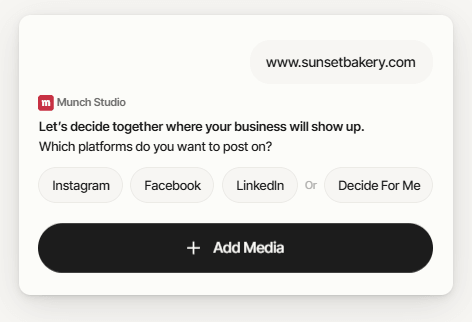
Munch builds posts from your content strategy, including goals, audience, tone, keywords, and brand inputs, with your website used as supporting context rather than the only source.
The platform can create up to 30 short clips from one long video, with auto-crop, subtitles, captions, aspect-ratio controls, and brand-kit options.
You can edit images, video, text, colors, tone, hashtags, formatting, and caption length before approving or scheduling.
Smart Scheduling suggests publish times from engagement data, manual scheduling is available, and the Planner gives you a calendar-style control center.
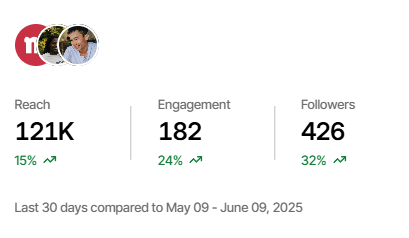
Once integrations are connected, Munch can auto-post and track performance across supported social platforms.
You can rely on auto-generated strategy-driven content, use Smart Posts from a short prompt, upload your own media, or create posts from blog flows and repurposed video projects.
The easiest way to think about Munch Studio is as a hybrid between a video repurposing tool and a lightweight social media operating system. Its roots are in GetMunch, and the company explicitly says the newer product keeps video at the center while expanding into scheduling, editor workflows, brand kits, performance insights, and new content creation methods for times when you do not have fresh footage.
That matters because many tools in this category are narrow. Some are mostly schedulers. Some are mostly short-form clip cutters. Some are mostly caption generators. Munch is trying to handle the whole chain: understand the business, generate social content, let you adjust it, publish it, and measure it. The homepage and help docs consistently frame it that way.
So the right lens is not “Is this the most advanced manual social suite?” It is “Is this a good done-for-you or mostly-done-for-you content engine for people who do not want to piece together five separate tools?” On that question, Munch is much more interesting.
Munch’s workflow starts earlier than most schedulers. The platform asks for your website, media, and brand context, and its docs say post generation is driven mainly by your content strategy: goals, audience, preferences, platforms, and keywords. Your website helps with messaging and positioning, but it is explicitly treated as supporting context rather than the sole source of truth.
That is a smart design choice. It means Munch is not just scraping your site and paraphrasing it into generic posts. In theory, it is trying to map business inputs into a repeatable content strategy first, then generate assets from that. You can edit social platforms, posting frequency, goals, audience, and keywords later, and once you save changes, Munch automatically generates a new batch of content from the updated settings.
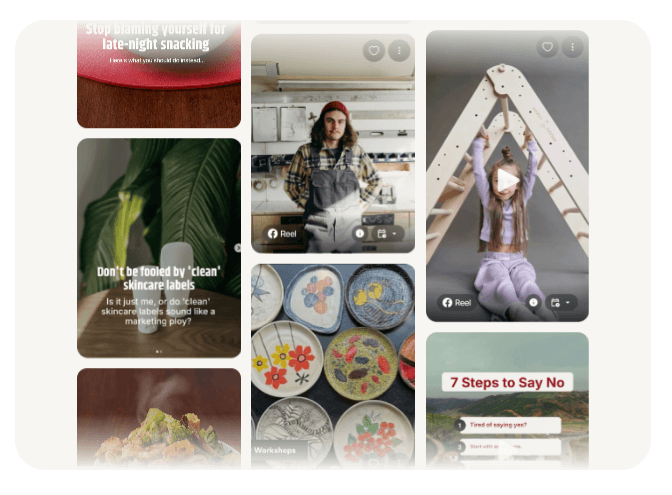
The left-side navigation also reflects that broader workflow. The help center describes clear sections for Integrations, Media Library, Content Strategy, Explore or Collections or Ideas, Planner or Calendar or Scheduled Posts, and account settings.
In real use, this should feel fairly approachable for a small business owner or solo marketer. The homepage pitch is “run your social in 10 minutes a week,” and the product flow is clearly built around reducing decisions: connect the business, let AI create strategy and posts, approve your favorites, and track results. Whether any user actually gets down to ten minutes will depend on how picky they are, but the product is obviously built to reduce repetitive work, not increase it.
Munch is strongest when a business has some real source material already. That could be a website, brand assets, existing videos, blog posts, photos, or Zoom recordings. The platform’s own onboarding and homepage make that clear. It performs best when it can absorb context rather than invent everything from nothing.
It is also strongest when video is part of the content mix, not an afterthought. The product still carries forward its repurposing DNA. The current project flow supports uploading video by link, computer upload, or media library, and the clip pipeline can create up to 30 short-form clips from one long video with auto-crop, subtitle selection, platform-aware aspect ratio choices, brand-kit application, and clip-length controls. Munch even recommends an “I trust Munch” setting for clip lengths when you want the system to choose what fits the selected platforms best.
That makes Munch a better fit for creator-business hybrids, educators, consultants, coaches, podcast operators, and brands with recurring recorded content than for businesses that only need static quote posts or occasional announcements. You can absolutely use Smart Posts for a sale, tip, or announcement, but the tool gets more compelling when one long recording can become multiple clips plus the surrounding social content to support them.
A subtler strength is that Munch tries to preserve platform differences without forcing you to manually rewrite everything. Its help docs say it automatically formats posts differently for X, LinkedIn, Instagram, and Facebook, and its cross-platform article says content is optimized for where it is likely to perform best, while still letting the user choose where it ultimately goes. That is the kind of practical automation that matters more than flashy AI wording.
Munch is not a black box in the worst sense. It does automate heavily, but it also gives you enough editing surface to keep the outputs from feeling locked. The editor supports changes to image, video, text, colors, and layout elements, and separate help docs say you can refine tone, personality, emojis, wording, hashtags, spacing, and length before approval or scheduling.
That is important because Munch’s target buyer is not a power designer who wants full canvas-level control. It is more likely a business operator who wants something 80 to 90 percent done, then wants to make light fixes. For that user, the editing layer sounds about right. It covers the common things people actually change without requiring design software or video-editing skill.
Brand control is also better than it first appears. You can modify brand colors, logos, tone, audience reach, business description, and problem statement inside Brand Settings, and Munch will generate a fresh batch of content after those changes are saved. So while the system is opinionated, it is not static. You can keep tuning the brand identity that drives the outputs.
Smart Prompts exist too, but they are not the main reason to buy Munch. They are a useful escape hatch for “I need a post about this specific thing right now.” You write a short description, and Munch generates branded visuals, captioning, and layout aligned with your strategy. Helpful, yes. But the bigger value is still the platform structure around that prompt, not the prompt box itself.
This is one of the product’s stronger sections. Munch’s scheduling system supports both Smart Scheduling and manual scheduling. Smart Scheduling recommends post times using engagement data, and the Planner provides a day-by-day, hour-by-hour calendar where you can inspect, edit, and move scheduled posts. There is also support for adding a first comment automatically when a post goes live.
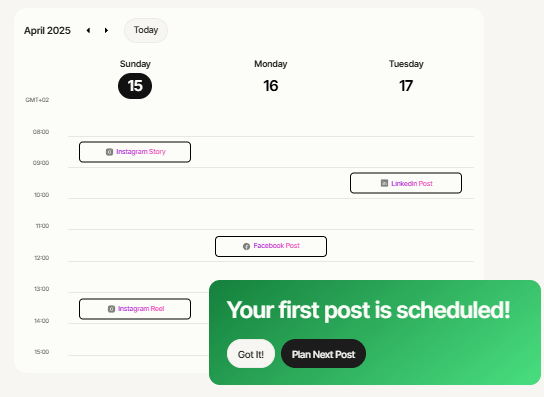
That combination is practical. A lot of smaller businesses do not need advanced social workflow theory. They need a queue, a calendar, sensible timing, and a low-friction way to keep publishing. Munch seems to understand that. The homepage, help center, and strategy articles all reinforce the same point: maintain consistency without constant manual publishing.
The integration layer matters here. Munch says that when you connect platforms, it can auto-post, track performance data, and keep your content moving without manual uploads. It also names Instagram, TikTok, Facebook, LinkedIn, and YouTube in its integration documentation. That is a solid mix for businesses that care mostly about mainstream social distribution rather than every niche network under the sun.
- Solo business owners: Munch Studio is a strong fit for solo business owners who have a website, some brand assets, and no appetite for building a full social workflow from scratch.
- Creator-led brands: It is well suited to creator-led brands with interviews, podcasts, webinars, Zoom calls, or recurring long-form video that can be broken into clips and supporting posts.
- Lean marketing teams: It makes sense for lean marketing teams that want a centralized content engine rather than separate tools for clipping, caption drafting, posting, and calendar management.
- Consultants, coaches, and educators: These users can get more value when existing recordings, lessons, workshops, or calls become multiple social assets.
- Businesses that need consistency: The combined Explore, Strategy, Planner, Integrations, and Media Library structure is clearly designed for brands that need a repeatable publishing rhythm.
- The biggest trade-off is that Munch works best when you accept its opinionated workflow. It wants to build strategy, suggest formats, automate timing, and shape content around platform best practices. That is good for speed, but people who want full manual control over every publishing decision may find it constraining.
- There are also operational limits. Without social integrations, you can still create and customize content, but you lose automatic publishing and performance tracking. Published posts also cannot be edited inside Munch after they have already gone live; only scheduled posts can still be modified in-platform.
- Video projects have constraints too. In the clip-generation flow, one project can only create clips in one aspect ratio, and you can select up to two target platforms per project. That is not a deal-breaker, but it is a reminder that this is automated repurposing, not an infinite-format video finishing suite.
- Integration setup can be annoying, especially on Meta properties. Munch’s docs spell out Business-account, Page-linking, and Admin-permission requirements for Instagram and Facebook connections. That is normal for third-party publishing tools, but it still creates friction for non-technical users.
- It is weaker for multi-brand management inside one account. Munch’s current help center says the best option is still a separate account for each brand or website.
Munch Studio is best understood as a practical AI social content system with video repurposing at its core.
It is strongest for small businesses, creator-led brands, and lean teams that want brand-aware post generation, short-form video repurposing, built-in editing, smart scheduling, and cross-platform publishing in one workflow.
Its main caveat is that it is not the deepest manual social suite, and some operational details, especially integrations, multi-brand handling, and pricing-page consistency, still need careful attention.
TAGS: Social Media Tools Video Editing
Related Tools:
Creates short-form videos from texts
Simplifies video and podcast editing
Transforms long videos into engaging clips
Streamlines content creation

Provides SEO analysis and monitoring

Enhances website SEO optimization