

Share this tool:
 |
Description:
TubeBuddy is still best understood as a YouTube optimization stack, not a general AI app. Its current official product mix centers on SEO tools, content strategy tools, thumbnail and title optimization, A/B testing, analytics, and bulk channel management, all delivered through a browser extension that appears inside YouTube Studio after installation. That matters because the real value is not “AI for creators” in the abstract. It is helping you make better publishing decisions, improve click-through rate, and manage a growing video library without doing everything manually.
Finds keyword opportunities with search volume, competition, long-tail ideas, and real-time search metrics.
Guides title, description, and tag optimization with keyword ranking, search volume, competition, and step-by-step recommendations.
Tests thumbnails and metadata, tracks CTR, watch time, engagement, and traffic-source impact, and declares winners at 95% statistical significance.
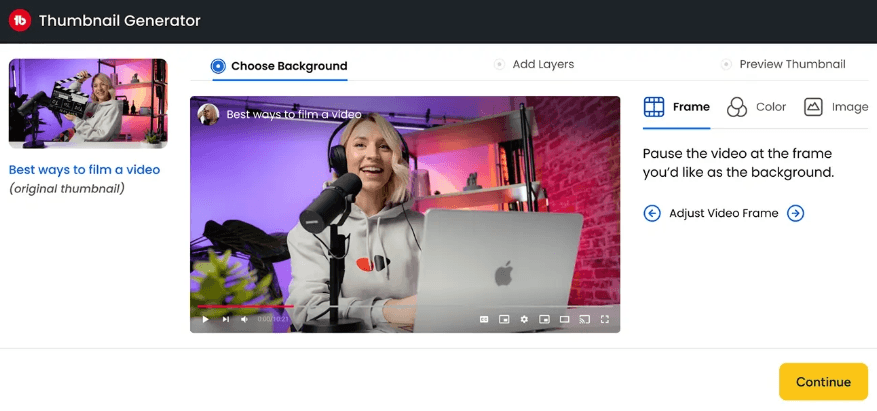
Thumbnail Analyzer adds AI scoring, heatmaps, real-time feedback, and competitor comparison, while Title Generator produces AI-based title ideas.
Channelytics, Channel Insights, Niche Leaderboard, and Topical Analysis help you study channel growth, posting patterns, breakout videos, and topic performance.
Bulk tools let you update comments, related videos, cards, end screens, and other library elements at scale instead of editing one video at a time.
The easiest way to think about TubeBuddy is as a creator-side operations layer for YouTube. The homepage groups its product into SEO tools like Keyword Explorer, SEO Studio, and Click Magnet; content strategy tools like Channel Insights, Niche Leaderboard, A/B Testing, and Topical Analysis; and video and thumbnail tools like Title Generator, Thumbnail Analyzer, and Thumbnail Generator. That structure tells you what TubeBuddy really prioritizes: discoverability, click performance, competitive research, and catalog management.
That is why TubeBuddy still matters even though YouTube Studio itself keeps improving. TubeBuddy is not trying to replace editing software or turn itself into a broad social media suite. It is trying to tighten the part of the workflow where creators lose momentum: topic selection, metadata quality, thumbnail performance, competitor analysis, and repetitive maintenance across a growing library. That is partly an inference from the official feature mix, but it is a very strong one.
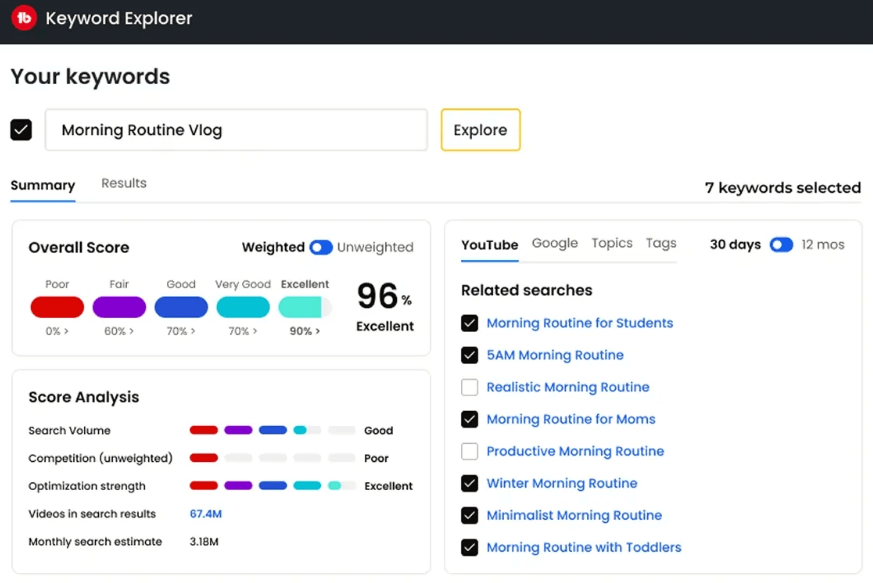
TubeBuddy is strongest when you already publish regularly and need better decisions, not just more ideas. SEO Studio and Keyword Explorer are built around target keywords, ranking signals, search volume, and competition, which makes them useful before publishing and again when you revisit older uploads. The platform’s own SEO materials repeatedly position TubeBuddy as a way to improve titles, descriptions, tags, and search visibility rather than merely brainstorm random content ideas.
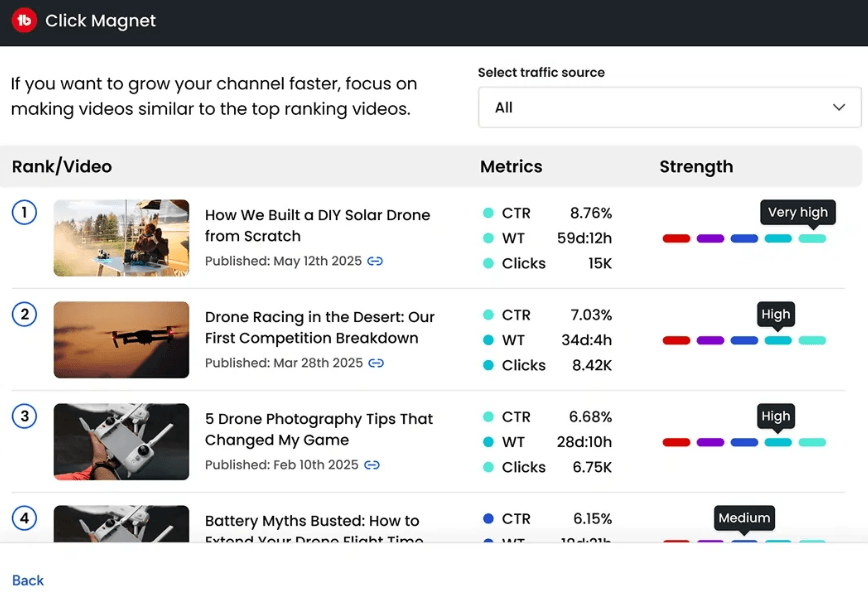
It is also especially strong on the click layer. Thumbnail Analyzer, Title Generator, A/B Testing, and Click Magnet all point at the same practical problem: your video can be good and still underperform if nobody clicks. TubeBuddy’s current AI pages emphasize predictive thumbnail scoring, AI-generated title suggestions, and CTR-oriented analytics, while Click Magnet is explicitly framed as a CTR booster that analyzes existing titles, thumbnails, and descriptions.
A third strength is that TubeBuddy keeps getting more useful as your archive gets bigger. Bulk tools, bulk end-screen editing, related-video management, and batch updates matter far more when you have dozens or hundreds of uploads than when you have five videos. TubeBuddy’s own support article is unusually candid here: the process works one video at a time, but it still turns tasks that would take weeks by hand into something manageable.
The workflow is more integrated than it first appears. TubeBuddy says you install the browser extension, authorize access, and it shows up inside YouTube Studio. From there, tools like SEO Studio, Title Generator, A/B Testing, and bulk editors are used in context rather than in a disconnected dashboard. That makes TubeBuddy feel less like an external “AI assistant” and more like an extra control layer on top of your normal YouTube workflow.
SEO Studio is a good example of that product design. You open it from the TubeBuddy menu, enter a target keyword, and the tool walks you through title, tag, and description optimization with real-time suggestions and performance indicators like search volume, competition level, keyword ranking, and optimization score. For newer creators, that step-by-step structure is one of TubeBuddy’s better qualities because it reduces guesswork without demanding deep SEO knowledge.
The title and thumbnail workflow is also pragmatic. Title Generator can populate your current title automatically and then generate eight AI-backed alternatives you can apply directly. Thumbnail Analyzer adds AI scoring, heatmaps, and feedback before you publish, while A/B Testing lets you validate thumbnail or metadata choices against real performance data later. In practice, that means TubeBuddy is not just “generate something and hope.” The stronger workflow is generate, analyze, test, then keep the winner.
Competitor and niche research is where TubeBuddy starts to feel more strategic. Channelytics compares channels on views, subscribers, growth, uploads, and trends directly on YouTube. Channel Insights and Niche Leaderboard help you benchmark yourself against creators in your niche, and Topical Analysis adds a newer layer by letting you inspect content inside a topic your competitors have already published, sorted by performance and grouped by long-form, Shorts, Lives, and Premieres. That is a much more actionable research loop than simply copying whatever is trending on your home page.
TubeBuddy does have a real AI layer now. Its official AI pages highlight AI-generated titles, predictive thumbnail analysis, and Suggested Shorts. Suggested Shorts is especially interesting because TubeBuddy says it uses AI to identify the most compelling parts of your content and turn them into Shorts ideas tailored to your channel and audience rather than generic trend chasing.
But AI is not the main reason to buy TubeBuddy. The main reason is that TubeBuddy combines AI suggestions with workflow tools and measurement tools. A lot of creator software can generate titles. Fewer tools can generate title options, analyze thumbnail performance, benchmark competitors, run A/B tests, and then help you bulk-update older assets when you learn something new. That combination is where TubeBuddy still feels practical. This is partly an inference, but it is grounded in the current official feature set.
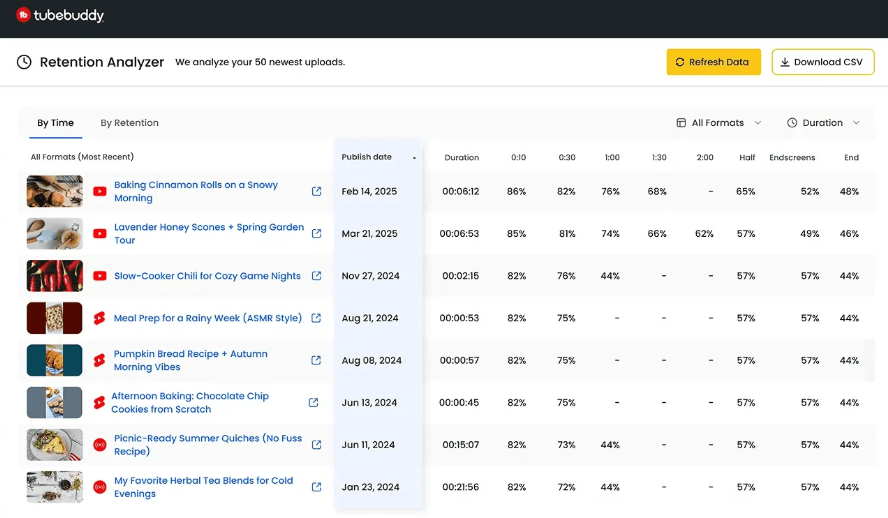
The retention and analytics layer is useful because it moves TubeBuddy beyond pre-publish optimization. Once a video is live, creators need to understand whether people are clicking, staying, and responding. That post-publish loop is what turns TubeBuddy from a keyword helper into a more complete YouTube optimization layer.
- Consistent YouTube creators: TubeBuddy is a strong fit for creators who already have a real publishing habit and want to improve discoverability, clicks, and workflow efficiency.
- Educational and tutorial channels: Keyword Explorer, SEO Studio, and metadata optimization are especially useful when videos answer searchable questions.
- Review and niche expert channels: Competitor research, topic analysis, and title-thumbnail optimization help identify patterns before creating or updating videos.
- Gaming and commentary channels: Click Magnet, thumbnail tools, and A/B testing are useful when packaging and CTR matter heavily.
- Channels with a growing backlog: Bulk editors, end-screen tools, related-video management, and re-optimization workflows become more valuable as the catalog expands.
- Use TubeBuddy’s optimization stack in sequence, not as isolated widgets. A practical loop is: Keyword Explorer and Topical Analysis for opportunity discovery, SEO Studio for metadata setup, Thumbnail Analyzer and Title Generator for pre-publish refinement, then A/B Testing and Click Magnet after the video has real traffic.
- Treat metadata A/B tests more carefully than thumbnail tests. TubeBuddy says thumbnail tests do not hurt how YouTube perceives your content, but metadata tests can temporarily drop a video out of search while YouTube reindexes the updated title, description, or tags.
- If you run a large channel, respect the bulk-processing limits. TubeBuddy’s own support docs recommend working in batches of up to 1,500 videos, note that loading more than 500 can be slow, and explain that bulk updates are still processed one video at a time.
- Use Click Magnet after you already have performance data. The tool is more useful when it can analyze real titles, thumbnails, descriptions, CTR, and clicks rather than guesses.
- Use Retention Analyzer to find content patterns, not just weak videos. Look for repeated retention drops, strong openings, and formats that keep viewers longer.
- The first trade-off is that TubeBuddy works best once you have enough content and traffic for its data to mean something. Beginners can still benefit from SEO Studio and title help, but tools like A/B Testing, Click Magnet, niche benchmarking, and large-scale bulk edits become much more meaningful once the channel is active and the back catalog is real.
- The second trade-off is that TubeBuddy is still a browser-extension-driven product. That integration is convenient, but it also means your experience is tied closely to how comfortably you work inside YouTube Studio rather than inside a polished standalone workspace.
- The third trade-off is that the most powerful features live above the free tier. TubeBuddy’s own pricing and tool pages make that clear: Channel Insights is limited on Pro, Click Magnet is Legend-only, and the stronger testing and analytics features sit higher up the plan stack.
- It is a weaker fit for creators who want heavy editing help, scripting help, or a complete off-platform social media manager. TubeBuddy can suggest titles, predict thumbnail performance, and support Shorts ideation, but the official product still revolves around YouTube optimization and management rather than scriptwriting or video production.
TubeBuddy remains one of the more practical YouTube growth tools because it combines SEO, thumbnail and title optimization, competitor research, testing, and library management in one extension-driven workflow.
It is best for creators who publish consistently, care about discoverability and CTR, and want to optimize an expanding catalog instead of just chasing random content ideas.
The main caveat is that its strongest value appears once you have enough videos, traffic, and workflow complexity for the data and bulk tools to really matter.
TAGS: Social Media Tools
Related Tools:

Analyzes and optimizes YouTube thumbnails

Creates posts for social media

Enhances social media engagement

Streamlines social media strategies

Helps you create, schedule, and publish social media content

Assists creators with social media data analysis