

Share this tool:
 |
Description:
Formularizer is a focused AI assistant for people who work in spreadsheets but do not want to manually build formulas from scratch. Its main job is simple: you describe what you want in plain English, and the tool helps turn that request into a usable formula, explanation, or spreadsheet-related output. It is not trying to be a full spreadsheet app or business intelligence platform. It is a formula helper first, with enough extra support to be useful for everyday Excel, Google Sheets, and Notion-style formula work.
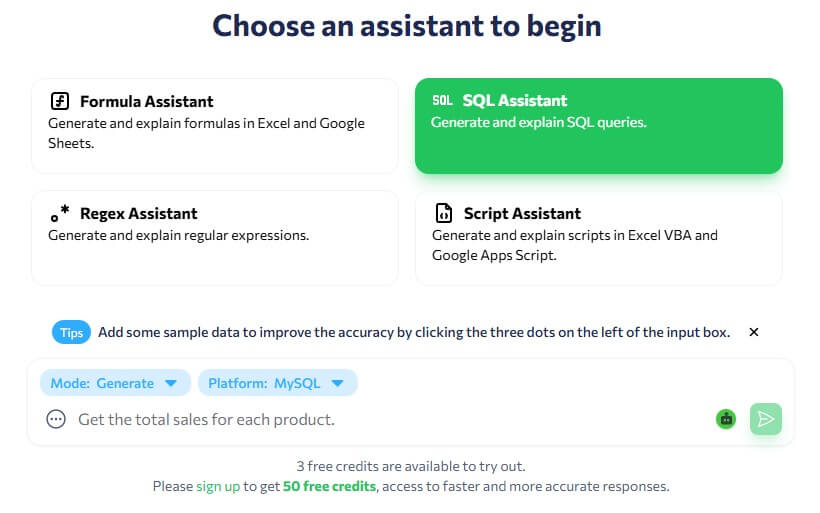
These examples show where Formularizer makes the most sense. It is strongest when you know the business logic but do not know the exact formula syntax.
Use Formula Assistant
Prompt:
“Create an Excel formula for cell D2 that calculates commission based on sales in C2. If sales are below 10,000, return 5% of sales. If sales are between 10,000 and 25,000, return 8%. If sales are above 25,000, return 12%.”
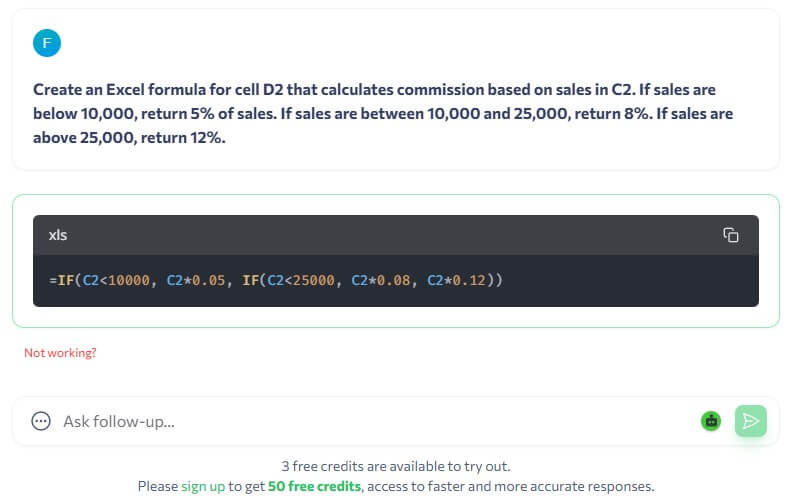
Use Formula Assistant
Prompt:
“Write a Google Sheets formula that extracts only the domain name from an email address in A2. For example, if A2 contains jane@company.com, the result should be company.com.”
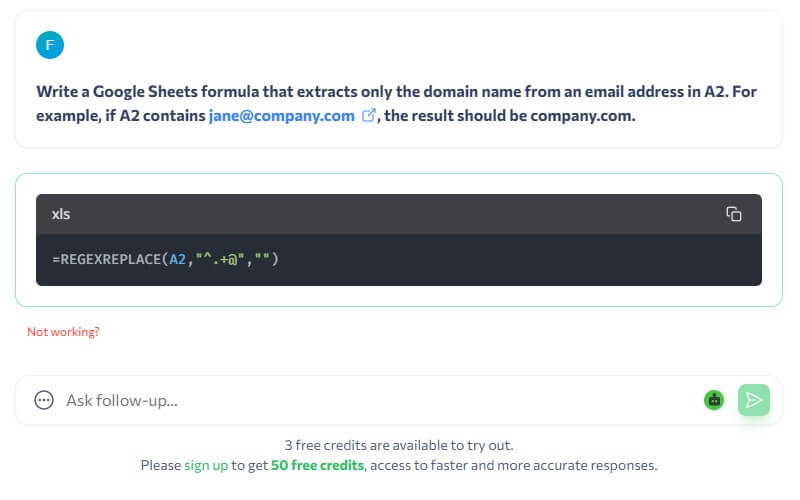
Use Formula Assistant
Prompt:
“Create an Excel formula that checks the due date in B2. If the date is before today, return ‘Overdue’. If the date is today or later, return ‘On time’. If B2 is blank, return blank.”
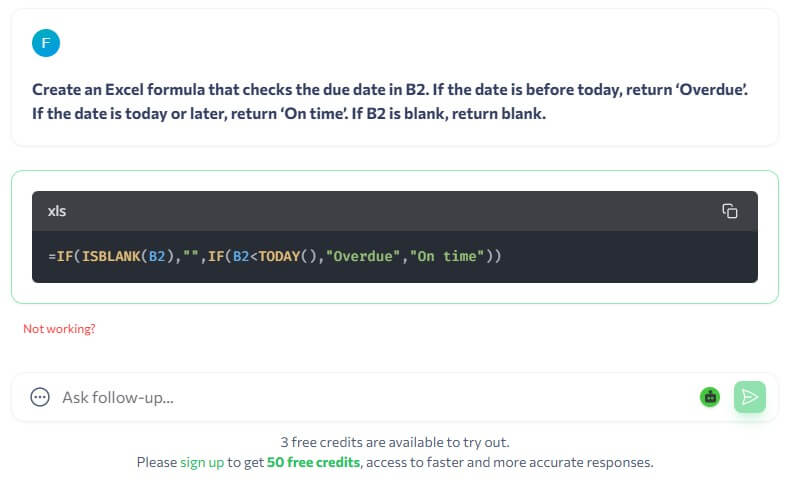
Use SQL Assistant
Prompt:
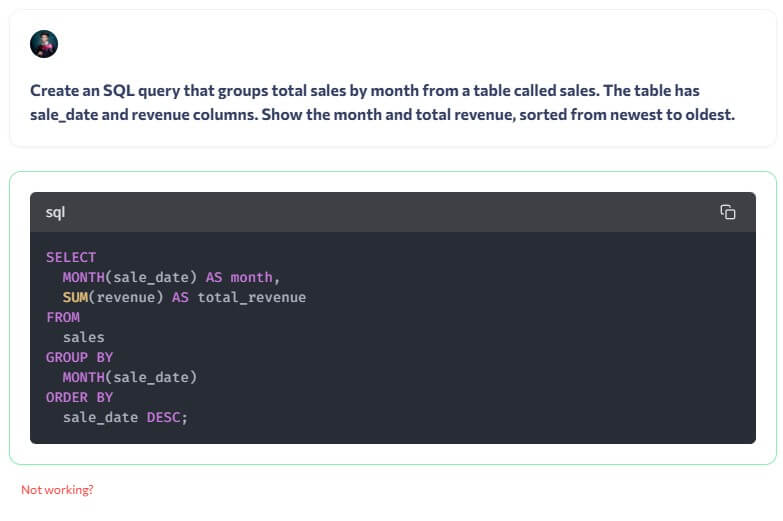
“Create an SQL query that groups total sales by month from a table called sales. The table has sale_date and revenue columns. Show the month and total revenue, sorted from newest to oldest.”
Use SQL Assistant
Prompt:
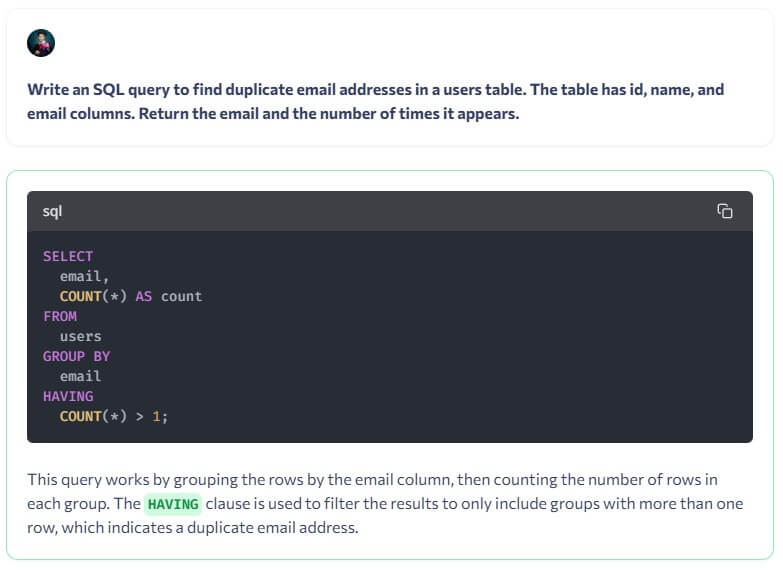
“Write an SQL query to find duplicate email addresses in a users table. The table has id, name, and email columns. Return the email and the number of times it appears.”
Use SQL Assistant
Prompt:
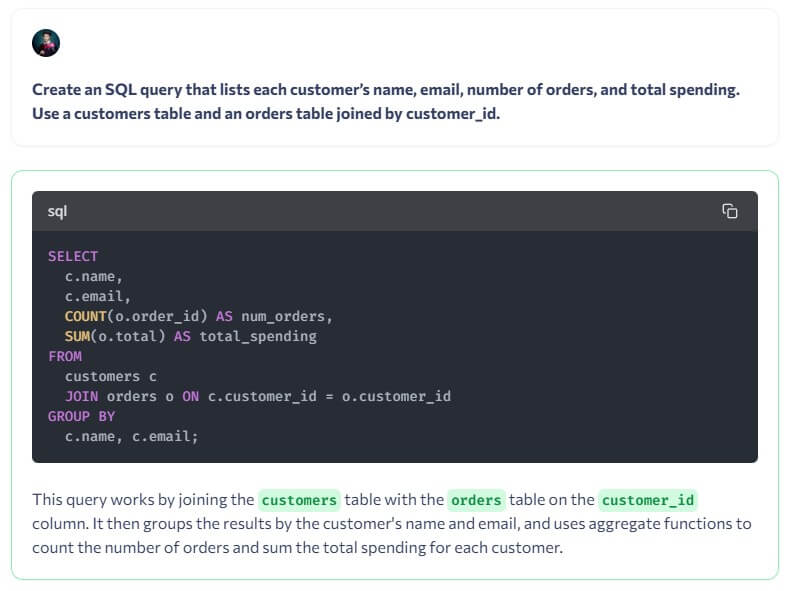
“Create an SQL query that lists each customer’s name, email, number of orders, and total spending. Use a customers table and an orders table joined by customer_id.”
Use Regex Assistant
Prompt:
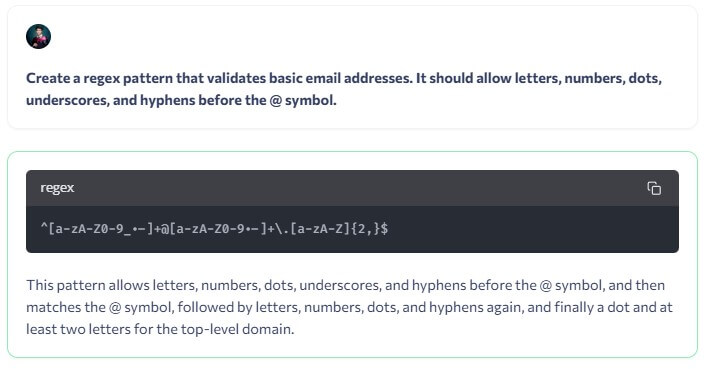
“Create a regex pattern that validates basic email addresses. It should allow letters, numbers, dots, underscores, and hyphens before the @ symbol.”
Use Regex Assistant
Prompt:
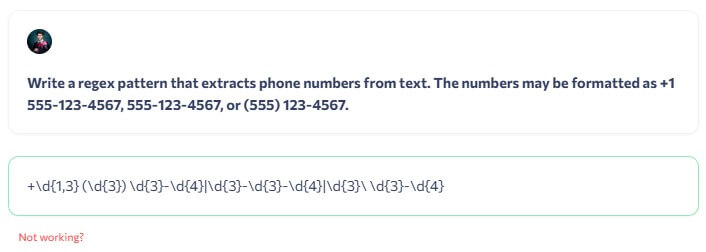
“Write a regex pattern that extracts phone numbers from text. The numbers may be formatted as +1 555-123-4567, 555-123-4567, or (555) 123-4567.”
Use Script Assistant
Prompt:
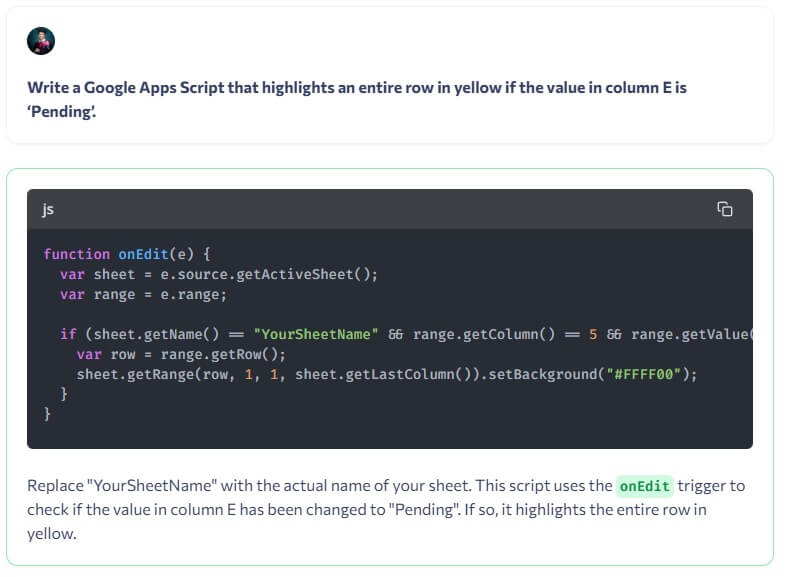
“Write a Google Apps Script that highlights an entire row in yellow if the value in column E is ‘Pending’.”
Use Script Assistant
Prompt:
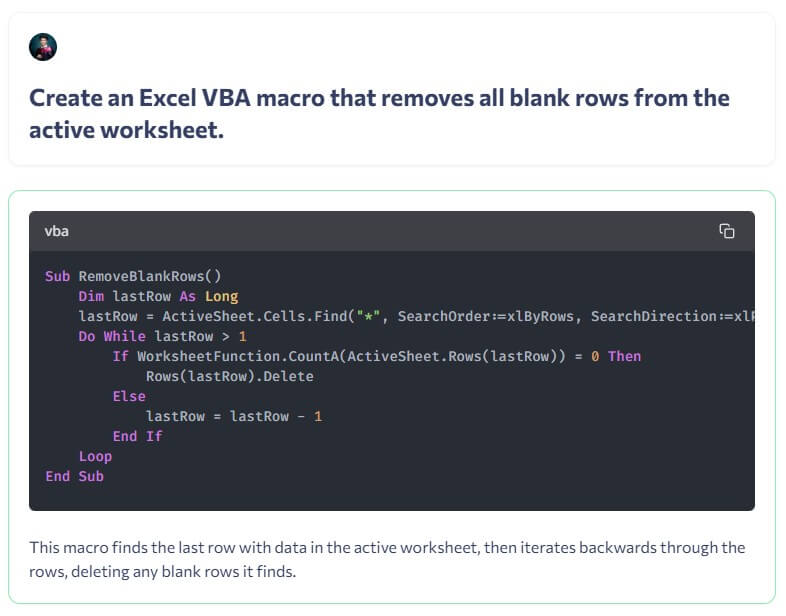
“Create an Excel VBA macro that removes all blank rows from the active worksheet.”
Formularizer is an AI formula generator and explainer. The company’s public LinkedIn page describes it as an assistant for Excel, Google Sheets, and Notion formulas, with text-to-formula generation as the core task. It also mentions support for Excel VBA and Google Apps Script, which gives the tool some usefulness beyond single-cell formulas.
That matters because many spreadsheet users are not beginners. They may understand what they want to calculate, filter, extract, or classify, but they get stuck on syntax. Nested IF statements, lookup formulas, date calculations, array formulas, regular expressions, and script tasks are easy to describe but harder to write cleanly.
Formularizer sits in that gap. It helps translate intention into spreadsheet language.
Formularizer converts plain-language instructions into formulas, which is its core value.
Users can paste an existing formula and ask what it does, which is helpful for auditing or learning from older spreadsheets.
Public descriptions mention Excel, Google Sheets, and Notion formulas, making it more flexible than an Excel-only helper.
The company page says VBA and Google Apps Script are supported, which helps with lightweight automation tasks beyond normal formulas.
The homepage describes data insights as part of the platform, so the tool is not limited to formula strings alone.
Formularizer is strongest for quick formula creation, formula explanation, and small spreadsheet automation tasks. It is especially useful for people who use spreadsheets often but do not want to memorize every function.
The best use case is not “build my whole financial model.” It is closer to: “I need the correct formula for this exact column problem.” That can include extracting names from text, calculating overdue status, assigning categories, checking duplicates, combining conditions, converting dates, cleaning imported data, or explaining a formula someone else built.
This is a practical category. A good formula assistant saves time in small chunks. It reduces search time, syntax errors, and trial-and-error editing. That is enough to make it useful for office workers, analysts, students, founders, marketers, operations teams, and anyone who inherits messy spreadsheets.
The workflow is direct: describe the spreadsheet task, generate the formula, copy it into your sheet, then test it on real data. For formula explanations, the process is even simpler. Paste the formula, ask for an explanation, and review the breakdown.
This is why Formularizer feels more like a utility than a large productivity suite. There is not much conceptual overhead. The quality of the output depends heavily on how clearly you describe the sheet structure. Good prompts mention the column letters, the type of data, the desired result, and any edge cases.
A weak instruction would be: “Make a formula for commission.”
A better one would be: “In Excel, calculate commission in D2 based on sales in C2. Return 5% if sales are below 10,000, 8% if sales are 10,000 to 25,000, and 12% if above 25,000.”
That small difference matters. Formularizer can only generate the right logic if the task is specific enough.
Formularizer’s output should be treated as a strong first draft, not something to trust blindly. Formula tools can produce correct-looking formulas that fail because of regional separators, sheet names, data types, blank cells, hidden spaces, or mismatched spreadsheet platforms.
The tool is most reliable for contained problems with clear logic. It is less predictable when the task depends on complex workbook structure, multiple tabs, unusual formatting, or business rules that the user does not fully explain.
The formula explanation feature helps balance that. If you do not understand the generated formula, ask Formularizer to explain each part before using it. That turns the tool from a shortcut into a learning aid.
Formularizer is a good fit for spreadsheet users who need formulas faster but still want to understand what they are using. It works well for sales trackers, inventory sheets, project dashboards, gradebooks, lead lists, marketing reports, content calendars, finance logs, and simple operational databases.
It is also useful for students learning Excel or Google Sheets. Instead of searching function-by-function, they can ask for a formula and then request an explanation. For workplace users, the biggest value is speed. Formularizer can help with those small spreadsheet problems that interrupt a task but do not justify asking a developer or analyst for help.
The main limitation is context. Formularizer does not see your full spreadsheet unless you provide the relevant structure. If the workbook has hidden assumptions, messy data, merged cells, unusual date formats, or inconsistent headers, the generated formula may need adjustment.
The second limitation is that formula correctness still needs testing. Users should run outputs on sample rows before applying them to a full sheet.
The third limitation is scope. Formularizer is useful for formulas, explanations, scripts, and spreadsheet guidance, but it is not a replacement for a full BI tool, database, or advanced analytics platform.
Formularizer is best for people who know what they want a spreadsheet to do but do not want to fight with formula syntax. Its strongest value is fast text-to-formula generation, clear formula explanations, and light spreadsheet automation support for Excel, Google Sheets, and related workflows.
The main caveat is that the output still needs checking against your actual data. For everyday spreadsheet work, though, it is a practical time-saver.
TAGS: Productivity
Related Tools:

Turns your to-do list into a time-blocked schedule

Helps users create customized resumes and cover letters

Uses AI to analyze, automate, and visualize data

Analyzes your documents to help you understand information

Automates chat interactions with customizable chatbots

AI tool that automates scheduling