

Share this tool:
 |
Description:
AIPRM is a prompt-management platform and community library for tools such as ChatGPT and Claude. It gives you a searchable collection of templates for SEO, writing, marketing, productivity, software development, sales, customer support, and plenty of other everyday tasks.
The library currently contains more than 5,400 public prompts. AIPRM also offers browser extensions for ChatGPT on Chrome and Edge, along with a Chrome extension for Claude.
AIPRM does not generate content by itself. Think of it as an organizational layer for the AI model you already use. It gives good prompts somewhere to live, so you can find and reuse them instead of digging through old conversations or rebuilding the same instructions every week.
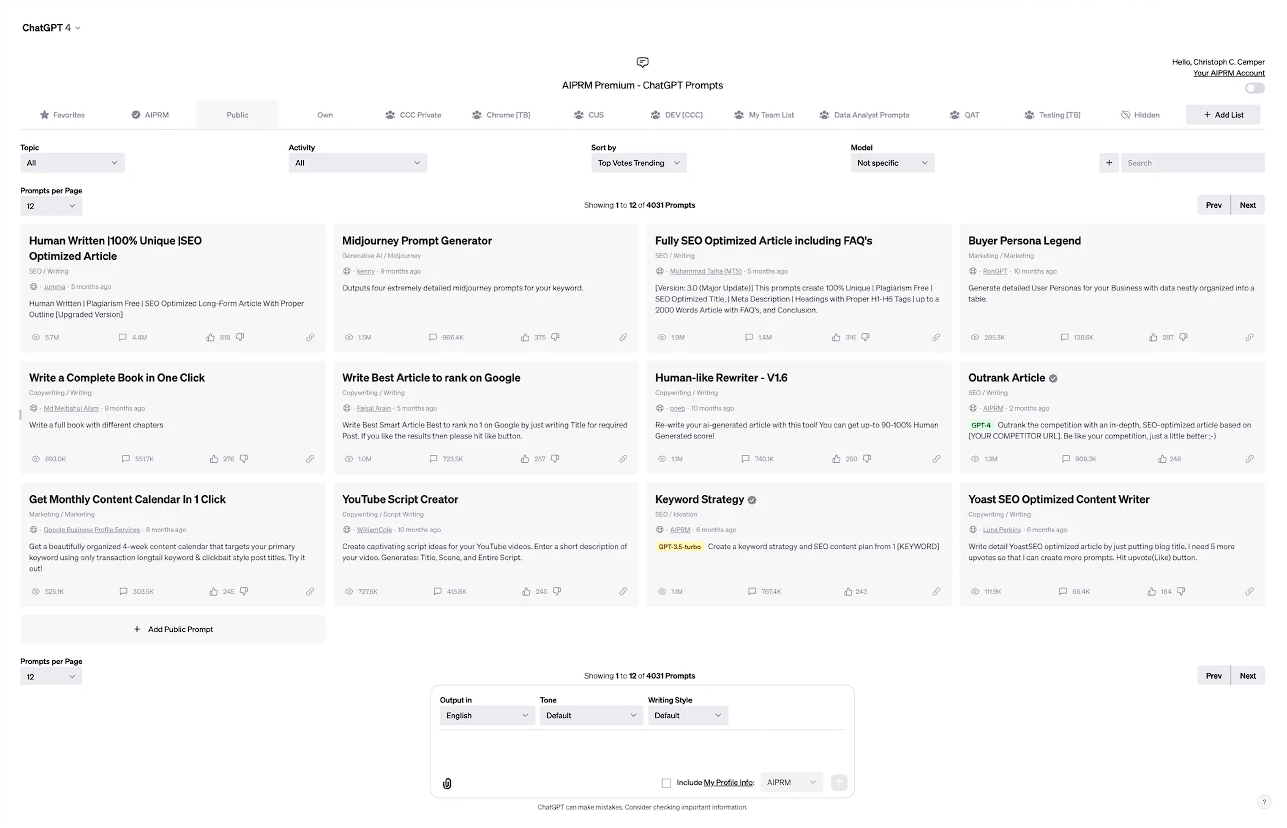
The public prompt library is AIPRM’s headline feature.
Say you need an article outline, a keyword strategy, a social media post, help with a coding task, or a first draft of a business document. Rather than spending time working out the right wording, you can search for an existing prompt and run it inside the supported AI interface.
Search options include keywords, categories, and models. Community ratings can help narrow the results, while spam and duplicate detection prevent the library from filling up with too many copies of the same prompt.
It is a useful shortcut, especially if prompt writing is not something you enjoy. The catch is quality. Community prompts are created by different people for different purposes, so even a highly rated template may need editing before it suits your brand, task, or chosen model.
The platform becomes more useful once you start adding your own prompts.
You can save private templates for work you repeat regularly and sort them into lists. That might include a standard format for product descriptions, a checklist for reviewing an article, or a research prompt you use at the beginning of every project.
Teams can share chosen prompts and lists as well. This helps everyone approach recurring tasks with the same instructions instead of having five employees develop five different ways of asking the AI for essentially the same result.
Prompt Variables let you reuse one template without manually rewriting it each time. A prompt can ask for specific details or offer predefined choices, then insert those answers into the final instruction. The framework stays put while the topic, audience, format, or other project details change.
Custom Profiles handle the background information. You can save details about yourself, your company, a client, or a brand and bring that context into a prompt when needed. No more pasting the same company description into every new conversation.
AIPRM also lets users define writing styles and tones. These settings will not automatically capture every subtlety of a brand voice, but they can make the first draft feel less generic.
AIPRM now includes several tools that go beyond reusable prompt templates.
Power Continue adds shortcuts for common follow-up requests, including rewriting, summarizing, shortening, and clarifying an AI response. Live Crawling can pull information from a specific URL into a prompt for analysis.
With AIPRM Everywhere, you can highlight text on a webpage and send it to ChatGPT as part of a prompt. The Omnibox feature goes a step further by letting you start prompts from the browser’s address bar.
AIPRM also supports prompt management for Custom GPTs and allows prompts to be tagged for specific AI models. That last feature is practical because model behavior changes, and a prompt that works beautifully with one model can produce a very different result with another.
AIPRM is particularly useful for:
- Marketers and SEO teams that run the same types of content workflows regularly.
- Writers who prefer a reusable framework to a blank prompt box.
- Agencies managing content for several clients or brands.
- Teams that want everyone to follow the same AI instructions.
- Business users who need practical templates without becoming prompt-engineering experts.
- Frequent ChatGPT or Claude users whose useful prompts are becoming difficult to organize.
AIPRM cannot improve the underlying intelligence of an AI model. A well-designed prompt may produce a clearer or more relevant answer, but the model can still make factual mistakes, reason poorly, or invent information.
Finding the right prompt can also take time. With more than 5,400 public options, some filtering is unavoidable. Certain templates are extremely specific, and others may lose their usefulness as the models they were written for change.
Then there is the extra layer itself. Prompt management is helpful when you repeat tasks often, but it can feel unnecessary if you only use AI occasionally or already maintain a small, tidy prompt collection elsewhere.
AIPRM is a practical way to manage prompts when generative AI has become part of your regular workflow. Its public library gives new users somewhere to start, while private prompts, variables, profiles, team lists, and browser tools make repeated tasks easier to organize.
Marketers, writers, agencies, and teams are likely to find the most value in it. Just remember what AIPRM can and cannot do: it can bring order and consistency to your prompts, but it cannot guarantee that the AI’s answer will be accurate.
TAGS: Prompt Guides AI Chat/Assistant
Related Tools:

Generates text, code, and reasoning solutions

Offers prompt engineering support

Answers questions, generates content, and analyzes information
Generates and optimizes prompts for AI

Allows users to interact with various advanced AI models

Provides diverse range of prompts