

Share this tool:
 |
Description:
ChatBotKit is a platform for building conversational AI agents that can answer questions, search business information, call tools, and work across several channels.
It goes well beyond a website chat widget. Teams can combine agents, datasets, skillsets, integrations, AI models, analytics, and governance controls to create assistants for customer support, sales, or internal operations.
Much of the appeal comes from how those pieces fit together. You can connect a bot to company information, give it specific actions, choose a model, and deploy the same underlying logic to a website or messaging service. There is no need to rebuild the entire system for every channel.
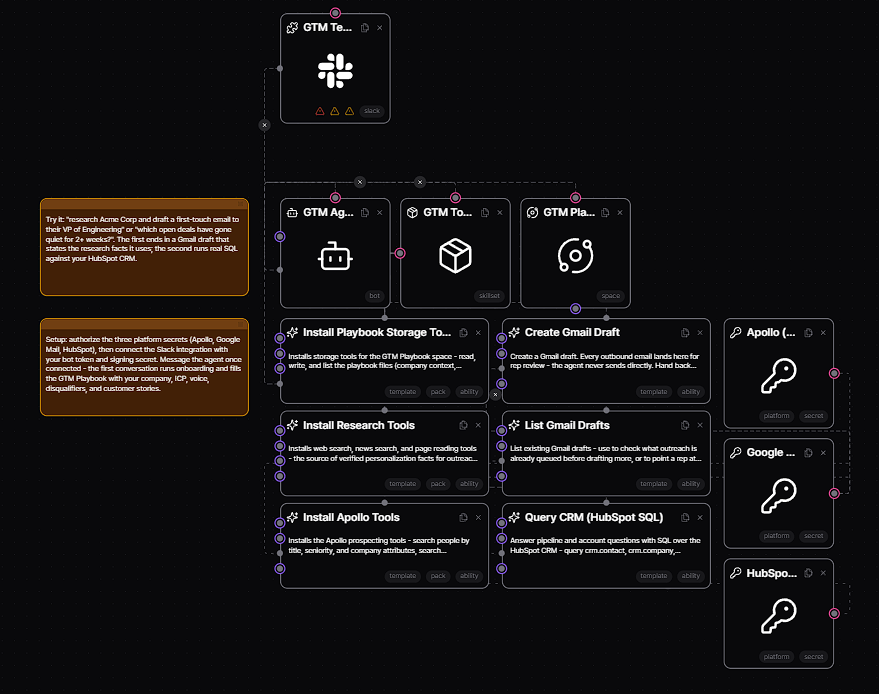
Datasets give ChatBotKit agents access to company documentation, product details, FAQs, policies, and other internal material. Before answering, a bot can search this information for relevant context.
ChatBotKit uses retrieval-augmented generation, or RAG, to handle that process. The agent is not forced to rely entirely on the model’s general knowledge because it can retrieve information supplied by the business first.
For a support team, this may be more valuable than switching to the newest model. A polished answer is not much help if it invents the return policy. Finding the correct company information matters more.
Skillsets allow ChatBotKit agents to interact with external services, APIs, web tools, code-execution systems, data-processing functions, image generators, and other resources.
The platform currently highlights more than 150 prebuilt abilities. Teams can also add custom functions and APIs when the existing options do not cover what they need.
These abilities turn a chatbot into something closer to a working agent. It can answer a question, look up a record, update another system, trigger a service, or complete a related task.
ChatBotKit supports models from OpenAI, Anthropic, Google, Mistral, and Perplexity, along with custom model configurations.
Available settings may include temperature, context handling, reasoning effort, multimodal input, and interpreter support, depending on what the selected model allows.
This gives teams room to choose models according to the job. They are not forced to tie the entire application to one provider.
ChatBotKit supports website widgets and integrations for Slack, Discord, WhatsApp, Telegram, Google Chat, Microsoft Teams, Messenger, and other channels.
Its website widget can be embedded directly into an existing site and customized to suit the surrounding interface.
This arrangement works well for organizations that want one agent architecture in several places. A customer-facing assistant might run on the website, while a related internal agent works inside Slack or Teams.
ChatBotKit has a substantial developer layer. Its API provides access to bots, datasets, conversations, skillsets, and integrations.
Official tooling includes Node and Go SDKs, along with a Terraform provider for managing resources through infrastructure-as-code workflows. That gives technical teams options beyond clicking through a visual editor.
For day-to-day oversight, analytics cover conversations, messages, usage, and platform events. ChatBotKit also includes policy controls, authentication, audit logging, and security features for organizations running agents in production.
ChatBotKit makes the most sense for:
Customer-support agents that answer from company documentation.
Sales assistants that qualify visitors or route leads.
Internal knowledge bots for Slack, Teams, or Google Chat.
Workflow agents that combine conversation with API actions.
SaaS products that need embedded conversational AI without building the entire agent stack.
Development teams that want model choice and API-level control.
ChatBotKit has many moving parts. Teams need to configure datasets, models, skills, integrations, policies, channels, and deployment options. That range is useful for complex projects, but it may be excessive for someone who only wants a small FAQ bot.
The quality of an agent also depends heavily on its setup. Disorganized knowledge, vague instructions, and overly broad abilities can all lead to unreliable behavior.
The risk increases when an agent is allowed to take action. Permissions, failure handling, and awkward edge cases need to be tested carefully before the system touches live business data or customer workflows.
ChatBotKit is best understood as a modular AI agent platform rather than a conventional chatbot creator.
It lets teams combine models, business knowledge, tools, and integrations, then deploy the resulting agent across websites, messaging services, and custom applications. That makes it a good fit for businesses and developers who need an assistant to perform useful work across several systems.
The flexibility comes with a fair amount of configuration. ChatBotKit will reward teams that are prepared to design, test, and monitor their agents carefully. For a basic website Q&A bot, much of the platform may simply be unnecessary.
TAGS: AI Chat/Assistant
Related Tools:
GPT-powered chatbots for websites
Automates chat interactions with customizable chatbots

Project management and time tracking tool
AI agent that executes user commands across platforms

Create custom chat and voice bots
Searches the web, analyzes sources, and helps investigate topics