

Share this tool:
 |
Description:
- Introduction
- Strong Features and Capabilities
- What Vrew Actually Is
- What Vrew Does Best
- The Core Workflow
- Captioning and Subtitle Control
- Speech Editing and Audio Cleanup
- Generative AI Inside the Editor
- Workflow and Ease of Use
- Best Use Cases
- Where Vrew Is Strongest
- Where It Is Weaker
- Privacy and Data Handling
- Practical Tips
- Final Takeaway
Vrew is an AI-powered video editor built around a simple idea: instead of forcing users to cut footage through a complicated timeline, it turns spoken video into editable text, then lets creators cut, clean, caption, translate, narrate, and rebuild videos from that transcript-based workflow. That makes it especially useful for YouTubers, educators, marketers, interview editors, course creators, and business users who need fast, clean videos without learning a traditional editing suite.

Edit video by changing the transcript, cutting or moving spoken sections without complex timeline work.
Upload video or audio and generate captions automatically, with transcript upload available to improve accuracy.
Use Find and Replace to fix repeated caption mistakes, update terms, and keep names or brand language consistent.
Translate subtitles into 100+ languages, with GPT-based translation available for more natural video context.
Fix spoken mistakes by editing transcript text, then regenerate only the changed audio in a voice matched to the original.
Detect pauses and shorten or remove them across a whole video or selected clips.
The easiest way to understand Vrew is to break it into five practical layers.
| Layer | What it does | Why it matters |
|---|---|---|
| AI transcription | Converts speech in videos into captions automatically | Saves time on manual captioning and gives the whole editor its foundation |
| Text-based editing | Lets you cut and rearrange video by editing transcript text | Makes video editing feel closer to editing a document |
| Caption and subtitle workflow | Supports caption correction, batch edits, styling, and translation | Strong fit for social, education, accessibility, and localization |
| Audio repair and cleanup | Includes speech editing, silence removal, and noise removal | Helps polish talking-head, interview, lecture, and webinar content |
| Generative tools | Adds AI voiceover, AI scriptwriting, AI images, and video-from-text features | Useful when you need to create or fill video content without separate apps |
That structure is the real point. Vrew is not just an automatic caption generator. It is a video editor where captions, transcript editing, speech correction, and AI generation all connect inside one production flow.
Vrew is strongest when the video is speech-heavy. Talking-head videos, interviews, tutorials, lectures, webinars, online lessons, explainers, coaching content, business demos, and social clips are where the product makes the most sense.
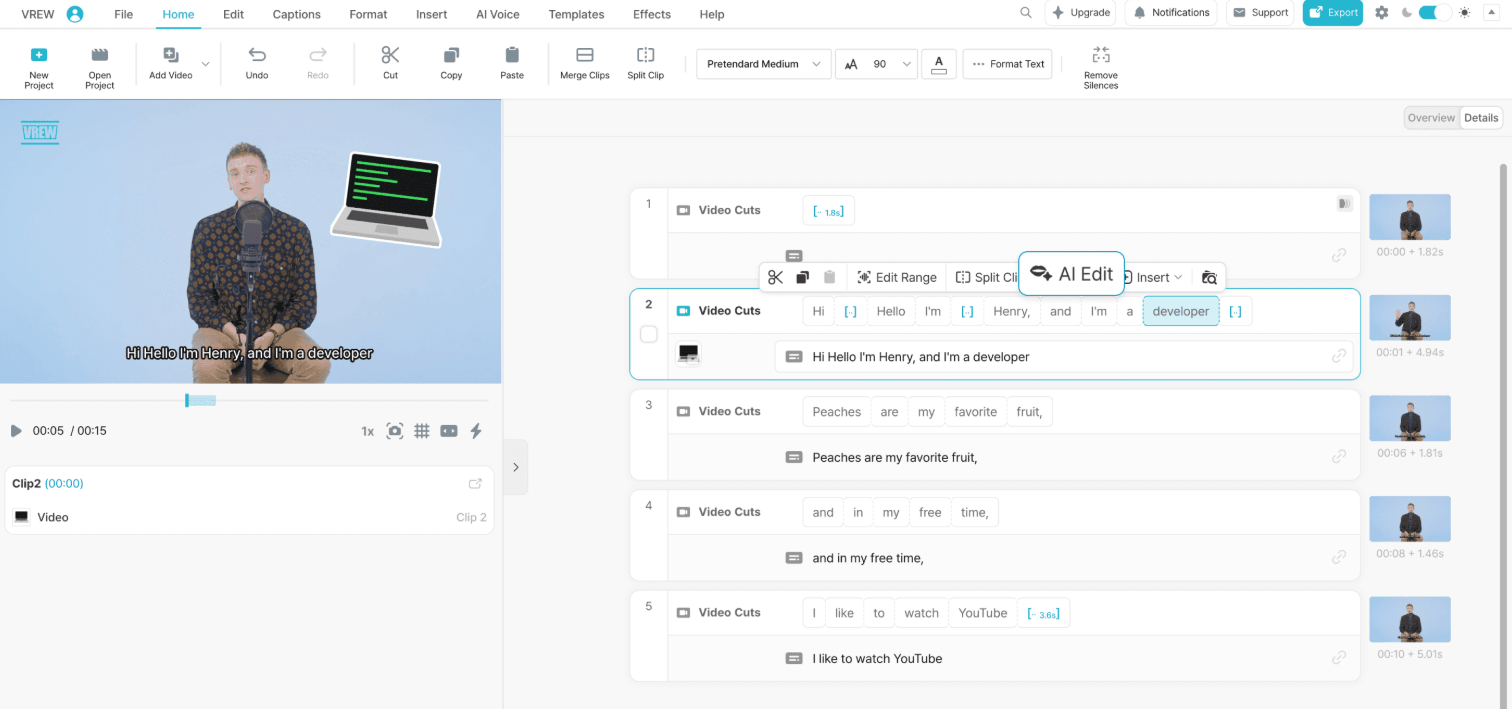
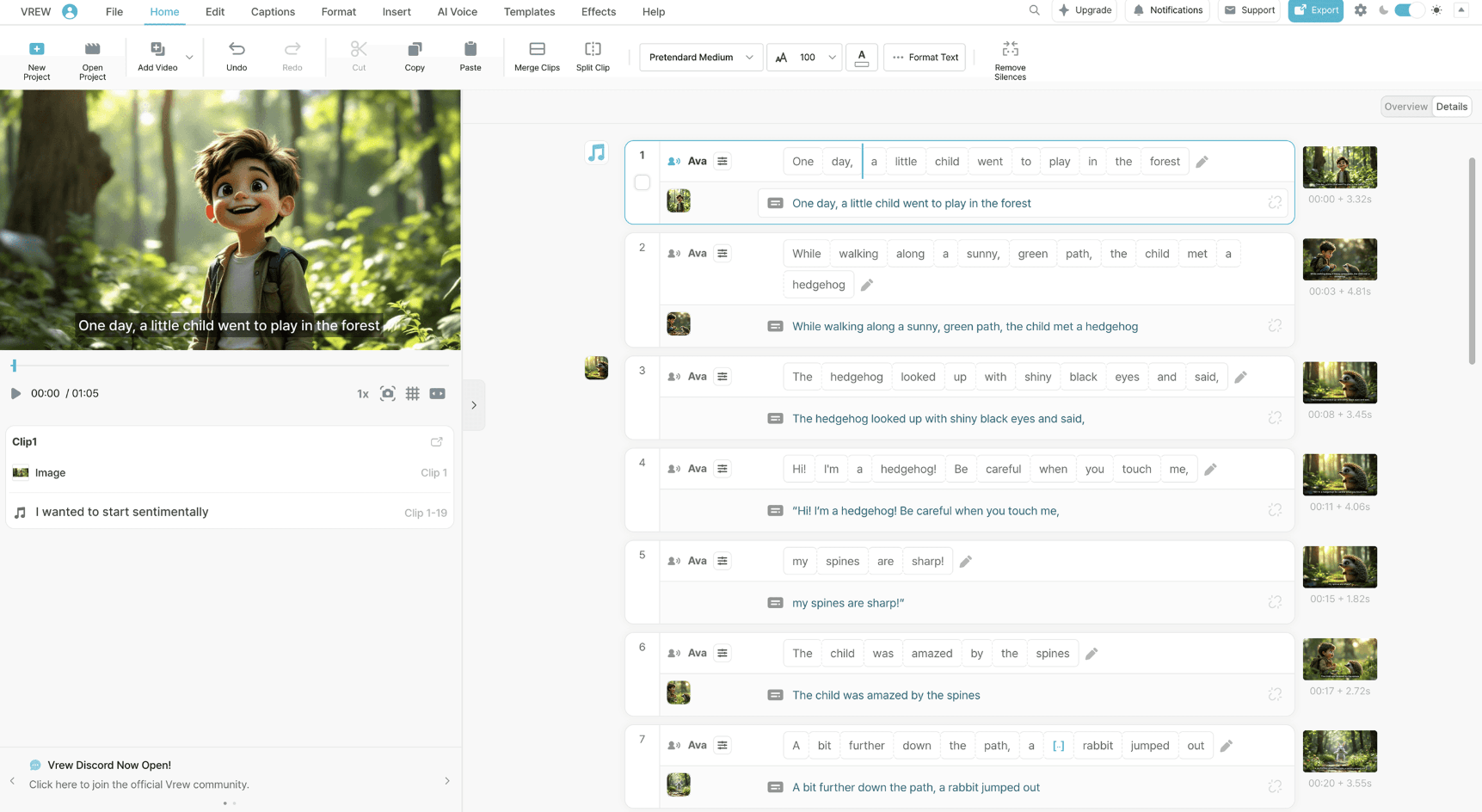
The standout feature is text-based editing. Vrew automatically breaks uploaded videos into word-based blocks, then lets users edit the video by reading and selecting the transcript. Deleting text removes that portion of the video, which is much easier for beginners than scrubbing through a timeline and manually finding cut points.
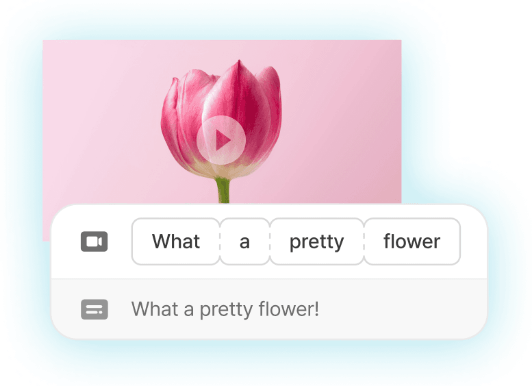
That makes Vrew especially good for removing rambling sections, tightening a lesson, cutting repeated phrases, cleaning up interviews, or reshaping long spoken content into shorter clips. If the main material is speech, Vrew gives you a faster way to see the structure of the video.
The second big strength is captions. Vrew can automatically transcribe audio and video, generate captions, and let users review and correct them. It also supports transcript upload to improve caption accuracy, which matters when videos include names, technical terms, brand language, or words AI may otherwise miss.
Vrew’s typical workflow is straightforward.
First, you upload a video. Vrew transcribes the audio and turns the speech into editable text. From there, you can remove sections by deleting text, correct captions, style subtitles, trim pauses, translate subtitles, add voiceover, generate visuals, and export the finished video.
That workflow is strongest because it puts the transcript at the center. Traditional editors make you listen, scrub, cut, replay, and adjust. Vrew lets you read through the video first, which is often faster for content that depends on spoken information.
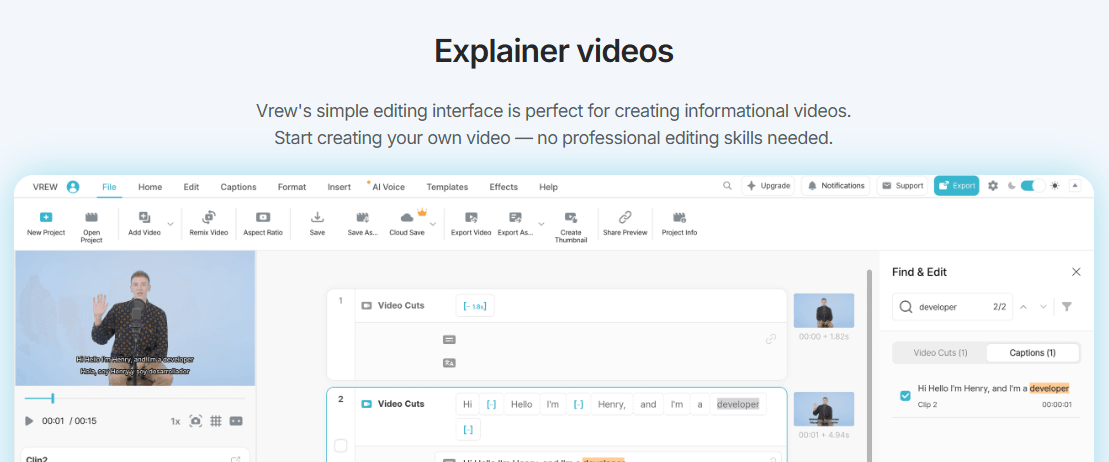
This also changes how editing feels. Instead of thinking like a video editor, you can think like a writer. Is this sentence needed? Is this section too long? Did the speaker repeat themselves? Is there a cleaner order? That is where Vrew feels most useful.
Captioning is one of Vrew’s clearest strengths. It is not only about generating subtitles quickly. It is about making subtitle correction less painful.
The automatic captions give you a draft. The transcript editor gives you a readable way to correct mistakes. Find and Replace helps fix repeated errors across hundreds of subtitles at once. That is useful for names, product terms, acronyms, technical phrases, recurring typos, and words the transcription engine keeps mishearing.
This is especially important for creators who publish regularly. A one-off caption error is easy to fix manually. A repeated brand-name error across a 20-minute video becomes annoying very quickly. Vrew’s batch subtitle editing makes that kind of cleanup much faster.
The translation workflow also adds practical value. Vrew can translate subtitles into more than 100 languages, with both GPT and Google Translate options described on its official subtitle translation page. The GPT option is positioned for more natural, context-aware video translation, while Google Translate gives broader language coverage. That does not mean translated subtitles should always be published untouched. For client work, education, legal, medical, or technical content, human review still matters. But for creators expanding reach across languages, Vrew gives a strong first pass.
The Speech Editor is one of Vrew’s most interesting tools because it addresses a common creator problem: small spoken mistakes that would normally require a retake.
Vrew’s official description is simple: edit the transcript, and the tool regenerates the changed speech in the same voice. The goal is to fix a mispronounced word, update a date, swap a term, or create alternate versions without recording the full sentence again.
That is a practical feature, not just a flashy one. In real video work, many creators waste time re-recording because one word is wrong. Vrew gives you a way to patch that mistake in context.
The limitation is that this kind of AI repair still needs careful listening. A regenerated word may be close, but not always invisible. It may sound slightly different in tone, pacing, emphasis, or room feel. For small corrections, it can save a lot of time. For emotional delivery, performance-heavy videos, or polished brand films, you still need to check the blend carefully.
Silence Remover is the other high-value audio workflow. Vrew can auto-detect pauses, let users decide how short silences should be, set a minimum pause length, apply changes to specific clips, and even detect non-speech segments such as applause or laughter.
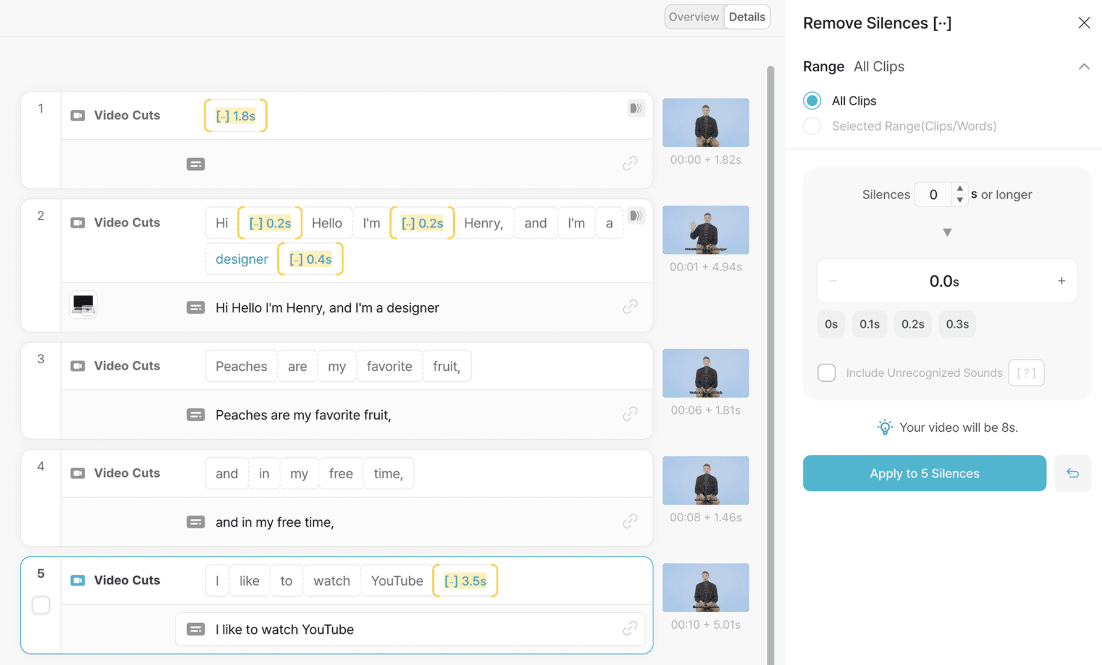
This is a strong fit for lecture videos, webinars, interviews, and talking-head content. It helps remove dead air without forcing the editor to manually hunt for every pause.
Vrew is not only a cleanup tool. It also includes generative features for building videos from scratch or filling gaps in a project.
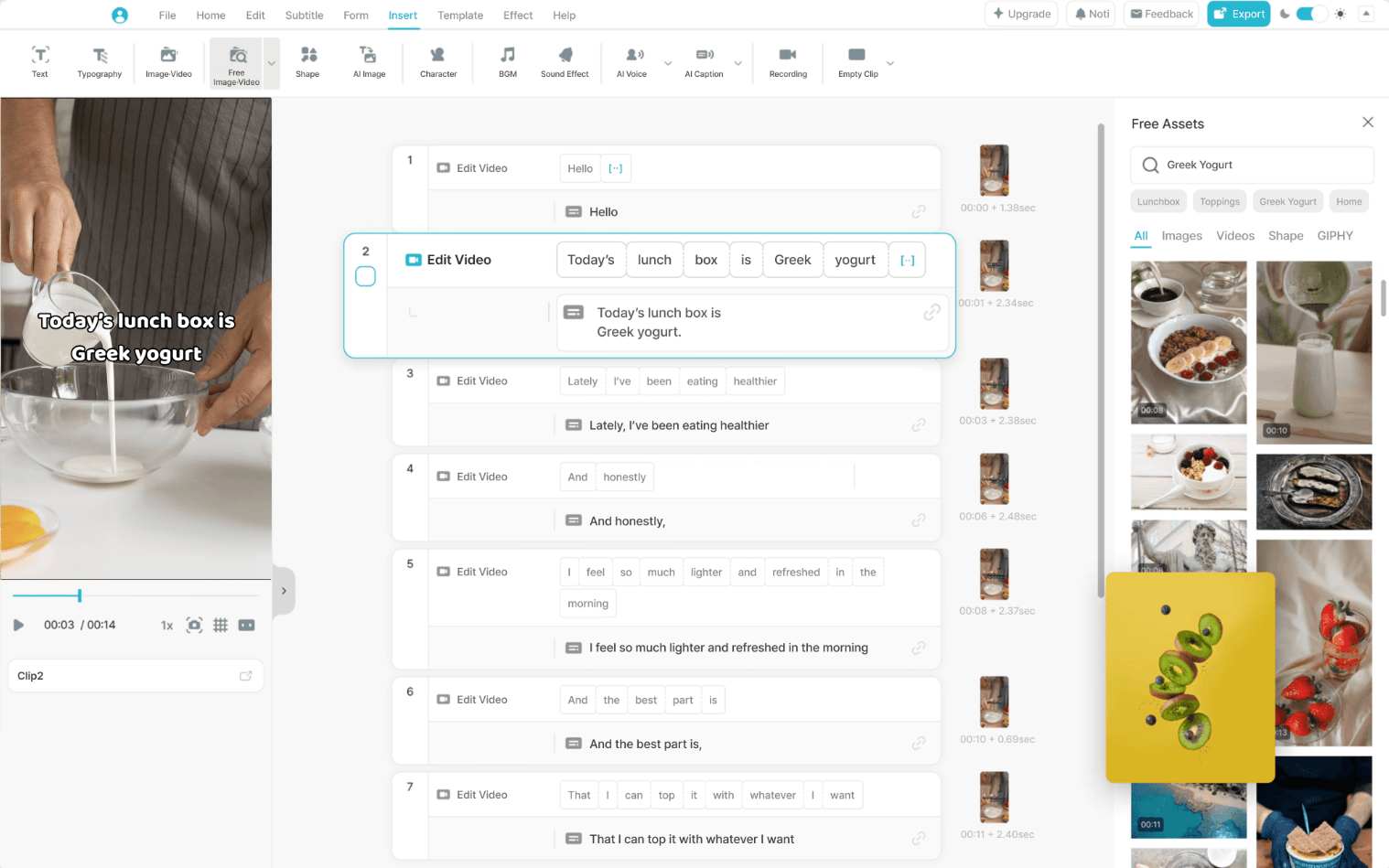
Its generative AI tools include video from text, AI voiceover, AI image generation, noise removal, and AI scriptwriting. Vrew says users can enter a few keywords and generate a complete video with script, visuals, sound, and more. It also lists 600+ AI voices across multiple languages for voiceover work.
This is useful, but it should be understood correctly. Vrew’s generative tools are best for creator workflows, explainers, educational content, simple visual storytelling, and fast drafts. They are not the same thing as a cinematic text-to-video model focused on photorealistic motion, character continuity, or advanced camera control.
The value is convenience. You can write, narrate, generate visuals, clean audio, add subtitles, and edit in one place. For many creators, that matters more than maximum visual realism.
Vrew is designed for people who want fewer editing steps. Its homepage positions the tool around editing like a document, with text-based editing, Speech Editor, Silence Remover, and generative AI tools all grouped into the same product. It is available on Mac, Windows, and Linux, and the official homepage lists the latest desktop version as 4.0.2.
The learning curve is much lower than traditional editors because the most important actions are easy to understand. Upload a video. Read the transcript. Delete what you do not want. Correct captions. Remove silences. Add or adjust voiceover. Export.
That said, Vrew is not frictionless for every type of editing. It works best when speech drives the video. If you are editing a cinematic montage, music video, complex ad, motion graphics piece, or multi-layer visual composition, transcript editing becomes less useful. In those cases, timeline-first tools still make more sense.
The interface is most valuable when the script, captions, and spoken structure are the core of the video.
- YouTube and talking-head creators: Vrew is strong for cutting rambling sections, adding captions, removing pauses, and cleaning up narration-heavy videos.
- Educators and course creators: It works well for lectures, tutorials, training videos, and learning modules where captions and speech clarity matter.
- Interview and podcast editors: Text-based editing makes it easier to remove tangents, repeated answers, long pauses, and filler sections.
- Social media teams: Vrew is useful for caption-heavy clips, short explainers, repurposed videos, and content designed to work even when muted.
- Business and marketing users: It fits product demos, internal updates, presentation-based videos, training material, and quick professional explainers.
- Localization workflows: Subtitle translation helps creators adapt content for more audiences, especially when paired with human review for important material.
Vrew is strongest as a practical production tool for spoken video. Its biggest advantage is speed. You can move from raw footage to cleaned transcript, captions, trimmed pauses, translated subtitles, and patched audio much faster than in a conventional editor.
It also has a strong beginner advantage. Users who are intimidated by video timelines can still understand text editing. That makes Vrew a good bridge between “I need to make videos” and “I know how to edit videos.”
The tool is also useful for accessibility. Auto captions and subtitle translation make videos easier to follow for viewers watching without sound, viewers with hearing needs, and viewers who prefer subtitles in another language.
- Vrew is not a full replacement for advanced editing software. It is not built around deep compositing, advanced color grading, motion graphics, multi-camera editing, complex audio mixing, or frame-perfect visual control.
- Its AI transcription can also make mistakes. Accuracy depends on audio quality, speaker clarity, accents, background noise, overlapping speech, and technical vocabulary. Vrew helps with correction through transcript editing and Find and Replace, but users still need to review important captions.
- The Speech Editor is useful, but it should not be treated as magic. Small fixes are the best use case. Larger rewritten sections may sound less natural, especially if the regenerated audio has to match emotion, pace, and room tone.
- The generative video tools are convenient, but they are best for fast creator assets and structured content, not high-end AI film generation. If your main goal is cinematic text-to-video with detailed camera movement, character consistency, and visual realism, another tool may be better.
- There is also an access note for mobile users. Vrew’s iOS App Store listing currently includes a notice that Vrew Mobile Service will end on July 1, 2026, so the safer long-term path is to think of Vrew primarily as a desktop/web workflow rather than a mobile-first editing tool.
Vrew’s official data protection page makes a few important claims: it says user creative content is not used for AI training, data is protected with encryption and strict access controls, and users can delete their data. The page also says data transmitted between a user’s device and Vrew servers is encrypted using TLS, with stored data protected by encryption protocols and internal access controlled through authorization systems.
That is relevant because video editors often involve sensitive raw footage, internal training material, client recordings, interviews, or private business content. For teams, privacy claims should still be reviewed against internal compliance needs, but Vrew’s public positioning is much clearer than many lightweight creator tools.
- Use Vrew first on speech-heavy videos. It shines when the transcript is the main editing surface.
- Clean your audio before judging transcription quality. Background noise, echo, overlapping voices, and weak microphones make every AI captioning tool less accurate.
- Use Find and Replace before manually correcting every caption. It is especially useful for brand names, speaker names, product names, and recurring transcription mistakes.
- Do not over-remove silence. Tight videos are good, but removing every pause can make a speaker sound unnatural.
- Use Speech Editor for small fixes. It is best for correcting words, dates, names, or short phrases, not rewriting entire performances.
- Review translated subtitles before publishing important work. AI translation is useful, but context, tone, and technical terms still need human judgment.
- Use generative tools for drafts and simple creator videos. For polished campaigns, treat AI-generated scripts, images, and voiceovers as starting points.
Vrew is best understood as an AI-assisted video editor for people who work with spoken content.
Its strongest value comes from combining automatic transcription, text-based editing, captions, translation, silence removal, speech repair, and generative tools in one accessible workflow.
It is best for creators, educators, marketers, trainers, podcasters, interview editors, and business teams that want faster video production without learning a heavy editing suite. The main caveat is that Vrew is strongest when speech and subtitles drive the video. For advanced visual editing, cinematic generation, or complex post-production, it should be treated as a focused AI workflow tool rather than a full professional editing replacement.
TAGS: Video Editing
Related Tools:
Creates short-form videos from texts

Transforms YouTube videos into short clips

Online AI video editing platform

Comprehensive tool for detailed SEO audits

Automatically transforms long videos into engaging short clips

Automates video editing by quickly removing silences