
Share this tool:
 |
Description:
- Introduction
- Strong Features and Capabilities
- What Quso AI Actually Is
- The Core Workflow
- Where Quso AI Is Strongest
- Video Repurposing and Clip Generation
- Editing, Captions, and Branding
- Scheduling and Content Planning
- Analytics and Feedback Loop
- AI Writer and Content Expansion
- AI Influencer and Synthetic Video
- Best Use Cases
- Practical Tips
- Limitations and Trade-Offs
- Final Takeaway
Quso AI, formerly Vidyo.ai, has grown from a long-video-to-short-clips tool into a broader AI social media platform. Its strongest value is not just clipping videos. It combines AI video repurposing, captions, content planning, scheduling, analytics, AI writing, and AI influencer-style video creation into one workflow. That makes it most useful for creators and teams who already produce video content but need a faster way to turn it into consistent social output.
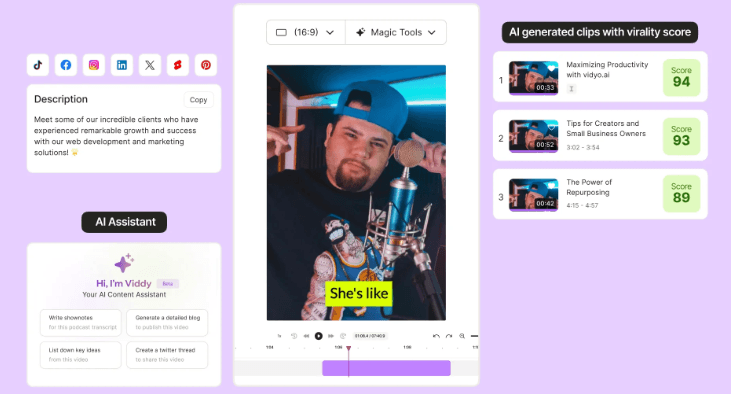
Finds highlights in long videos and turns them into short-form clips for platforms like TikTok, Instagram, and YouTube Shorts.
Helps trim, resize, caption, brand, and optimize clips for different social platforms.
Lets users plan, preview, bulk schedule, and manage posts from a single dashboard.
Adds a visual calendar and centralized content planning across connected social channels.
Tracks engagement, reach, follower growth, impressions, audience insights, and performance reports across platforms.
Turns videos or ideas into social posts, captions, hashtags, blogs, scripts, and other supporting content.
The easiest way to understand Quso AI is this: it is an AI social content operating system for video-first creators.
It starts with repurposing. You upload a long-form video or paste a YouTube link, and Quso AI analyzes the content to detect highlights, engaging moments, and short-form segments. From there, you can customize the clips inside the editor, add captions, apply branding, resize for social platforms, export, or schedule directly from the platform. Quso’s own AI Clips Generator page describes the workflow as upload, auto-generate clips, customize in the editor, then export or schedule.
That makes Quso different from a normal video editor. A traditional editor gives you a timeline and asks you to do the creative labor yourself. Quso tries to automate the early and repetitive parts: finding good moments, cutting them down, formatting them for social, captioning them, and preparing them for distribution.
It is also broader than a clipping-only tool. Quso’s AI Social Media Manager page positions the product around video clipping, content creation, scheduling across multiple platforms, and performance analytics in one place. That is the real product direction: not just “make clips,” but “turn one piece of content into a social media workflow.”
| Stage | What Quso AI Does | Why It Matters |
|---|---|---|
| Import | Upload a video or paste a YouTube link | Reduces setup friction for existing content |
| Detect | Finds highlights, scene changes, and engaging moments | Saves time compared with manually scrubbing footage |
| Edit | Adds captions, text, branding, effects, and format changes | Makes clips more platform-ready |
| Repurpose | Turns one video into several short-form assets | Extends the life of long-form content |
| Schedule | Publishes or schedules content across social platforms | Helps maintain consistency |
| Analyze | Tracks what performs and what should be adjusted | Turns content creation into a feedback loop |

That last part is important. Quso is strongest when it becomes a cycle: record long-form content, extract clips, publish them, measure performance, then use the data to shape the next batch.
Quso AI is strongest for creators and businesses with a steady supply of video content.
A podcast creator can use it to turn a 60-minute episode into clips. A coach can turn a webinar into short teaching moments. A founder can turn interviews into LinkedIn or YouTube Shorts content. A small marketing team can repurpose product demos, livestreams, event recordings, or expert videos into a posting calendar.
The tool is especially practical because it handles more than the edit. Quso’s content planner supports centralized scheduling, flexible uploads, and a visual calendar, while its scheduler supports post previews, bulk scheduling, and a dashboard for scheduled posts.
That matters because short-form video is rarely just an editing problem. It is a consistency problem. Many creators can make one good clip. Fewer can turn every long video into a structured batch of clips, captions, posts, and scheduled publishing. Quso’s biggest advantage is that it tries to join those steps together.
The AI Clips Generator is the center of the platform. Quso says its AI analyzes uploaded videos to detect key highlights, engaging moments, and viral-ready segments. Users can then browse the suggested clips and refine the strongest ones.
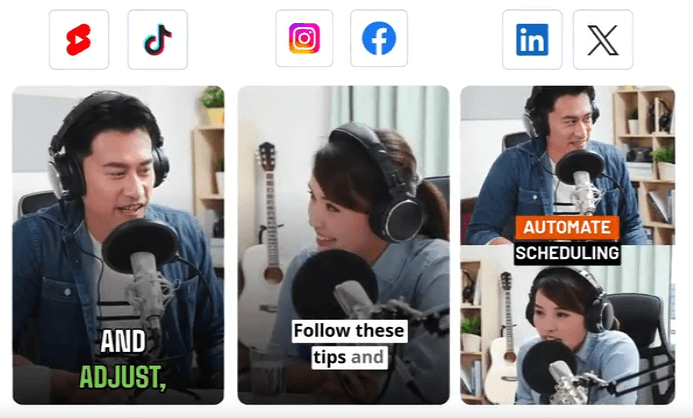
This is useful because the slowest part of repurposing is often not the final edit. It is finding the right moments. In a long interview, podcast, or webinar, there may be ten usable clips hidden inside a lot of setup, context, and conversational filler. Quso reduces that search time.

The output still needs human review. AI can identify a moment that sounds energetic or self-contained, but it may not fully understand the brand, the audience, or the risk of missing context. A clip can be technically strong and still not be the right clip to publish. The best workflow is to let Quso generate candidates, then use editorial judgment to choose the final set.
Quso also says an hour-long video can generate a wide range of shorts depending on the content, which is a useful reminder that clip quantity depends on source quality. A structured interview with strong answers will produce more usable clips than a rambling recording with no clear hooks.
Quso’s editor is built around social-ready output rather than deep cinematic editing. It supports the kind of controls that matter for short-form publishing: captions, text overlays, branding elements, effects, resizing, scene detection, platform-specific templates, speed adjustment, and background cleanup.
Captions are one of the most important parts. Quso’s AI Video Editor page describes AI-generated subtitles and captions that are synchronized with the video, while the subtitle generator page says subtitles can support multiple languages.

The branding layer also matters. Quso says its automated branding tools can apply brand colors, logos, and fonts consistently across videos. That is valuable for teams posting frequently because inconsistent fonts, caption styles, and logo placement can make a channel feel messy even when the content is good.
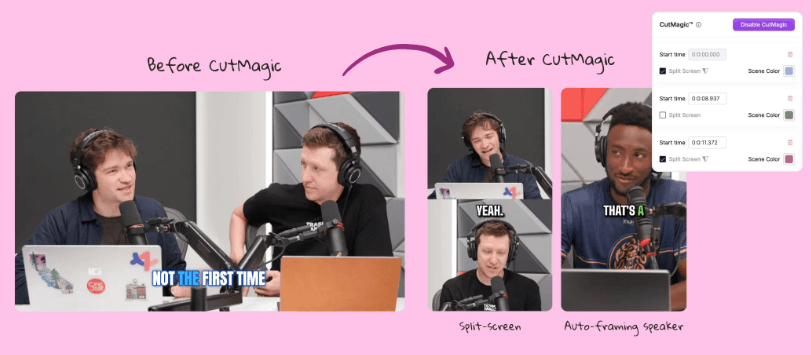
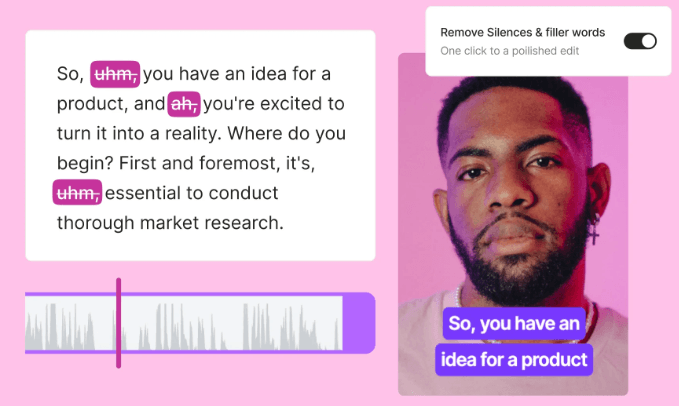
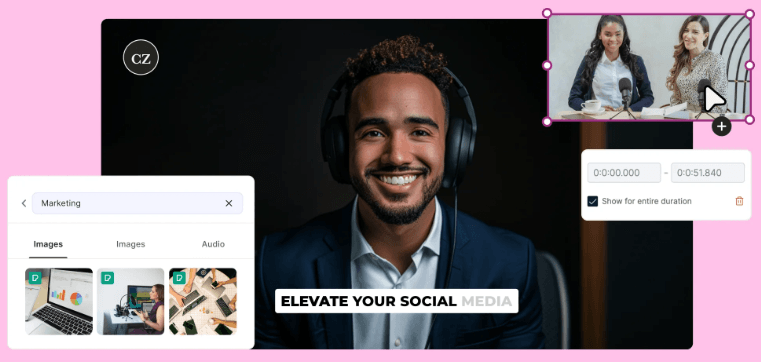
This is where Quso is most useful for small teams. It gives you enough creative control to make clips look consistent without forcing you into a full timeline editor for every post.
The scheduling side is one of the main reasons to use Quso instead of a clip-only platform.
Quso’s AI Content Planner lets users schedule and automate posts across platforms such as Facebook, Instagram, TikTok, Pinterest, LinkedIn, YouTube, and X/Twitter through a connected dashboard. It also includes a visual calendar for planning posts ahead of time.
The scheduler adds practical workflow details: users can plan posts ahead, preview scheduled posts, view everything in one dashboard, select posting dates, and use AI assistance for captions. Quso’s scheduler page also says it supports multiple major networks including Instagram, TikTok, Facebook, LinkedIn, YouTube, and Twitter/X.
This is the part that makes Quso feel more like a social media management platform than only an AI video editor. A clip is useful only if it gets published consistently. By placing planning, scheduling, editing, and analytics in one system, Quso reduces the tool-switching that usually slows content teams down.
Quso’s analytics tools are built to answer a simple question: which content is actually working?
The analytics page says users can track engagement, reach, follower growth, impressions, audience insights, demographic and behavioral data, custom reports, and a personalized social score across connected platforms.
That makes analytics more than a reporting feature. It helps turn content creation into iteration. You can see which clips get engagement, which topics perform best, which formats fit your audience, and where posting consistency may need improvement.
Quso also offers an AI Virality Score that analyzes video content and gives predictions about viral potential, including suggestions around elements such as visuals, sound, timing, length, format, and tone.
This kind of scoring should be treated as guidance, not truth. Virality prediction is not magic. Social performance depends on audience, timing, platform behavior, topic relevance, thumbnail, hook, retention, and distribution. Still, a scoring layer can help creators compare clips before publishing and decide which ones deserve more attention.
Quso becomes more useful when you think beyond video clips.
Its AI Writer can extract key takeaways from videos and turn them into blogs, social posts, captions, threads, and other content formats. It also supports SEO-friendly blogs, captions, and posts, and can work from videos or other source material.
That is helpful because every long-form video contains more than short clips. A podcast episode can become YouTube Shorts, LinkedIn posts, newsletter material, blog summaries, quote graphics, and caption copy. Quso’s content creator page also says it can generate social media posts, captions, hashtags, post ideas, and text-to-video content from ideas or topics.
This is a practical expansion of the platform. For many creators, the bottleneck is not only editing. It is writing all the supporting material around the video. Quso’s AI Writer helps fill that gap.
Quso also includes an AI Influencer product for creating talking videos with AI personas. The official page describes a workflow where users select an AI persona, write or generate a script, refine the video, and distribute it across platforms. It also references lifelike avatars and custom scripts.
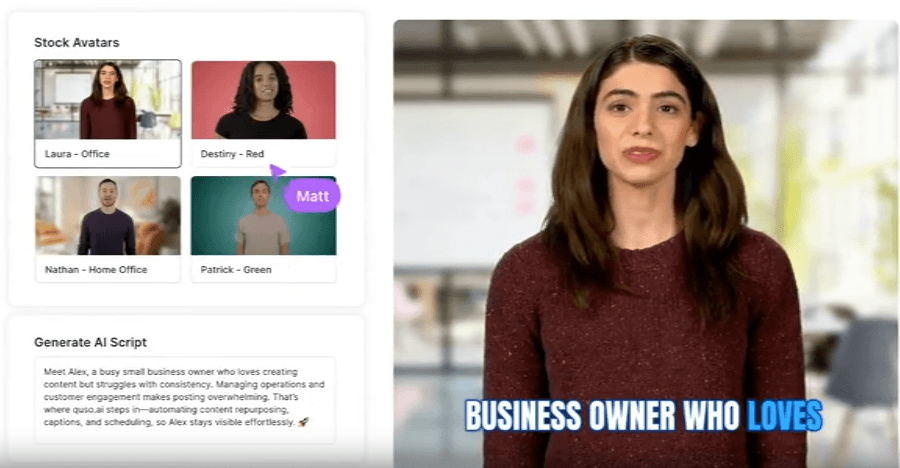
This is a different use case from clipping. Instead of starting from a long video, the AI Influencer workflow starts from a persona and script. It is more useful for explainers, announcements, lightweight ads, faceless channel content, or brands that want video output without recording a human presenter every time.
The trade-off is authenticity. AI presenter content can be efficient, but it may not create the same trust as a real founder, educator, or creator speaking directly. It is best used where speed and consistency matter more than personal connection.
- Podcast repurposing: Quso is a strong fit for podcasters who want to turn long episodes into short clips, captions, social posts, and scheduled content.
- Coach and educator content: Coaches, consultants, and teachers can repurpose webinars, lessons, live calls, and interviews into short teaching clips.
- Founder-led social media: Founders who record interviews, product updates, or thought-leadership videos can use Quso to create a steady posting engine.
- Small marketing teams: Teams without a dedicated video editor can use Quso to clip, caption, brand, schedule, and analyze content from one workspace.
- Webinar and event content: A single webinar can become clips, recap posts, blog material, and social snippets.
- Content calendar building: Quso is especially useful when the goal is not one video, but a repeatable weekly or monthly content system.
- Start with structured source videos. Quso will perform better when the original content has clear sections, strong answers, and clean audio.
- Review every AI-selected clip before publishing. Check the first five seconds, the ending, the caption accuracy, and whether the clip makes sense without the original context.
- Create reusable brand settings early. Consistent fonts, caption style, logo placement, and colors will make your channel look more professional.
- Use analytics to cut weaker formats. If certain hooks, topics, or clip lengths underperform, adjust the next batch instead of posting blindly.
- Use AI Writer after clipping. Once the strongest moments are identified, turn those moments into captions, posts, blogs, and newsletter material.
- Do not rely only on Virality Score. Use it as a decision aid, but keep your audience knowledge and editorial judgment in charge.
- Source quality matters heavily: The biggest limitation is that Quso depends on the quality of the source material. If the original video is poorly recorded, low-energy, badly structured, or full of unclear audio, the AI has less to work with.
- Context can be missed: AI clipping can find moments, but it may not always understand nuance. A clip might sound punchy but misrepresent the full conversation if it starts or ends in the wrong place.
- Creative depth is limited: Quso is built for social content workflows, not high-end video production. For advanced motion graphics, cinematic color grading, complex sound design, and heavily controlled edits, a traditional editor will still be stronger.
- Platform breadth can create complexity: Quso covers clipping, editing, captions, scheduling, analytics, writing, planning, and AI influencer content. That is useful, but new users may need time to decide which parts matter most to their workflow.
- Performance tools are not guarantees: Analytics and virality predictions can guide decisions, but social growth still depends on strategy, audience fit, consistency, creative quality, and platform behavior.
Quso AI is best for video-first creators and teams who want to turn long-form content into a steady stream of short-form social posts. Its biggest strength is the full workflow: clip generation, editing, captions, branding, content writing, scheduling, and analytics all sit close together.
It is not the right tool if you only need a professional timeline editor or if you want a fully generative video system that creates everything from scratch. But for podcasters, coaches, educators, founders, marketers, and small teams trying to repurpose video content consistently, Quso AI is a strong and practical platform. Its real value is not one feature. It is the way it connects content creation, publishing, and performance into one repeatable system.
TAGS: Video Editing