

Share this tool:
 |
Description:
SparkReceipt is a receipt and expense management platform aimed at freelancers, self-employed workers, and small businesses. It handles more than photographing receipts. SparkReceipt can collect documents from email, extract transaction details, categorize expenses, process bank statements, match transactions with receipts, track mileage, and prepare records for accounting software.
The main appeal of SparkReceipt is consolidation. Instead of using one app for receipt storage, another for mileage, spreadsheets for reconciliation, and an inbox full of invoices, SparkReceipt brings much of that work into a single system.
Receipt capture is the starting point. Users can photograph paper receipts with the mobile app or upload PDFs, images, and screenshots. SparkReceipt's AI-powered OCR extracts structured details including the vendor, amount, date, tax, currency, payment method, and individual line items.
That structured extraction is more useful than plain text recognition. Once a receipt has been processed, SparkReceipt can categorize it and make the information searchable and ready for reports or accounting exports.
It also supports receipts in different languages and handles 190 currencies, including automatic currency conversion.
The obvious caveat is that OCR isn't something to trust blindly. Faded paper, unusual receipt layouts, incorrect tax recognition, or ambiguous line items can still justify a manual check.
Digital receipts often create more clutter than paper ones. SparkReceipt addresses this by connecting directly to Gmail, Outlook, Microsoft accounts, and other IMAP mailboxes.
The AI looks for receipts and invoices while filtering unrelated messages. Historical scanning can also retrieve qualifying documents from older email, with date filters controlling how far the search goes.
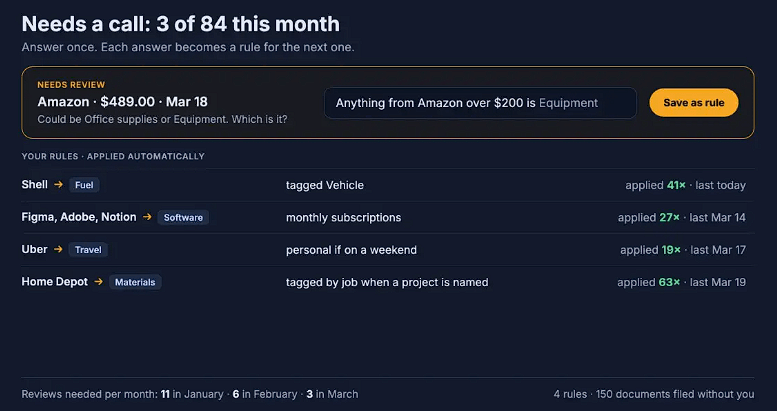
Custom processing rules make this more practical for users managing several accounts or document types. Receipts can be routed according to instructions rather than requiring the same filing decision every time.
For freelancers with subscriptions, travel bookings, online purchases, and emailed invoices, this may be one of SparkReceipt's most useful automations.
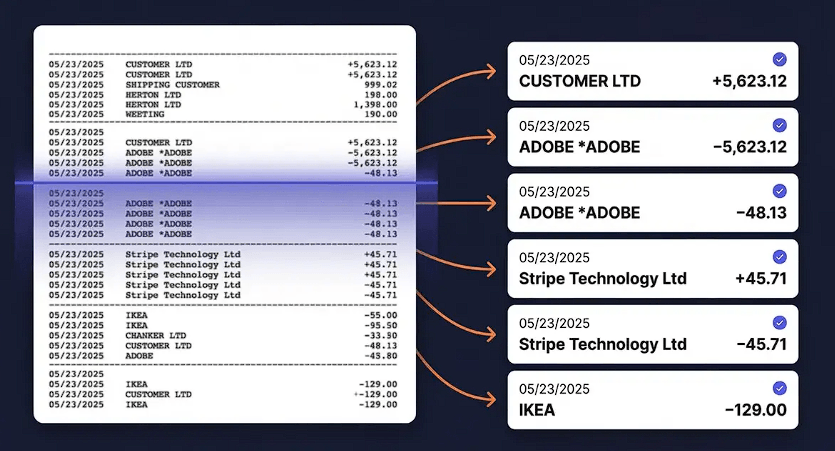
A folder of organized receipts is useful, but it doesn't tell you what you've forgotten. SparkReceipt addresses that gap with bank statement extraction and transaction matching.
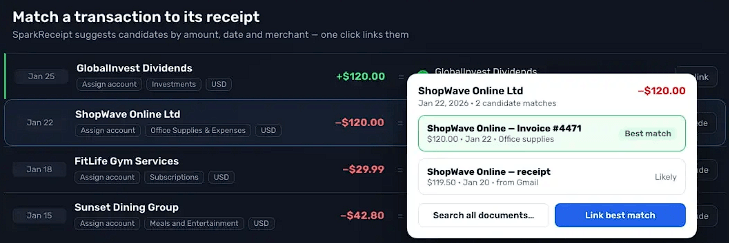
Users can import bank and credit-card statements, including PDF, CSV, and Excel files. SparkReceipt extracts the transactions, categorizes them, and compares them against receipts already stored in the account. Missing documentation can then be identified instead of discovered later while preparing financial records.
This makes SparkReceipt more interesting as a bookkeeping preparation tool. It is no longer just asking, "What information is on this receipt?" It is helping answer, "Do my receipts account for the transactions in my records?"
SparkAgent is the platform's built-in AI assistant, and it adds a different layer of automation.
You can give it plain-language instructions to search records, tag documents, change categories, edit line items, reconcile statements, and build reports. It can also publish approved information to QuickBooks Online or Xero. Reversible changes can be performed directly, while actions that publish data externally require approval.
SparkReceipt also supports MCP, so compatible external AI clients can interact with an account using the user's permissions.
This is useful when the job involves a batch of documents. Instead of editing receipts one at a time, users can describe what needs to happen across a group.
Mileage tracking sits alongside the receipt workflow rather than in a separate product. Trips can be recorded using GPS or entered manually, classified as business or personal, and calculated using a rate set for the vehicle.
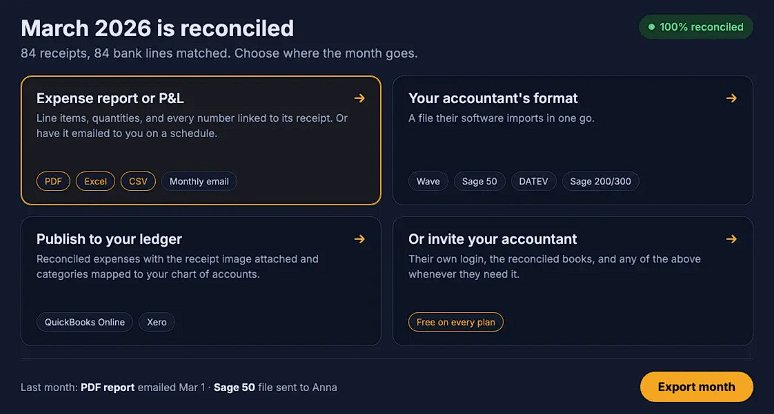
SparkReceipt can then generate expense reports and export records in PDF, Excel, CSV, and ZIP formats. Reports can contain totals, categories, tax information, and links to the supporting receipt images.
For users who want the data elsewhere, native integrations include QuickBooks Online and Xero. Automation options extend to Zapier, Make, Pabbly, webhooks, API access, and MCP.
| User | Where SparkReceipt Fits |
|---|---|
| Freelancers | Capturing receipts and organizing deductible expenses |
| Self-employed workers | Combining expenses and business mileage |
| Small businesses | Managing receipts, invoices, statements, and reports |
| Accountants | Reviewing categorized client records and source documents |
| International users | Handling expenses across currencies |
| Automation-focused users | Connecting expense data with accounting and AI workflows |
SparkReceipt automates much of the preparation around bookkeeping, but financial review still matters. Extracted taxes, categories, receipt matches, and AI-generated changes should be checked when they affect accounting records.
Its broader feature set may also be unnecessary for someone who only needs to archive a small number of receipts. SparkReceipt becomes more useful as documents start arriving through several channels and need to be reconciled, categorized, reported, and transferred elsewhere.
It is also better viewed as an expense management and pre-accounting system than as a replacement for full accounting software. The QuickBooks Online and Xero integrations reinforce that role.
SparkReceipt's strongest feature isn't receipt scanning by itself. It is the workflow around the scan.
Paper receipts, email invoices, bank transactions, mileage, expense categories, and reports can feed into the same system, while SparkAgent handles repetitive work through plain-language instructions. That gives freelancers and small businesses a practical route from scattered documents to cleaner accounting records.
The main caveat is verification. AI can remove a large amount of manual sorting and data entry, but financial information still deserves a human check before it reaches the books.
TAGS: Finance
Related Tools:

Collaborative document editing and project management tool

Helps businesses verify international trade compliance

Visualizes workflows, automates tasks, and provides real-time analytics

Enhances team productivity and task organization

Helps users organize tasks, set reminders, and sync lists

Provides real-time market insights