
Share this tool:
 |
Description:
Rectify is an operations and debugging platform aimed at founders and development teams, particularly those building products with AI coding tools. It brings together session replay, bug reporting, code analysis, uptime monitoring, customer support, roadmaps, changelogs, workflows, and AI assistance rather than treating each task as a separate tool.
The problem it addresses will sound familiar to anyone shipping software quickly. AI can help a team write a feature in an afternoon, but finding out why that feature breaks for one customer can still take hours. Rectify collects the technical context around an issue so its AI agent and the developers investigating it have more to work with.
Rectify's AI operations agent is called Quanta. This is the part that gives the platform more value than a normal feedback widget or session recorder.
Quanta can search session replays through natural-language requests, such as looking for sessions where users encountered errors, rage-clicked, or abandoned a flow. It can also draft support replies using conversation context, retrieve operational information, generate changelogs, move roadmap items, and connect information from different parts of the workspace.
Support can run in AI-first, AI-only, or human-only modes, so teams don't have to hand over the entire customer conversation process to automation.
Bug reporting is one of Rectify's stronger practical features. Users can provide annotated screenshots or Loom recordings, while Rectify can attach technical information such as console logs, network requests, browser details, and session activity.
That addresses a familiar problem for developers: a report such as “the button doesn't work” often gives almost no clue about what happened.
Session replay extends this further. Teams can inspect what the user experienced, while Quanta can surface errors, drop-offs, and rage clicks. The important difference is that the replay data sits alongside the rest of the debugging workflow rather than being isolated in another analytics product.
Rectify also reaches into engineering operations.
Its Code Scan feature performs static analysis on GitHub repositories and reports bugs, security vulnerabilities, and code smells. Results include maintainability, reliability, and security ratings, alongside locations and suggested fixes.
Uptime monitoring covers HTTP/HTTPS, TCP, DNS, and ICMP checks, with incident alerts and SSL certificate monitoring. Teams can also create status pages and track incident resolution metrics.
This wider scope makes Rectify more interesting for smaller product teams that would rather connect debugging, monitoring, feedback, and product operations instead of maintaining several disconnected workflows.
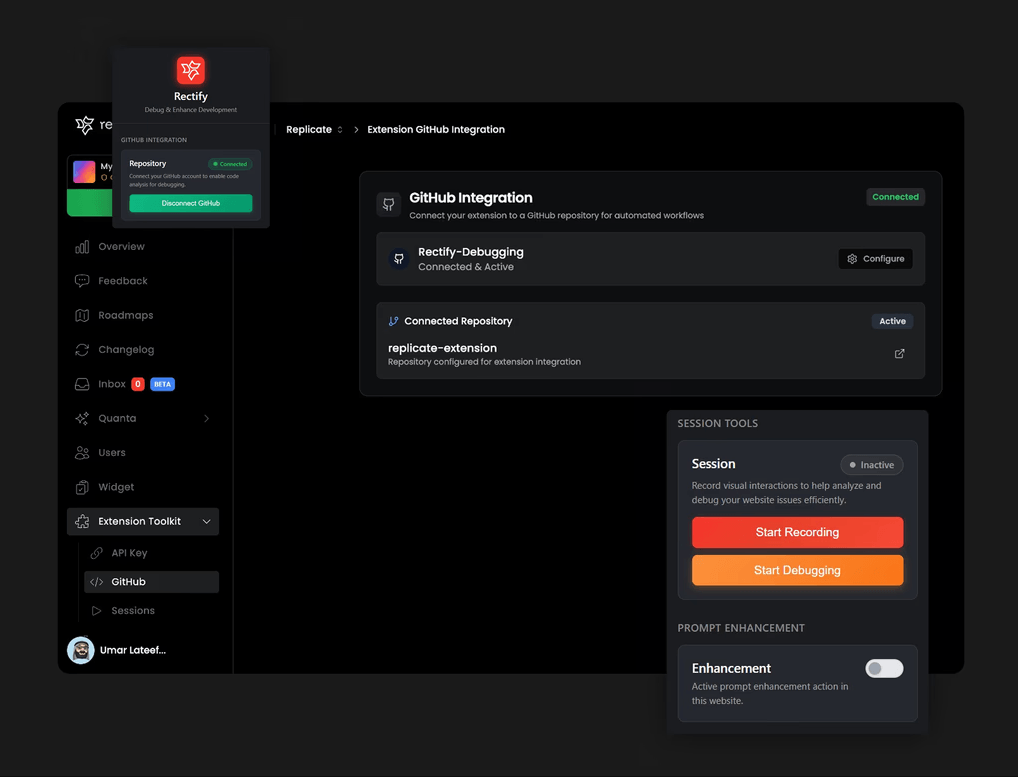
The Chrome extension keeps bug capture close to the development process. It can record sessions, collect console and network data, annotate problems, save reusable code snippets, and generate structured product requirements.
Rectify also provides an MCP server. This allows compatible tools such as Claude and Cursor to access project information and code-scan results.
Its integration directory includes GitHub, GitLab, Linear, Jira, Slack, Intercom, HubSpot, Zapier, OpenAI, Gemini, and other services. For teams already using several of those products, the integrations may be as important as Rectify’s built-in tools.
Rectify is a strong fit for SaaS founders, small development teams, and developers using AI coding environments who want debugging to keep pace with rapid feature development.
It also makes sense when customer feedback, support tickets, session data, and engineering issues regularly overlap. Instead of manually connecting those clues, Rectify gives the team one workspace where they can be investigated together.
Breadth is both the appeal and the risk. A team that needs only session replay or a simple feedback widget may find the wider operations platform unnecessary.
The product also handles sensitive diagnostic information. According to its Chrome Web Store listing, the extension processes user activity and website content. Organizations should decide what may be recorded, confirm their privacy requirements, and configure data capture before deploying it widely.
Quanta’s diagnoses and suggested fixes still need a developer’s review. An AI agent can speed up the investigation, but it cannot prove that a proposed fix is correct. Tests and technical judgment remain part of the job.
Rectify is most useful as an AI-assisted product operations and debugging hub, not just a bug-reporting tool. Its strongest advantage is connecting session evidence, technical diagnostics, support, monitoring, code analysis, and product planning around the same issue.
It is best suited to founders and lean development teams shipping quickly with AI coding tools. The main caveat is scope: teams should make sure they need the wider connected workflow rather than only one piece of it.
TAGS: AI Automation
Related Tools:

Automates follow-ups to streamline your inbox

Connects AI agents to real-world apps and services

Creates intelligent agents to automate tasks

Connects apps and services to create automated workflows
Extracts data from large batches of documents

Manages agents to automate complex business tasks