

Share this tool:
 |
Description:
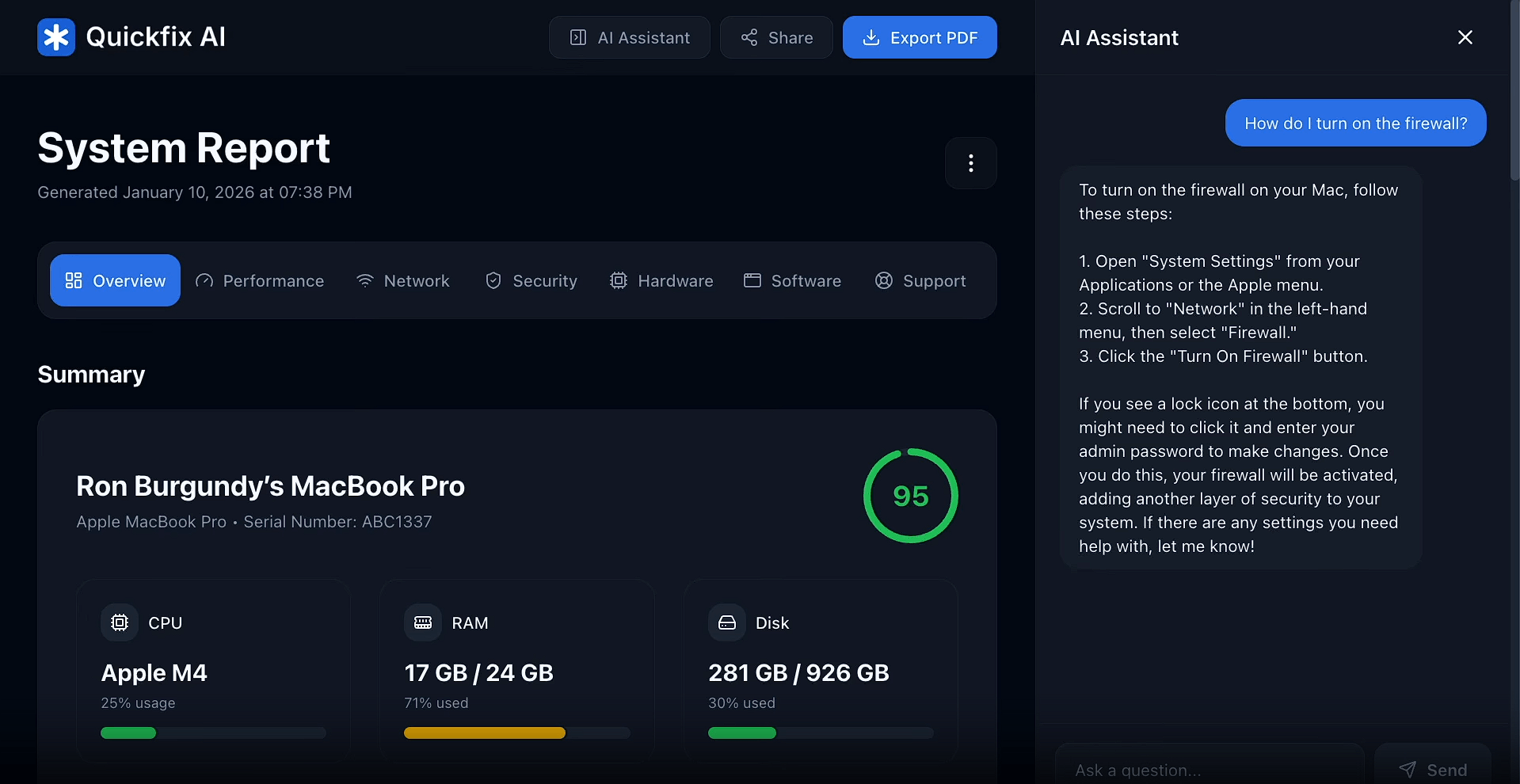
QUICKFIX is an AI-powered computer diagnostics tool designed to make system troubleshooting easier for people who don’t want to interpret raw hardware statistics on their own. It scans your computer, checks areas such as CPU load, memory, storage, battery health, graphics hardware, network performance, and security settings, then turns the results into a structured online report.
The useful part is what happens after the scan. Instead of leaving you with technical numbers, QUICKFIX includes an AI assistant that can read the diagnostic report and answer questions about what may be causing a problem.
QUICKFIX offers two levels of system analysis.
| Scan | Best For | What It Checks |
|---|---|---|
| Quick Scan | Routine checks and fast troubleshooting | CPU, memory, storage, battery, GPU, displays, and Wi-Fi |
| Advanced Scan | Deeper troubleshooting and IT support | Everything in Quick Scan plus processes, installed apps, peripherals, and network quality |
The Quick Scan makes sense when you mainly want to know whether something obvious is wrong. Advanced Scan is more useful when performance problems are harder to explain because it can examine running processes, software, connected devices, and network behavior.
The strongest part of QUICKFIX is the combination of diagnostics and explanation.
Reports organize system information into understandable categories rather than dumping technical logs on the user. They can show overall system health, component-level information, detected findings, and recommendations. An overall health score also gives users a quick indication of whether the machine needs attention.
This makes the tool useful for problems such as unexplained slowdowns, memory pressure, limited disk space, battery degradation, heavy CPU usage, or poor network performance.
The built-in AI assistant already has access to the diagnostic results, so users don’t need to manually copy hardware specifications into a chatbot.
You can ask why the computer feels slow, what is consuming memory, whether storage needs attention, which detected issue should be handled first, or why Wi-Fi performance is poor. The assistant then bases its response on the collected system data rather than giving generic troubleshooting advice.
That distinction matters. QUICKFIX isn’t trying to replace a general AI chatbot. Its advantage comes from connecting AI explanations directly to a real diagnostic scan.
QUICKFIX also has a practical support workflow. Each report can be shared through a short code, allowing another person to inspect the diagnostic information without needing remote control of the computer.
Reports can also be exported as PDFs. This is useful for IT teams, repair technicians, or anyone helping a less technical user diagnose a machine remotely.
Diagnostic software naturally raises privacy questions because it needs access to system information.
QUICKFIX says it collects technical information needed for diagnosis, including hardware specifications and system health data. Advanced scans can also include running process names, installed applications, peripherals, and network measurements. According to its documentation, it does not access personal files, passwords, browsing history, emails, messages, financial information, or biometric data.
It also doesn’t need to modify system settings to perform the diagnosis.
QUICKFIX makes the most sense for people who know something is wrong with their computer but don’t know where to start. It can also help gamers or power users investigate performance bottlenecks, check battery or storage health, and identify resource-heavy applications.
The sharing workflow makes it particularly useful for IT support. Instead of asking someone to describe their problem over the phone, a technician can inspect a structured diagnostic report and work from the same information as the user.
QUICKFIX diagnoses and explains problems, but it is not an automatic repair utility. The AI assistant cannot change settings, remove files, stop applications, or repair hardware on your behalf. Serious hardware failures may still require a technician.
An internet connection is also important because online reports and the AI assistant rely on QUICKFIX’s servers. Some deeper diagnostic information is only available through the Advanced Scan, so the faster scan may not reveal enough detail for complicated performance problems.
QUICKFIX works best as a bridge between raw computer diagnostics and understandable troubleshooting advice. Its strongest feature isn’t just scanning hardware. It is turning those results into an organized report that users, AI assistance, and remote support staff can all work from.
It is a good fit for everyday troubleshooting, performance checks, and remote IT support. The main caveat is that QUICKFIX explains and recommends rather than fixing problems automatically, so more serious issues may still need manual intervention or professional repair.
TAGS: AI Chat/Assistant
Related Tools:
Generates quick, context-aware replies

Project management and time tracking tool

Helps users organize tasks, set reminders, and sync lists

Ad-free AI Search engine

Multilingual chatbot for websites

Enables users to run advanced AI models locally