

Share this tool:
 |
Description:
Pikzels is an AI thumbnail and title tool built specifically for YouTube packaging. That framing matters. This is not trying to be a general image generator like ChatGPT, NanoBanana, DALL·E, or Stable Diffusion. Pikzels is built around YouTube-specific tasks: creating thumbnails from prompts, recreating proven thumbnail formats, editing with text notes, scoring thumbnails and titles, generating CTR-focused titles, and keeping faces or visual styles consistent across a channel.
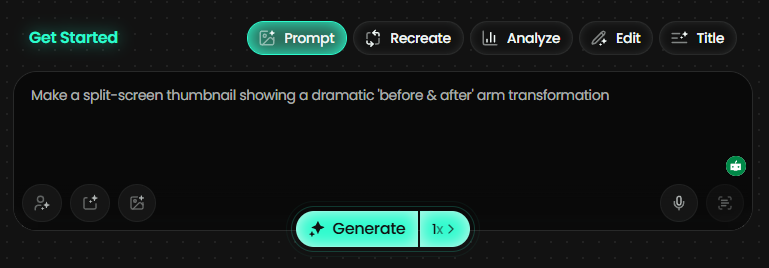
The easiest way to understand Pikzels is this: it helps creators move from a video idea to a testable YouTube package faster.
That package usually means two things: the thumbnail and the title. Pikzels can generate thumbnails from a prompt, create title options, analyze an existing thumbnail/title pair, apply one-click improvements, recreate a thumbnail format from a YouTube link, and reuse a trained Persona or Style so the channel does not look random from upload to upload.
That makes Pikzels more useful than a normal AI image tool for YouTube creators because the workflow is not just “make a cool image.” It is “make a clickable thumbnail, pair it with a title, test the packaging, and iterate until the idea is clearer.”
High-curiosity documentary thumbnail
Prompt:
“Create a dramatic YouTube thumbnail for a documentary video titled ‘The Man Who Disappeared From a Cruise Ship’. Show a dark ocean at night, a luxury cruise ship in the background, a shocked investigator in the foreground, red mystery lighting, bold empty space for short text, high contrast, clickable but not cheesy.”
Why this is a good first test: This checks the main Pikzels use case: turning a video concept into a YouTube-ready thumbnail. Pikzels officially supports prompt-to-thumbnail generation where you describe the idea and get a ready-to-test thumbnail back.
Gaming challenge video
Prompt:
“Create a bright, high-energy YouTube thumbnail for a Minecraft challenge video about surviving 100 days on one block. Show a player character looking shocked, one tiny floating block, dangerous mobs in the background, glowing lava below, big colorful composition, strong contrast, clear focal point.”
Why this matters: Gaming thumbnails need instant readability. Pikzels works best when you clearly define the subject, emotion, setting, and visual tension instead of asking for something vague like “cool gaming thumbnail.”
Generate title options before designing
Prompt:
“Generate YouTube title ideas for a video about a small creator who grew from 0 to 100,000 subscribers by changing only thumbnails and titles. Make the titles curiosity-driven, clear, and not clickbait.”
Why this belongs early: Pikzels is not only a thumbnail generator. Its title tool generates multiple YouTube-focused title variations and can send a chosen title into the thumbnail prompt workflow.
Borrow a format without copying the video
Before using this prompt: Paste a YouTube thumbnail link you want to use as format inspiration.
Prompt:
“Recreate this thumbnail format for my video about testing the cheapest AI tools for YouTubers. Keep the layout energy, but change the subject, text idea, colors, and objects so it fits my topic.”
Why this is useful: Recreate is one of Pikzels’ most practical features. Instead of starting from a blank prompt, you can paste a YouTube link and have Pikzels rebuild the format around your own content. The important part is to use it for structure and idea direction, not lazy imitation.
Improve a near-miss thumbnail
Before using this prompt: Start with a generated or uploaded thumbnail.
Prompt:
“Make the face larger, increase the contrast, simplify the background, remove the small distracting objects, and make the emotion feel more surprised. Keep the same core idea.”
Why this matters: This is where Pikzels starts to feel faster than a standard image generator. Its edit workflow lets you request changes with simple notes instead of rebuilding the entire thumbnail from scratch.
Diagnose weak packaging
Before using this prompt: Upload a thumbnail and add the title you plan to use.
Prompt:
“Analyze this thumbnail and title. Tell me what is weak across clarity, curiosity, emotion, idea, and virality. Then suggest what I should change first.”
Why this is a strong test: Pikzels Score™ is one of the biggest reasons to use the platform beyond image generation. It scores thumbnail/title packaging across five pillars: Virality, Clarity, Idea, Curiosity, and Emotion.
Repair an underperforming idea
Before using this prompt: Run Pikzels Score™ on a thumbnail/title pair first.
Prompt:
“Apply the strongest fixes to improve clarity and curiosity while keeping the same topic and audience.”
Why this is useful: One-Click Fix™ is designed to apply data-backed improvements to weak packaging. It is especially useful when the concept is good but the thumbnail is too busy, too unclear, or not emotional enough.
Keep the creator’s face consistent
Before using this prompt: Create a Persona by uploading your photos.
Prompt:
“Use my Persona in a thumbnail for a video called ‘I Tried Every AI Side Hustle for 30 Days’. Put me in the foreground looking exhausted but surprised, with multiple laptop screens and money symbols behind me. Make it energetic, modern, and highly clickable.”
Why this matters: Pikzels lets users upload three photos once, create a Persona, and reuse that face consistently across thumbnails. For creator-led channels, that can save time and reduce the need for repeated photoshoots.
Keep a channel look recognizable
Before using this prompt: Train a Style from existing thumbnails.
Prompt:
“Create a thumbnail for a video about the rise and fall of a tech startup. Use my saved Style: dark background, bold subject lighting, red accent color, documentary feel, clean title space, high contrast.”
Why this is important: Pikzels’ Style feature is built for consistency. You can upload three thumbnails once and use that trained visual style so future thumbnails feel like they belong to the same channel.
Localize a strong layout around your own identity
Before using this prompt: Start from a thumbnail with a clear face and have your own face available.
Prompt:
“Swap the face in this thumbnail with mine while keeping the pose, expression, lighting, and overall layout intact.”
Why this belongs here: FaceSwap is useful when the layout works but the identity needs to match your channel. Pikzels positions it as a way to stay recognizable without reshooting everything.
Turns a video concept into a ready-to-test thumbnail from a simple text prompt.
Lets you paste a YouTube link and rebuild the thumbnail format around your own topic.
Scores thumbnail and title packaging across Virality, Clarity, Idea, Curiosity, and Emotion.
Applies improvement suggestions to weak packaging without requiring manual design work.
Helps creators reuse their face and visual identity across many thumbnails.
Generates CTR-focused YouTube title options and connects title ideas back into thumbnail creation.
Pikzels is built for speed. The basic workflow is simple: type a concept, generate thumbnails, pick a direction, edit with notes, generate title options, score the package, and keep iterating. The platform says most thumbnails generate in under 30 seconds, while batch generation takes longer depending on how many variants you request.
The main advantage is that the whole workflow stays inside YouTube packaging. A general image generator can make an impressive image, but it usually does not understand the full creator loop: thumbnail, title, curiosity gap, face, emotion, style consistency, and feed readability. Pikzels is narrower, but that narrowness is the point.
The best way to use it is not to generate one thumbnail and accept it. Use it like a thumbnail lab. Start with a broad idea, generate several directions, score the best ones, then edit the strongest candidate. That is where the tool becomes useful.
Pikzels performs best when the thumbnail concept is strong. A weak video idea still produces weak packaging, even if the image looks polished. The tool can help with clarity, emotion, layout, and title framing, but it cannot invent a compelling video promise from nothing.
For visual quality, Pikzels is strongest at bold YouTube-style imagery: expressive faces, dramatic backgrounds, clear contrast, simple focal points, and obvious story tension. It is less suited to subtle editorial design, minimalist brand campaigns, or thumbnails where understatement is the whole point.
The control layer is practical rather than technical. You do not get the same pixel-level design control as Photoshop or Figma. Instead, you get text-based edits: make the face bigger, simplify the background, change the mood, adjust the object, improve the composition. For most creators, that is enough. For professional thumbnail designers, Pikzels may be more useful as an ideation tool than a final design system.
Pikzels currently uses a credit system. The pricing page lists Premium at $40/month or $28/month when billed annually, with 18,000 annual credits and up to 1,800 thumbnails per year. Ultimate is listed at $80/month or $56/month when billed annually, with 54,000 annual credits and up to 5,400 thumbnails per year.
The listed credit costs are important: one Persona costs 50 credits to train, one Style costs 50 credits, one thumbnail costs 10–20 credits, one FaceSwap costs 5–10 credits, Analyze costs 5 credits, and a Title costs 1 credit on the pricing page.
In practice, the value depends on upload volume. A casual creator posting once a month may not need a dedicated thumbnail system. A serious YouTuber publishing weekly, running multiple channels, or testing many thumbnail directions can get more value because the workflow saves design time and speeds up iteration.
- Pikzels is strongest for creator-led YouTube channels where thumbnails and titles directly affect performance. That includes education channels, commentary channels, gaming channels, documentary channels, challenge content, AI channels, finance channels, and faceless channels that still need clear visual packaging.
- It is also useful for small teams that cannot justify a full-time thumbnail designer. Pikzels will not replace a top-tier human designer for major channels with high production standards, but it can replace a lot of early ideation, rough mockups, title brainstorming, and first-pass thumbnail creation.
- The tool is especially strong when you already understand your audience. If you know the emotional hook, target viewer, and video promise, Pikzels can help turn that into many visual directions quickly.
- Start with the title promise, not the image. A good thumbnail supports a clear video idea. Before generating visuals, write the viewer question: “What will make someone click this?” Then build the prompt around that.
- Use simple emotional language. “Shocked,” “confused,” “terrified,” “caught,” “exposed,” and “revealed” are more useful than vague words like “professional” or “interesting.”
- Score before you over-edit. Run Pikzels Score™ once you have a strong candidate. The five-pillar breakdown is more useful than guessing whether the thumbnail “looks good.”
- Train Style only after you know your look. Do not train a style from random old thumbnails if your channel branding is still messy. Use your best-performing or most on-brand examples.
- Use Recreate carefully. It is a good format-learning tool, but copying too closely can make your channel look derivative. Use it for layout logic, not identity theft.
- Pikzels is specialized. That is its strength, but also its ceiling. It is not a full image editor, not a graphic design suite, not a Photoshop replacement, and not a universal AI art tool. It is a YouTube packaging tool.
- The scoring system is useful, but it should not replace judgment. A high score does not guarantee views. Click-through rate also depends on topic, audience interest, video quality, timing, competition, channel trust, and whether the title and thumbnail accurately represent the video.
- The credit system can also shape how freely you experiment. Since thumbnails, face swaps, analyses, titles, Persona training, and Style training all use credits, heavy iteration can add up faster than expected if you generate without a plan.
- There is also an ethical line around Recreate and FaceSwap. Using successful thumbnails as structural inspiration is normal in YouTube strategy. Copying another creator’s identity, face, layout, or artwork too closely is a bad habit and can damage trust. Pikzels is most useful when it helps you understand what works, then adapt that insight into your own brand.
Pikzels is one of the more focused AI tools for YouTubers because it understands that thumbnails do not exist in isolation. The real job is packaging: thumbnail, title, emotion, curiosity, clarity, and repeatable channel identity.
Its strongest features are Prompt-to-Thumbnail, Recreate, Pikzels Score™, One-Click Fix™, Personas, Styles, FaceSwap, and Titles. Together, those make Pikzels more practical than a generic image generator for creators who care about CTR and upload performance.
The best fit is a creator or team publishing enough YouTube content that thumbnail iteration has become a bottleneck. If you only need one beautiful image, use a broader image generator or a designer. If you need to create, test, fix, and repeat YouTube thumbnails and titles quickly, Pikzels is built for exactly that workflow.
TAGS: Social Media Tools
Related Tools:

Simplifies social media content creation

Schedules and runs messages and routine social actions

Creates digital ads for social media

Quickly transforms YouTube videos into short, engaging clips
Automates Instagram engagement growth

Transforms texts into short-form videos