

Share this tool:
 |
Description:
Komo Search is an AI search engine that answers questions using current information from the web. You type a question in ordinary language, and Komo searches for relevant material, pulls the findings together, and returns an answer with its sources attached.
The homepage sums up the idea as “Answers with sources.” Komo’s documentation describes the product in similar terms: accurate, cited responses built from real-time web research.
Komo is no longer only a search engine, however. The wider platform now includes document analysis, structured research, integrations, and autonomous workflows. Search is still central to the experience, but it has become one part of a much larger research and automation product.
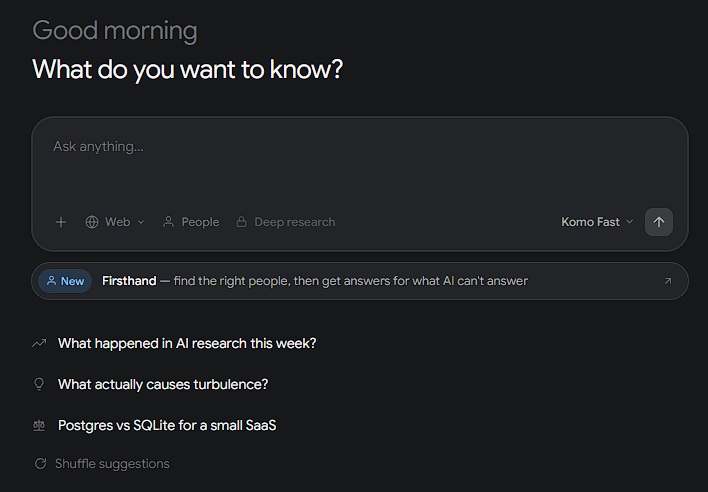
A conventional search engine gives you links. Komo starts by trying to answer the question.
That means you do not have to open half a dozen results and piece together the basic explanation yourself. Komo handles the first round of synthesis, which can be helpful when comparing technologies, learning a scientific concept, following a current event, or getting your bearings in an unfamiliar subject.
The sources are just as important as the generated response. Komo places particular emphasis on verifiable references, giving you a way to inspect the evidence behind a claim rather than accepting the AI’s wording at face value.
This makes it more useful for research than a chatbot that produces a convincing answer but leaves you wondering where any of it came from.
Komo’s search interface includes a Deep Research feature for questions that cannot be handled well with a quick summary.
A straightforward search may be enough to explain turbulence. A market study, competitor review, or technical comparison is different. Those jobs involve reading across many pages, weighing conflicting information, and working out which sources deserve more trust.
Deep Research is aimed at that heavier work. Analysts, marketers, founders, students, and researchers can use it when a single search result will not provide enough context.
The broader Komo platform continues in the same direction with Structured Research. The company describes this as a way to build AI-powered tables for systematic research at scale, with citations included. Komo can also analyze documents and data rooms, allowing users to ask questions about uploaded material while retaining links to the underlying evidence.
Firsthand takes Komo in a less obvious direction. The company describes it as a way to find suitable people and ask questions that AI cannot answer on its own.
That distinction makes sense. Web research works when the information has already been published somewhere. It is far less useful when you need an experienced practitioner’s opinion, details about an undocumented process, or insight into what happened inside a specific organization.
Firsthand is meant to bring that human knowledge into the research process. It sits apart from ordinary web search, but it fits Komo’s broader goal of finding usable answers rather than simply returning a list of pages.
The main Komo interface is deliberately sparse. Most of the attention goes to a central question box, with search history and access to tools such as Firsthand available nearby.
There is not much to learn before getting started. You can write a complete question as you would ask it aloud instead of trying to compress the idea into a string of search keywords.
For everyday research, that simplicity is a genuine advantage. Less time goes into deciding which link looks promising. More goes into checking whether Komo’s summary and supporting evidence hold up.
Komo Search is particularly useful for:
- Getting up to speed on an unfamiliar topic.
- Comparing technologies, products, or methods.
- Following current developments through source-backed answers.
- Finding clear explanations of technical and scientific subjects.
- Researching markets and competitors.
- Turning a broad question into a workable research starting point.
- Finding source material for reports and articles.
- Investigating questions that draw on several webpages.
Komo carries the same basic risk as any AI search tool: the synthesis can be wrong even when the source material is accurate. Citations make errors easier to catch, but they do not remove the need to check important claims.
The quality of those sources matters too. An answer can have plenty of citations and still be poorly supported if the linked pages are outdated, unreliable, or repeating the same unverified claim.
Komo is also unnecessary for some searches. If you already know which website or page you need, a conventional search engine will often get you there faster. An AI-generated explanation adds little in that situation.
The platform’s expansion into automation and more advanced research tools introduces another trade-off. Komo still looks simple from the search page, but the full product is becoming more involved than the minimalist search engine it first appears to be.
Komo Search works best when you want a direct answer followed by the sources behind it. Its uncluttered interface, real-time web research, citations, Deep Research, and connection to Komo’s wider research tools make it useful for people who need to understand a subject rather than merely find a webpage.
Researchers, students, writers, analysts, and curious professionals are the clearest audience. The caution is simple: citations make an AI answer easier to verify, not automatically correct. Komo can shorten the path through the research, but checking the evidence is still your job.
TAGS: AI Chat/Assistant Search Engines
Related Tools:

Generates descriptive narratives from images

GPT-powered chatbots for websites

Integrates Google search with ChatGPT

Synchronizes and backs up files across multiple devices
Cloud based file storage platform

Helps users organize tasks, set reminders, and sync lists