
Share this tool:
 |
Description:
Docus AI has shifted from looking like a general “AI doctor” app into something more focused and operational: an AI layer for diagnostic labs, clinics, doctors, and patients. Its main job is to make lab data easier to interpret, explain, route, and act on. That gives it a clearer place in the health AI market than a simple symptom chatbot, but it also means users need to understand what it can support and what it should never replace.
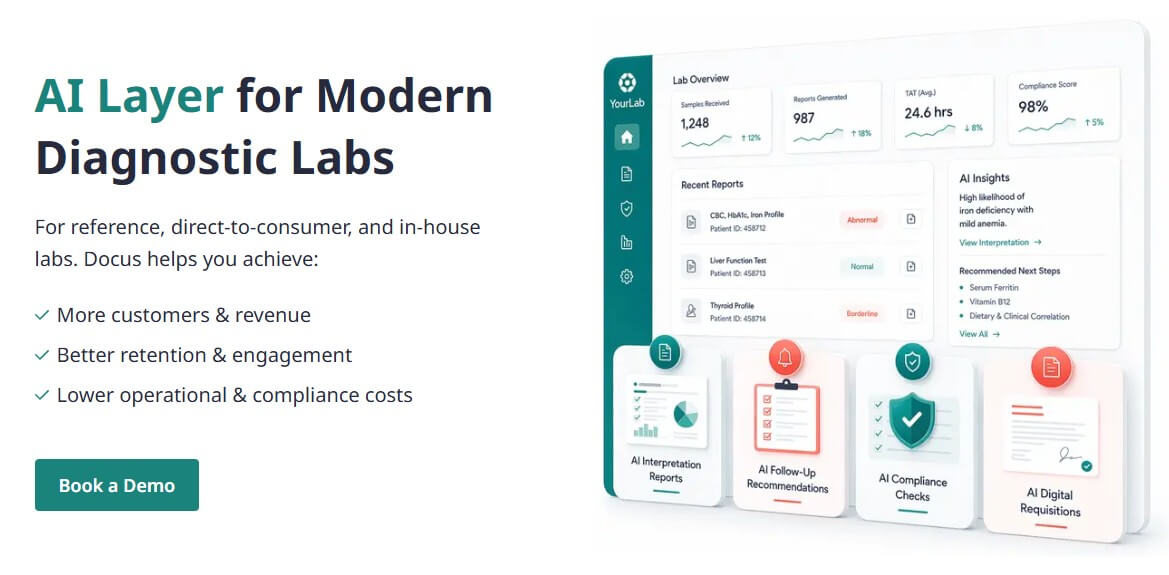
Docus AI is a health AI platform built around lab result interpretation and decision support. On the lab side, it helps turn test results into clinical reports for doctors and patient-friendly explanations. Its current homepage highlights interpretation reports, follow-up recommendations, compliance checks, digital requisitions, and context-aware AI assistants as core solutions for diagnostic labs.
That positioning matters. Docus AI is not just a chatbot where users ask random medical questions. It is trying to sit closer to the diagnostic workflow: lab results come in, the system analyzes them, reports are generated, follow-up steps are suggested, and the information can be sent back into lab or clinical systems.
The consumer-facing side is still present. Docus offers an AI Doctor and AI Health Assistant that can answer health questions, consider symptoms and history, generate reports, and support second-opinion workflows. But the more serious value is in how it handles structured health data, especially lab tests.
Docus AI is strongest when there is real medical data to work from. A vague symptom question can only go so far. A blood test, urine test, swab result, stool result, or other lab report gives the system something concrete to analyze.
The lab test interpretation workflow is straightforward: users can upload PDFs, images, screenshots, or photos of lab results; Docus analyzes biomarkers, flags abnormal values, compares results with reference ranges, and generates a report with explanations and recommendations.
For patients, the practical benefit is readability. Lab reports are often full of numbers, abbreviations, ranges, and medical terms that are hard to connect to real decisions. Docus makes those results easier to understand. For doctors and labs, the value is different: faster review, clearer reporting, and more structured follow-up paths.
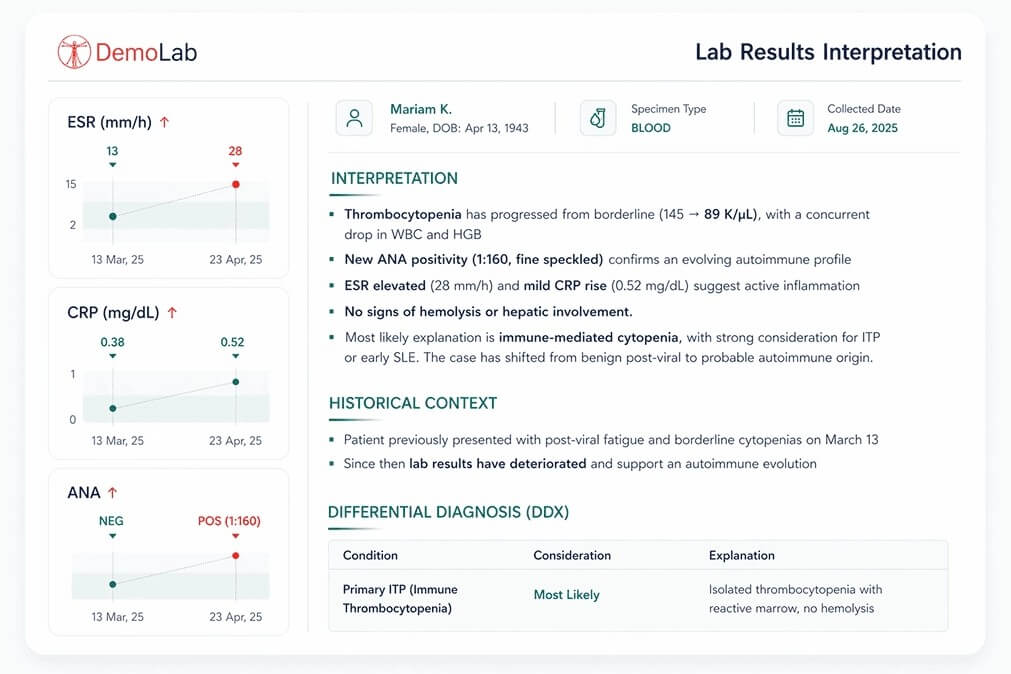
Docus can create doctor-ready clinical reports and simpler patient reports from lab results, including differential diagnosis support, follow-up suggestions, and clinical planning notes.
The platform explains measured values, normal ranges, abnormal results, related risks, and changes over time when multiple tests are available.
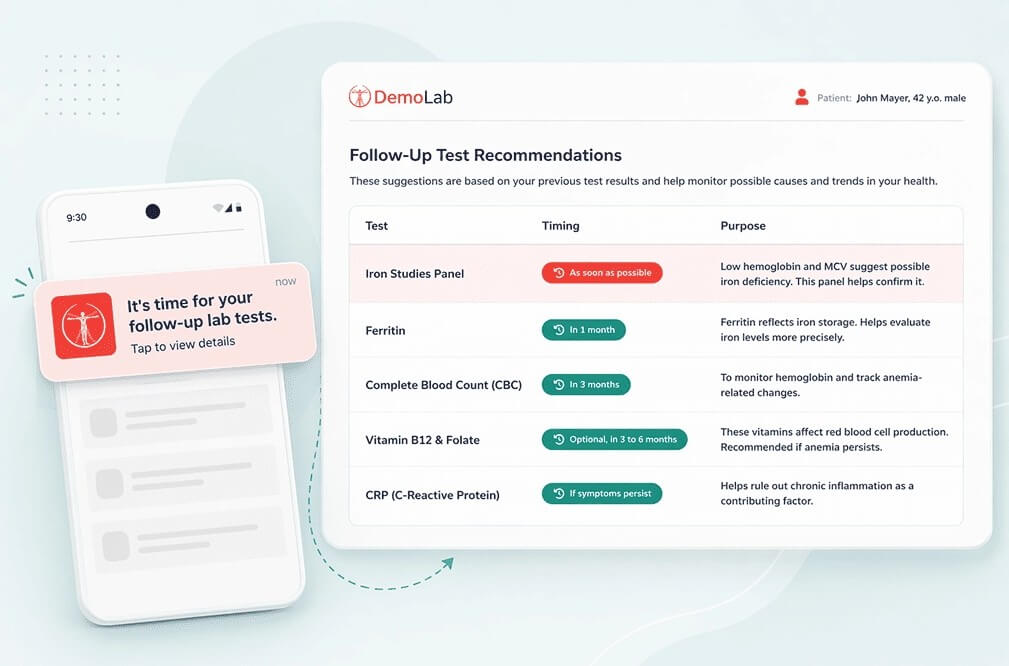
Docus can suggest additional tests or follow-up steps based on lab results and detected risks, which is useful for labs that want more structured patient engagement.
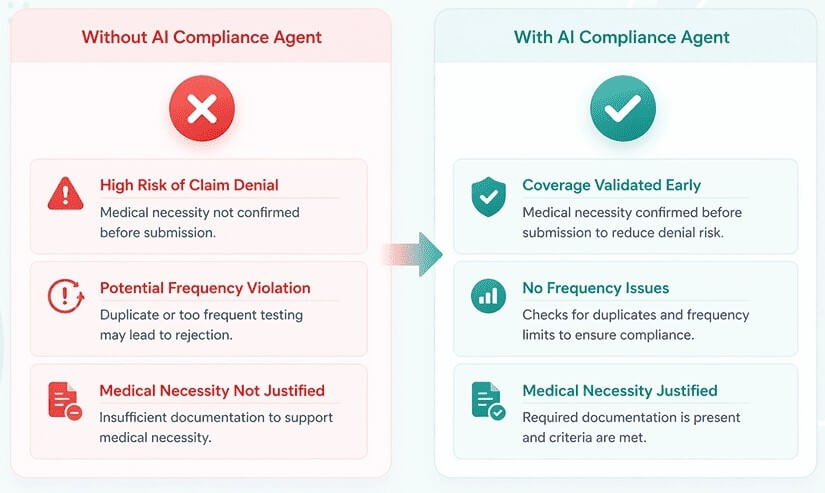
For labs, Docus includes checks for test order and ICD code alignment, repeat testing frequency, and pre- or post-test compliance review.
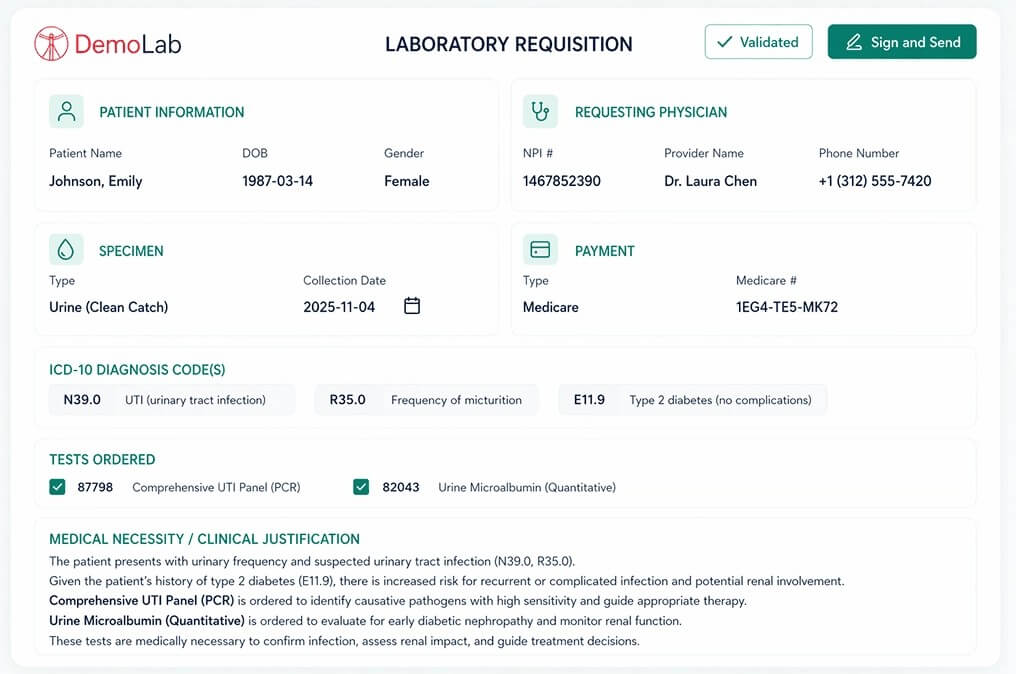
Doctors can use guided ordering, autocomplete-style form support, AI-generated medical necessity text, e-signatures, and direct delivery into lab workflows or LIS systems.
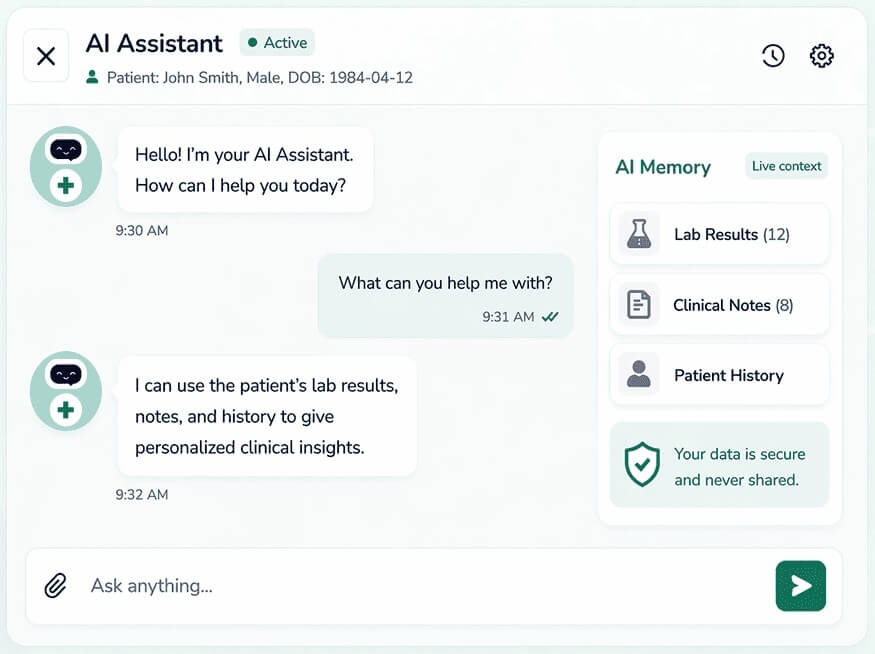
Docus supports AI assistants for doctors and patients that use patient history and lab results to give more relevant answers.
For patients, the workflow is easy to understand: upload test results, receive an AI-powered report, then ask follow-up questions through the AI Doctor. The stronger experience will likely come from clean uploads. A cropped, clear lab result with visible values and reference ranges should be easier to interpret than a blurry photo or partial screenshot.
For labs and clinics, the workflow is more involved but also more useful. Docus supports API and HL7 integration so lab data can be sent into the platform and outputs can return to an LIS, CRM, or EHR. It also offers Docus interfaces for labs, doctors, and patients when a full integration is not needed.
That flexibility is important. Smaller labs may want a ready interface. Larger labs will care more about system integration, structured outputs, compliance review, and how the platform fits into existing operations.
| Workflow Layer | What Docus AI Supports | Why It Matters |
|---|---|---|
| Patient upload | PDFs, screenshots, images, and photos of lab results | Makes lab interpretation easier to start |
| AI analysis | Biomarker review, abnormal values, ranges, risks, and trends | Turns raw results into structured context |
| Clinical reports | Doctor-facing summaries, DDx notes, and planning support | Helps clinicians review results faster |
| Follow-ups | Suggested next tests, timing, and patient reminders | Supports continuity after the initial result |
| Integrations | API, HL7, LIS, CRM, and EHR workflows | Fits lab systems instead of staying isolated |
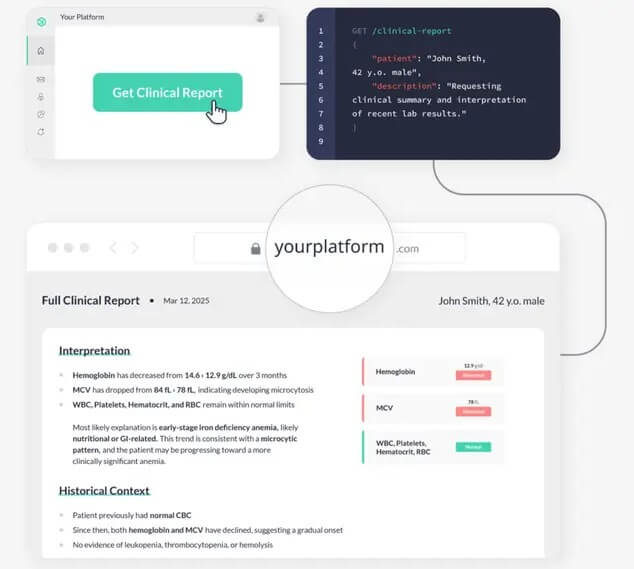
The best output from Docus AI is not just “an answer.” It is a structured interpretation. That is the right direction for healthcare AI because free-form chat can become too loose. Reports, flagged values, ranges, follow-up suggestions, and doctor-facing summaries give users something easier to review.
Still, this is not a replacement for medical judgment. Docus itself says the AI Doctor is not a substitute for professional medical advice, diagnosis, or treatment. It also says the tool can suggest possible conditions but cannot make definitive diagnoses or prescribe medication.
That caveat should stay front and center. Docus can help organize questions, explain results, and prepare users for a doctor conversation. It should not be treated as the final authority on a diagnosis, medication choice, emergency symptom, or treatment plan.
Docus puts a lot of emphasis on health data security. Its lab test page says users do not need to provide personally identifiable information for lab analysis and can crop or black out personal details. It also says shared data is protected with security protocols aligned with HIPAA and GDPR.
The broader privacy policy is worth reading because Docus does collect website and service-related information, including traffic data, cookies, analytics data, and other usage signals. It also states that users consent to the way Docus may use and disclose identifiable health information under applicable privacy rules.
The practical advice is simple: remove unnecessary identifiers from uploads when possible, read the privacy terms before sharing sensitive data, and avoid using any AI health tool as a storage place for information you do not need to submit.
- Docus AI is a strong fit for diagnostic labs that want to give patients clearer reports, help doctors review results faster, and create more structured follow-up workflows.
- It also fits direct-to-consumer labs, reference labs, and in-house clinic labs, which Docus names as its target lab models.
- It can help patients who already have lab results and want plain-English explanations before speaking with a clinician.
- The AI Doctor is useful for asking follow-up questions like what an abnormal marker may mean, what questions to ask a doctor, or what next steps might be worth discussing.
- For doctors, the most useful role is support, not replacement: summarizing results, generating discussion-ready reports, and helping patients understand what their numbers mean.
- The first limitation is medical risk: Any AI health tool can sound more certain than it should. Docus includes warnings, but users still need to treat outputs as informational and confirm decisions with licensed professionals.
- The second limitation is input quality: Lab interpretation depends on the uploaded data. Missing pages, unclear images, unusual reference ranges, or incomplete history can weaken the result.
- The third limitation is fit: Docus makes the most sense around lab interpretation and related workflows. If someone wants therapy, urgent triage, chronic disease management, prescription help, or a full telehealth replacement, this is not the right category.
- Finally, labs should evaluate integration depth carefully: API, HL7, LIS, CRM, and EHR connections sound useful, but the real value depends on how well Docus maps into each organization’s existing systems.
Docus AI is best at making lab results more understandable and actionable for labs, doctors, and patients.
Its strongest use case is structured lab interpretation, especially when paired with follow-up recommendations, patient-friendly reports, and clinical review.
It is a good fit for diagnostic labs and health users who want clearer explanations of test results. The main caveat is serious: Docus can support health decisions, but it should not replace a qualified clinician, especially for diagnosis, treatment, medication, or urgent care.
TAGS: Self Improvement
Related Tools:

AI-based language learning application

Facilitates English language learning

Analyzes skin health and provides assessments for various skin conditions.

Enhances emotional well-being through interactive AI chatbot

AI-powered mental health companion

Enhancing organizational efficiency and decision-making