
Share this tool:
 |
Description:
- Introduction
- Core Features and Capabilities
- What Cavya Actually Is
- What Cavya Does Best
- Glossary Generation and Terminology Control
- Style Guide Creation
- Smart Document Analyzer
- CavyaQA and Translation Quality Control
- File and Language Support
- Best Use Cases
- Practical Tips
- Limitations and Trade-Offs
- Final Takeaway
Cavya is an AI-powered translation preparation and QA platform for localization teams, project managers, linguists, and translation vendors. Its main value is not translating final content end-to-end. It is helping teams prepare translation projects faster by generating glossaries, style guides, document analysis reports, and QA insights before or during the localization process.
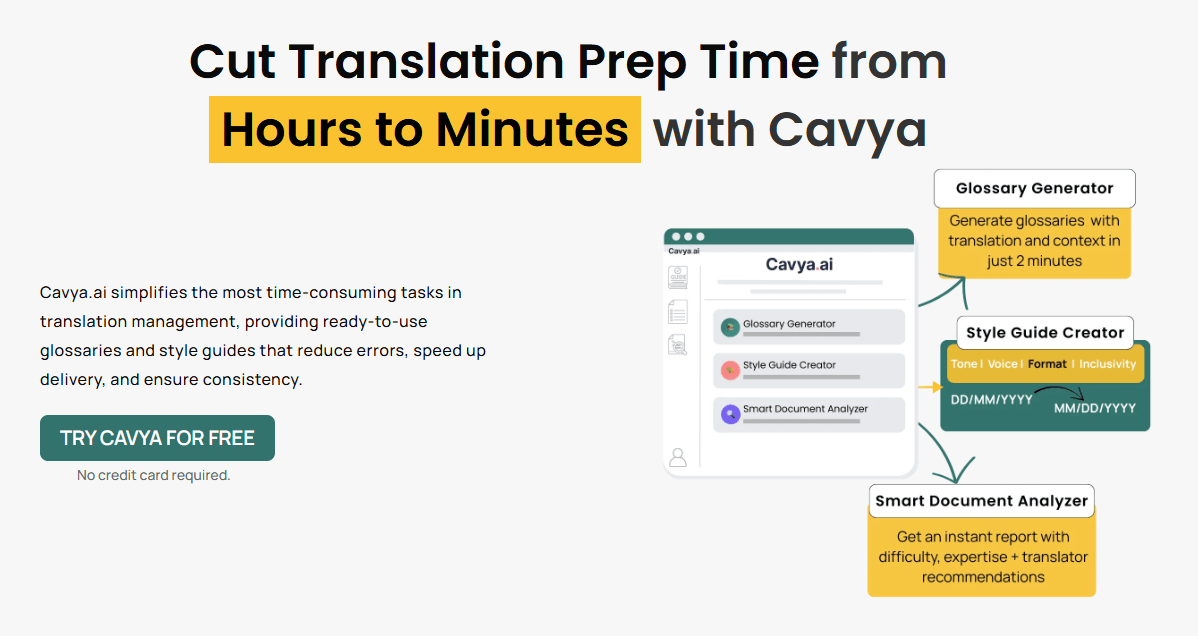
Extracts acronyms, product names, technical terms, regulatory references, context, usage meaning, and built-in translations from source documents.
Produces editable translation style guides covering audience, terminology, formatting, conventions, tone, inclusivity, visual elements, and structural rules.
Reviews files for document profile, language, complexity, compliance cues, risk detection, translation planning, and difficulty scoring.
Combines standard rule-based QA with AI-driven grammar, agreement, tone, phrasing, typo, style guide, and language-specific analysis.
Cavya’s public pages describe support for 120+ languages across terminology and source document workflows.
Cavya repeatedly emphasizes private access, encryption, secure file handling, and no AI training on user data, though teams should still review policies for sensitive enterprise use.
Cavya sits in a very specific part of the localization workflow: the layer before and around translation. It helps teams understand the source document, extract terminology, define style rules, identify project risks, and check translated content more intelligently. The official homepage describes Cavya as a way to cut translation prep from hours to minutes by producing ready-to-use glossaries and style guides that reduce errors, speed up delivery, and improve consistency.
The easiest way to understand Cavya is to break it into four main tools.
| Tool | What it does | Why it matters |
|---|---|---|
| Glossary Generator | Extracts key terms, acronyms, brand names, technical terms, regulatory references, context, and translations. | Gives translators terminology guidance before work begins. |
| Style Guide Creator | Builds translation style guides around tone, terminology, formatting, audience, inclusivity, structure, and target language. | Keeps translators, reviewers, PMs, and clients aligned. |
| Smart Document Analyzer | Reviews source files for language, domain, complexity, risk, compliance cues, required expertise, and workflow guidance. | Helps PMs scope and plan projects before translation. |
| CavyaQA | Combines rule-based QA with AI-driven linguistic analysis. | Adds grammar, tone, phrasing, agreement, and language-specific checks beyond structural QA. |
That structure makes Cavya different from a normal AI translator. It is not trying to replace CAT tools, TMS platforms, or human linguists. It is trying to remove the repetitive preparation work that happens before translation and the quality checks that happen after translation.
Cavya is strongest when a translation team needs structure before the project starts. Many translation problems are not caused by weak translators. They are caused by unclear terminology, missing style guidance, hidden compliance requirements, vague client expectations, and poor source-document analysis. Cavya is built to surface those things earlier.
The Glossary Generator is one of the clearest examples. Cavya says it can pull company names, product names, acronyms, technical terms, and context directly from files, generate multilingual terminology across 120+ languages, and handle bulk uploads for multiple files.
The Style Guide Creator is the second major strength. It creates guidance around tone, terminology, inclusivity, punctuation, numbers, dates, measurements, formatting, audience, and industry context. That matters because style guides are often skipped when teams are under deadline pressure, even though they prevent many downstream consistency problems.
The Smart Document Analyzer is especially useful for project managers. It identifies file type, domain, target audience, content elements, source language, complexity, regulatory cues, non-negotiables, risks, recommended workflows, and translator expertise. That gives teams a clearer project map before assigning linguists or promising delivery timelines.
The Glossary Generator is probably Cavya’s most immediately useful feature. It extracts terms that translators need to handle consistently: acronyms, product names, brand names, technical jargon, regulatory references, legal phrases, chemical names, and other domain-specific terms. It also provides context and usage meaning, which is important because a term list without context can still create ambiguity.
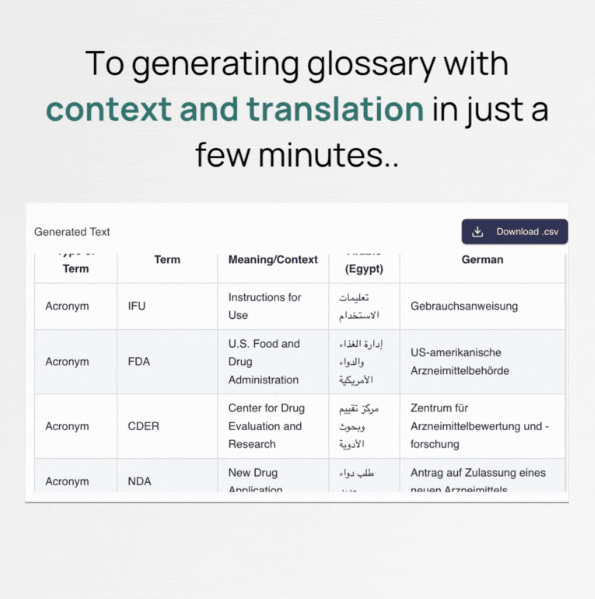
This is especially valuable in technical and regulated domains. Cavya’s pages specifically mention patents, IFUs, medical content, and technical manuals as examples of content it is built to handle. That positioning matters because these documents often contain acronyms, model numbers, classification terminology, standards, and non-negotiable references that should not be translated loosely.
The strongest use case is not just “make a glossary.” It is “create a project-specific terminology foundation before translators begin.” That helps reduce repeated translator questions, inconsistent term choices, client rework, and reviewer disputes.
The limitation is that glossary output still needs review. AI can surface terms quickly, but a linguist or project lead should still approve preferred translations, forbidden terms, brand exceptions, and context-specific usage rules. Cavya speeds up terminology work, but it should not remove human terminology ownership from serious projects.
Cavya’s Style Guide Creator is built for one of the most overlooked parts of localization: instruction quality. A translator can be excellent and still produce inconsistent results if the project has no clear rules around tone, register, punctuation, units, capitalization, product names, inclusivity, formatting, and audience expectations.
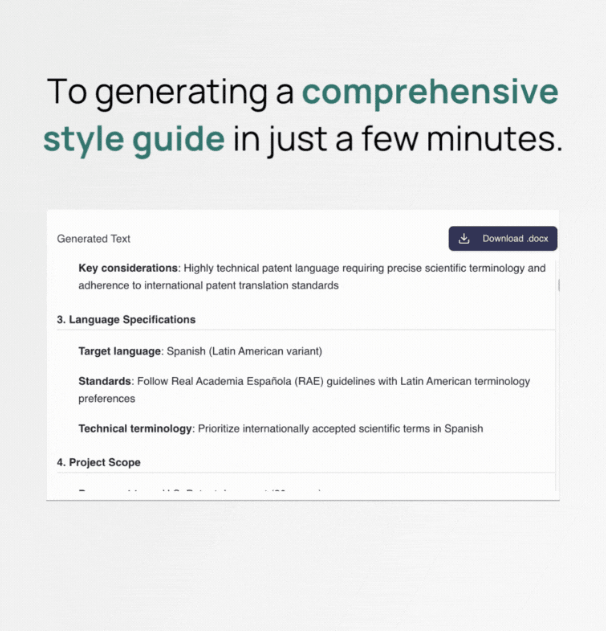
Cavya’s style guide page says the tool covers audience alignment, accepted language variants, industry domain, terminology and references, acronyms, product names, technical terms, trusted external resources, formatting conventions, project context, company background, tone, voice, inclusivity, and visual or structural elements.
This is useful because many teams build style guides too late. They discover tone issues during review, argue over terminology after translation, or realize that measurements, dates, and capitalization were handled inconsistently across files. Cavya helps move those decisions earlier.
The best way to use this feature is as a draft generator, not as a final authority. A generated style guide should be reviewed by the localization lead, client owner, or senior linguist. Once approved, it can become a reusable project asset for translators, editors, reviewers, and QA teams.
The Smart Document Analyzer is Cavya’s planning layer. It is designed to answer questions that project managers usually ask manually: What kind of document is this? How complex is it? What expertise does it require? Are there compliance risks? Are there formatting risks? Does it need human translation, assisted workflows, extra review, style guide prep, or specific QA checks?
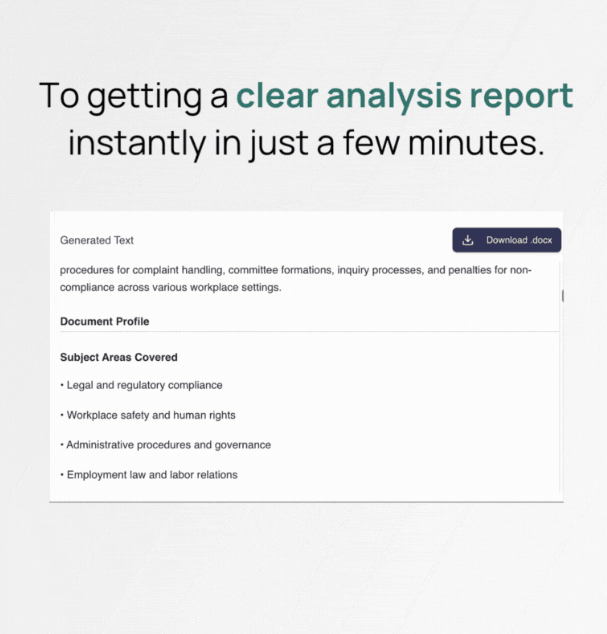
This is one of Cavya’s most useful features for agencies and teams handling varied content. A marketing brochure, legal agreement, patent filing, software string file, medical IFU, and technical manual should not be planned the same way. They require different expertise, different risk handling, and different review depth.
The analyzer also helps with client communication. Cavya says reports can be shared with translators and clients, giving both teams clear insights from the start. That can be useful when explaining why a project requires specialist review, more prep, additional QA, or different workflow expectations.
The practical caveat is that document analysis should guide planning, not replace PM judgment. A difficulty score and risk report are helpful, but they cannot fully know the client relationship, past terminology decisions, reviewer preferences, legal sensitivity, or hidden business context.
CavyaQA is the newest and most quality-control-focused layer. Cavya describes it as a translation QA tool that combines traditional rule-based checks with AI-driven linguistic analysis. It is designed to catch grammar, agreement, terminology usage, phrasing, tone, typos, style guide issues, and target-language-specific problems that standard QA tools may miss.
This distinction matters. Traditional QA tools are good at checking tags, numbers, placeholders, formatting, untranslated segments, and terminology consistency. CavyaQA tries to add language judgment on top: whether the sentence sounds wrong, whether agreement is off, whether phrasing can improve, or whether the style guide is not being followed.
CavyaQA is especially useful as a second layer, not a replacement for existing QA. A strong workflow could use a CAT tool or QA tool for structural checks, then CavyaQA for linguistic suggestions and context-aware review. Cavya’s own page frames it this way by saying traditional QA validates structure, formatting, and consistency, while CavyaQA adds context-aware language analysis and actionable suggestions.
One important caveat: CavyaQA is currently described as being in beta, with limited access while the product is refined through real-world testing and feedback. That means teams should test it carefully before relying on it as the only QA layer in production workflows.
Cavya’s Smart Document Analyzer FAQ says the platform supports common file formats including .docx, .doc, .ppt, .pptx, .pdf, .txt, .csv, .xlsx, .xls, .json, .xml, .srt, .xliff, .xlf, .po, and more. That is useful because localization prep often begins from whatever file the client sends, not from a perfectly prepared CAT-tool package.
Language coverage is also broad. Cavya’s homepage and glossary pages reference 120+ languages for multilingual glossary and translation preparation workflows, while the document analyzer FAQ says it supports over 120 source document languages.
The practical takeaway is that Cavya is built for global translation prep, not only English-to-major-European-language projects. Still, teams should test their actual language pairs, especially for lower-resource languages or highly specialized domains, before assuming uniform quality.
- Localization project managers: Cavya is especially useful for PMs who need fast project setup, source-document analysis, terminology extraction, risk mapping, translator guidance, and client-ready prep materials.
- Freelance linguists: Translators can use Cavya to understand source files faster, generate terminology starting points, spot complexity, and reduce manual prep before translation.
- LSPs and localization agencies: Agencies handling many client files can standardize the first layer of project preparation and reduce how much manual time goes into every kickoff.
- Technical, medical, legal, and patent translation teams: Cavya’s strength in acronyms, regulatory references, technical terms, legal content, IFUs, patents, and manuals makes it especially relevant for specialized translation work.
- Marketing localization teams: Style guide generation is useful for maintaining tone, brand voice, formatting, inclusivity, and product-name consistency across markets.
- QA teams: CavyaQA is useful for teams that already run rule-based QA but want a second layer for grammar, phrasing, tone, agreement, and language-specific issues.
- Start with the Smart Document Analyzer when the project is unfamiliar. If the source file is technical, regulated, long, or from a new client, analysis should come before glossary or style guide work. It helps identify complexity, risk, expertise needs, and recommended workflow steps.
- Generate the glossary before translation starts. A glossary is far more valuable at kickoff than during final QA. Use Cavya to extract terms early, then have a lead linguist or client reviewer approve preferred terms before the translation team begins.
- Treat style guides as editable drafts. Cavya can create the structure quickly, but client-specific tone, brand rules, banned terms, locale preferences, and reviewer expectations still need human confirmation.
- Use CavyaQA as an additional QA layer. It is useful for language quality issues that rule-based QA may miss, but because it is currently described as beta, it should complement established review workflows rather than replace them entirely.
- Use Cavya most aggressively on complex files. The payoff is higher for patents, IFUs, medical documents, technical manuals, legal documents, and multi-file projects than for simple short marketing copy.
- Review security requirements before uploading sensitive client files. Cavya emphasizes encryption, private access, and no AI training, but regulated or NDA-heavy work should still follow internal data handling policies.
The biggest limitation is that Cavya is not a full CAT tool or translation management system. It helps with preparation, analysis, style guidance, terminology, and QA, but it does not replace the environment where translators translate, manage segments, apply translation memory, or deliver final bilingual files.
The second trade-off is that AI-generated prep still needs expert review. Glossaries, style guides, and analysis reports can save time, but they should be validated by someone who understands the client, domain, target market, and production workflow.
The third limitation is CavyaQA maturity. Cavya’s own FAQ says CavyaQA is currently in beta, so teams should test it carefully and avoid treating it as a fully proven replacement for established QA and human review.
The fourth trade-off is that quality depends heavily on source material. Clean, complete, well-structured documents will usually produce stronger analysis and glossary output than messy scans, inconsistent files, or documents with poor formatting.
The fifth limitation is that Cavya is specialized. That is a strength for localization teams, but it makes the tool less relevant for general business users who only need occasional translation or writing help.
Cavya is best understood as an AI translation preparation and QA assistant, not as a generic translator. Its strongest value comes from helping localization teams create glossaries, style guides, document analysis reports, and QA insights much faster than manual prep alone.
It is best for localization project managers, freelance linguists, LSPs, QA reviewers, and technical translation teams that regularly handle complex files and need stronger consistency before translation begins.
The main caveat is that Cavya should support professional judgment, not replace it. Its outputs are most valuable when reviewed, refined, and used as part of a disciplined localization workflow.
TAGS: Translation
Related Tools:

Translates text and media into over 130 languages

Creates, edits, and optimizes videos with professional effects

Streamlines localization and translation processes

Transcribe, translate, and localize multimedia content
Translates video speech into multiple languages
Writing assistant that improves text clarity and translations