

Share this tool:
 |
Description:
Receipt AI is an expense and receipt management tool built around a refreshingly narrow idea: submitting a receipt shouldn't require opening another business app. Users can take a photo and send it through SMS, WhatsApp, email, or the website. Receipt AI then extracts the important information, categorizes the expense, and can send the resulting record into accounting software.
That focus makes Receipt AI particularly relevant for accountants, bookkeepers, business travelers, contractors, and teams that spend too much time chasing receipts. The AI sits behind the workflow rather than becoming another interface users have to learn.
The most distinctive feature is the way receipts enter the system.
Receipt AI supports four main submission methods: SMS, WhatsApp, email, and web upload. With SMS, for example, a user can photograph a receipt and text the image directly to Receipt AI. There's no need to type the vendor or transaction information alongside it.
This small workflow decision matters more than it might appear. Expense tools often fail because employees postpone entering purchases until later. Receipt AI makes capture something that can happen immediately after a purchase, using communication tools people already have.
SMS submission does have a geographic limitation. Receipt AI currently supports SMS uploads from phone numbers in the US, Canada, and Australia, although WhatsApp, email, and website uploads provide alternatives elsewhere.
Once a receipt arrives, Receipt AI handles much of the repetitive data-entry work.
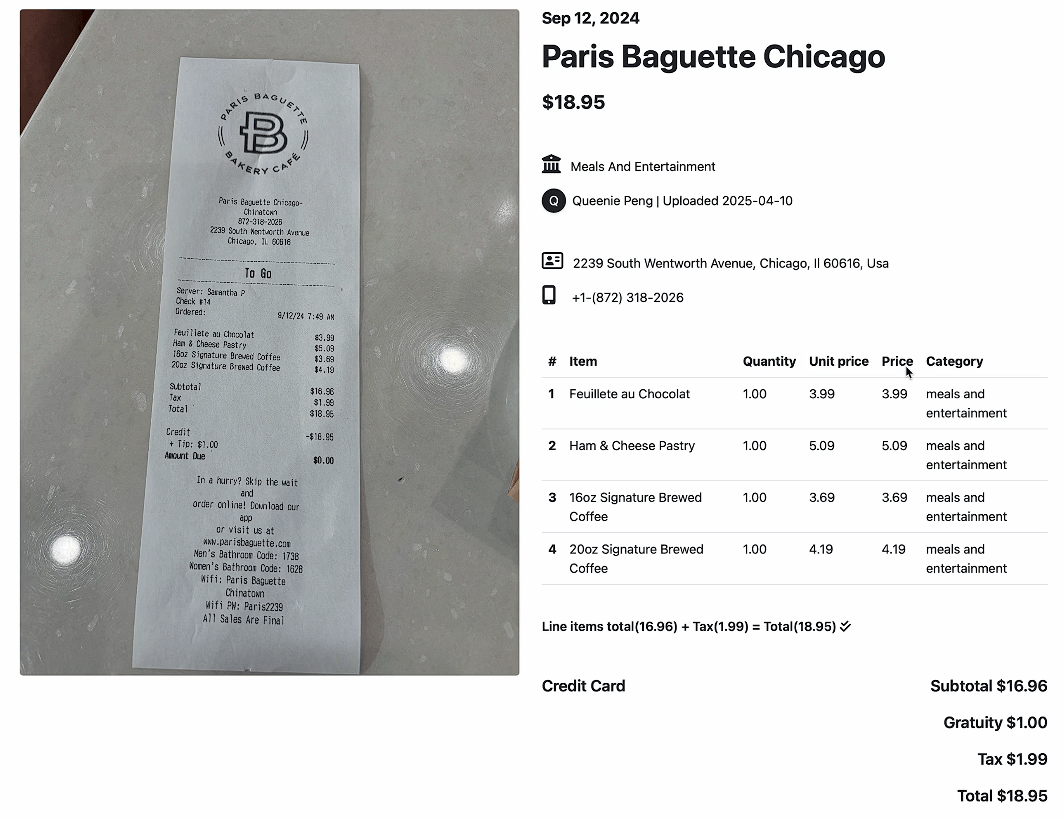
Its AI extracts details including the vendor, transaction information, tax, total amount, and individual line items. It can rename files, apply expense categories and tax codes, and prepare the information for accounting.
Line-item extraction is particularly useful. Instead of recording an entire receipt as one generic expense, Receipt AI can identify individual purchases and categorize them separately when that option is enabled.
Users can also attach context. A memo can accompany a receipt through SMS or WhatsApp, while email submissions can use the subject line. Memos remain editable afterward.
| Capability | What Receipt AI Does |
|---|---|
| Receipt capture | Accepts SMS, WhatsApp, email, and web uploads |
| AI extraction | Reads vendor, tax, totals, and other receipt data |
| Line items | Extracts and categorizes individual purchases |
| Expense organization | Applies categories and tax codes |
| Accounting sync | Works directly with QuickBooks Online and Xero |
| Reconciliation | Matches uploaded expenses with transactions |
| Notes | Supports memos attached to receipts |
| Documents | Handles receipts plus several other financial document types |
The accounting integration is where Receipt AI becomes more than a receipt scanner.
It connects directly with QuickBooks Online integration and Xero integration. After processing a receipt, the system can categorize it using the appropriate account and tax code, upload the information to the accounting platform, and match it against a transaction.
The remaining reconciliation step is deliberately small. QuickBooks users review the suggested transaction and click Match, while Xero users can confirm it with OK.
This is one of Receipt AI's strongest practical features. Extracting text from a receipt isn't difficult for modern AI. Turning that extraction into an accounting entry that's already categorized and waiting to be reconciled is much more useful.
Despite the name, Receipt AI isn't limited to cash-register receipts. The platform says it supports more than nine document types, including invoices, checks, bank statements, and purchase orders.
That broadens its role for bookkeeping teams. A business dealing with several kinds of financial paperwork can route more of that material through one capture and extraction workflow rather than maintaining a receipt-only process.
Accounting software isn't mandatory either. Users without QuickBooks or Xero can still use Receipt AI to organize and review their expense information.
Receipt AI also provides charts and data views intended to turn captured expenses into something easier to analyze. Project expense tracking can help businesses see what a job or project is costing rather than treating receipt storage as the final goal.
This isn't positioned as a replacement for a full financial analytics platform. Its strength remains the connection between capturing an expense and getting clean information into the bookkeeping process.
Receipt AI makes the most sense for accountants and bookkeepers collecting documents from clients, especially when getting people to use a dedicated expense app is difficult. Clients can submit receipts through familiar channels while the accounting team receives more structured information.
It's also a natural fit for business travelers, contractors, field workers, real estate investors, and distributed teams. Anyone making purchases away from a desk benefits from being able to photograph and send a receipt immediately.
Businesses already using QuickBooks Online or Xero stand to get more value because Receipt AI can carry the process through to reconciliation rather than stopping after data extraction.
Receipt AI is intentionally specialized. Businesses looking for broad accounting, payroll, invoicing, or financial planning features will still need their existing accounting stack.
The QuickBooks and Xero integrations are central to its strongest workflow, so companies using other accounting platforms won't get the same end-to-end experience.
AI extraction also deserves human review. Poor photographs, unusual receipt formats, complicated taxes, or ambiguous line items can create situations where categorization needs correction. The one-click reconciliation design is useful here because a person still gets a final opportunity to review the transaction.
On security, Receipt AI states that receipts and account information are encrypted and protected. Businesses handling sensitive financial documents should still assess its security and data practices against their own compliance requirements.
Receipt AI solves a mundane problem in a practical way. Its strongest feature isn't AI extraction by itself. It's the full path from sending a receipt through SMS, WhatsApp, email, or the web to having a categorized transaction ready for reconciliation in QuickBooks or Xero.
That makes it best suited to accounting teams, traveling employees, contractors, and small businesses where collecting receipts is still unnecessarily manual. The main caveat is its specialization: Receipt AI works best as a focused receipt and expense-processing layer alongside an existing accounting workflow, not as a replacement for accounting software.
TAGS: Finance
Related Tools:

Enhances team productivity and task organization

Helps businesses find investors

Comprehensive project management platform

Helps users organize tasks, set reminders, and sync lists

Optimizes small business operations

Provides real-time insights for stock and crypto