

Share this tool:
 |
Description:
Plask is a browser-based AI motion-capture and 3D animation platform that converts regular video into character movement. It does not require a mocap suit, tracking markers, or a dedicated studio. Users can upload footage or record themselves with a webcam, extract the motion, apply it to a 3D character, and edit the resulting animation. Plask also includes camera and lighting controls, along with options to render the scene or export it to other 3D software.
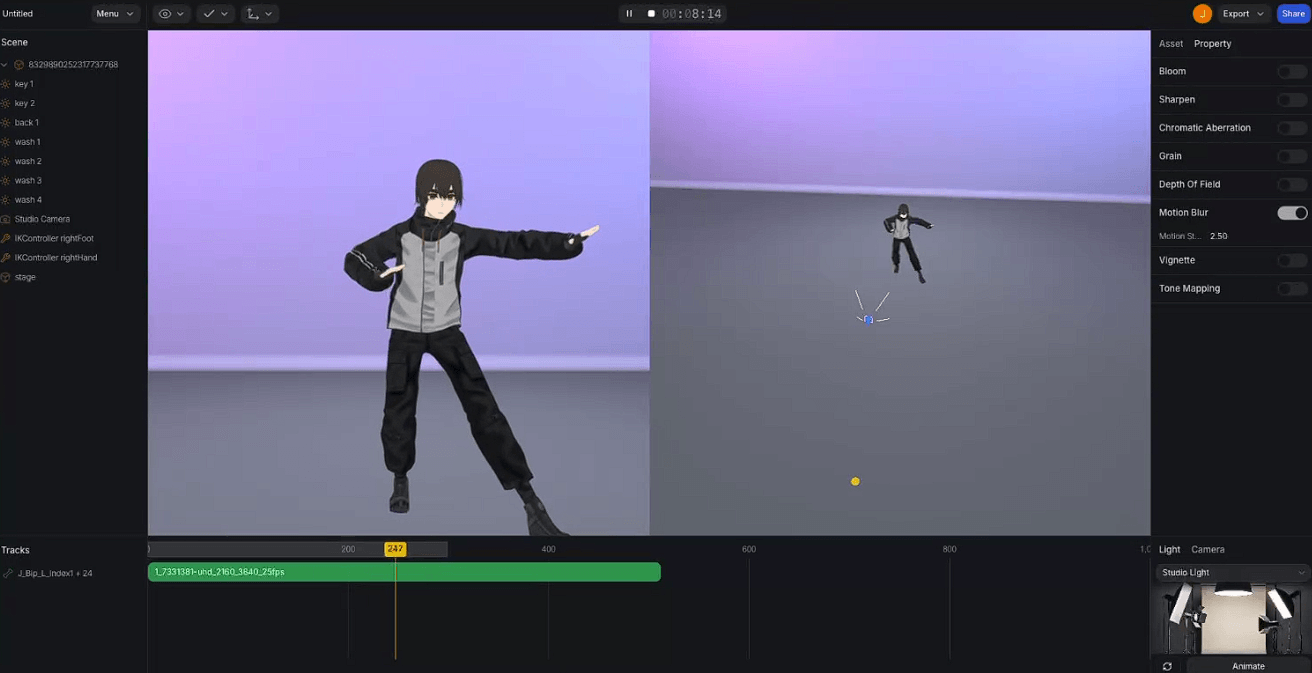
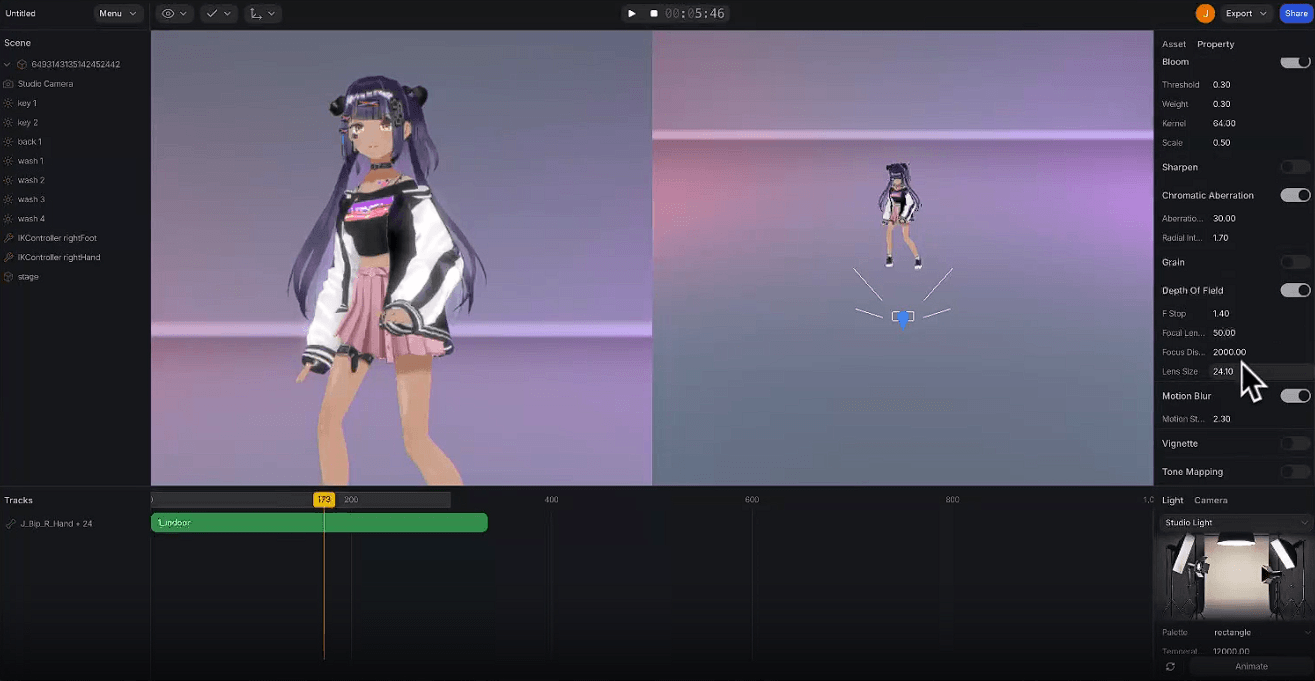
The basic workflow is straightforward: import a video, select the part you want to capture, extract the motion, and drag the animation onto a compatible 3D character.
Plask offers several extraction modes, including Classic V1, Accurate, and Stable. Each handles the balance between fluid movement and precise tracking differently. Users can add hand animation, begin the capture in a T-pose, lock the character’s feet, and select a specific performer when more than one person appears in the video.
| Capability | What It Adds |
|---|---|
| Video Mocap | Converts human movement from ordinary footage into 3D animation |
| Webcam Capture | Records source motion directly inside Plask |
| Hand Tracking | Adds finger and hand movement to body capture |
| Multi-Person Mocap | Extracts movement from several performers in one scene |
| Auto Retargeting | Maps extracted motion onto compatible character rigs |
| Animation Editor | Adjusts keyframes, tracks, timing, and curves |
| Camera and Lighting Tools | Builds a presentable scene around the animation |
| FBX, GLB, BVH Export | Sends animations into external 3D pipelines |
Plask can track more than one person at a time, so it is not restricted to solo performances. That opens it up to dances, sports, group scenes, and action sequences.
The setup still matters. Plask recommends that performers avoid overlapping, the camera remain stationary, and footage be recorded at 720p or higher. Keeping fewer than ten people in frame should also produce better results. Occlusion is an unavoidable weak spot: a single camera cannot reliably reconstruct body parts hidden from view.
Hand animation extends the capture to fingers instead of leaving the hands rigid. That makes a noticeable difference in gestures and character acting, although subtle finger movement is harder to track than broad body motion.
Users are not limited to Plask’s built-in mannequin. Custom characters can be imported as FBX, GLB, VRM, or PMX files, which covers conventional 3D production as well as VRoid and MikuMikuDance-style workflows.
Automatic retargeting works best with a character that has a skeletal mesh, familiar bone names, and a suitable hierarchy. Plask recommends a T-pose. When the automatic mapping gets the skeleton wrong, users can adjust or rename the bones manually to match the structure Plask expects.
This separates Plask from simpler avatar-animation services. It is designed to join an existing 3D workflow rather than keep every project inside a closed character system.
The motion extracted from a video is a starting point, not necessarily the finished animation.
Plask provides animation groups, individual tracks, keyframes, timing controls, and a curve editor. Sections of motion can be moved along the timeline, then adjusted after the first AI pass.
That editing room is necessary because markerless mocap rarely comes out perfect. Foot placement, physical contact, timing, and joint movement often need correction. Being able to handle some of that work in the same browser window makes Plask more flexible than a service that simply returns an animation file.
Plask now covers more of the presentation process too. Its camera and lighting tools are joined by depth of field, motion blur, vignette effects, tone mapping, and video rendering.
Creators can animate the camera, change the lighting, or have the camera follow a particular part of the character. For VTuber clips, dance videos, social posts, and quick previews, these controls may be enough to delay or avoid a trip into a separate rendering package.
Animated models can be exported as FBX, GLB, or BVH files. Plask provides documented workflows for Blender, Maya, Unreal Engine, Unity, Cinema 4D, iClone, MetaHuman, VRoid, and After Effects.
This broad compatibility gives creators room to use only the parts of Plask they need. A game developer, for example, can extract motion in Plask and complete the retargeting, cleanup, animation blending, or rendering in an established production tool.
Plask is a practical option for indie game developers, animators, VTuber creators, short-form video creators, virtual-production teams, and small studios that need human motion but cannot justify a conventional mocap setup.
It is well suited to dance, exercise, sports movement, gestures, combat blocking, and character animation based on recorded performances. Rapid prototypes are another obvious use: capturing an action with a phone is usually much faster than keyframing every pose by hand.
The quality of the result depends heavily on the source video. Plask recommends horizontal footage, even lighting, a fully visible body, and clothing that does not obscure the performer’s shape. Its motion recognition is made for people, not animals or arbitrary moving objects.
Custom skeletons may also need manual attention when their bone names or hierarchy differ from what Plask expects. And although the platform has its own animation editor, demanding production work will often require further cleanup in Blender, Maya, Unreal, or another dedicated package.
Plask is more convincing as a complete video-to-3D animation workspace than as a standalone motion extractor. It brings single-camera AI mocap, hand tracking, multi-person capture, custom characters, retargeting, timeline editing, cinematography controls, and standard 3D export formats into one browser-based tool.
It suits creators who want to record human movement quickly and then shape the result into a usable animation. The usual markerless-mocap condition applies: clean footage and some manual correction are still needed when precise contact, smooth movement, or production-level polish matters.
TAGS: Motion Capture 3D Model
Related Tools:
Enhances the process of keyfrrame animation
Generates 3D models with advanced texturing

Allows creators to easily build, market, and sell online courses

Enables to build online learning courses

Offers online courses taught by industry experts
Enables natural interaction through realistic hand tracking