
Share this tool:
 |
Description:
- Introduction: What Is Instant 3D?
- Text and Image Generation Cover Different Jobs
- Image to 3D Is the More Controlled Starting Point
- Character Generation Has Its Own Workflow
- Remeshing Makes the Platform More Practical
- Browser Viewer and Export Workflow
- Speed Is Part of the Appeal
- Best Use Cases
- Limitations and Trade-Offs
- Final Takeaway
Instant 3D is a browser-based AI platform for creating 3D models from either written descriptions or reference images. Its current toolset includes Text to 3D, Image to 3D, a Character Generator, Auto Remesh, a browser 3D Viewer, and additional editing and optimization tools grouped under its AI Studio. The platform is aimed at making asset creation approachable for users who may not want to model everything manually in Blender, Maya, or another traditional 3D application.
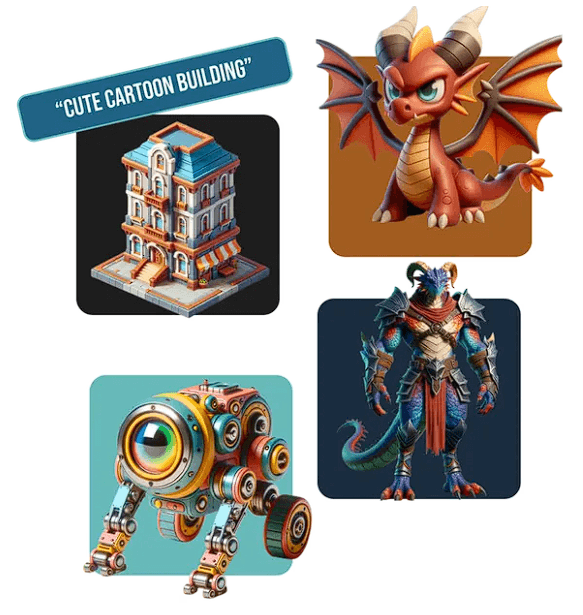
Instant 3D gives users two main routes into generation.
Text to 3D works when the asset exists mainly as an idea. You describe an object, character, building, or prop in plain English and let the system build the initial mesh and textures. Instant 3D specifically gives examples ranging from spaceships and castles to cartoon characters.
Image to 3D is more useful when appearance matters. You can upload concept art, a photograph, product image, character design, or sketch. The system analyzes the visible shapes, proportions, and details before constructing a textured 3D interpretation. Multiple reference images of the same object from different angles are also supported, which can give the model more information about surfaces hidden in a single view.
| Workflow | Best Use |
|---|---|
| Text to 3D | Fast concept assets and objects that do not yet have reference art |
| Image to 3D | Products, props, characters, and designs with a defined visual target |
| Multi-image input | Objects where shape accuracy from several viewpoints matters |
| Character Generator | Building 3D characters from turnaround-style references |
| Auto Remesh | Reducing or cleaning geometry for downstream work |
| 3D Viewer | Inspecting and editing assets directly in the browser |
Text-to-3D is useful for exploration, but reference images usually give the model a clearer target.
Instant 3D's web app recommends using a single subject on a plain background for image generation. That is sensible advice. A clean product photo or isolated character tells the reconstruction system which object matters, while a busy environment creates more ambiguity about boundaries and depth.
For harder objects, multi-view input is more interesting. A single front image cannot reveal what the back of a chair, creature, or product looks like. Additional angles reduce how much geometry the system has to invent.
This does not make reconstruction exact. Hidden surfaces and small structural details still need inspection, especially if the asset will be seen from every side.
Instant 3D also separates character creation from general image reconstruction.
Its current homepage describes an AI Character Generator that creates 3D characters from character turnarounds.
Turnaround sheets are a better source than one portrait because they show the same character from several viewpoints. For animation pre-production, game prototypes, stylized avatars, and concept characters, that can provide a faster bridge between 2D design and a usable 3D starting point.
The important word is starting. A generated character should still be checked for topology, joint areas, facial geometry, and animation readiness before being treated as a finished production model.
Generative 3D tools are often judged on the first visual result, but mesh structure matters once the model leaves the preview window.
Instant 3D includes Auto Remesh, described as a tool for refining and optimizing 3D geometry. Its text and image workflows also allow users to lower polygon counts before export.
That matters for game engines, AR/VR, web-based 3D, and other environments where an unnecessarily dense mesh can hurt performance.
Instant 3D's refinement workflow also mentions controls around textures, lighting, texture quality, and polygon count. This gives users a chance to improve a promising generation before moving it elsewhere.
Instant 3D includes an online viewer for uploading, editing, and inspecting 3D assets without opening separate desktop software.
That is particularly useful for beginners. Being able to rotate the object immediately helps reveal problems that a single rendered preview can hide.
The generation pages currently list GLTF, OBJ, and FBX as export options. Instant 3D's public model library also exposes downloadable models in formats such as GLB, FBX, and OBJ, with textures supported on listed assets.
These formats make it easier to continue work in conventional 3D software rather than remaining inside Instant 3D.
Instant 3D emphasizes rapid asset generation. Its current FAQ says a generation typically takes around 15 to 25 seconds, depending on server load.
That makes the platform most interesting during iteration. A developer can test several prop ideas, or a designer can compare multiple versions of an object, without committing to a lengthy manual modeling process for every concept.
The trade-off is predictable: speed does not guarantee production-ready geometry.
Instant 3D is a good fit for indie game development, 3D concepting, product visualization, AR/VR assets, animation pre-production, educational projects, and early 3D-printing experiments. Its official generation pages explicitly position the output around games, animation, AR/VR, and 3D printing.
It is particularly useful for people who need many rough-to-medium-fidelity assets quickly rather than one manually perfected hero object.
Instant 3D's public site makes broad claims about accurate and production-quality output, but generated assets should still be inspected in the context of the final job. Image reconstruction can only infer hidden surfaces, and text generation has even more freedom to interpret form.
Auto Remesh helps with geometry, but it does not automatically guarantee topology suited to deformation, animation, subdivision, or a studio's internal standards. 3D-printing users should also check wall thickness, manifold geometry, scale, and supports in dedicated preparation software before printing.
For precise CAD, engineering models, hard-surface production assets, or hero characters, manual refinement remains important.
Instant 3D is strongest as a fast AI-assisted asset creation workspace. Text to 3D handles open-ended ideas, Image to 3D gives creators a more visual starting point, and character generation, remeshing, browser inspection, and standard exports make the result easier to continue using.
It is best for creators who value speed and iteration, particularly in games, visualization, and prototyping. The main caveat is that an attractive generated model is not automatically a finished production asset. Geometry, topology, accuracy, and downstream compatibility still deserve a proper check.
TAGS: 3D Model
Related Tools:
Easily create 360 worlds
Digital classroom to facilitate student engagement

Offers online courses taught by industry experts

Enhances classroom engagement through interactive lessons

Facilitates online education through course management

Allows user to create and share quizzes