
Share this tool:
 |
Description:
- Introduction
- Core Features and Capabilities
- Sample Prompts to Try
- What One Click Article Creator Actually Is
- What It Does Best
- Best Use Cases
- Workflow and Ease of Use
- Output Quality and Control
- BuildAI Platform Context
- Where It Fits Compared With Other Writing Tools
- Practical Tips
- Limitations and Trade-Offs
- Final Takeaway
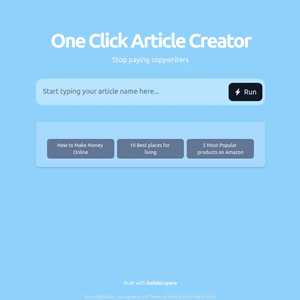
One Click Article Creator is a lightweight AI writing app built on BuildAI.space for users who want fast article drafts from simple topic ideas. It is not a full editorial system, SEO suite, CMS, or research assistant. Its value is speed: give it a topic, and it aims to produce article-style copy you can revise, fact-check, and publish elsewhere. That makes it useful for bloggers, small business owners, affiliate marketers, newsletter creators, and content teams that need first drafts quickly, but it should still be treated as a drafting tool rather than a finished-content machine.
Converts a short idea or instruction into article-style copy that can become a draft, outline, or starting point.
The public app appears to work as a lightweight BuildAI app where users enter a topic and run the generator rather than manage a full writing workspace.
Best suited for quick blog posts, listicles, explainers, and general informational content.
The app sits on BuildAI.space, a platform that supports no-code app publishing, AI-powered features, user management, payments, subscriptions, custom domains, and integrations at the platform level.
The app’s visible examples are short topic-style inputs, which suggests it is designed for users who want minimal setup.
The best use is not final publishing; it is generating a draft that can be edited into a stronger, more original article.
This is a feature-led review, so prompts are not the main structure. Still, this kind of app is easier to judge if you test it with stronger inputs than one-line topics.
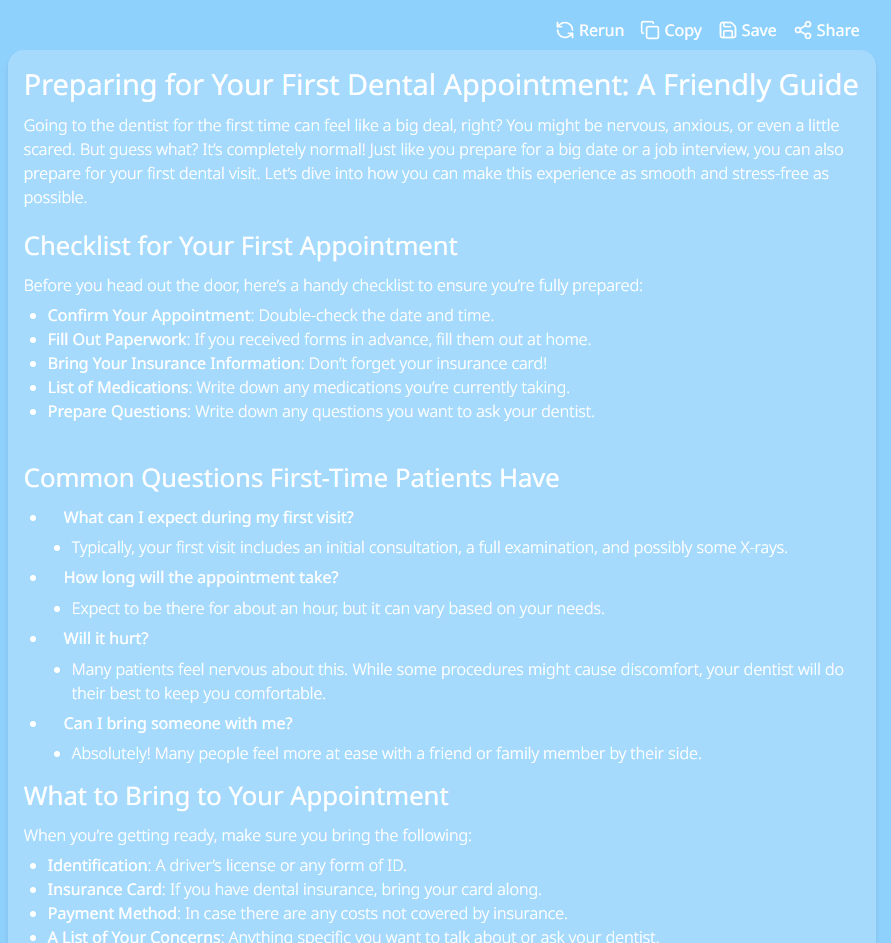
“Write a 1,200-word blog article for a small dental clinic explaining how first-time patients can prepare for their first appointment. Include a friendly introduction, a checklist, common questions, what to bring, how insurance paperwork works, and a short conclusion that encourages readers to book a consultation. Keep the tone reassuring, practical, and beginner-friendly.”
Why this is a good test: It checks whether the app can produce useful service-business content instead of generic advice.
“Create a detailed buying guide for beginners choosing a home espresso machine under $500. Compare manual, semi-automatic, and capsule machines. Include what features matter, common mistakes to avoid, who each type is best for, and a final recommendation framework. Do not mention specific product rankings unless the information can be verified later.”
Why this works: It tests list-style commercial content while reminding the workflow that product claims need verification.
“Write an article explaining compound interest to young professionals in their 20s. Use simple examples, explain why starting early matters, include a short comparison between saving and investing, and end with three practical steps someone can take this week. Keep the article clear, encouraging, and not overly technical.”
Why this matters: This checks whether the app can explain a concept clearly without drifting into shallow motivational content.
“Write a thought-leadership article for SaaS founders about why customer onboarding is more important than adding new features. Cover activation, time-to-value, churn, support tickets, product education, and onboarding metrics. Use a confident but practical tone and include subheadings.”
Why this is useful: It tests business content, structure, and whether the generated article can handle a specific audience.
“Create a detailed article for remote workers comparing three types of places to live for one month: beach towns, major cities, and smaller mountain towns. Compare cost, internet reliability, lifestyle, safety, community, and productivity. Avoid naming specific cities unless you explain that readers should verify current prices and visa rules.”
Why this is a strong test: It checks whether the app can handle travel-style content while avoiding unsupported current claims.
“Turn this idea into a blog article: small businesses should repurpose one customer success story into a blog post, email, LinkedIn post, short video script, and sales deck slide. Explain the workflow step by step and include examples of what each format should focus on.”
Why this belongs here: It tests whether the app can create operational, step-by-step content rather than only broad summaries.
One Click Article Creator is a single-purpose article generation app hosted on BuildAI.space. The public app page is very minimal, but the indexed listing identifies the product as One Click Article Creator and presents it around fast content creation with short example topics.
The broader BuildAI.space platform is a no-code AI app builder. Its homepage says users can build custom apps by describing what they need, and BuildAI handles databases, authentication, deployment, AI features, payments, and integrations depending on the plan. That context matters because One Click Article Creator is not a standalone writing platform in the same category as Jasper, Writesonic, Copy.ai, or ChatGPT. It is more like a focused AI mini-app built inside a no-code AI app ecosystem.
In practical terms, the app is best understood as a quick article draft generator. You enter a topic or instruction, run the app, and use the output as raw material. The more specific the input, the more usable the article will be.
The app is strongest for speed and simplicity. It is useful when you need a quick first draft, a starter article, a content angle, or a rough structure around a topic. That is especially helpful for users who do not want to open a complex writing suite, set up brand settings, manage templates, or build a long prompt.
Its second strength is low-friction ideation. Short inputs can produce enough material to help you decide whether a topic is worth expanding. For content creators, that can be valuable before investing time in keyword research, interviews, screenshots, original data, or deeper editing.
Its third strength is beginner accessibility. BuildAI’s broader platform is built around describing what you want rather than coding or configuring a technical system. The homepage frames the process as “describe it,” “build it,” and “launch it,” which explains the simple feel of apps built on the platform.
The main limitation is also clear: speed does not equal editorial quality. A one-click article tool can help you start, but it cannot reliably replace research, fact-checking, product experience, expert quotes, screenshots, original examples, or human judgment.
- Blog first drafts: Useful for getting a rough article structure when you are stuck at the blank page.
- Small business content: Can help service businesses create educational posts for customers, such as guides, FAQs, and introductory explainers.
- Affiliate and niche-site drafts: Helpful for starting buying guides and list articles, as long as product details are verified manually.
- Newsletter idea expansion: Can turn a rough newsletter idea into a longer draft that can be edited down.
- Content brainstorming: Useful when you need angles, section ideas, or a starter article before deeper research.
- Simple SEO support: Can help produce early draft copy around a keyword, but it should not be treated as a full SEO strategy tool.
One Click Article Creator appears to be built for a simple flow: enter a topic, run the app, receive an article-style output, then revise it elsewhere. That makes it easy to use, but it also means most of the serious editorial work happens after generation.
The best workflow looks like this:
| Stage | What to do | Why it matters |
|---|---|---|
| Topic setup | Give the app a specific topic, audience, tone, and article type | Generic inputs usually create generic articles |
| Draft generation | Run the app and treat the result as a rough first draft | The output gives you momentum, not final quality |
| Structure pass | Check headings, flow, intro, conclusion, and missing sections | AI drafts often need stronger organization |
| Fact-checking | Verify claims, stats, prices, dates, tools, locations, and product details | Current facts can change quickly |
| Human editing | Add examples, personal experience, brand voice, and sharper transitions | This is where the article becomes publishable |
| SEO polish | Add search intent, internal links, meta title, and keyword coverage manually | The app is not a complete SEO platform |
That workflow is important because “one-click” content can become risky when users publish it without review. The tool is best for draft acceleration, not hands-off publishing.
The quality will depend heavily on the input. If you give the app a short phrase, you will probably get broad article copy. If you give it a clear audience, structure, tone, and constraints, the result should be more useful.
For example, “write about remote work” is too vague. A stronger instruction would define the reader, article goal, section structure, and angle. That gives the generator enough direction to produce something closer to a usable draft.
Control appears limited compared with larger writing tools. There is no visible evidence from the public page of advanced settings such as brand voice memory, SEO scoring, competitor SERP analysis, citation support, content calendars, team review workflows, or plagiarism checking. The broader BuildAI platform supports app publishing and AI features, but the specific One Click Article Creator public page is sparse.
That does not make the app useless. It simply means expectations should be realistic. Use it to produce draft material quickly, then rely on your own editing system for quality control.
One Click Article Creator sits inside the BuildAI.space ecosystem, and that platform context is part of the review. BuildAI describes itself as a way to build custom apps through conversation, with no coding required. It highlights built-in databases, user authentication, role-based access, payments and subscriptions, AI-powered features, agents, integrations, branding, and custom domains.
That means this app is likely more basic than a dedicated writing SaaS, but it benefits from a platform designed for quick AI app deployment. For users, the app feels like a simple tool. For builders, it shows how BuildAI can be used to launch a small AI utility quickly.
BuildAI’s pricing page also shows that the platform has plan-based AI credits, builder messages, publishing, watermark removal, custom domains, support levels, payment systems, and custom integrations. Those platform features may matter more to someone building or monetizing apps than to someone simply using this article generator.
| Tool type | Better for | Where One Click Article Creator wins |
|---|---|---|
| ChatGPT / Claude | Flexible reasoning, long conversations, research-style prompting | Simpler one-purpose article generation |
| Jasper / Copy.ai | Brand workflows, campaigns, templates, team content operations | Faster lightweight drafting with less setup |
| SurferSEO / Clearscope | SEO scoring, SERP analysis, optimization | Basic article draft creation |
| Grammarly | Editing, grammar, tone, clarity | Creating a first draft from a topic |
| Human copywriter | Originality, brand judgment, strategy, nuance | Speed and low-cost draft momentum |
The tool’s clearest advantage is convenience. Its clearest weakness is depth. It can help you start an article, but it will not replace a complete editorial workflow.
- Use full instructions, not just titles. Include the audience, tone, article type, target length, and desired sections.
- Avoid asking it to invent current facts. For prices, rankings, products, locations, or laws, generate the structure first and verify the details separately.
- Use it for the first 60 percent of the draft, not the final 100 percent. The human edit is where the article becomes trustworthy.
- Add original examples. AI-generated articles often feel generic until you add personal experience, screenshots, customer stories, interviews, or actual data.
- Check for repetition. One-click article tools often repeat the same point in different words.
- Rewrite the introduction and conclusion manually. These are the sections where generic AI language is easiest to notice.
- The biggest limitation is that the public app page gives very little detail about controls, model choice, citation support, SEO features, export options, or content quality safeguards. The live listing confirms the app’s article-creator positioning, but not a deep feature set.
- The second limitation is likely generic output from generic inputs. A short topic can create a readable article, but readable does not mean distinctive, accurate, or competitive.
- The third limitation is fact reliability. Article generators can produce confident statements that still need checking, especially for product recommendations, medical claims, financial advice, legal topics, travel details, and current trends.
- The fourth limitation is SEO depth. The app may help write around a topic, but there is no visible evidence that it analyzes search intent, competitors, backlinks, entity coverage, internal linking, or keyword difficulty.
- The fifth limitation is editorial sameness. If many users generate articles from similar prompts, the outputs can feel formulaic unless heavily edited.
One Click Article Creator is a useful lightweight app for generating quick article drafts from simple topic ideas. It is best for bloggers, small business owners, marketers, and creators who need a fast starting point rather than a blank page.
Its best use is draft acceleration. Give it a specific topic, audience, tone, and structure, then use the output as raw material. Its main weakness is that it is not a full research, SEO, editing, or fact-checking system. For publishable content, the workflow should always include manual revision, verification, originality, and brand voice editing.
TAGS: Content Creation
Related Tools:

Enhances writing productivity

Generates relevant keywords for content creation

Video editing software with smart masking and background removal

AI-powered academic writing tool
Quickly generate high-quality, customizable written content

Streamlines content creation