

Share this tool:
 |
Description:
- Introduction: What Is Movmi?
- Video-to-3D Motion Capture Is the Core
- PoseAI Adds Text-to-3D Posing
- Multiple People Make It More Interesting
- Mixamo Integration Helps With Fast Character Tests
- RenderAI Expands Movmi Beyond Mocap
- Web App vs. Offline Software
- Best Use Cases
- Limitations and Trade-Offs
- Final Takeaway
Movmi is an AI-powered motion-capture platform for turning 2D video into 3D human animation without requiring a mocap suit or dedicated capture hardware. It is aimed mainly at 3D animators, game developers, and digital creators who need human movement but do not want to keyframe every action manually. The current website presents Movmi V3, with motion capture joined by text-to-pose generation, AI video rendering, character tools, and team collaboration.
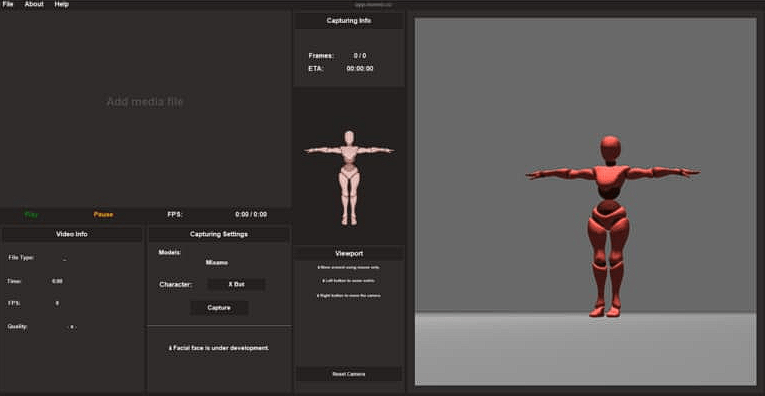
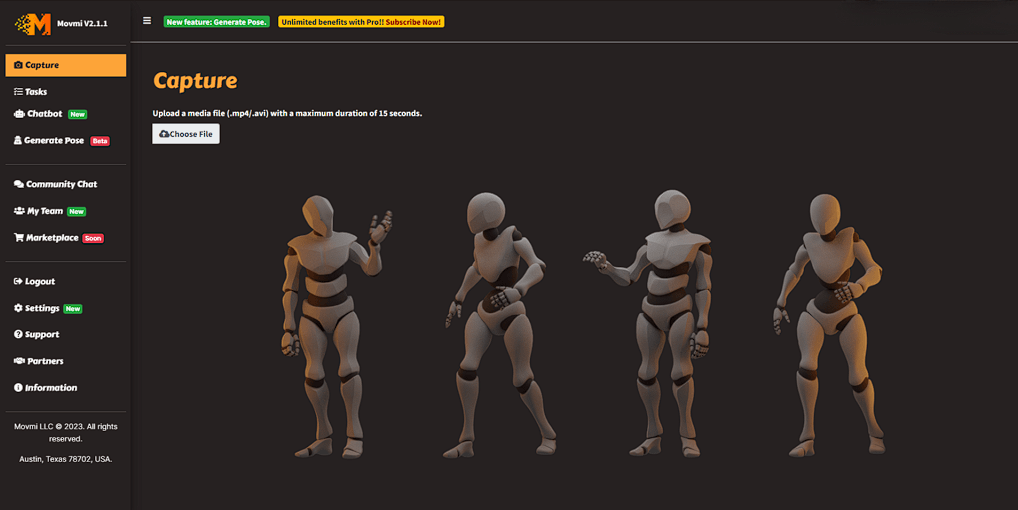
Movmi’s main job is straightforward: provide it with footage of a person moving, then use computer vision to estimate that movement as 3D animation.
This makes the tool useful for capturing actions that are easy to perform but tedious to animate from scratch, such as walking, running, dancing, gestures, exercise movements, or short performance sequences. Movmi exports motion as FBX, so the resulting animation can be moved into standard 3D production environments rather than remaining locked inside the platform.
The capture setup is also deliberately lightweight. Movmi’s guide recommends landscape footage, a stable camera, and keeping the performer fully inside the frame throughout the clip. Higher-resolution input can improve motion estimation. Those requirements are not unusual for markerless mocap, but they do mean shaky handheld footage or heavily cropped performances are poor source material.
| Capability | What It Adds |
|---|---|
| Video Motion Capture | Converts human movement in ordinary footage into 3D animation |
| PoseAI / Generate Pose | Turns written descriptions into static 3D poses |
| Multiple Humans | Handles scenes containing more than one performer |
| Mixamo Characters | Applies captured motion to 40+ integrated characters |
| RenderAI | Builds videos from poses or animations with AI-generated scenes |
| My Team | Provides a shared space for animation and pose projects |
| FBX Export | Moves captured animation into external 3D software |
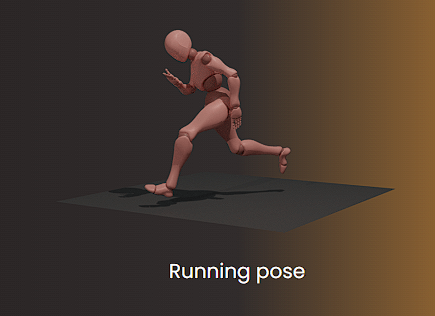
Movmi is not limited to copying motion from footage. Its Generate Pose feature takes a written description and converts it into a 3D pose.
Examples shown by Movmi include a running pose, stopping from a run, a character standing with one hand on the hip, two people running, and two people fighting.
This is useful for blocking a scene before full animation begins. Instead of manually rotating joints just to establish a starting stance, a creator can describe the pose and use the generated result as a foundation.
The feature is better thought of as pose creation than full text-to-animation. For continuous movement, video capture remains Movmi’s central workflow.
Single-person markerless mocap is useful, but many scenes involve interaction. Movmi specifically supports multiple humans, with the company highlighting examples such as fights and conversations.
That can matter for animators working on contact-heavy performances. A fight scene, handshake, or two-person interaction is much harder to reconstruct if each performer has to be captured independently.
The practical limitation is that multi-person capture makes good source footage even more important. Occlusion becomes a problem when one performer passes in front of another or body parts disappear from the camera. Movmi can estimate motion, but it cannot recover every hidden joint perfectly from a single 2D view.
Movmi includes more than 40 Mixamo characters that can receive captured motion directly.
That is useful for checking whether an animation works before spending time preparing a custom character. A game developer can capture an action, apply it to one of the available characters, inspect the result, and then decide whether the motion is worth carrying into a larger production pipeline.
For creators who already work with their own characters, FBX export is more important. It allows Movmi to sit between video capture and tools used later for retargeting, editing, cleanup, or rendering.
Movmi V3 also promotes RenderAI, which can create videos from captured animations and poses while adding AI-generated background scenes.
This pushes the platform closer to content creation rather than pure animation processing. Someone can capture movement, build a pose or animation, then create a more presentable scene around it.
For professional 3D pipelines, this may be secondary to clean motion data. For social content, previews, concept videos, or quick visualization, it makes Movmi more self-contained.
Movmi supports both web-based and local workflows. Its current offline download page lists Movmi 2.1.1 for Windows 10 and 11 and requires an NVIDIA GPU with CUDA/cuDNN plus 16GB of RAM. The local version can process motion offline and supports up to two people in a scene.
This is useful when uploading footage is inconvenient or when local processing is preferred. However, the version naming is a little confusing because the main website now advertises Movmi V3 while the separate offline package still carries the 2.1.1 name.
Movmi makes the most sense for indie game developers, animators, previz artists, virtual-production creators, and small studios that need body motion without a dedicated mocap stage.
It is particularly useful for capturing custom performances that are not already available in stock animation libraries. Fight choreography, dance, gestures, exercise demonstrations, and character blocking are natural fits.
The text-to-pose feature also helps concept and animation artists who need quick body positions without building every pose manually.
Markerless motion capture still depends heavily on the input video. Occlusion, camera movement, performers leaving the frame, loose clothing, and unclear limb positions can reduce accuracy.
Movmi also generates a starting animation, not necessarily a finished one. Foot sliding, joint placement, contact points, and retargeting may still need cleanup in dedicated animation software.
The offline application has meaningful hardware requirements, and the difference between the V3 web branding and the 2.1.1 desktop release may also make the current product lineup less obvious than it could be.
Movmi is strongest as an accessible video-to-3D motion capture tool with useful extras around the core workflow. Multiple-person capture, text-generated poses, Mixamo characters, RenderAI, FBX export, and offline processing give it more range than a basic pose-estimation service.
It is best suited to creators who want to capture human performance quickly and are comfortable doing some cleanup afterward. The main caveat is that camera-based AI mocap still cannot remove the need for good footage or final animation refinement.
TAGS: Motion Capture 3D Model
Related Tools:
Transforms text prompts detailed 3D models

Facilitates online education, student engagement, and collaboration

Educational platform with productivity tools

Converts 2D images to 3D

Designed to support online education through personalized learning

Creates interactive eLearning content