

Share this tool:
 |
Description:
iListen is a narrow but clear product: it takes an article or webpage, pulls out the key points, and turns them into a concise audio summary you can listen to instead of reading. The official site positions it as a way to simplify insights from articles into audio so you can learn faster without getting buried in information overload.
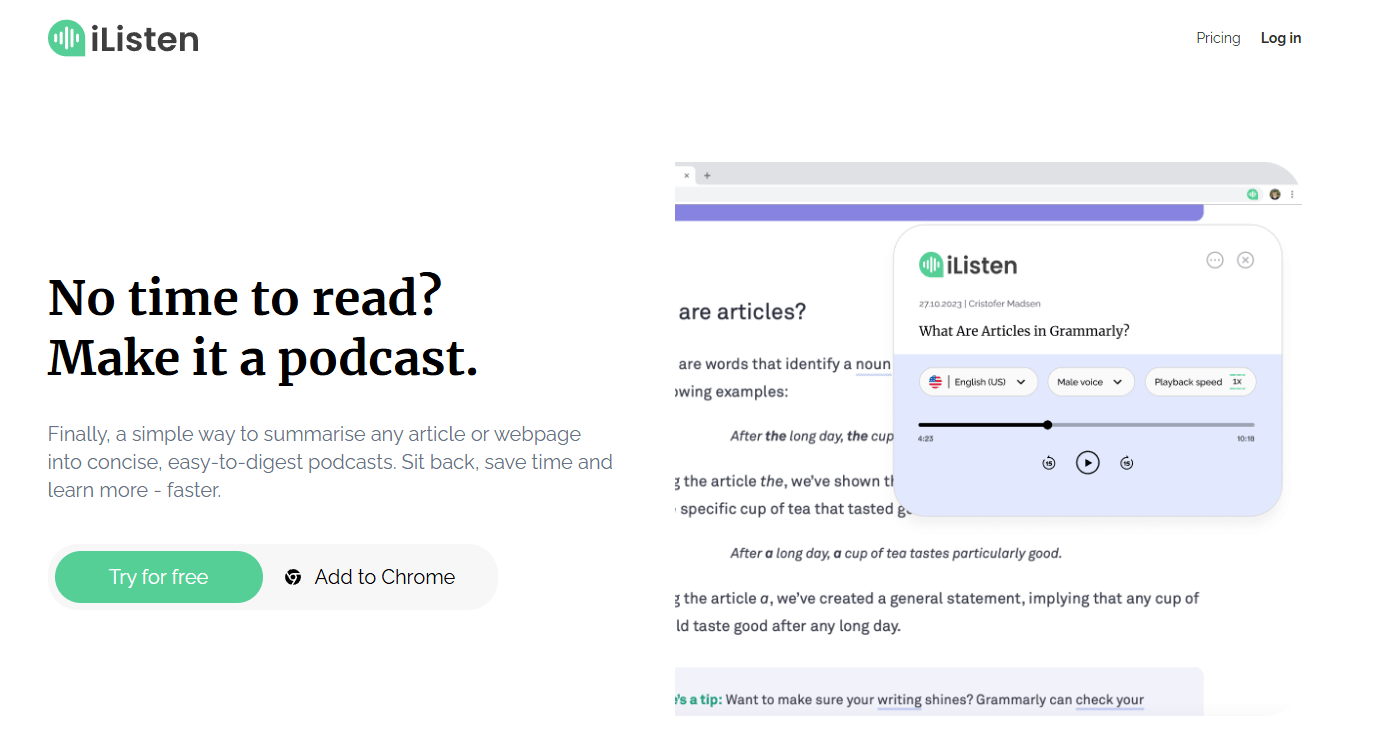
At its core, iListen is a web app plus Chrome extension for URL-based summarization. The public product descriptions consistently frame it around one main job: paste a webpage, or use the browser extension while browsing, and get a short AI-generated podcast version back. The Chrome Web Store listing and the official site both describe it as summarizing articles and webpages into concise, easy-to-digest podcasts.
That sounds simple, but the product is more specific than a general text-to-speech app. It is not being marketed as “listen to any document” software or as a research workspace. It is being marketed as a friction-light way to convert web reading into audio summaries. That narrower focus is important, because it explains both what iListen does well and where it feels limited.
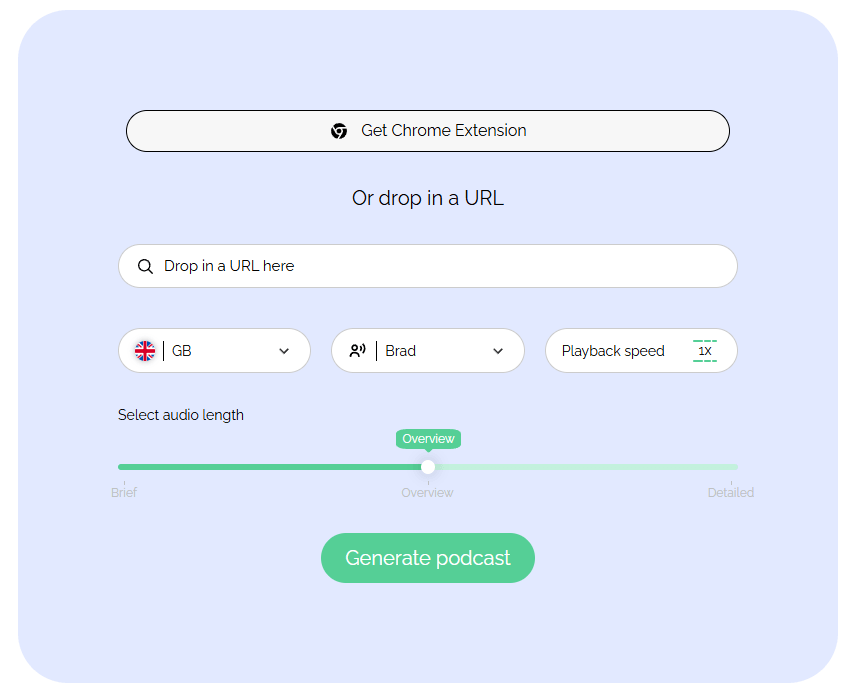
The workflow is intentionally minimal. Recent public listings describe three main steps: enter a URL or trigger the Chrome extension, personalize the output by choosing things like voice, accent, and summary depth, then generate and save the result to your library. Those same sources say the resulting audio summaries are stored in a personal library inside the web app so you can replay them later.
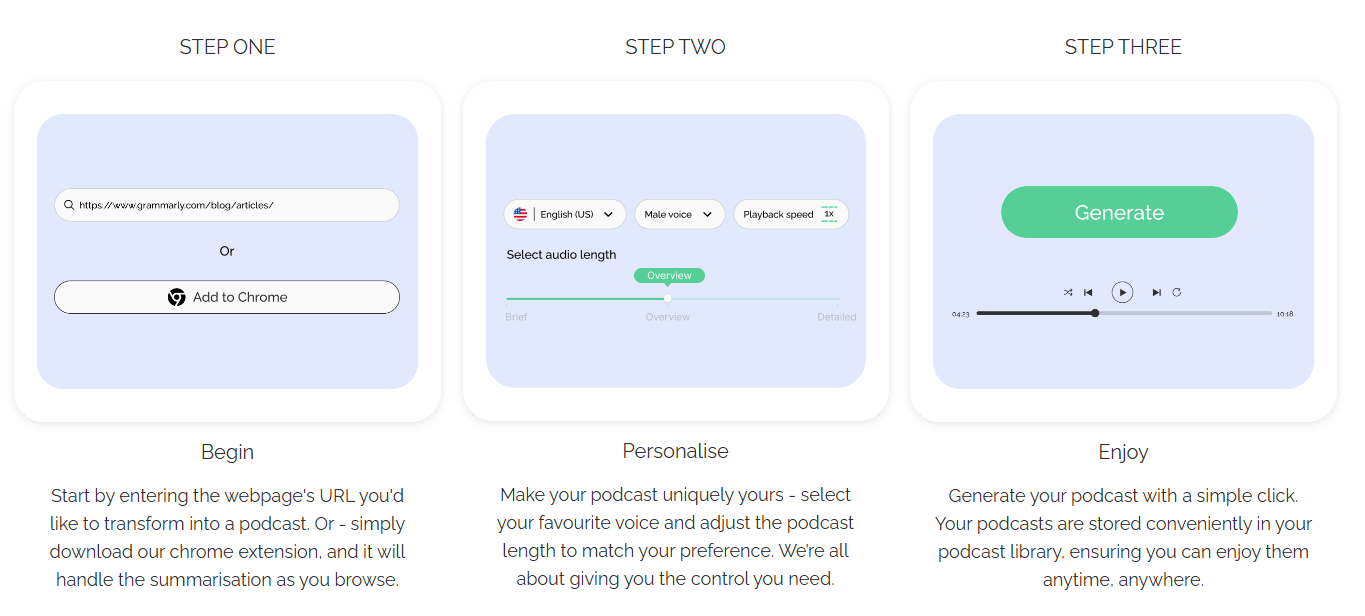
That is the main reason to use iListen. It removes most of the setup that makes other read-it-later or text-to-audio tools feel heavier than they need to be. You are not building a knowledge base, creating a polished synthetic-narration project, or editing a multi-speaker show. You are taking a webpage and turning it into something you can consume on a walk, commute, or while doing other work. Based on the public workflow, iListen is strongest when that is exactly what you want.
The Chrome extension is a meaningful part of that story, not an afterthought. Google’s Chrome Web Store listing says the extension lets you summarize any webpage into a podcast in a few clicks, and it highlights customizable audio length, voice selection, and library storage as the core feature set. That makes the product feel more browser-native than tools that require copying text into a separate workspace every time.
Public descriptions say you can choose voice or accent, adjust the podcast length, and pick summary depth rather than accepting one fixed output style.
The Chrome extension is central to the product and is meant to convert the page you are already reading into audio without much friction.
Generated summaries are stored in a library so you can replay them later from the web app instead of regenerating every time.
The official pricing page publicly confirms monthly and yearly billing plus a 14-day free trial, while recent listings describe a light-consumption plan, a heavier-use plan, and an organization-focused accessibility tier.
Recent public plan descriptions say the top tier adds multilingual summaries, audio translation, and Easy Read-style outputs for organizations.
iListen is strongest for people who already know what they want to consume and just do not want to read it on screen. The product’s whole shape favors quick conversion over deep interaction. That is useful for newsletter reading, long articles, explainers, opinion pieces, and general web learning where the goal is “get the main ideas into my head while I am doing something else.”
It is also a decent accessibility-oriented tool, at least in concept. Public descriptions repeatedly frame it around reducing information overload and making content easier to absorb in audio form, and the organization-facing plan is described as adding Easy Read outputs plus multilingual support. That does not automatically make it the best accessibility product in the category, but it does suggest that accessibility is part of the product direction rather than just marketing garnish.
Where iListen feels less compelling is when you want interaction rather than conversion. There is no strong public sign of a chat layer, note-taking system, citation workflow, multi-document synthesis surface, or advanced editing environment. Based on what is publicly described, the tool is better understood as a quick translation layer from webpage to audio summary than as a full research or reading platform.
The public-facing material suggests you get a modest but useful amount of control. You can choose among summary types such as Brief, Overview, and Detailed, and customize voice, accent, and length. That is enough to make iListen more practical than a one-button summarizer, because it lets you decide whether you want a quick skim or something closer to a fuller recap.
That said, this still looks like a summarization-first tool, not a high-end narration platform. There is no strong evidence in the current public materials of advanced voice directing, dialogue generation, detailed script editing, or richer production controls. So the likely trade-off is obvious: iListen is easier than a full TTS workflow, but it also gives you much less control over how the final audio feels. That is fine for article digestion. It is less fine if you want polished, presentation-grade voice output.
- Students and knowledge workers who save long reads but struggle to finish them on screen. iListen’s browser-first workflow and audio summaries are built for exactly that.
- Commuters, walkers, and multitaskers who want the gist of a webpage while doing something else. The whole product pitch is learn-on-the-go rather than sit-and-study.
- Accessibility-oriented teams that want lightweight audio and simplified outputs for web content rather than a full publishing stack. Public plan descriptions say the top tier includes Easy Read outputs, multilingual summaries, and audio translation.
- People who live in Chrome. The extension looks like one of the cleaner reasons to choose iListen over generic copy-paste summarizers.
- The biggest trade-off is scope. Public descriptions say iListen currently works on online articles and webpages via URLs, and recent plan pages explicitly say PDFs, YouTube videos, and standalone audio are not supported yet. That makes the tool clean and simple, but it also makes it narrower than broader read-aloud or multimodal summarization products.
- The second limitation is control depth. You can personalize length, voice, accent, and summary type, but there is no clear public sign of deeper editing or research-oriented controls. For many users that simplicity is a strength. For power users, it is the ceiling.
- The third limitation is public maturity and visibility. The Chrome extension currently shows a small user footprint and only a handful of public ratings, and the listing shows the extension version was updated in February 2024. That does not prove the product is weak, but it does mean there is less public validation than you would get from a larger, more established reading-audio platform.
- There is also a privacy consideration. The Chrome Web Store listing says the extension handles personally identifiable information, authentication information, web history, and website content, while also declaring that the data is not sold to third parties outside approved use cases. That is not unusual for a webpage summarizer, but it is something users should read carefully before installing.
iListen is a good fit for one very specific job: turning articles and webpages into short, customizable audio summaries you can consume away from the screen.
It is best for audio-first learners, busy readers, and Chrome-heavy users who want a lightweight listen-later workflow rather than a full research platform. The main caveat is that it looks intentionally narrow: if you need PDFs, video summarization, deep editing, or a richer knowledge workflow, you will probably outgrow it quickly.
TAGS: Text to Speech
Related Tools:
Text-to-Speech and Voice Cloning

AI voice assistant that understands natural speech

Productivity software for document and spreadsheet editing

Provides natural-sounding dubbing and translation

Provides automated dubbing and translation

Generates realistic speech and powers voice-based applications