

Share this tool:
 |
Description:
DraftAid is an AI-powered CAD automation tool for engineers and manufacturers who spend too much time turning finished 3D models into 2D fabrication drawings. It handles routine drafting work such as creating views, arranging sheets, adding dimensions and annotations, applying company templates, and preparing drawings for manufacturing.
Its role begins after the 3D geometry has been completed. DraftAid does not generate engineering concepts from text prompts. It automates much of the documentation required to manufacture an existing design.
The core workflow is straightforward. An engineer starts with an existing CAD model, launches DraftAid inside the CAD environment, and lets the system generate the corresponding 2D drawing. The engineer then reviews the result and makes any necessary adjustments before release.
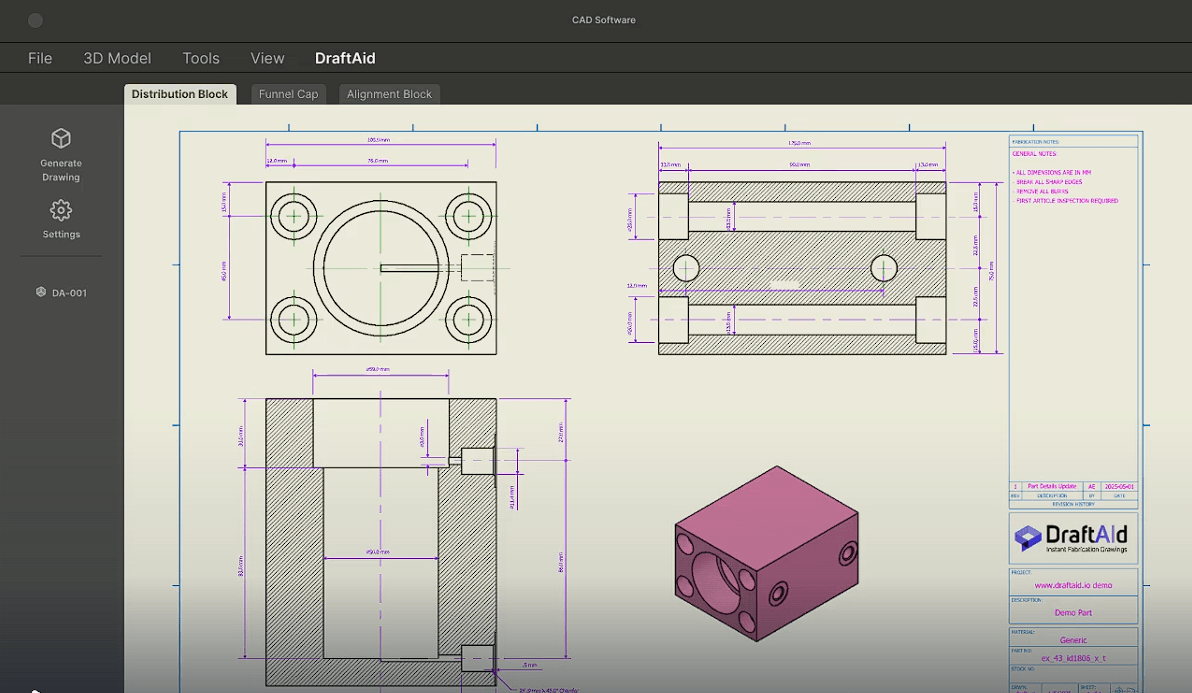
DraftAid says most drawings can be generated in roughly 20 to 30 seconds, with more complex parts taking longer. More importantly, the company describes its AI as producing drawings that are typically 80 to 90 percent complete after it has been trained on the organization's drawing data.
That distinction matters. DraftAid isn't positioned as an autonomous replacement for engineering review. Its practical value is reducing the amount of repetitive drafting an engineer has to perform before reaching the review stage.
Generating drawing views is only part of the job. A manufacturing drawing needs dimensions and annotations placed in ways that communicate how the part should be made and inspected.
DraftAid automates dimensioning and supports different strategies, including chain dimensions, ordinate dimensions, and hole tables. Companies can define their preferred approach instead of accepting one generic dimensioning scheme.
The system also handles drawing layout, scaling, break lines, annotations, callouts, and dimension formatting. Additional information can be placed in title blocks or added as general drawing notes.
This is where the software has the potential to save more time than a basic 3D-to-2D conversion tool. Creating a view is easy. Producing a readable drawing with useful manufacturing information is where much of the manual work normally sits.
Different engineering organizations don't document parts in exactly the same way. Sheet layouts, annotation styles, dimensioning preferences, arrowheads, notes, and other conventions can vary considerably.
DraftAid addresses this by learning from a company's existing 3D models and drawings. Uploaded templates can define elements such as sheet size, layout, annotation style, and note placement.
This makes the tool more interesting for teams than a generic automatic-drawing feature. If dozens or hundreds of drawings need to be created, consistency becomes almost as important as speed.
There is an onboarding trade-off, though. DraftAid's own customer material acknowledges an initial learning and refinement period when aligning generated output with specific requirements.
DraftAid isn't limited to generating drawings one at a time. Its batch automation is designed to process hundreds of fabrication drawings in the background while engineers continue with other work.
That changes the value proposition for large projects. Saving several minutes on one drawing is useful. Automating repetitive documentation across hundreds of components can remove a much larger bottleneck.
DraftAid currently describes support for fabrication drawings involving aluminum extrusions, rectangular machined parts, beams, sheet metal, turned parts, and milled parts. Supported drawing types include fully detailed mechanical part drawings, key-feature drawings, and flat patterns with bend notes.
DraftAid is designed to work with existing CAD workflows rather than asking engineering teams to migrate into a separate design environment.
Its integration information specifically names Autodesk Inventor and SolidWorks, while also referencing platforms such as CATIA, Solid Edge, and Siemens NX.
The platform accepts common CAD inputs including STEP and IGES, along with files used in supported CAD systems. Finished drawings can be delivered in native drawing formats and exported as PDF, DWG, or DXF. The product page also lists IDW among its native-format outputs.
| Best use case | Why DraftAid fits |
|---|---|
| Manufacturing teams | Automates repetitive fabrication documentation |
| Mechanical engineering | Converts completed 3D parts into detailed drawings |
| Large projects | Batch processing handles many drawings in the background |
| CNC workflows | Automated dimensions help prepare parts for manufacturing |
| Standardized teams | Templates keep drawing conventions consistent |
| Sheet metal work | Supports flat patterns and bend-note drawings |
DraftAid's workflow deliberately leaves room for engineers to finish the drawing. The company says uncertain features may be left blank rather than having the AI make an unsupported decision.
That's an appropriate approach for manufacturing documentation. A drawing that looks finished but contains an incorrect dimension or annotation can create much bigger problems downstream.
Engineers therefore still need to verify dimensions, tolerances, notes, manufacturing intent, and other critical information before release.
There are capability boundaries too. DraftAid's FAQ, for example, lists GD&T as forthcoming rather than currently supported, so teams heavily dependent on geometric dimensioning and tolerancing should confirm current capabilities for their workflow.
DraftAid is specialized software. It won't replace a CAD system, design the underlying component, or remove the need for engineering judgment.
Its benefits also depend on repetition. A company producing many similar manufacturing drawings stands to gain more than someone occasionally documenting unusual one-off parts. Training the system around company standards also means the strongest results may come after setup and refinement rather than immediately.
Finally, automated output should be treated as a drafting accelerator, not unquestioned manufacturing truth. DraftAid itself describes generated drawings as near-complete and maintains a review-and-finalize stage in its workflow.
DraftAid tackles a less glamorous but expensive part of engineering work: turning finished 3D designs into consistent manufacturing documentation.
Its strongest features are automated dimensioning, company-specific drawing standards, batch generation, native CAD integration, and editable output. That makes it best suited to engineering teams, fabrication businesses, CNC operations, and manufacturers producing large numbers of part drawings.
The main caveat is that automation doesn't remove engineering responsibility. DraftAid can do much of the drafting work, but drawings still need professional review before they reach the shop floor.
TAGS: Generative Art
Related Tools:

Generates high-quality marketing assets

Generates previews of hairstyles

Generates high-quality images

Offers interior design ideas
Transforms sketches to digital images

Generates high-quality visual content