

Share this tool:
 |
Description:
AURALIS is an enterprise customer-support platform that uses AI across chat, email, voice, and ticketing systems.
Instead of selling a single chatbot, it brings several support functions together under a system called SupportOS. The platform can resolve customer requests automatically, help human agents during conversations, monitor service quality, handle phone calls, and maintain the knowledge used by both people and AI.
AURALIS is also positioned as a managed service rather than software that a company simply installs and figures out alone. Its team handles setup, monitoring, and ongoing adjustments.
That arrangement may suit organizations that want support automation but have no interest in building an internal team to operate the AI behind it.
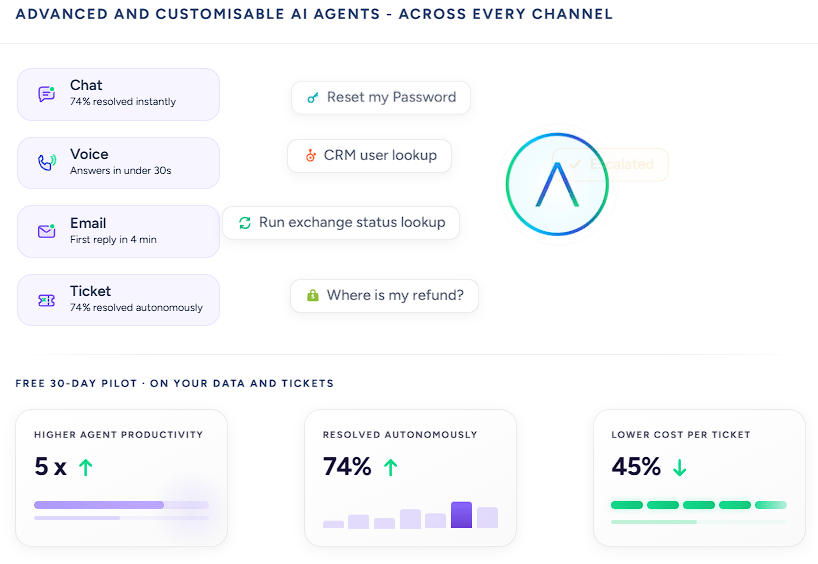
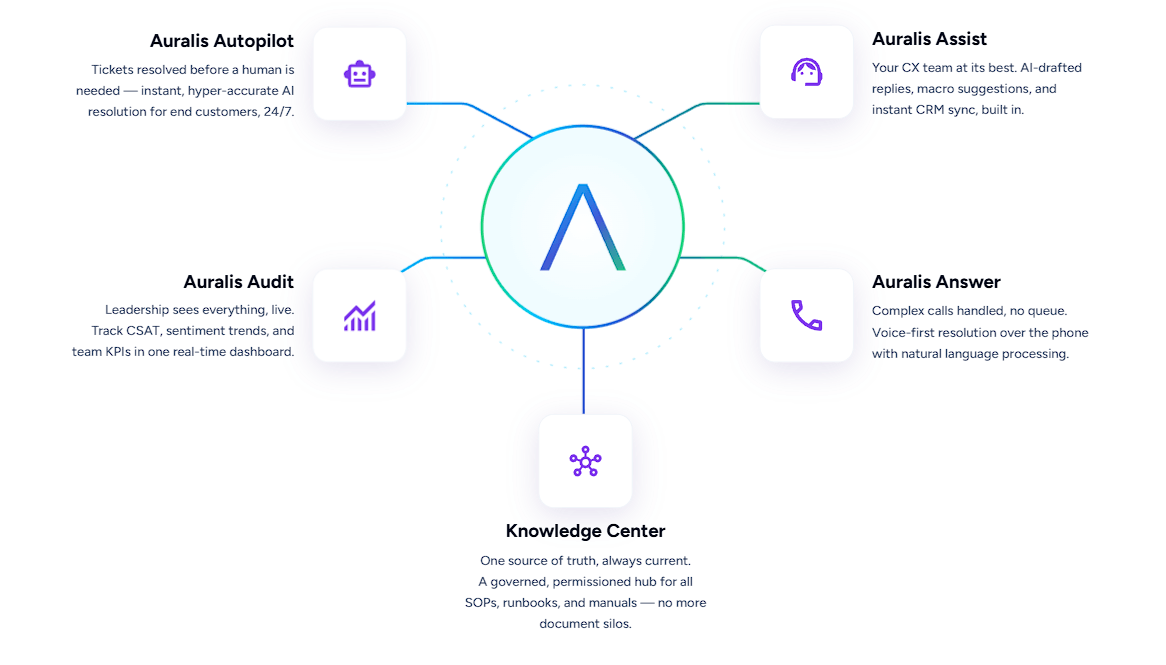
AURALIS divides the platform into five connected modules:
| Module | Main Role |
|---|---|
| Auralis Autopilot | Resolves customer requests through AI agents |
| Auralis Answer | Handles voice conversations and phone support |
| Auralis Assist | Gives human agents suggested replies and guidance |
| Auralis Audit | Monitors interaction quality and support performance |
| Knowledge Center | Stores and governs the information used by AI and agents |
The value of this structure is that automation, agent support, voice, quality assurance, and knowledge management all work from the same support information.
Many companies currently handle those jobs with separate products. That can leave teams maintaining several versions of the same knowledge and piecing together reports afterward.
Autopilot is the part customers interact with directly.
It can interpret intent, search approved knowledge, retrieve information from connected systems, answer questions, and hand a conversation to a person when necessary. AURALIS says the module supports more than 100 languages and works across chat and messaging channels.
Autopilot is intended to resolve requests, not merely recite FAQ answers. When the appropriate business systems are connected, an agent can use current data and complete multi-step support tasks.
That makes it a better fit for repetitive operational requests involving account details, order status, service updates, troubleshooting, and ticket management.
The Knowledge Center controls the information available to the AI.
Companies can connect SOPs, manuals, PDFs, help articles, internal wikis, and other support material. AURALIS uses semantic search to find relevant content, while version controls and governance features help keep outdated material out of customer responses. Answers can also include source references and confidence information.
This is not the glamorous part of support automation, but it may be the most consequential. An AI agent is only as dependable as the information it can access.
The Knowledge Center can also identify gaps when customers repeatedly ask questions that the existing documentation does not answer. That gives support teams a practical way to see which articles or procedures need attention.
Not every support request should be automated.
Auralis Assist works alongside staff by categorizing tickets, suggesting replies or macros, finding relevant knowledge, and helping route requests. Teams can use it to reduce repetitive searching and writing without removing the human agent from the conversation.
Auralis Audit reviews interactions and tracks areas such as customer sentiment, service quality, and team performance.
Together, these modules make AURALIS relevant even for organizations that want AI to support their staff rather than replace them.
Auralis Answer extends the same support system to phone conversations. It provides natural-language voice handling, transcription, sentiment analysis, and access to the knowledge used across the rest of the platform.
AURALIS also connects with major help desks, CRMs, collaboration tools, messaging services, and documentation systems. Listed integrations include Zendesk, Intercom, HubSpot, Freshdesk, Salesforce, ServiceNow, Jira Service Management, Zoho Desk, and other business platforms.
Services with suitable APIs can be connected through custom integrations.
Using the same knowledge across written and spoken support is a sensible choice. Customers should not receive one answer in chat and a different one when they call.
AURALIS fits support organizations with enough ticket volume and operational complexity to justify automation across several channels.
Relevant uses include SaaS customer support, IT service management, field support, ERP support, e-commerce service, and organizations maintaining large internal knowledge bases.
The platform becomes particularly useful when answering a customer requires information from several systems rather than one static FAQ page.
AURALIS is built around an enterprise-style deployment. A small team looking for a quick, self-serve chatbot may find it more system than it needs.
The managed approach also changes the kind of control customers receive. Organizations that prefer to experiment rapidly and configure everything themselves may find a lighter platform more flexible.
Results will still depend on the source material. Governance can reduce unsupported answers, but it cannot repair incomplete documentation or missing integrations. If the underlying information is poor, the AI will have less chance of resolving requests correctly.
Security-sensitive organizations should examine the deployment details closely. AURALIS says it supports major enterprise security and compliance standards, encrypts data in transit and at rest, and does not use customer data to train its foundation models.
AURALIS makes the most sense as a complete AI support layer, not a standalone chatbot. Autopilot handles automated resolution, Assist helps staff, Answer covers phone support, Audit monitors quality, and the Knowledge Center keeps the system tied to approved information.
It is aimed at mid-sized and enterprise support operations that want automation across several channels without assembling a collection of disconnected AI products.
For a company that only needs a basic FAQ bot, the platform is probably excessive. For a support organization juggling voice, tickets, knowledge, and quality monitoring, the joined-up approach is the point.
TAGS: AI Chat/Assistant
Related Tools:
AI platform for building chatbots and automating workflows

Enhances ChatGPT user interaction and functionalities

Task management app that helps users organize tasks

Streamlines project management and collaboration

Multilingual chatbot for websites

Transforms website into a 24/7 smart assistant