
Share this tool:
 |
Description:
Atlas is an AI study assistant built for students who want help with class materials, homework, test prep, writing, and review. Its main pitch is simple: instead of answering from a general web-style knowledge base alone, Atlas is designed to study the user’s lectures, textbooks, readings, homework, videos, and uploaded files so answers stay closer to the actual course context.
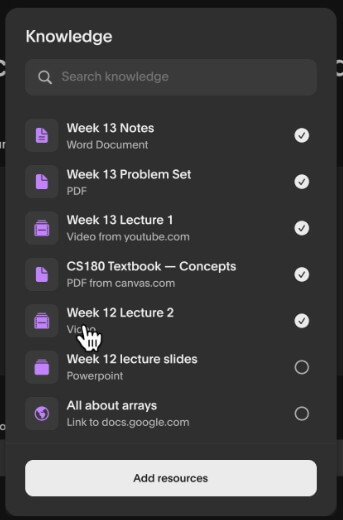
Atlas is strongest when the user has real study material to work from. That is the difference between a general chatbot and a school-focused assistant. A student can upload course files, ask questions about them, generate notes, build flashcards, create practice quizzes, or get help solving homework problems with step-by-step explanations.
That makes Atlas useful for the messy parts of school, not just the polished parts. Most students do not study from one clean textbook chapter. They deal with slides, PDFs, recorded lectures, partial notes, homework sheets, readings, and professor-specific expectations. Atlas is built around that reality.
Its strongest value is context. If the assistant can pull from the same materials the student is expected to understand, the answer can feel more relevant than a broad explanation from a normal AI chatbot. This matters for exam review, essay planning, lecture catch-up, and subjects where a professor’s framing matters.
| Feature | What It Helps With |
|---|---|
| Solve | Step-by-step answers for homework and subject problems. |
| Write | Drafting and structuring academic writing from study materials. |
| Record | Turning lectures into automatic notes. |
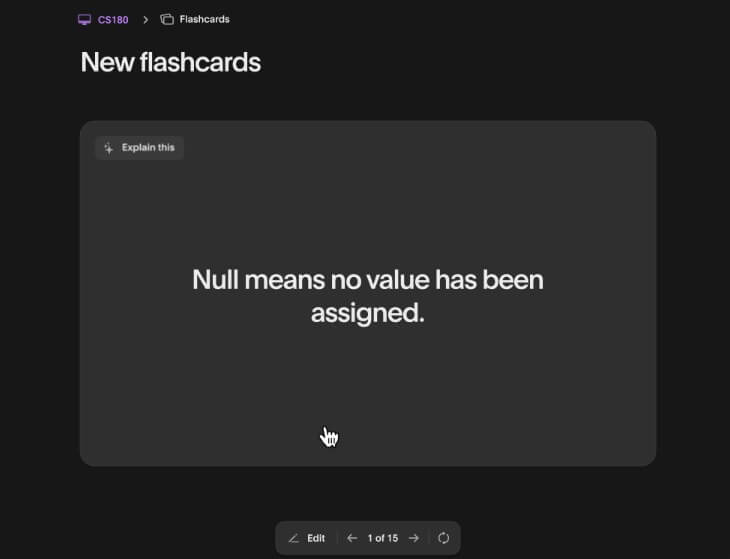
| Memorize | Creating flashcards for review. |
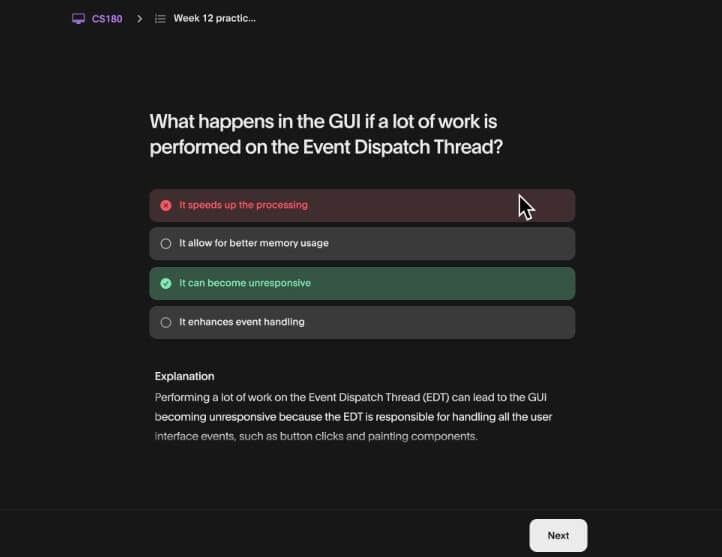
| Practice | Generating quizzes to test understanding. |
| Chat | Asking questions across uploaded course materials. |
Atlas presents these tools clearly on its website: Solve, Write, Record, Memorize, Practice, and Chat. The app listings add more detail, noting support for websites, PDFs, videos, PowerPoint slides, Word documents, audio recordings, notes, flashcards, quizzes, study guides, essays, and homework explanations.
This mix is practical. It covers the full study loop: collect material, understand it, condense it, test yourself, then write or solve from it.
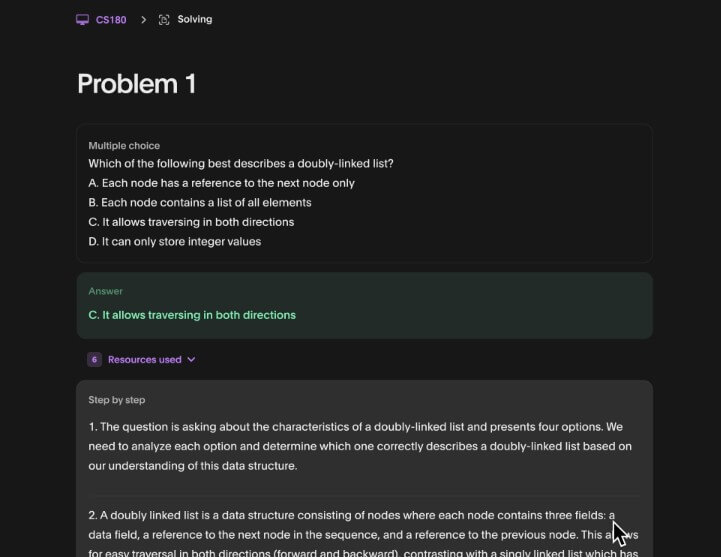
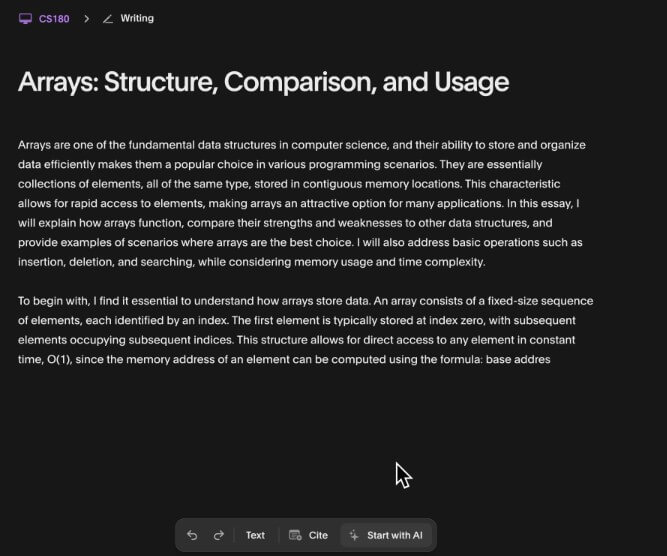
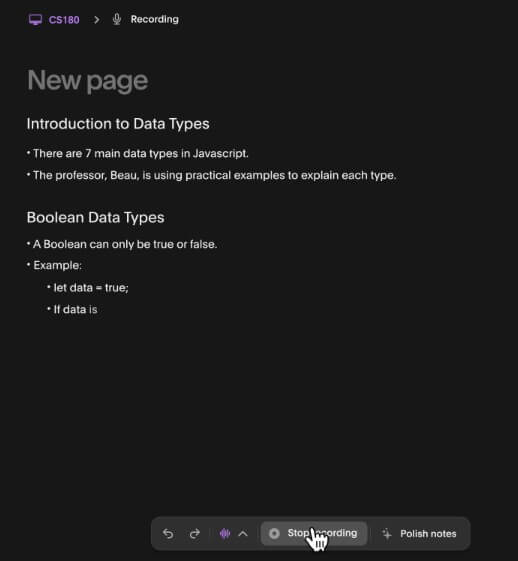
The workflow is built around uploading or adding study material, then choosing what you want Atlas to do with it. For a lecture, the useful path may be automatic notes followed by quiz questions. For a textbook chapter, it may be summary notes and flashcards. For homework, the workflow is more direct: submit the question, then review the explanation. Atlas also supports typing a question or taking a picture of homework for help, including math and science problems.
The mobile apps matter here. Students often study from a phone between classes, on public transport, or while reviewing screenshots and lecture recordings. Atlas syncing across the app and website also helps because schoolwork rarely happens on one device only.
The interface appears built for fast study actions rather than open-ended research. That is a good fit for students. They do not always need a blank AI canvas. They need a tool that says: solve this, summarize that, quiz me, explain what my professor meant.
The most important quality question for Atlas is not whether it can produce fluent text. Most AI tools can do that now. The better question is whether it stays grounded in the user’s materials and explains answers in a way that helps learning.
Atlas makes that grounding central. Its site says the assistant studies all course materials, not just one lecture or textbook, and the app listings emphasize chatting with uploads and creating essays that cite those uploads.
That is a useful design choice, but students should still check the work. AI study tools can misread a slide, skip context, overstate certainty, or produce a correct-looking answer that does not match a teacher’s rubric. Atlas reduces some of that risk by working from uploaded materials, but it does not remove the need for review.
The best way to use it is as a study partner, not as an answer machine. Ask for the reasoning. Ask it to explain the concept in simpler terms. Use quizzes to test recall. Compare essay drafts against the prompt and grading rules. The tool becomes more valuable when it helps the student learn the material rather than bypass it.
Atlas competes most directly with general AI assistants, homework solvers, note generators, and flashcard tools. Its edge is that it combines these study jobs in one place and ties them to uploaded course content.
A general chatbot is better when a student wants broad brainstorming, open research, coding help, or flexible conversation beyond school. Atlas is better when the work starts with class files and the goal is academic review.
| Need | Better Fit |
|---|---|
| Studying from lecture slides and PDFs | Atlas |
| Broad brainstorming outside course context | General chatbot |
| Flashcards from uploaded notes | Atlas |
| Open-ended research exploration | General chatbot |
| Homework explanation tied to a subject | Atlas |
| Reviewing professor-specific materials | Atlas |
That said, Atlas should not be treated as a shortcut around academic standards. Because it can generate essays and solve homework problems, students need to use it within their school’s rules. The safer use is tutoring, outlining, explanation, quiz practice, and revision support.
- Lecture catch-up: Upload or record lecture material and turn it into notes, then ask follow-up questions about confusing parts.
- Exam review: Generate flashcards and practice quizzes from the exact material likely to appear on a test.
- Homework support: Use step-by-step explanations to understand where a solution comes from, especially in math, chemistry, physics, accounting, and statistics.
- Essay planning: Use Atlas to organize ideas and cite uploaded materials, then revise the draft yourself so the final work reflects your own thinking.
- Multi-file study sessions: Atlas is useful when a course has slides, readings, recordings, and notes that need to be studied together rather than one file at a time.
- Atlas is only as useful as the material and questions users give it: Weak uploads, blurry images, incomplete lecture notes, or vague questions can lead to weaker results.
- There is also an accuracy trade-off: Atlas is designed for school context, but students should still verify answers, especially for graded homework, technical subjects, citations, and essay claims. AI can sound confident even when it misses a detail.
- Another limitation is academic integrity: Since Atlas can solve homework and generate essays, the line between help and misuse depends on the assignment rules. Students should treat it as a tutor and study assistant, not a substitute for doing the work.
- Privacy also deserves attention: Google Play’s data safety section says the app may collect personal info, photos and videos, and other data types, and may share device or other IDs. Students uploading course files should read the privacy policy and avoid adding sensitive personal material unless they are comfortable with the terms.
Atlas is best for students who want one AI workspace for studying from real class materials.
Its strongest use cases are lecture review, homework explanation, flashcards, practice quizzes, and course-specific Q&A.
The main caveat is that it still needs student judgment: verify important answers, follow academic rules, and use the tool to learn the material rather than outsource the work.
TAGS: Self Improvement
Related Tools:

Captures, organizes, and reviews your reading highlights

Enhances emotional well-being through interactive AI chatbot

Provides scientific and health-related answers

Analyzes skin health and provides assessments for various skin conditions.

Records and organizes your ideas, notes, and memories
Enhances user's language fluency